Assemble WordPress Theme
by Edge-Themes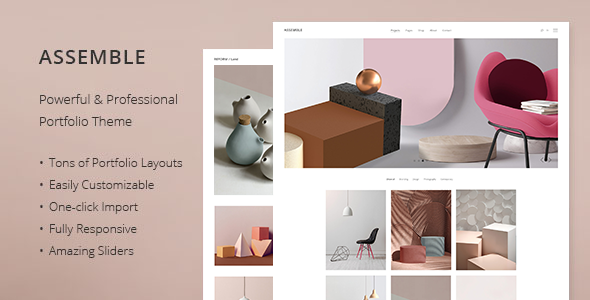
Stuck on your Assemble WordPress theme? Let's fix it.
No endless back-and-forth. Just send us the details and we'll get it done.
No obligation · Replies within 1 hour · Quote within 1 day
Setup · Customization · Bug fixes · WooCommerce integration
About Assemble WP Theme
Assemble is a multipurpose WordPress theme built by Edge-Themes, the team behind popular themes like Elated and Bridge. It ships with a drag-and-drop page builder, over 30 demos, and a large library of shortcodes and widgets. The theme targets agencies, creatives, and businesses that need a polished site without writing code from scratch.
Assemble includes WooCommerce support, custom post types for portfolios and team members, and a built-in mega menu. It works with the Edge Composer, a proprietary visual builder that gives you layout control without touching PHP. Retina-ready and translation-ready out of the box, it covers most standard site requirements. That said, the sheer volume of options can slow down initial setup and make customization tricky if you stray too far from the provided demos.
Get matched with a Assemble developer in under one day
Tell us about your Assemble project. Small fixes, Assemble theme customization, or a full website build, whatever you need, we've got it covered.
We'll connect you to the right Assemble developers, define the scope, and get everything 100% clear.
You'll get one estimate, hire your preferred developer, and start collaborating.
Assemble has a lot of moving parts. Between Edge Composer, the shortcode library, and dozens of theme options, making it do exactly what you want takes experience. A developer who has worked with Edge-Themes products before knows where the theme bends and where it breaks. Through Codeable, you get matched with vetted WordPress developers who understand themes like Assemble at a code level, not just the options panel. No guesswork, no junior freelancers learning on your project.
Pros
- Over 30 pre-built demos covering a wide range of industries, making initial setup faster
- Edge Composer gives non-developers layout control without requiring raw HTML or PHP
- Built-in portfolio, team, and testimonial post types reduce reliance on third-party plugins
- Native WooCommerce support with shop-specific demo layouts included
- Active development from Edge-Themes with regular updates and a large existing user base
Cons
- The options panel is extremely large, which creates a steep learning curve for new users
- Page load times can suffer out of the box due to bundled scripts and styles from unused shortcodes
- Heavy reliance on Edge Composer makes it harder to switch page builders or migrate to block-based editing later
- Support response times from Edge-Themes can be slow during busy periods
- Demo content import sometimes fails or imports incompletely, requiring manual cleanup
Who is Assemble for?
Creative Agencies
Assemble’s portfolio post types and filterable grid layouts make it a practical choice for agencies showcasing client work. The full-screen sliders, project case study layouts, and team member sections give agency sites a polished look without heavy custom development. An Assemble developer can refine these layouts to match your exact brand style.
Freelance Portfolios
Freelancers in design, photography, or development can use Assemble’s portfolio demos to build a personal site quickly. The theme handles image-heavy layouts well, and the built-in contact section works fine for inbound inquiries. A developer can strip out the excess and build something lean and focused around your work.
WooCommerce Stores
Assemble’s WooCommerce integration covers product pages, category layouts, and cart and checkout styling. It’s a strong starting point for small to medium shops. Developers familiar with the theme can extend WooCommerce functionality, add custom product filters, or integrate payment and shipping options without breaking the theme’s layout system.
Corporate Business Sites
For businesses that need a professional web presence with service pages, team bios, and a contact form, Assemble covers the basics well. Its corporate demo layouts are clean and structured. A developer can configure the mega menu, set up custom header styles, and tailor the content sections to reflect your actual services and messaging.
Event and Conference Sites
Assemble includes countdown timers, schedule layouts, and speaker profile sections that work well for events or conferences. The theme can handle registration integrations when paired with the right plugins. Getting the event-specific features configured correctly, especially ticketing or session management, typically benefits from developer involvement.

Customizing Assemble
Assemble’s options panel gives you control over typography, colors, header styles, and footer layouts without touching code. But once you move beyond the included demos, things get more technical. Custom layouts often require working inside Edge Composer, understanding the theme’s shortcode structure, or overriding CSS at a level that trips up most non-developers.
If you need a specific layout, custom post type integration, or a WooCommerce setup that doesn’t map to a demo, you’ll want an Assemble expert to handle it properly. Getting the details right, like sticky header behavior, custom breakpoints, or portfolio filtering, takes real familiarity with how Edge-Themes structures its code. A developer who knows Assemble well will save you hours of digging through documentation and trial and error.
Recommended plugins for Assemble
Assemble supports WooCommerce natively, making it a workable base for product-focused sites. The theme also integrates with popular contact form plugins, WPML for multilingual setups, and most caching plugins. For performance, Edge-Themes bundles a lot of CSS and JavaScript that can weigh on load times, so pairing Assemble with a solid performance optimization setup is worth doing early.
If SEO matters to you, which it should, Assemble is compatible with Yoast SEO and Rank Math, but schema and technical SEO still benefit from expert attention. A proper WordPress SEO setup on top of Assemble will do far more than the theme alone.
Not sure which plugins to use? This WordPress plugins directory covers the most popular options with reviews and setup guides.
Assemble common issues
Assemble theme demo import not working
Demo import failures in Assemble are usually caused by server memory limits, PHP timeouts, or missing required plugins. Start by checking that Edge Composer and all recommended plugins are activated before importing. Increase max_execution_time and memory_limit in your PHP configuration. If the import still fails halfway, try importing XML content manually through WordPress’s native importer. If problems persist, a WordPress bug fixing specialist can diagnose the server environment and complete the import correctly.
Assemble page builder layout broken after update
Layout issues after an Assemble update often come from Edge Composer’s shortcode output changing between versions, or conflicts with cached stylesheets. Clear all caching layers first, including server cache, plugin cache, and browser cache. If elements are misaligned or missing, check whether any custom CSS is targeting classes that changed in the update. In more complex cases, shortcode parameters may need to be updated manually. A developer familiar with Edge-Themes can trace which update caused the break and fix it without rebuilding the page from scratch.
Assemble theme slow loading speed
Assemble loads a significant amount of CSS and JavaScript, much of it tied to shortcodes and features you may not be using. The first step is auditing which scripts are actually needed on each page. Tools like Query Monitor or Chrome DevTools will show you what’s loading and how long it takes. Defer or remove unused scripts, enable lazy loading for images, and use a caching plugin. For deeper gains, a WordPress performance optimization service can minify and combine assets and configure server-level caching properly.
Assemble header not showing correctly on mobile
Mobile header issues in Assemble are usually tied to the mobile menu breakpoint settings or conflicting CSS from custom header styles. Check the theme options under Header and make sure the mobile header is enabled and set to the correct breakpoint. If you’ve added custom CSS targeting the header, inspect it on mobile using browser DevTools to find the conflicting rule. Sticky header settings can also cause display problems on smaller screens. If the issue appeared after a plugin update, test with plugins deactivated one at a time to isolate the conflict.
Assemble FAQ
Assemble was built around Edge Composer, a proprietary page builder, rather than the Gutenberg block editor. Basic posts and pages work in the block editor, but most of the theme’s layout features depend on Edge Composer shortcodes. If you want a fully block-based workflow, Assemble is not the right fit. For Gutenberg-heavy projects, a different theme would serve you better.
Yes. Assemble includes native WooCommerce support with styled product pages, category grids, cart, and checkout. Several of the included demos are built specifically for shop setups. You can sell physical or digital products without additional styling plugins. For complex shop configurations, custom product types, or checkout modifications, working with an experienced developer will get you further faster.
Assemble is listed as WPML-compatible, meaning the theme’s text strings and layout can be translated and managed through WPML’s interface. That said, running a multilingual site on any theme involves careful setup. String translation, language switchers in the menu, and per-language demo content all need attention. Edge Composer layouts also need to be duplicated and translated correctly for each language.
Start by deactivating plugins you’re not using and removing demo content you imported but don’t need. Enable a caching plugin, optimize images, and defer non-critical JavaScript. Assemble’s built-in shortcodes load scripts globally by default, which adds weight. A proper WordPress performance setup can significantly reduce load times by targeting exactly what Assemble loads and when.
Migrating an existing site to Assemble means rebuilding your pages inside Edge Composer and mapping your content to the theme’s structures. It’s not a simple import. If your current site has custom post types, specific layouts, or complex menus, the migration requires planning. A WordPress migration specialist familiar with Edge-Themes can handle the transition without losing content or breaking functionality.
Hire an Assemble WordPress Developer
Whether you need a custom layout built, a demo imported and tailored to your brand, or a WooCommerce setup that actually converts, working with an experienced Assemble developer gets it done right. FoxyConcept connects you with specialists through Codeable’s vetted network. Get a free estimate with no obligation to hire. You’ll have a developer matched and ready within 24 hours.
You'll need a free Codeable account so developers can ask questions and send their quotes.