Aurum WordPress Theme
by Laborator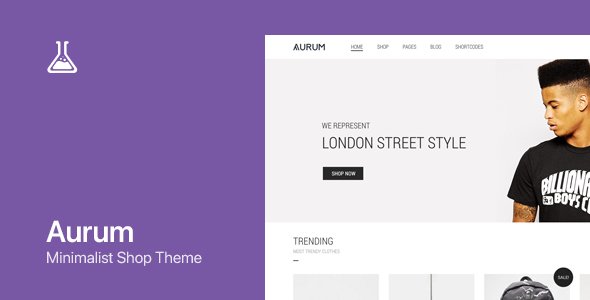
Stuck on your Aurum WordPress theme? Let's fix it.
No endless back-and-forth. Just send us the details and we'll get it done.
No obligation · Replies within 1 hour · Quote within 1 day
Setup · Customization · Bug fixes · WooCommerce integration
About Aurum WP Theme
Aurum is a premium WordPress theme built by Laborator, designed primarily for luxury and high-end brands. It ships with a clean, minimal layout system, smooth page transitions, and a strong focus on visual presentation. The theme is built on the WPBakery Page Builder and supports WooCommerce out of the box, making it a practical choice for boutique shops, creative agencies, and portfolio-driven businesses.
Aurum uses custom post types for portfolio items and includes several pre-built demo templates that can be imported in a single click. Typography is handled through Google Fonts integration, and the theme offers sticky navigation, fullscreen sections, and parallax effects without requiring additional plugins. It is actively maintained by Laborator and has accumulated strong ratings on ThemeForest since its original release.
Get matched with a Aurum developer in under one day
Tell us about your Aurum project. Small fixes, Aurum theme customization, or a full website build, whatever you need, we've got it covered.
We'll connect you to the right Aurum developers, define the scope, and get everything 100% clear.
You'll get one estimate, hire your preferred developer, and start collaborating.
Aurum is not a difficult theme, but its combination of WPBakery, a custom options panel, and WooCommerce creates enough moving parts that custom work often takes longer than expected without prior experience. A developer who already knows where Laborator stores template files and how the theme hooks into WooCommerce will save you significant time.
Through Codeable, you get matched with vetted WordPress developers who have worked with themes like Aurum. Post your project, get a free estimate, and only move forward if the scope and cost make sense for you.
Pros
- Strong visual presentation out of the box, suitable for luxury and boutique brands
- WooCommerce integration is built into the theme, not bolted on
- One-click demo import makes initial setup fast
- Smooth page transitions and scroll effects without third-party plugins
- Actively maintained by Laborator with regular ThemeForest updates
Cons
- WPBakery dependency makes migrating to block-based editing difficult
- Theme options panel and WPBakery can conflict on certain layout settings
- Image-heavy portfolio pages can load slowly without performance optimization
- Limited documentation for advanced WooCommerce customization
- Child theme setup is necessary for safe long-term modifications
Who is Aurum for?
Luxury Fashion Boutique
Aurum’s clean product layouts and fullscreen imagery make it a natural fit for fashion boutiques selling premium clothing or accessories. WooCommerce support handles product variants and checkout, while the minimal design keeps the focus on the product. An Aurum developer can customize the shop archive and single product templates to match a specific brand identity.
Creative Portfolio
The portfolio post type and filtering system built into Aurum work well for designers, illustrators, or agencies presenting case studies. Projects can be categorized and displayed in grid or masonry layouts. A developer can extend the filtering logic or connect portfolio items to custom fields for richer project detail pages.
Interior Design Studio
Interior design studios benefit from Aurum’s large imagery support and parallax sections. Before and after project galleries, service pages with clean typography, and a contact form setup all fit within the theme’s structure. Custom layout work from an Aurum specialist can build out service or project pages that go beyond the default demos.
Jewellery & Accessories Shop
For jewellery or accessories brands, Aurum handles the visual weight required to present small, high-detail products well. WooCommerce product zoom, multiple image support per product, and custom shop layouts all work within the theme. A developer can also configure upsells and cross-sells to match the brand’s visual style.
Photography Studio
Photography businesses use Aurum for its fullscreen sections and portfolio grid system. The theme handles large image files acceptably, though performance optimization is recommended for galleries with many high-resolution images. An Aurum developer can set up client gallery pages, booking forms, and custom navigation that fits the studio’s workflow.

Customizing Aurum
Aurum’s customization lives inside the Laborator Theme Options panel, which controls everything from header styles and logo placement to footer layout and color schemes. WPBakery handles page-level layout, but the options panel drives the global design decisions. Getting these two systems to work together consistently often requires hands-on experience with the theme.
Custom post type styling, portfolio filtering logic, and WooCommerce template overrides are common areas where clients need help. An Aurum expert can modify shop templates, adjust breakpoints for mobile, or build new section layouts inside WPBakery without breaking existing styles. If you need something beyond what the options panel allows, a developer can add child theme overrides or targeted CSS without touching core files.
Recommended plugins for Aurum
Aurum pairs well with several plugins without causing conflicts. WooCommerce handles product management, while WPML adds multilingual support for international stores. Contact Form 7 and Mailchimp for WooCommerce integrate cleanly with the existing layouts.
For performance, caching plugins like WP Rocket or LiteSpeed Cache work alongside Aurum, but image-heavy portfolio pages may still need additional optimization work. See our WordPress performance service for specific tuning options. If you are running a product-focused site, pairing Aurum with proper schema markup and technical SEO configuration is worth doing early. Our WordPress SEO service covers that setup.
Not sure which plugins to use? This WordPress plugins directory covers the most popular options with reviews and setup guides.
Aurum common issues
Aurum theme page transitions not working
Page transitions in Aurum rely on JavaScript that can conflict with caching plugins or third-party scripts. Start by disabling caching on JavaScript files to rule that out. Check the browser console for JS errors on transition. If you recently updated a plugin, test with plugins disabled one at a time. If transitions were working before an update, a WordPress bug fixing specialist can isolate the conflict quickly.
Aurum WooCommerce shop page layout broken
A broken WooCommerce shop layout in Aurum usually means a template file mismatch after a WooCommerce update. Aurum overrides several WooCommerce templates inside the theme folder, and these need updating when WooCommerce releases a new version. Check WooCommerce > Status > System Status for outdated template warnings. Updating templates requires PHP editing. If you are not comfortable with that, get professional help to avoid further breakage.
Aurum portfolio filter not working after update
Portfolio filtering in Aurum uses Isotope, which depends on jQuery. If the filter stops working after an update, first check whether jQuery is loading correctly in the browser console. Conflicts with other plugins that load their own jQuery version are a common cause. Try switching to the default WordPress jQuery via the Laborator options panel if that setting is available. A WordPress bug fix can resolve script conflicts without guesswork.
Aurum theme options not saving
If Aurum’s theme options panel is not saving settings, the most common causes are a PHP memory limit that is too low, a nonce verification failure, or a caching layer serving stale data. Check your PHP error log for related entries. Increase PHP memory to at least 256MB in wp-config.php. Clear all caches including server-level caching after saving. If the issue persists, it may be a database write permissions problem that needs server-level investigation.
Aurum mobile menu not opening
The Aurum mobile menu depends on a JavaScript toggle that can be blocked by script optimization plugins. If the hamburger icon appears but clicking it does nothing, open the browser console and look for JS errors. WP Rocket’s script defer or combine settings are a frequent cause. Exclude Aurum’s main JavaScript file from those optimizations. If the menu is missing entirely, check that the correct menu is assigned to the mobile menu location in Appearance > Menus.
Aurum header logo not displaying correctly
Logo display issues in Aurum are usually controlled through the Laborator options panel under the Header section. There are often separate fields for the standard logo, retina logo, and sticky header logo. Make sure all three are set if you are seeing inconsistent logo rendering. Also check that your logo image dimensions match what the theme expects. A retina logo should be exactly double the display size. CSS overrides in a child theme can cause conflicts if a previous developer set explicit logo dimensions.
Aurum WPBakery rows not full width
Full-width rows in WPBakery inside Aurum require both the row stretch setting to be enabled in WPBakery and the theme’s content area to allow it. If rows are not stretching, check that the row is set to full width in the WPBakery row settings. Also verify that the page template selected in Page Attributes does not have a forced container. Some Aurum page templates apply a wrapper that limits content width regardless of WPBakery settings.
Aurum custom fonts not loading
Custom fonts in Aurum load via Google Fonts integration in the Laborator options panel. If fonts are not rendering, check whether your site has an ad blocker or privacy plugin blocking Google Fonts requests. If you have migrated the site to a new domain, ensure the font settings were carried over correctly. Alternatively, if you self-host fonts via a plugin, confirm the font files are correctly enqueued and the theme options panel is not overriding them with a different selection.
Aurum sticky header overlapping content
A sticky header in Aurum can overlap page content when the scroll offset is not correctly calculated, especially on pages with anchor links. This is often a CSS or JavaScript issue where the sticky header height is not accounted for in anchor positioning. You can fix this in a child theme by adding a CSS scroll-margin-top value to anchor targets equal to the header height. If the overlap occurs on all pages regardless of anchors, check for conflicting header height settings in the theme options panel.
Aurum demo import fails or is incomplete
Aurum demo import failures are commonly caused by PHP upload limits or execution timeouts. Increase max_execution_time to 300, upload_max_filesize to 64M, and memory_limit to 256M in your PHP configuration. Also check that the required plugins listed in the demo requirements are activated before importing. If the import completes but content is missing, try importing XML content and theme settings separately. A WordPress specialist can complete the import manually if automated methods keep failing.
Aurum FAQ
Aurum is built around WPBakery Page Builder, which predates Gutenberg. The block editor is available for basic text editing, but page layouts created in WPBakery will not translate to blocks. Laborator has not announced a full Gutenberg rebuild of Aurum, so if native block editing is a priority, this theme may not be the right fit.
Yes. WooCommerce support is built into Aurum, not added through a separate extension. The theme includes custom shop, product archive, and single product templates. It supports standard WooCommerce features including product variations, cart, and checkout. Template files may need updating after major WooCommerce version releases to avoid layout issues.
Always use a child theme for customizations. When you update the parent Aurum theme, changes made directly to parent theme files will be overwritten. If you have been editing the parent theme, document all changes before updating and reapply them to the child theme afterward. The Laborator options panel settings are stored in the database and will not be affected by a theme update.
Laborator continues to update Aurum on ThemeForest. The theme receives compatibility updates for WordPress and WooCommerce major releases. You can check the changelog on the ThemeForest product page to see the date of the most recent update. Aurum has been on the market for several years and has accumulated a solid update history.
Aurum is listed as WPML-compatible on ThemeForest. You can translate page content, product descriptions, and theme strings using WPML. For a complete multilingual setup, you will also need to configure the language switcher in the header, which requires some custom work in the theme options panel or a child theme.
Create a child theme by making a new folder in wp-content/themes, adding a style.css file with the correct template header pointing to Aurum, and a functions.php file that enqueues the parent theme’s stylesheet. Activate the child theme from Appearance > Themes. All custom CSS and PHP modifications should go into the child theme to survive parent theme updates.
Aurum sites slow down most often due to unoptimized images in portfolio and product galleries, unminified WPBakery scripts, or too many active plugins. Start by running a speed test on PageSpeed Insights to identify specific bottlenecks. Image compression, lazy loading, and a caching plugin usually produce the biggest gains. Our WordPress performance service can handle a full audit.
Aurum is not officially built for Elementor. Swapping WPBakery for Elementor would require rebuilding all existing pages in the new editor and likely cause conflicts with Aurum’s layout system. If Elementor is important to your workflow, a different theme built around Elementor would be a better starting point than trying to force it into Aurum.
The Laborator options panel includes a custom CSS field for theme-level styles. For more organized customization, use the Additional CSS field in Appearance > Customize, or add styles to a child theme’s style.css. Avoid editing the parent theme’s CSS files directly, as updates will overwrite those changes.
Yes, Aurum is compatible with WPML. Laborator has registered the theme with the WPML compatibility program. You can translate strings, page content, and WooCommerce products. Full multilingual setup typically requires configuring both WPML and the theme’s navigation settings, which may need developer involvement for a clean result.
Hire an Aurum Developer
Whether you need a layout adjusted, a WooCommerce template customized, or a bug tracked down, working with an Aurum specialist means the job gets done without guesswork. FoxyConcept delivers Aurum development through Codeable, where every developer is vetted before taking client work.
There is no risk to getting started. Get a free estimate and see exactly what your project will involve before committing to anything.
You'll need a free Codeable account so developers can ask questions and send their quotes.