Autoimage WordPress Theme
by Templines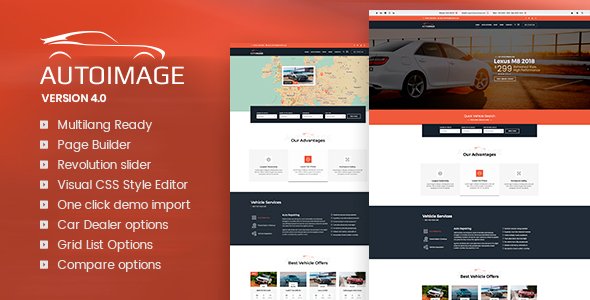
Stuck on your Autoimage WordPress theme? Let's fix it.
No endless back-and-forth. Just send us the details and we'll get it done.
No obligation · Replies within 1 hour · Quote within 1 day
Setup · Customization · Bug fixes · WooCommerce integration
About Autoimage WP Theme
Autoimage is a WordPress theme built by Templines, designed for automotive businesses, car dealerships, and vehicle listings. It ships with a structured layout focused on presenting vehicles clearly, with dedicated sections for specs, galleries, and pricing. The theme uses a dark, high-contrast design that suits automotive branding well.
Out of the box, Autoimage includes a vehicle listing post type, search filters, and comparison features. It integrates with WPBakery Page Builder, giving non-developers a way to build pages without writing code. The theme is translation-ready and works with WPML for multilingual setups.
It targets small to mid-sized dealerships or auto-related businesses that need a presentable, functional site without building everything from scratch. Performance and plugin compatibility depend heavily on how the theme is configured and which additional plugins are layered on top.
Get matched with a Autoimage developer in under one day
Tell us about your Autoimage project. Small fixes, Autoimage theme customization, or a full website build, whatever you need, we've got it covered.
We'll connect you to the right Autoimage developers, define the scope, and get everything 100% clear.
You'll get one estimate, hire your preferred developer, and start collaborating.
Autoimage is not a simple blog theme. It has custom post types, filter logic, and a page builder integration that can conflict with other plugins if misconfigured. Getting it set up correctly from the start prevents a lot of headaches later.
Through Codeable, you get matched with vetted WordPress developers who have worked with automotive themes and know what to look for. Post your project, get a free estimate, and only move forward if the scope and price make sense. No risk, no pressure.
Pros
- Purpose-built for automotive and vehicle listing sites with dedicated custom post types
- Includes built-in vehicle comparison and search filter functionality
- WPBakery Page Builder included, so non-developers can edit page layouts
- Translation-ready with WPML compatibility for multilingual dealership sites
- Dark, bold design style that fits automotive branding without heavy customization
Cons
- WPBakery shortcodes create vendor lock-in and make switching themes difficult later
- Theme options panel is dated compared to Customizer-based or block-based themes
- Limited updates from Templines raise long-term compatibility concerns with newer WordPress versions
- Heavy out-of-box scripts and styles can slow page load without additional performance tuning
- Documentation is sparse, making advanced customization harder without developer help
Who is Autoimage for?
Used Car Dealerships
Autoimage suits second-hand car dealerships that need to list multiple vehicles with photos, specs, mileage, and pricing. The built-in vehicle post type and search filters let buyers narrow down inventory by make, model, or price range without any custom development needed for the basics.
Car Rental Companies
Rental companies can use Autoimage’s listing structure to display their fleet with availability details and booking contact forms. Combined with a booking plugin or WooCommerce, the theme provides a solid base for presenting vehicles and capturing rental inquiries directly from the site.
Auto Parts Retailers
With WooCommerce added, Autoimage can support an auto parts shop alongside the vehicle content. Retailers can sell parts online while using the theme’s strong visual style to keep the automotive feel consistent across listings and product pages without a major redesign.
Motorcycle Dealers
Motorcycle dealers benefit from the same vehicle listing infrastructure. Specs like engine size, weight, and seat height can be added through custom fields. The gallery layout handles multiple angles well, and the comparison feature works for buyers evaluating different models side by side.
Auto Service and Repair Shops
Service and repair businesses can use Autoimage for a branded online presence with service listings, team pages, and lead capture forms. The theme’s dark, mechanical aesthetic fits this audience. A contact form plugin and a simple page structure cover most of what a local shop needs.

Customizing Autoimage
Autoimage gives you a Theme Options panel for controlling colors, fonts, header styles, and layout settings. Most visual changes can be made through the panel or WPBakery’s front-end editor. However, getting the theme to match a specific brand identity often requires going beyond default settings.
Custom vehicle listing fields, modified search filter logic, homepage layout changes, and integration with third-party plugins like dealers feeds or CRM tools typically need direct code edits. That is where hiring an Autoimage expert saves time and avoids breaking things.
An experienced Autoimage developer understands the theme’s template structure, custom post types, and how its built-in components behave. They can extend the design, fix layout conflicts, and add functionality that the panel alone cannot handle. For anything beyond basic styling, professional help is the faster route.
Recommended plugins for Autoimage
Autoimage works alongside several plugins that extend what it can do. WooCommerce can be added for parts sales or service bookings. Contact Form 7 or Gravity Forms handle lead capture on listing pages. WPML covers multilingual requirements for dealerships operating across regions.
For site speed, image optimization plugins like ShortPixel and caching tools such as WP Rocket make a measurable difference, especially when listings include large photo galleries. You can read more about that on our WordPress performance page.
If SEO is a priority for ranking vehicle listings locally, pairing Autoimage with Rank Math or Yoast and a proper SEO setup is worth the effort. See our WordPress SEO service for details.
Not sure which plugins to use? This WordPress plugins directory covers the most popular options with reviews and setup guides.
Autoimage common issues
Autoimage vehicle listing not showing on homepage
This usually happens when the custom post type is not assigned to the correct page template, or the homepage is set to a static page that is not pulling the listing loop. Check that your reading settings point to the right page and that the WPBakery element for vehicle listings is configured to display the correct post type. Flushing permalinks under Settings > Permalinks often resolves display issues after setup. If the problem persists, a WordPress bug fix can isolate the cause quickly.
Autoimage search filter not working correctly
Filter issues in Autoimage are commonly caused by JavaScript conflicts with other plugins or incorrect taxonomy assignments on vehicle posts. Check the browser console for JS errors first. Make sure all vehicles are assigned the right categories and attributes the filter depends on. If filters work in isolation but break with other plugins active, deactivate plugins one by one to find the conflict. A WordPress bug fixing service can trace these conflicts faster than manual testing.
Autoimage theme broken after WordPress update
WordPress core updates can break themes that rely on deprecated functions or older PHP patterns. With Autoimage, common post-update issues include broken WPBakery layouts, missing styles, or PHP warnings. First, update all plugins including WPBakery. If the issue remains, check the PHP error log for specific function errors. Switching to an older PHP version temporarily can confirm whether that is the cause. Long-term, the theme may need patching by a developer.
Autoimage WPBakery elements not loading on frontend
WPBakery elements failing to load usually points to a missing or deregistered script, a plugin conflict blocking assets, or a caching layer serving outdated files. Clear all caches first, including server-side and CDN caches. Disable asset minification plugins temporarily. If elements load after clearing cache but break again, the issue is likely script concatenation stripping required dependencies. A developer can configure exclusions in your caching or minification plugin to fix this permanently.
Autoimage FAQ
Autoimage has not been updated frequently by Templines, which means compatibility with recent WordPress versions is not guaranteed. Core functionality may still work, but WPBakery integration and older PHP patterns can trigger warnings or layout issues on newer setups. Testing on a staging environment before updating your live site is strongly recommended.
Most of Autoimage’s page layouts are built using WPBakery shortcodes. Removing the builder would leave those pages as raw shortcode text. You could rebuild pages using the block editor or another builder, but it requires significant effort. If you want to move away from WPBakery, a developer can handle the migration systematically without losing your content.
Yes, WooCommerce can be installed alongside Autoimage for selling parts, accessories, or services. The theme does not include native WooCommerce styling, so product pages will use default WooCommerce templates. A developer can style these to match the Autoimage design. See our WordPress development services if you need this done properly.
Autoimage includes a set of default vehicle fields like price, mileage, and year. For additional fields, you can use a plugin like Advanced Custom Fields (ACF) and attach field groups to the vehicle post type. Getting those fields to display correctly inside the listing template usually requires editing the theme’s PHP template files directly.
Migrating an existing dealership site to Autoimage involves moving vehicle data, images, and page content into the theme’s structure. If your current site uses a different post type setup, data mapping and import scripting will be needed. Our WordPress migration service handles this kind of structured content move without data loss.
Hire an Autoimage Developer
Whether you need a full Autoimage setup, custom vehicle listing templates, plugin integrations, or fixes to an existing build, a specialist gets it done faster than trial and error. Our developers have handled automotive WordPress projects across dealerships, rental companies, and auto service businesses.
Get a free estimate and describe your project. You will hear back within 24 hours with a clear scope and price. No obligation to hire.
You'll need a free Codeable account so developers can ask questions and send their quotes.