AutoParts WordPress Theme
by ThemeREX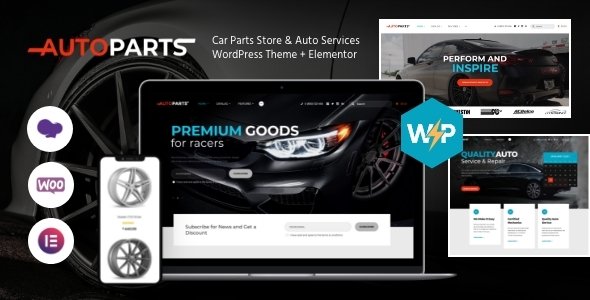
Stuck on your AutoParts WordPress theme? Let's fix it.
No endless back-and-forth. Just send us the details and we'll get it done.
No obligation · Replies within 1 hour · Quote within 1 day
Setup · Customization · Bug fixes · WooCommerce integration
About AutoParts WP Theme
AutoParts is a WooCommerce theme built by ThemeREX specifically for automotive parts stores. It ships with a vehicle compatibility filter, letting shoppers narrow down parts by make, model, and year before they even reach the product page. That single feature alone sets it apart from generic shop themes.
The layout is designed around high-volume catalogs. Grid and list views, sticky add-to-cart, comparison tables, and a parts finder widget all come included. It integrates with popular WooCommerce extensions and supports AJAX filtering for fast catalog browsing without page reloads.
ThemeREX built AutoParts on their own framework, so updates come regularly and the code base is structured. If you sell auto parts, accessories, tools, or performance upgrades online, this theme covers the core functionality you need from day one.
Get matched with a AutoParts developer in under one day
Tell us about your AutoParts project. Small fixes, AutoParts theme customization, or a full website build, whatever you need, we've got it covered.
We'll connect you to the right AutoParts developers, define the scope, and get everything 100% clear.
You'll get one estimate, hire your preferred developer, and start collaborating.
AutoParts has specific quirks that take time to learn. The vehicle lookup system, the ThemeREX framework hooks, and WooCommerce integration points all need to work together correctly. A developer who has shipped AutoParts stores before will move faster and avoid the mistakes that slow down first attempts.
Through Codeable, you get matched with vetted WordPress developers who have real experience with themes like AutoParts. No junior freelancers, no bidding wars. Post your project and receive a clear estimate within 24 hours. See what our WordPress development service covers.
Pros
- Built-in vehicle fitment search (make, model, year) out of the box
- Designed for large WooCommerce catalogs with AJAX filtering and list/grid switching
- Product comparison table included, useful for parts with multiple spec variations
- Regular updates from ThemeREX with active support documentation
- Pre-built demo content covers common auto parts store layouts and page structures
Cons
- ThemeREX framework creates dependency that complicates switching themes later
- Vehicle compatibility database setup requires manual work or a separate data import process
- Page builder included is ThemeREX's own, not Elementor or Gutenberg, which limits third-party support
- Heavy default feature set means unused elements add bloat if not cleaned up
- Documentation covers basics but leaves gaps for advanced WooCommerce configurations
Who is AutoParts for?
Online Auto Parts Retailer
AutoParts is built for this exact use case. A retailer selling OEM and aftermarket parts benefits directly from the fitment filter, structured product pages, and comparison tables. Shoppers can search by vehicle before browsing, which reduces returns and support queries from customers ordering incompatible parts.
Performance and Tuning Shop
Performance shops sell parts where spec details matter: power ratings, material grades, fitment notes. AutoParts product pages support detailed attribute display and tabbed descriptions, giving tuning customers the technical information they need to buy with confidence. Pair this with a brand filter to organize products by manufacturer.
Car Accessories Store
Car accessories stores sell products that do not always require fitment filtering, but they still benefit from the theme’s catalog structure and product comparison features. Categories like seat covers, dash cameras, and lighting can be organized cleanly using AutoParts’ built-in navigation and filtering tools.
Motorcycle Parts Supplier
The vehicle lookup system can be configured for motorcycle makes and models rather than cars. A motorcycle parts supplier gets the same fitment-driven browsing experience. Custom taxonomy setup is required during build, but the underlying search and filter system handles it without additional plugins.
Wholesale Auto Parts Distributor
Wholesale distributors often need tiered pricing, bulk ordering, and trade account access. AutoParts works alongside WooCommerce B2B extensions to support these needs. The catalog layout handles large SKU counts, and the AJAX filtering keeps navigation usable even when a store carries thousands of line items.

Customizing AutoParts
AutoParts comes with a visual page builder and pre-built demo content, but most stores will need customization beyond what those tools offer. Changing the vehicle search logic, adjusting the parts compatibility database structure, or connecting a custom ERP feed all require direct code work.
An AutoParts expert can configure the fitment filter to match your actual inventory, rework the product page layout for your specific parts categories, and set up WooCommerce properly for tax, shipping zones, and bulk pricing rules.
Theme options panels can only take you so far. When you need the storefront to reflect how your business actually works, a developer who knows the AutoParts codebase will save you weeks of trial and error. Custom header layouts, brand-specific color schemes, and performance tuning are all common requests handled during a proper build.
Recommended plugins for AutoParts
AutoParts works well with several WooCommerce extensions that extend its core functionality. The WooCommerce Brands plugin pairs naturally with the built-in brand filter. YITH WooCommerce Ajax Product Filter adds deeper catalog filtering on top of the theme’s own fitment search.
For stores with large inventories, a proper caching layer matters. WordPress performance optimization ensures product pages load fast even with hundreds of variations. Product schema and category page optimization through WordPress SEO work helps auto parts rank for specific fitment queries, which is where most organic traffic comes from in this niche.
Not sure which plugins to use? This WordPress plugins directory covers the most popular options with reviews and setup guides.
AutoParts common issues
AutoParts vehicle filter not showing results
This is usually a taxonomy mismatch. The vehicle filter relies on correctly structured make, model, and year data assigned to each product. If any level of the hierarchy is missing or inconsistently labeled, the filter returns no results. Check that every product has all three taxonomy terms assigned. If you recently imported products via CSV, verify the import mapped those fields correctly. A developer can audit the taxonomy structure and fix bulk assignment issues quickly. See our WordPress bug fixing service for help.
AutoParts WooCommerce products not displaying correctly
Product display issues in AutoParts often trace back to plugin conflicts, a child theme overriding template files incorrectly, or a WooCommerce update that changed template structure. Start by switching to the default theme temporarily to isolate whether the issue is theme-specific. Clear all caches before testing. If the problem only appears with AutoParts active, a template file is likely outdated or a ThemeREX plugin dependency is missing or deactivated.
AutoParts theme slow to load on product pages
AutoParts loads several scripts and styles by default, and many stores run additional WooCommerce plugins on top. Product pages with multiple variations and a fitment lookup can get heavy fast. Common fixes include enabling server-side caching, deferring non-critical scripts, and optimizing product images. The ThemeREX framework also has built-in minification options that are often left disabled. Our WordPress performance service covers full audits and fixes for slow WooCommerce stores.
AutoParts fitment data not importing properly
Fitment data imports fail when the CSV format does not match the expected taxonomy structure AutoParts uses. The make, model, and year columns need to correspond exactly to the custom taxonomy slugs registered by the theme or its companion plugin. Encoding issues and inconsistent capitalization also cause silent import failures. A developer familiar with the AutoParts data model can write a proper import script or clean the CSV before running it through WooCommerce’s importer.
AutoParts FAQ
AutoParts uses ThemeREX’s own page builder, not Elementor. Some sections can be edited with Elementor if you install it, but the theme was not built around Elementor’s structure. Full Elementor compatibility is not guaranteed, and the fitment filter and product layout components are controlled by ThemeREX’s framework. Using Elementor for landing pages is generally fine; using it for core WooCommerce templates is not recommended without developer support.
AutoParts is built for WooCommerce stores. While you can technically activate it on a non-WooCommerce site, almost all of its features assume a shop context. The fitment filter, product comparison, and catalog layouts are all WooCommerce-dependent. Without WooCommerce active, most of what makes AutoParts useful simply does not appear. It is not a practical choice for non-ecommerce sites.
AutoParts handles vehicle compatibility through custom taxonomies. You assign make, model, and year terms to each product, and the front-end filter queries those terms. The setup requires creating the taxonomy structure first, then assigning terms either manually or via import. For large catalogs, bulk assignment through a CSV import is the only practical approach. The process is documented by ThemeREX but often needs developer help to get right at scale.
AutoParts outputs clean HTML and supports WooCommerce’s built-in structured data, which helps with product schema. However, fitment-specific SEO, like ranking for year-make-model keyword combinations, requires additional work beyond what the theme provides. Proper URL structure, category optimization, and schema markup for vehicle compatibility need to be configured separately. Our WordPress SEO service can handle that layer.
Cost depends on scope. A basic AutoParts setup with demo import and configuration typically takes 10 to 20 hours. A full custom build with fitment data import, custom layouts, and payment setup runs longer. Hourly rates on Codeable reflect vetted developer experience. The best way to get an accurate number is to describe your project and request a free estimate. There is no obligation to proceed.
Hire an AutoParts Developer
Whether you need a full store build, a fitment filter fix, or a performance overhaul, working with someone who knows the AutoParts theme saves time. Post your project and get a free estimate with no obligation to hire. Work is handled through Codeable, so every developer is vetted before they touch your site. Get your free estimate today and describe exactly what you need. You’ll hear back within 24 hours.
You'll need a free Codeable account so developers can ask questions and send their quotes.