Avantage WordPress Theme
by BoldThemes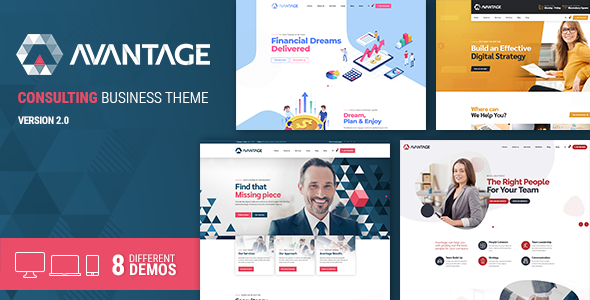
Stuck on your Avantage WordPress theme? Let's fix it.
No endless back-and-forth. Just send us the details and we'll get it done.
No obligation · Replies within 1 hour · Quote within 1 day
Setup · Customization · Bug fixes · WooCommerce integration
About Avantage WP Theme
Avantage is a multipurpose WordPress theme built by BoldThemes, designed around a bold typographic style and clean grid layouts. It ships with multiple pre-built demo sites covering business, portfolio, agency, and creative niches, all importable in a few clicks.
The theme is built on BoldThemes’ custom page builder framework and is compatible with Elementor. It supports WooCommerce, custom post types, and a wide range of header and footer layouts. Avantage uses a modular section system, so pages are assembled from pre-designed blocks rather than coded from scratch.
Performance is reasonable out of the box, though like most multipurpose themes it loads more assets than a stripped-down theme would. For most business sites, it delivers a solid foundation without requiring heavy custom development from the start.
Get matched with a Avantage developer in under one day
Tell us about your Avantage project. Small fixes, Avantage theme customization, or a full website build, whatever you need, we've got it covered.
We'll connect you to the right Avantage developers, define the scope, and get everything 100% clear.
You'll get one estimate, hire your preferred developer, and start collaborating.
BoldThemes releases regular updates to Avantage, which means changes can break customizations made directly in the theme files. An Avantage specialist working through Codeable builds with child themes and documented code, so updates do not wipe your work.
Codeable vets every developer on the platform, so you are matched with someone who has proven WordPress experience, not a generalist taking a guess. Projects are scoped with a free estimate before any commitment.
Pros
- Ships with multiple polished demo sites that cover business, portfolio, and creative use cases
- Elementor compatibility means page building does not require BoldThemes' proprietary builder exclusively
- Strong typographic defaults with Google Fonts integration and granular font controls
- WooCommerce support is built in, with product page and archive templates included
- Active updates from BoldThemes with regular WordPress compatibility patches
Cons
- Loads multiple scripts and stylesheets by default, which requires cleanup work for good Core Web Vitals scores
- The BoldThemes page builder and Elementor can conflict if both are used heavily on the same page
- Demo content import can overwrite existing settings, making it risky on a live site
- Limited community resources compared to themes like Astra or Divi, so troubleshooting is slower without developer help
- Some advanced layout options are only accessible through custom CSS, not the Customizer
Who is Avantage for?
Creative Agency
Avantage suits agency sites that need strong visual presence without custom development from scratch. Its bold typography and full-width section layouts work well for showcasing services, team members, and case studies. An Avantage developer can adapt the agency demo to match brand guidelines and connect it to a CRM or lead form tool.
Portfolio Site
The portfolio templates in Avantage support filterable grids, project detail pages, and custom category taxonomies. Photographers, designers, and developers use these layouts to present work cleanly. An Avantage specialist can extend the default portfolio post type with custom fields for project details, client names, and results.
Small Business Website
Small businesses get a professional multi-page site quickly using one of the Avantage demos as a base. Service pages, a contact form, Google Maps integration, and a blog all work within the default setup. Customization by an Avantage expert ensures the site reflects the business accurately rather than looking like an unmodified demo.
WooCommerce Store
Avantage’s WooCommerce integration covers product archives, single product pages, and cart and checkout layouts. It works for physical and digital products. A developer can extend the store with custom product tabs, upsell sections, or filtered shop pages that the default WooCommerce templates do not provide.
Consultancy or Professional Services
Consultancies and professional services firms need clear messaging, strong calls to action, and trust signals like testimonials and case studies. Avantage has section blocks for all of these. An Avantage developer can structure the site around conversion goals rather than just matching the demo layout.

Customizing Avantage
Avantage gives you control through the WordPress Customizer, BoldThemes’ own options panel, and Elementor integration. You can adjust typography, colors, header styles, sidebar layouts, and footer columns without touching code.
That said, deeper changes, such as custom post type templates, WooCommerce checkout redesigns, or unique landing page layouts, require PHP and CSS work. An Avantage expert can restructure the demo content to match your brand properly, remove unused scripts, and build child theme overrides so your changes survive updates.
If you need the theme to behave differently from any of its demo layouts, hiring an Avantage developer saves significant time. BoldThemes follows standard WordPress template hierarchy, so an experienced developer can navigate the codebase without difficulty.
Recommended plugins for Avantage
Avantage works with several plugins that extend its default functionality. WooCommerce adds a full shop layer. WPML and Polylang handle multilingual setups. Contact Form 7 and WPForms integrate without styling conflicts in most cases.
For sites where speed matters, pairing Avantage with a proper caching and optimization setup is important. See the WordPress performance service for specifics. If you are running a content-heavy site on Avantage, structured data and on-page optimization require attention. The WordPress SEO service covers that in full.
Not sure which plugins to use? This WordPress plugins directory covers the most popular options with reviews and setup guides.
Avantage common issues
Avantage theme demo import not working
Demo import failures in Avantage are usually caused by PHP memory limits, max upload size restrictions, or execution time limits set too low on the server. Increase memory_limit to at least 256MB, upload_max_filesize to 64MB, and max_execution_time to 300 in your php.ini or via wp-config.php. Also ensure the One Click Demo Import plugin is active and updated. If the import still stalls, import XML content and widgets separately.
Avantage header layout broken after update
Header layout breaks after an Avantage update usually happen when custom CSS or header settings stored in the Customizer conflict with new theme markup. Check the browser console for CSS errors and compare your header settings against the updated theme defaults. If you modified header templates directly in the theme folder rather than a child theme, the update overwrote your changes. For persistent issues, the WordPress bug fixing service can identify the conflict and rebuild the header in a child theme.
Avantage slow page load speed
Avantage loads several stylesheets and scripts by default, including ones tied to sections you may not use. Start by auditing loaded assets with a tool like Query Monitor. Dequeue unused scripts in a child theme’s functions.php. Enable caching via a plugin like WP Rocket or LiteSpeed Cache. Serve images in WebP format and defer non-critical JavaScript. These steps typically cut page load time significantly on an Avantage site without changing the visual output.
Avantage Elementor widgets not displaying correctly
When Avantage Elementor widgets fail to display correctly, the cause is often a CSS conflict between BoldThemes’ stylesheet and Elementor’s generated CSS. Open the page in Elementor, check the widget’s advanced settings for any conflicting custom CSS, and test by temporarily disabling the BoldThemes plugin. Update both Elementor and Avantage to their latest versions. If widgets render in the editor but break on the front end, regenerate the Elementor CSS files from the Elementor Tools panel.
Avantage WooCommerce product page layout broken
Broken WooCommerce product page layouts in Avantage are often caused by a WooCommerce update changing template hooks that the theme relies on. Check the WooCommerce system status for outdated template files. If Avantage’s WooCommerce templates are out of date, copy the updated WooCommerce templates into your child theme’s woocommerce folder and re-apply your customizations. This is a common issue after major WooCommerce version jumps. Get help with WordPress bug fixing if the template conflicts are extensive.
Avantage mobile menu not opening
If the Avantage mobile menu does not open, check for JavaScript errors in the browser console first. A common cause is a jQuery conflict with another plugin loading its own version of jQuery. Test by deactivating plugins one at a time. Also check whether the hamburger menu icon appears but the click event is blocked by a z-index or pointer-events CSS rule from a customization. Verify the menu is assigned correctly in Appearance > Menus and that the mobile breakpoint is set in the theme options.
Avantage custom fonts not loading
Custom fonts failing to load in Avantage can be caused by browser caching, a missing font file in the child theme, or a Content Security Policy header blocking external font sources. If using Google Fonts through the Customizer, check that the font is still available and correctly selected. For self-hosted fonts added via CSS in a child theme, confirm the file paths are correct relative to the child theme directory. Clear all caches after making font changes, including server-side and CDN caches.
Avantage child theme not inheriting styles
If your Avantage child theme is not inheriting parent styles, check that your child theme’s functions.php enqueues the parent stylesheet using wp_enqueue_style with the parent theme as a dependency, not using @import in the child theme’s CSS file. Also confirm the child theme’s style.css has the correct Template: avantage header field matching the parent theme’s folder name exactly. A missing or misspelled template declaration is a common cause. The WordPress bug fixing service can audit and correct child theme setup issues.
Avantage contact form not sending emails
Contact forms not sending emails on Avantage sites is rarely a theme issue. It is almost always a server mail configuration problem or a missing SMTP setup. WordPress uses PHP mail by default, which many hosts block. Install an SMTP plugin such as WP Mail SMTP and configure it with your mail provider’s credentials. Test delivery using the plugin’s built-in test tool. Also check spam folders and ensure the form’s sender address matches your domain to avoid SPF and DKIM rejections.
Avantage slider images not showing on mobile
Avantage slider images that disappear on mobile are usually caused by the image being set as a CSS background rather than an HTML element, combined with a mobile-specific CSS rule hiding it. Check the slider settings in the Customizer or the page builder section and look for a toggle that controls mobile visibility. Alternatively, the image dimensions may be too large for the mobile breakpoint’s container, causing overflow to be hidden. Set explicit mobile image dimensions or use a separate mobile image in the slider settings if available.
Avantage FAQ
Yes, Avantage is compatible with Elementor. You can build and edit pages using Elementor’s drag-and-drop interface alongside BoldThemes’ own page builder. Using both builders heavily on the same page can cause CSS conflicts, so most developers pick one as the primary tool per project to keep the output clean and maintainable.
Yes, Avantage includes built-in WooCommerce support. It provides styled templates for the shop archive, single product pages, cart, and checkout. For heavily customized stores, a developer may need to create child theme WooCommerce template overrides to match the design precisely without breaking on WooCommerce updates.
Install the One Click Demo Import plugin, then go to Appearance > Import Demo Data. Select the demo you want and click import. Make sure your server’s PHP memory limit is at least 256MB before importing. The process imports pages, posts, widgets, and Customizer settings. It is safest to do this on a fresh WordPress install to avoid overwriting existing content.
Avantage produces clean semantic HTML which is a reasonable base for SEO. It does not include bloated inline styles or excessive DOM depth on most layouts. For full SEO performance, pair it with a dedicated SEO plugin like Yoast or Rank Math, and address Core Web Vitals by optimizing scripts and images. The theme itself does not hinder search performance when set up correctly.
Create a new folder in wp-content/themes/ named something like avantage-child. Add a style.css file with a header that includes Template: avantage matching the parent theme’s folder name. Add a functions.php file that enqueues both the parent and child stylesheets using wp_enqueue_style. Activate the child theme in Appearance > Themes.
Avantage is compatible with WPML and Polylang for multilingual setups. You will need a multilingual plugin in addition to the theme since translation functionality is not built into Avantage itself. String translation for theme-specific text labels may require additional configuration in WPML’s theme and plugin localization settings.
Start by dequeuing scripts and styles loaded by Avantage that your site does not use. Add a caching plugin, serve images in WebP format, and enable lazy loading. Use a CDN for static assets. For deeper optimization including critical CSS and deferred JavaScript, see the WordPress performance service for a full audit approach.
Avantage is developed and maintained by BoldThemes, a theme development company that publishes WordPress themes on ThemeForest and their own website. BoldThemes produces several other themes and maintains an active update schedule. Support is provided through ThemeForest comments and their dedicated support system.
BoldThemes updates Avantage regularly to maintain compatibility with the latest WordPress versions and WooCommerce releases. Update frequency varies, but the theme receives patches when WordPress or WooCommerce major versions ship. Always back up your site before updating and use a child theme to protect customizations from being overwritten.
Post your project on Codeable to be matched with a vetted Avantage developer within 24 hours. You describe the work, receive a free estimate, and only proceed if you are happy with the scope and cost. Visit the free estimate page to get started. There is no obligation to hire after receiving the estimate.
Hire an Avantage Developer for Your Project
Whether you need a full site built on Avantage, a specific layout fixed, or WooCommerce integrated cleanly, a dedicated Avantage developer can scope and deliver the work without back-and-forth guesswork. Projects are matched within 24 hours on Codeable. Get a free estimate and describe what you need. No obligation to hire.
You'll need a free Codeable account so developers can ask questions and send their quotes.