Avante WordPress Theme
by ThemeGoods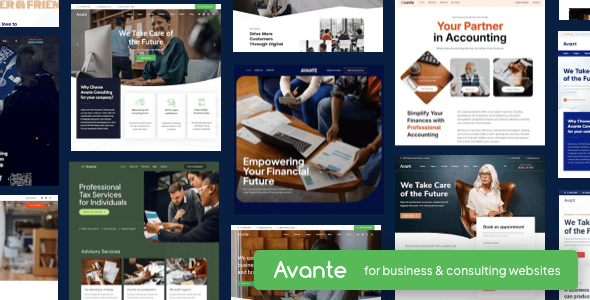
Stuck on your Avante WordPress theme? Let's fix it.
No endless back-and-forth. Just send us the details and we'll get it done.
No obligation · Replies within 1 hour · Quote within 1 day
Setup · Customization · Bug fixes · WooCommerce integration
About Avante WP Theme
Avante is a premium WordPress theme by ThemeGoods, built around a clean, minimal aesthetic with a strong focus on creative portfolios and agency sites. It ships with the WPBakery page builder, multiple demo layouts, and a header builder that gives you control over navigation without touching code.
Out of the box, Avante handles most visual design needs through its layered slider integration, custom post types for portfolio work, and a built-in mega menu system. Performance is reasonable on clean installs, though the bundled plugins add weight quickly. It suits studios, freelancers, and small agencies that want a polished site without building from scratch. That said, deeper customization, layout conflicts, or plugin compatibility issues usually require someone who knows the theme well.
Get matched with a Avante developer in under one day
Tell us about your Avante project. Small fixes, Avante theme customization, or a full website build, whatever you need, we've got it covered.
We'll connect you to the right Avante developers, define the scope, and get everything 100% clear.
You'll get one estimate, hire your preferred developer, and start collaborating.
Most Avante problems have clean solutions, but they require knowing where the theme stores its logic and how ThemeGoods structured its hooks and filters. Guessing costs time. The developers available through Codeable have worked across dozens of ThemeGoods-based projects and can scope your work accurately before writing a single line of code. Whether it’s a layout issue, a plugin conflict, or a full site build on Avante, you get a fixed estimate with no obligation to proceed.
Pros
- Clean minimal design that suits creative and agency sites without heavy restyling
- Built-in header builder with multiple layout options and sticky header support
- Portfolio post type with filterable grid works well for freelancers and studios
- Multiple prebuilt demo layouts that can be imported with one click
- WooCommerce compatible with styled templates for basic shop pages
Cons
- WPBakery shortcode lock-in makes switching page builders painful later
- Bundled plugins increase page weight significantly on default installs
- Theme Options panel has limited documentation for non-obvious settings
- Mobile menu behavior requires CSS overrides on complex navigation setups
- Updates occasionally break custom CSS added outside a child theme
Who is Avante for?
Creative Agency
Avante’s agency demo layouts include service sections, team grids, and client logo rows that cover most of what an agency homepage needs. A developer can extend these with case study post types, custom filterable project archives, and animated counters tied to real data. Good starting point for studios that want a polished presentation without a full custom build.
Freelance Portfolio
The portfolio grid in Avante supports categories, hover overlays, and lightbox integration. Freelancers get a workable structure from day one. An Avante specialist can add custom filtering logic, project detail templates, or a password-protected client area layered onto the existing portfolio system without touching core theme files.
Photography Studio
Avante’s full-width layouts and support for high-resolution featured images make it a practical base for photography sites. Pairing it with a gallery plugin or a custom masonry layout requires some developer work, but the theme handles the visual foundation well. Speed optimization matters here since image-heavy pages need deliberate asset management.
Digital Marketing Firm
Marketing firms often need landing pages with strong CTAs, lead capture forms, and integration with CRM tools. Avante’s row and column system in WPBakery handles these layouts. An experienced Avante developer can connect contact forms to HubSpot or ActiveCampaign, add conversion tracking, and build repeatable page templates for campaign use.
Small Product Shop
Avante’s WooCommerce compatibility covers product pages, cart, and checkout with styled templates that match the theme. For small shops selling a focused product range, this is enough. A developer can add custom product tabs, size guide overlays, or upsell logic without needing a separate WooCommerce-specific theme.

Customizing Avante
Avante gives you a Theme Options panel and WPBakery for layout building, which covers most surface-level changes. But when clients want something beyond the included demos, like custom animations, modified header behavior, unique portfolio filters, or a layout that doesn’t follow the grid assumptions baked into the theme, you hit limits fast.
An experienced Avante expert can work directly with the theme’s PHP templates, override styles cleanly using a child theme, and extend WPBakery with custom elements without breaking future updates. If you need conditional layouts, custom post type integrations, or a checkout experience that matches your brand exactly, working with an Avante developer saves significant time compared to trial and error in the page builder.
Recommended plugins for Avante
Avante pairs well with several plugins, but each adds load. WooCommerce, WPML, and Contact Form 7 are common additions that work with minimal friction. If you’re running a portfolio or agency site, adding schema markup and proper metadata structure is worth doing early. A developer can also wire up WordPress SEO optimisation cleanly without conflicting with the theme’s built-in open graph handling.
On the speed side, Avante’s slider assets and WPBakery scripts need deliberate optimization. Addressing these through proper caching and asset management is covered in detail through WordPress performance services.
Not sure which plugins to use? This WordPress plugins directory covers the most popular options with reviews and setup guides.
Avante common issues
Avante theme not loading styles after update
This usually happens when a theme update overwrites custom CSS added directly to the theme files instead of a child theme. Check whether a child theme is active and whether the main stylesheet is enqueuing correctly. Clearing the server cache and regenerating dynamic CSS from the Theme Options panel resolves it in most cases. If the issue persists after a cache clear, a WordPress bug fixing specialist can trace the enqueue order and identify conflicts with caching plugins.
Avante portfolio filter not working
Portfolio filter failures in Avante are often caused by a JavaScript conflict with another plugin loading its own version of jQuery or Isotope. Open the browser console and check for JS errors on the portfolio page. Disabling plugins one at a time identifies the conflict. If the filter worked before a recent plugin update, that update is likely the cause. A developer can re-enqueue scripts in the correct order and isolate the conflict without disabling plugins permanently. For persistent issues, check the WordPress bug fixing service.
Avante header overlapping content on scroll
The sticky header in Avante adds a fixed offset to the page body, but this offset value sometimes doesn’t account for custom header heights set through the header builder. Go to Theme Options and check the header height and sticky header offset values. If you’ve added a top bar or custom logo with a larger image, the offset needs adjusting to match. This is a CSS variable in most cases and can be overridden cleanly in a child theme stylesheet.
Avante WPBakery elements not showing on mobile
WPBakery columns and rows sometimes collapse or hide incorrectly on mobile due to responsive visibility settings applied at the element level. Check each row and column in the WPBakery backend editor and look for hidden responsive classes applied by mistake. Avante also adds its own mobile breakpoints in the theme stylesheet, which can override WPBakery’s display logic. Inspecting the element in browser dev tools on a mobile viewport shows exactly which rule is hiding the element.
Avante FAQ
Avante uses semantic HTML and supports Yoast SEO and Rank Math without conflicts. The theme doesn’t add excessive heading tags or duplicate content by default. That said, the bundled scripts and slider assets can hurt Core Web Vitals scores on unoptimized installs. Proper caching, image compression, and deferred script loading are needed to get strong SEO performance from an Avante site.
Avante is built around WPBakery and isn’t officially compatible with Elementor. You can technically install Elementor alongside it, but you’ll run into CSS conflicts and layout inconsistencies. Switching page builders mid-project also means rebuilding existing pages. If you want an Elementor-based setup, a different theme is a better starting point than forcing compatibility with Avante.
Create a new folder in your themes directory named avante-child. Add a style.css file with the correct theme header referencing Avante as the parent, then add a functions.php file that enqueues the parent stylesheet. Activate the child theme from the WordPress dashboard. Any custom CSS or template overrides go into the child theme to survive future updates.
Yes. Avante includes WooCommerce-compatible templates for shop, product, cart, and checkout pages. The styling matches the theme’s aesthetic reasonably well on default setups. For more advanced shop requirements like custom product layouts, filters, or checkout modifications, an Avante developer can extend the WooCommerce integration without conflicts.
Start by disabling unused bundled plugins and deregistering scripts that aren’t needed on every page. Use a caching plugin like WP Rocket and enable lazy loading for images. The Revolution Slider scripts add significant load if included globally. Limit slider loading to pages where it’s actually used. A full audit through a WordPress performance service can identify the biggest bottlenecks specific to your setup.
Hire an Avante Developer for Your WordPress Project
If your Avante site needs custom work beyond what the page builder handles, or something isn’t working the way it should, a specialist can sort it without the guesswork. Every project starts with a free estimate so you know the scope and cost upfront. No retainers, no surprises. Get a Free Estimate and describe what you need. You’ll hear back from a vetted Avante developer within 24 hours.
You'll need a free Codeable account so developers can ask questions and send their quotes.