Backpack Traveler WordPress Theme
by Mikado-Themes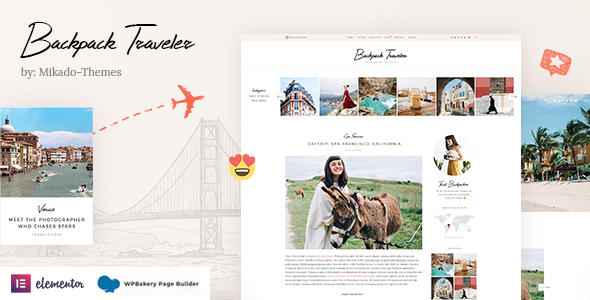
Stuck on your Backpack Traveler WordPress theme? Let's fix it.
No endless back-and-forth. Just send us the details and we'll get it done.
No obligation · Replies within 1 hour · Quote within 1 day
Setup · Customization · Bug fixes · WooCommerce integration
About Backpack Traveler WP Theme
Backpack Traveler is a WordPress theme by Mikado-Themes built specifically for travel bloggers, adventure journalists, and digital nomads. It ships with a visually driven layout that puts full-width photography front and center, making destinations feel immersive from the first scroll.
The theme includes multiple homepage layouts, a built-in travel journal post format, destination archive pages, and Mikado’s Qode Interactive page builder integration. It supports WooCommerce for selling travel guides or merchandise, and includes several header styles suited to content-heavy travel sites.
It’s a good fit if you want a polished travel blog without building everything from scratch. That said, getting the most out of Backpack Traveler often means adjusting its default settings beyond what the panel exposes, which is where a Backpack Traveler developer can save significant time.
Get matched with a Backpack Traveler developer in under one day
Tell us about your Backpack Traveler project. Small fixes, Backpack Traveler theme customization, or a full website build, whatever you need, we've got it covered.
We'll connect you to the right Backpack Traveler developers, define the scope, and get everything 100% clear.
You'll get one estimate, hire your preferred developer, and start collaborating.
Mikado-Themes builds well-structured themes, but Backpack Traveler has enough moving parts that custom work benefits from someone who already knows the codebase. Finding that person independently takes time. Through Codeable, every developer is vetted, and you get matched with a Backpack Traveler specialist within 24 hours. You describe the project, receive a clear estimate, and only proceed if it makes sense. No commitment required upfront.
Pros
- Strong visual layout designed specifically for travel content with full-width imagery support
- Multiple pre-built homepage and inner page demos covering different travel blog styles
- Built-in destination archive templates with filterable grid layouts
- WooCommerce-ready for selling travel guides, presets, or branded merchandise
- Qode Interactive page builder included, reducing reliance on third-party builders
Cons
- Options panel is large and can be disorienting for first-time Mikado-Themes users
- Demo import can conflict with existing content, sometimes requiring a clean WordPress install
- Mobile layout for destination grids needs additional CSS work in many cases
- Theme updates occasionally break custom CSS added outside a child theme
- Limited documentation for advanced WooCommerce customization within the Backpack Traveler context
Who is Backpack Traveler for?
Solo Travel Bloggers
Backpack Traveler is well-suited to individual bloggers documenting destinations, routes, and itineraries. The journal post format and author-focused layouts give solo creators a strong personal brand presence. A Backpack Traveler specialist can help configure category archives and reading flows that keep visitors browsing across posts.
Adventure & Outdoor Photographers
Photographers who travel need a theme that keeps images sharp and central. Backpack Traveler’s full-width gallery sections and portfolio-style post layouts handle this well. A Backpack Traveler developer can extend these layouts to include EXIF data display, client gallery access, or print shop integration through WooCommerce.
Group Travel Agencies
Travel agencies running group tours can use Backpack Traveler’s destination archives as a structured way to present tour offerings. With custom post types added by a Backpack Traveler expert, each destination page can include pricing, departure dates, and booking form integration without needing a separate booking plugin’s default styling.
Digital Nomad Resource Sites
Sites built around remote work travel, visa guides, or nomad resources benefit from Backpack Traveler’s flexible content layouts. A Backpack Traveler developer can build out resource directory structures, comparison tables, and newsletter capture sections that fit naturally within the theme’s design language.
Travel Gear & Guide Shops
Selling gear reviews, packing guides, or affiliate-driven product roundups works well when WooCommerce is properly integrated into Backpack Traveler’s design. A Backpack Traveler specialist can ensure shop pages, product cards, and cart flows match the travel aesthetic rather than defaulting to generic WooCommerce templates.

Customizing Backpack Traveler
Backpack Traveler ships with a detailed options panel covering typography, color schemes, header behavior, sidebar layouts, and footer configuration. Most visual changes are manageable without code, but anything outside those settings quickly requires custom CSS or PHP work.
Common customization requests include modifying the destination grid layout, changing post meta display, building custom author bio sections for multi-contributor blogs, and adjusting how featured images render on mobile. WooCommerce styling also often needs manual overrides to match the theme’s travel aesthetic.
A Backpack Traveler expert can handle these efficiently, working within the theme’s structure rather than against it. Whether you need a child theme built from scratch, a bespoke landing page for a travel series, or a full visual rebrand, working with someone who knows Mikado-Themes’ codebase makes the process faster and cleaner.
Recommended plugins for Backpack Traveler
Backpack Traveler works well with several key plugins that extend what it does by default. For site speed, caching plugins like WP Rocket pair well, and image optimization is essential given how photography-heavy these sites tend to be. Our WordPress performance service covers the full stack for travel sites running Backpack Traveler.
On the SEO side, Yoast or Rank Math integrate cleanly with the theme’s post structures, but schema markup for travel content often needs manual setup. If organic search is a priority for your travel blog, our WordPress SEO service can handle that properly.
Not sure which plugins to use? This WordPress plugins directory covers the most popular options with reviews and setup guides.
Backpack Traveler common issues
Backpack Traveler demo content not importing correctly
Demo import failures in Backpack Traveler are usually caused by server memory limits or PHP timeout settings. Increase max_execution_time to 300 seconds and memory_limit to 256MB in your php.ini or wp-config.php. If the import still stalls, try importing XML content manually through WordPress’s built-in importer rather than Mikado’s one-click tool. Required plugins must be installed and activated before import begins.
Backpack Traveler header not sticking on scroll
Sticky header behavior in Backpack Traveler is controlled through the theme options panel under Header settings. If the sticky option is enabled but not working, check for conflicting JavaScript from other plugins. Also verify that your header type selection supports sticky behavior, as not all Backpack Traveler header styles include it. Clearing your cache after changing header settings is necessary before testing.
Destination grid images showing wrong aspect ratio in Backpack Traveler
Aspect ratio issues in destination grids are typically caused by inconsistent source image dimensions. Backpack Traveler uses fixed crop sizes for grid thumbnails. After setting consistent featured image dimensions, run a thumbnail regeneration plugin to reprocess existing images. If problems persist, the grid CSS may need overrides to enforce a consistent ratio regardless of source size. A WordPress bug fix can resolve this quickly.
Backpack Traveler theme slow to load on mobile
Backpack Traveler can load slowly on mobile primarily due to large uncompressed hero images and undeferred scripts from the Qode page builder. Start by enabling lazy loading for images, compressing all photography assets, and using a caching plugin. Disable any Mikado scripts tied to features you are not using. Google PageSpeed will identify the specific blocking resources on your instance.
Backpack Traveler sidebar not showing on blog posts
If the sidebar is not appearing on Backpack Traveler blog posts, check the sidebar setting at both the global level in the theme options panel and at the individual post level. Post-level settings override global ones. Also confirm that the sidebar widget area has at least one active widget assigned to it. An empty sidebar area will not display even if the layout is set to show one.
WooCommerce product pages not matching Backpack Traveler style
WooCommerce uses its own template files, which Backpack Traveler does not fully override by default. To match shop pages with the theme’s style, you need to copy WooCommerce template files into the theme’s woocommerce folder and apply matching CSS. This should always be done through a child theme. If you are seeing default WooCommerce styling, no overrides are currently active. Our WordPress bug fixing service handles this type of integration work.
Backpack Traveler footer widgets not displaying correctly
Footer widget display issues in Backpack Traveler are often caused by incorrect widget column count settings in the theme options. Go to Appearance > Customize or the Mikado Options panel and verify the footer column layout matches the number of widget areas you have populated. If columns appear collapsed, inspect for CSS float or flexbox conflicts introduced by a plugin adding its own footer styles.
Custom fonts not loading in Backpack Traveler
Custom fonts in Backpack Traveler are configured through the theme options panel under Typography. If a Google Font is selected but not loading, check that your site can reach external Google APIs, as some hosting environments block these. For self-hosted fonts, they must be registered via @font-face in the child theme’s stylesheet. Fonts added only through Custom CSS without proper registration will not load reliably across browsers.
Backpack Traveler breaking after WordPress update
Breakage after a WordPress core update in Backpack Traveler usually points to deprecated PHP functions used in older versions of Mikado’s codebase. Check your PHP error log immediately after updating. If you are not running the latest Backpack Traveler version, update the theme first. Always run updates on a staging environment before applying to production. If the site is down, a WordPress bug fix can restore it quickly.
Backpack Traveler contact form not sending emails
Contact form email issues in Backpack Traveler are almost always a hosting or mail delivery problem rather than a theme issue. WordPress’s default mail function is unreliable on many hosts. Install an SMTP plugin such as WP Mail SMTP and connect it to a transactional email service like SendGrid or Mailgun. Test delivery using the plugin’s built-in test tool. Verify your form plugin itself is correctly configured with a valid reply-to address.
Backpack Traveler FAQ
Backpack Traveler remains a solid choice for travel bloggers who want a photography-forward design without building from scratch. It handles destination archives, journal posts, and visual storytelling well. Performance requires attention given the image-heavy layouts, but with proper optimization it holds up in 2024. A Backpack Traveler specialist can help you get it configured correctly from the start.
Backpack Traveler is built around Mikado’s own Qode Interactive page builder, not Elementor. You can install Elementor alongside it, but conflicts between the two builders are common and styling inconsistencies are likely. For serious Elementor use, a different base theme is a better fit. A Backpack Traveler developer can advise on the cleanest approach for your specific project.
Create a new folder in wp-content/themes/ named something like backpack-traveler-child. Add a style.css file with the required WordPress header including Template: backpack-traveler, then create a functions.php that enqueues the parent stylesheet. Activate the child theme from Appearance > Themes. All custom CSS and PHP changes belong in the child theme, not the parent.
Backpack Traveler can work for a small travel agency, particularly for destination showcases and itinerary pages. It lacks built-in booking functionality, so a plugin like WooCommerce or a booking-specific tool is needed for reservations. A Backpack Traveler expert can extend the theme’s destination templates to display tour details, pricing, and availability in a way that fits the design.
Yes. Backpack Traveler comes bundled with the Qode Interactive page builder, which is Mikado-Themes’ proprietary drag-and-drop tool. It includes a range of travel-relevant content elements and shortcodes. You do not need to purchase it separately. The builder is activated through the required plugins prompt when you first set up the theme.
Backpack Traveler includes WooCommerce compatibility, making it suitable for selling travel products, digital guides, or branded merchandise. Basic shop functionality works out of the box, but product page styling and cart flows often need CSS adjustments to fully match the theme’s aesthetic. A Backpack Traveler developer can handle these overrides properly through a child theme.
Start by compressing all images, as Backpack Traveler sites are typically image-heavy. Add a caching plugin, enable lazy loading, and minify CSS and JavaScript. Disable any Mikado feature scripts for elements you are not using on the site. Hosting quality matters significantly for this theme. For a full audit, our WordPress performance service covers the complete optimization stack.
Migrating content to Backpack Traveler is manageable using WordPress’s built-in export and import tools, but your existing layouts will not transfer automatically. Post content migrates cleanly, but page designs built with another theme’s builder will need to be rebuilt using Qode. A WordPress migration specialist can handle the technical side while minimizing downtime and content loss.
Backpack Traveler is compatible with WPML and Polylang for multilingual setups. Basic translation of theme strings is supported. However, setting up a fully functioning multilingual travel site requires careful configuration of both the translation plugin and the theme’s archive and destination templates. A Backpack Traveler specialist familiar with WPML can ensure the setup is stable across languages.
The most reliable way is through Codeable, where all WordPress developers are vetted before being accepted. Post your Backpack Traveler project, describe what you need, and get matched with a qualified developer within 24 hours. You receive a free estimate before committing to anything. Visit our WordPress development services page to learn more or go directly to Codeable to post your project.
Hire a Backpack Traveler Expert
Whether you need a single fix or a full theme build-out, working with a qualified Backpack Traveler developer gets you there faster. Our team delivers through Codeable, which means vetted expertise, transparent pricing, and no guesswork. Describe your project and get a clear estimate before spending anything. Get a Free Estimate and have a developer matched to your project within 24 hours.
You'll need a free Codeable account so developers can ask questions and send their quotes.