Bacola WordPress Theme
by KlbTheme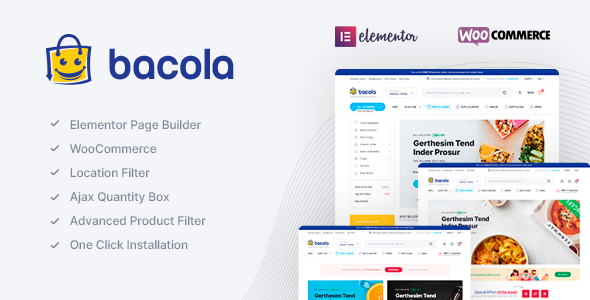
Stuck on your Bacola WordPress theme? Let's fix it.
No endless back-and-forth. Just send us the details and we'll get it done.
No obligation · Replies within 1 hour · Quote within 1 day
Setup · Customization · Bug fixes · WooCommerce integration
About Bacola WP Theme
Bacola is a grocery and food store WooCommerce theme built by KlbTheme. It ships with a pre-built demo specifically designed for online supermarkets, organic food shops, and general grocery retailers. The layout is product-dense, with mega menus, category grids, deal countdown timers, and a sticky header built in from the start.
KlbTheme built Bacola on top of WooCommerce and Elementor, so most of the page structure is editable without touching code. The theme supports variable products, product quick views, wishlist functionality, and an AJAX cart sidebar. It also includes built-in product label options for badges like “sale,” “hot,” and “new.”
For store owners moving from a basic WooCommerce setup to something more purpose-built for food retail, Bacola covers most of the visual and functional ground without requiring a stack of extra plugins.
Get matched with a Bacola developer in under one day
Tell us about your Bacola project. Small fixes, Bacola theme customization, or a full website build, whatever you need, we've got it covered.
We'll connect you to the right Bacola developers, define the scope, and get everything 100% clear.
You'll get one estimate, hire your preferred developer, and start collaborating.
KlbTheme updates Bacola regularly, and those updates occasionally break customizations made directly to theme files. A developer who knows the theme can set up a proper child theme, document custom modifications, and keep your store running through updates without emergency fixes.
Codeable connects you with vetted WordPress developers who have worked on WooCommerce grocery and food store builds. If you need a Bacola developer for a specific task or an ongoing project, you can post it and get a scoped estimate fast.
Pros
- Purpose-built for grocery and food retail with product-dense layouts out of the box
- Includes deal countdown timers, AJAX cart sidebar, and quick view without extra plugins
- Elementor compatibility makes page layout editing accessible without code
- Supports multiple header styles and a mega menu builder for large product catalogs
- Regular updates from KlbTheme with active support documentation
Cons
- Relies heavily on bundled KlbTheme plugins which creates lock-in and update dependencies
- Demo import can be slow and sometimes incomplete on shared hosting environments
- Some theme options duplicate Elementor settings, leading to conflicts if both are used
- Limited layout flexibility outside the pre-built grocery demo without developer involvement
- Support response times from KlbTheme can be slow for complex or theme-specific bugs
Who is Bacola for?
Online Grocery Store
Bacola’s default demo is built for high-volume grocery retail. Category grids, product label badges, and a sticky cart make browsing and purchasing fast. If you are running a broad catalog with dozens of categories, the mega menu and filterable shop page handle the navigation load well.
Organic and Health Food Shop
The clean product card layout and support for custom badges like “organic” or “local” make Bacola a solid fit for health food stores. Pair it with a product attribute filter and you can let customers sort by diet type, allergen, or certification without any custom development.
Local Butcher or Deli
Local specialty food shops benefit from Bacola’s deal timers and featured product sections. A Bacola specialist can configure the homepage to highlight weekly specials, add a delivery date picker at checkout, and set up local pickup zones through a compatible WooCommerce shipping plugin.
Meal Kit and Subscription Box
With WooCommerce Subscriptions and some developer configuration, Bacola can support recurring weekly or monthly box orders. The theme’s product layout handles subscription product display cleanly, and the checkout flow can be customized to collect delivery preferences.
Wholesale Food Supplier
Wholesale food businesses can use Bacola with a wholesale pricing plugin to show tiered pricing on product pages. A Bacola developer can restrict certain catalog sections to logged-in wholesale accounts and configure minimum order quantities per product category.

Customizing Bacola
Bacola gives you a reasonable amount of control through the WordPress Customizer and Elementor page builder. You can adjust header layouts, footer columns, color schemes, and typography without editing PHP. The theme panel also exposes options for shop page layout, product card style, and category display modes.
Where it gets more complex is when you need to deviate from the demo design. Custom product grid layouts, modified checkout flows, or integration with third-party loyalty or delivery plugins will require a Bacola expert who knows how KlbTheme structures its template files and custom hooks.
A Bacola specialist can also handle child theme setup, clean up plugin conflicts from the bundled KlbTheme plugins, and make sure your customizations survive theme updates without breaking.
Recommended plugins for Bacola
Bacola works with most major WooCommerce extensions. Popular additions include WooCommerce Subscriptions for recurring grocery boxes, YITH plugins for wishlists and product bundles, and delivery date pickers for local fulfillment.
If you are running a high-traffic food store, pairing Bacola with proper WordPress performance optimization is important since the theme loads several scripts for sliders, quick view, and AJAX functions. For stores targeting local or organic food search terms, structured WordPress SEO optimization on product and category pages will make a measurable difference in organic traffic.
Not sure which plugins to use? This WordPress plugins directory covers the most popular options with reviews and setup guides.
Bacola common issues
Bacola demo import not working
Demo import failures in Bacola are most often caused by PHP memory limits, max execution time settings, or missing required plugins like KlbTheme’s companion plugin. Set memory_limit to at least 256MB and max_execution_time to 300 in your php.ini. Make sure all required plugins are installed and activated before starting the import. If it still fails mid-import, try importing XML content manually through the WordPress importer.
Bacola AJAX cart not updating
If the AJAX cart sidebar is not updating after adding products, the most likely cause is a JavaScript conflict with another plugin or a caching plugin serving stale page fragments. Start by deactivating caching plugins and testing. Check the browser console for JS errors. If the issue persists, a WordPress bug fixing service can isolate the conflict without disrupting your live store.
Bacola mega menu not showing on mobile
Bacola’s mega menu typically hides or collapses on mobile by design, falling back to a hamburger menu. If the mobile menu itself is not functioning, check for CSS overrides from a child theme or page builder that might be hiding the toggle button. Also confirm the KlbTheme companion plugin is active, as the mega menu functionality depends on it. Clear all caches after any menu change.
Bacola product quick view broken after update
Quick view breakage after a Bacola update usually means a template file has changed in the theme but a cached or overridden version is still being served. If you have copied any WooCommerce templates into your child theme’s woocommerce folder, compare them against the updated theme versions and merge the changes. Disable full-page caching temporarily to confirm the fix.
Bacola countdown timer not displaying correctly
Bacola’s countdown timers pull from WooCommerce sale schedule dates or custom fields set in the theme panel. If the timer shows the wrong time or does not appear, verify the sale end date is set correctly on the product, check that your WordPress timezone is configured under Settings > General, and clear object cache. Some caching configurations prevent the timer from updating dynamically.
Bacola Elementor widgets missing or not loading
Missing Bacola Elementor widgets are almost always caused by the KlbTheme companion plugin being deactivated or out of date. The custom widgets are registered through that plugin, not the theme itself. Reactivate the plugin and update it to match the current theme version. If widgets still do not appear, check for PHP errors in the debug log that might be stopping widget registration. Professional WordPress bug fixing can resolve registration issues quickly.
Bacola header layout not saving in Customizer
Customizer settings not saving in Bacola can be caused by a permissions issue on the wp-config.php file, a REST API error blocking the save request, or a security plugin intercepting the nonce verification. Open browser developer tools, go to the Network tab, and trigger a Customizer save to see if any requests return errors. Temporarily disable security plugins to test.
Bacola WooCommerce checkout page layout broken
A broken checkout page layout in Bacola often comes from a conflict between the theme’s checkout template and a WooCommerce version update. Go to WooCommerce > Status > System Status and check for outdated templates. If Bacola’s checkout template is flagged as outdated, you will need to update it manually or through a developer. A WordPress bug fixing specialist can handle template reconciliation without data loss.
Bacola category page showing wrong number of products
If Bacola category pages show the wrong product count, the issue is usually a mismatch between the WooCommerce products per page setting and a theme-level override in the Customizer or functions.php. Check Bacola’s theme options for a shop products per page field. Also confirm that no page builder template is overriding the default WooCommerce archive loop for that category.
Bacola theme update broke custom changes
Updates breaking custom changes is the most common problem when modifications are made directly to Bacola’s theme files instead of a child theme. Going forward, move all customizations into a child theme. To recover from the current situation, use a file diff tool to compare your previous theme backup against the updated version and re-apply your changes selectively. If no backup exists, a developer may be able to reconstruct changes from the live site.
Bacola FAQ
Yes. Bacola is one of the more complete out-of-the-box options for WooCommerce grocery stores. It includes mega menus, deal timers, AJAX cart, quick view, and product badge labels without needing extra plugins. For large catalogs with many categories, it handles navigation and product display better than a generic WooCommerce theme.
Bacola is built with Elementor compatibility. KlbTheme provides custom Elementor widgets through their companion plugin for things like product sliders, category grids, and deal sections. Standard Elementor widgets also work across the site. You do not need Elementor Pro, though some layouts benefit from the Pro version’s features.
Bacola requires the KlbTheme companion plugin for its custom widgets, mega menu, and quick view functionality. It also bundles WooCommerce, Elementor, and Slider Revolution in some versions. You should keep all of these updated together since version mismatches between the theme and companion plugin are a common source of breakage.
Technically yes, but practically it takes more work. The demo and design decisions are grocery-specific. Using Bacola for a clothing or electronics store means overriding a lot of default styling and layout choices. A general-purpose WooCommerce theme would likely be less work to adapt for a different niche.
The safest way is to run all customizations through a child theme. Before any update, back up your site files and database. After updating, compare template files in the child theme against the updated parent theme and merge any changes. Without a child theme, customizations will be overwritten and you will need a backup to recover them.
Bacola does not include subscription functionality natively. You need WooCommerce Subscriptions or a compatible alternative like YITH WooCommerce Subscriptions. The theme’s product layout handles subscription products reasonably well, but checkout and account page modifications for subscription management may require a developer.
Yes, Bacola is responsive and the mobile layout collapses the mega menu into a hamburger navigation. Product grids reflow into single or double columns on smaller screens. That said, heavily customized Elementor sections may need manual breakpoint adjustments to display correctly on all screen sizes.
Go to Appearance > Import Demo after installing and activating the theme and the KlbTheme companion plugin. Select the demo you want and run the full import including content, widgets, and settings. Make sure your hosting environment meets the PHP memory and execution time requirements or the import may stall partway through.
Yes. A Bacola developer can handle integrations with delivery date plugins, loyalty programs, wholesale pricing tools, and local pickup systems. These typically require hooking into WooCommerce checkout, cart, and order flows, which needs someone familiar with both WooCommerce and how Bacola structures its templates.
Bacola works with WPML and Polylang for multilingual setups and supports WooCommerce’s built-in currency options. For more complex multi-currency or region-specific pricing, you will need a plugin like Currency Switcher for WooCommerce. A developer familiar with Bacola can configure these integrations without conflicts from the theme’s custom templates.
Hire a Bacola Expert Developer
Whether you need the Bacola demo imported and configured, custom layout work done in Elementor, or a WooCommerce integration built out properly, working with a Bacola developer saves time and avoids the trial-and-error of doing it alone.
FoxyConcept works through Codeable, so every developer is vetted and the estimate process is free. Get a Free Estimate and describe what you need. No obligation to hire.
You'll need a free Codeable account so developers can ask questions and send their quotes.