Barber WordPress Theme
by gljivec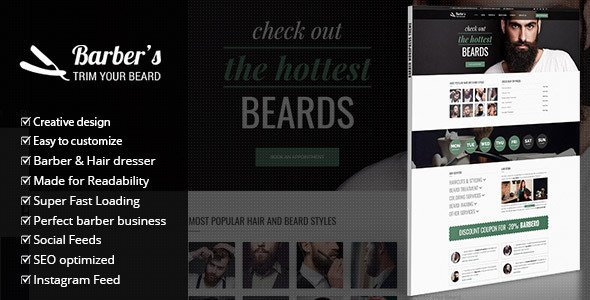
Stuck on your Barber WordPress theme? Let's fix it.
No endless back-and-forth. Just send us the details and we'll get it done.
No obligation · Replies within 1 hour · Quote within 1 day
Setup · Customization · Bug fixes · WooCommerce integration
About Barber WP Theme
Barber is a WordPress theme built by gljivec, designed specifically for barbershops, hair salons, and grooming businesses. It ships with a clean layout focused on appointments, services, and portfolio presentation.
The theme includes a built-in booking section, team member profiles, a services list, and a gallery. It works with popular page builders and integrates with WooCommerce for selling products like grooming kits or gift cards.
Barber uses a dark, masculine aesthetic by default, which suits most modern barbershop branding. Typography is bold and readable. The theme is translation-ready and includes demo content you can import with one click, making initial setup straightforward even without a developer on hand.
Get matched with a Barber developer in under one day
Tell us about your Barber project. Small fixes, Barber theme customization, or a full website build, whatever you need, we've got it covered.
We'll connect you to the right Barber developers, define the scope, and get everything 100% clear.
You'll get one estimate, hire your preferred developer, and start collaborating.
gljivec built Barber with a specific use case in mind, which means it does some things very well and others require workarounds. A developer who knows this theme avoids wasted time and guesswork.
Through Codeable, you get matched with a vetted WordPress developer who has hands-on experience with themes like Barber. No agencies, no junior freelancers. You post your project, get a clear estimate, and decide whether to move forward. There is no obligation and no risk upfront. That is a straightforward way to get expert help without the usual hiring headaches.
Pros
- Purpose-built layout for barbershops with appointment section, team profiles, and services grid included
- One-click demo import gets a working site up quickly without manual setup
- WooCommerce compatible, so selling grooming products or gift cards requires no additional theme work
- Dark masculine default design fits most modern barbershop branding without heavy customization
- Translation-ready with .po/.mo file support, suitable for multilingual barbershop sites
Cons
- Limited layout variety beyond the default dark style, lighter or feminine salon aesthetics require significant CSS work
- Built-in booking section is presentational only and needs a third-party plugin for actual appointment management
- Theme options panel lacks granular control over typography and spacing without custom CSS
- Updates from gljivec have slowed, which can create compatibility gaps with newer WordPress and PHP versions
- Demo content import can overwrite existing settings, making it risky to use on a live site mid-project
Who is Barber for?
Traditional Barbershop
Barber’s dark aesthetic and bold typography map directly onto the branding of a classic barbershop. The team section lets you highlight individual barbers with photos and specialties. The services list handles haircuts, shaves, and add-ons cleanly. Pair it with a booking plugin and the site covers everything a walk-in or appointment-based shop needs.
Modern Hair Salon
With some CSS adjustments and a lighter color palette, Barber works for upscale or gender-neutral hair salons. The gallery section is strong for showcasing haircut portfolios. You will likely need a developer to rework the default dark scheme, but the underlying structure, services, team, and booking, translates well to a salon context.
Grooming Product Shop
Adding WooCommerce to Barber creates a functional shop for beard oils, pomades, razors, or gift cards. The theme’s layout handles product pages without looking out of place. It works best when the product range is small and the focus stays on the service side, with retail as a secondary revenue stream rather than the primary purpose of the site.
Tattoo and Piercing Studio
Tattoo and piercing studios share a similar visual language with barbershops, dark tones, bold fonts, portfolio-first layouts. Barber adapts reasonably well to this niche. The gallery section handles artwork portfolios, and the team profiles work for individual artists. Some rework of service labels and copy is needed to shift the context away from hair.
Mobile Barber Service
Mobile barbers need a site that communicates availability, service area, and easy contact. Barber’s appointment section and contact layout cover those basics. A developer can simplify the homepage to focus on booking and location, stripping out team and gallery sections that are less relevant when one person runs the whole operation.

Customizing Barber
Out of the box, Barber covers the basics well. But most barbershop owners want something more specific — custom booking flows, brand colors, unique service page layouts, or a homepage that stands out from every other Barber-themed site.
That is where a Barber expert makes the difference. A developer familiar with this theme knows exactly where gljivec has built in flexibility and where custom CSS or child theme work is needed. They can modify the appointment section, restructure the services grid, add pricing tables, or wire up a third-party booking plugin without breaking the existing layout.
Custom font pairing, logo integration, and mobile layout adjustments are also common requests that go beyond what the theme options panel handles on its own.
Recommended plugins for Barber
Barber pairs well with several plugins that extend its core functionality. WooCommerce adds a product shop for retail items. Appointment booking plugins like Bookly or Simply Schedule Appointments slot in cleanly with the theme’s existing booking section.
For performance, image optimization and caching plugins are worth adding early. The theme’s gallery and portfolio sections load multiple images, so WordPress performance tuning helps keep load times fast. If you plan to rank locally, pairing Barber with a proper WordPress SEO setup will drive more foot traffic from search.
Not sure which plugins to use? This WordPress plugins directory covers the most popular options with reviews and setup guides.
Barber common issues
Barber theme booking form not working
The Barber theme’s built-in booking area is a static layout, not a functional form. It requires a booking plugin to handle actual submissions. Plugins like Bookly, Amelia, or Simply Schedule Appointments integrate well with the theme. If a previously working form has stopped submitting, check for plugin conflicts, SMTP configuration issues, or a broken contact form plugin. A WordPress bug fixing service can isolate the exact cause quickly.
Barber WordPress theme not displaying correctly on mobile
Mobile display issues in Barber usually come from custom CSS added without mobile breakpoints, a page builder element set to fixed widths, or a slider that overflows on small screens. Open browser DevTools on mobile view and inspect which element is causing the overflow. If the issue appeared after a theme or plugin update, check the changelog for known conflicts. Child theme CSS changes are the safest fix to avoid losing work on future updates.
Barber theme demo import failed or broken layout after import
Demo imports in Barber can fail if the required plugins are not activated before import, if server memory limits are too low, or if a previous partial import left conflicting data. Start by deactivating all non-essential plugins, set WP memory to at least 256MB in wp-config.php, and run the import on a staging site first. If the layout still breaks, manually import the XML content and rebuild widget areas and menus separately rather than relying on the full one-click import.
Barber theme slow loading on mobile and gallery pages
The Barber theme’s gallery sections load full-size images by default if thumbnails are not properly configured. Regenerate thumbnails using a plugin like Regenerate Thumbnails after setting correct image sizes in the theme settings. Add lazy loading to gallery images and enable a caching plugin. For persistent performance issues, a full WordPress performance audit will identify whether the bottleneck is images, scripts, hosting, or a combination of factors.
Barber FAQ
gljivec has released updates for Barber, but activity has slowed in recent years. This means some compatibility gaps may exist with the latest WordPress or PHP versions. Before purchasing or building on this theme, check the ThemeForest changelog and comments for recent update dates. If you are already using it, keep PHP and WordPress updated and monitor for any layout or functionality breaks after core updates.
Barber is compatible with WPBakery, which is commonly bundled with ThemeForest themes from this era. Elementor can be used alongside Barber, but some theme-specific sections like the booking area and team profiles are built with the theme’s own shortcodes, not native page builder elements. A developer can bridge the gap, but expect some limitations when mixing Elementor with theme-native sections.
Yes, with some adjustments. The core layout works for any salon business. The main changes needed are the color scheme, which defaults to dark and masculine, some copy and label updates, and possibly the font pairing. These are manageable with a child theme and CSS. The services, team, gallery, and booking structure all translate directly to a hair salon or beauty studio context.
The Barber theme includes a booking section visually, but it does not process appointments on its own. You need a booking plugin to handle actual scheduling, payments, and notifications. Amelia, Bookly, and Simply Schedule Appointments all work well with this theme. A developer can integrate the plugin so it matches the theme’s design rather than appearing as a generic form drop-in.
Create a folder in wp-content/themes named barber-child. Add a style.css file with the correct header referencing the parent theme, and a functions.php file that enqueues the parent stylesheet. Any CSS or PHP changes go in the child theme files. This ensures your customizations survive Barber theme updates without being overwritten. Most developers handle this setup as a standard first step before any custom work.
Hire a Barber WordPress Developer
Whether you need a full site build on the Barber theme or targeted fixes to an existing setup, working with a specialist saves time and avoids costly mistakes. Our developers know gljivec’s theme inside out and can handle customization, plugin integration, performance work, and more.
Get a free estimate with no obligation. Describe your project and get matched with a Barber expert within 24 hours through our WordPress development service.
You'll need a free Codeable account so developers can ask questions and send their quotes.