Barista WordPress Theme
by Edge-Themes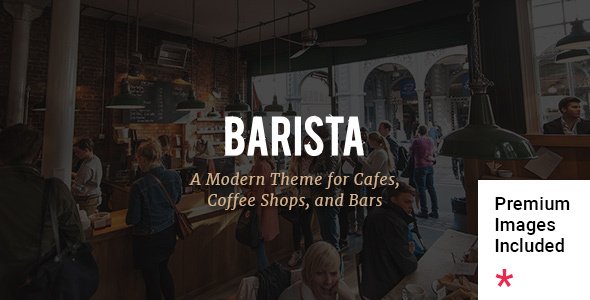
Stuck on your Barista WordPress theme? Let's fix it.
No endless back-and-forth. Just send us the details and we'll get it done.
No obligation · Replies within 1 hour · Quote within 1 day
Setup · Customization · Bug fixes · WooCommerce integration
About Barista WP Theme
Barista is a WordPress theme built by Edge-Themes, designed primarily for coffee shops, cafes, and food-related businesses. It ships with a set of pre-built demo sites you can import in one click, covering everything from minimalist cafe layouts to full restaurant setups with menus, reservations, and event listings.
The theme runs on Edge-Themes’ proprietary page builder, which handles most layout work without requiring a third-party builder. It supports WooCommerce for online merchandise or product sales, includes custom post types for team members and portfolio items, and comes with a built-in mega menu and header options. Typography and color controls are handled through the WordPress Customizer. It’s a niche-specific theme with enough flexibility to work for broader hospitality or lifestyle brands.
Get matched with a Barista developer in under one day
Tell us about your Barista project. Small fixes, Barista theme customization, or a full website build, whatever you need, we've got it covered.
We'll connect you to the right Barista developers, define the scope, and get everything 100% clear.
You'll get one estimate, hire your preferred developer, and start collaborating.
Edge-Themes builds polished themes, but Barista has enough moving parts that getting it production-ready takes experience. Codeable connects you with vetted WordPress developers who have worked with Edge-Themes products and understand the quirks of the options panel, the shortcode system, and how to make the theme perform properly in a real business context. Whether you need a full site build, a specific customization, or help fixing something that’s broken, a Barista developer on Codeable can scope the work accurately and deliver without the guesswork.
Pros
- One-click demo import gets a cafe or restaurant layout live quickly
- Built-in mega menu and multiple header styles without extra plugins
- WooCommerce support included out of the box
- Custom post types for menu items, team, and portfolio cover most hospitality needs
- Actively maintained by Edge-Themes with regular WordPress compatibility updates
Cons
- Proprietary shortcode system creates lock-in and makes switching builders difficult
- Page speed scores suffer without additional optimization work
- Documentation is thin in places, especially for advanced customization
- Demo content is closely tied to cafe aesthetics, limiting how far you can stretch it for other industries
- The options panel has a steep learning curve for non-technical site owners
Who is Barista for?
Independent Coffee Shops
Barista was built with independent coffee shops in mind. The demo layouts include menu sections, team profiles, gallery pages, and contact forms that cover what most small cafe websites need. A Barista developer can adapt these to match your branding and integrate a reservation or ordering plugin without rebuilding from scratch.
Specialty Cafes and Roasters
Specialty roasters need to show product detail and brand story. Barista’s WooCommerce integration handles online bean sales, and its portfolio and blog post types work for origin stories and roast notes. A Barista specialist can build product pages that reflect your catalog structure and connect to a subscription or wholesale inquiry flow.
Restaurants with Online Menus
The theme’s menu post type and layout options make it practical for restaurants that need a clean, readable online menu. Combined with a booking plugin like OpenTable or Bookly, a Barista developer can create a reservation flow that matches your seating schedule and sends confirmation emails automatically.
Food and Lifestyle Bloggers
Bloggers in the food and lifestyle space can use Barista’s editorial layout options and featured image handling to build a content-heavy site. The theme supports category filtering and magazine-style blog grids. It works best when a Barista expert has cleaned up the default scripts that slow down content-heavy pages.
Catering and Events Businesses
Catering businesses need clear service pages, inquiry forms, and event galleries. Barista’s flexible page templates and WooCommerce product pages can serve as a service catalog. A Barista specialist can tie this together with a quote request form and a gallery layout that shows past event work effectively.

Customizing Barista
Barista gives you a solid starting point, but most sites will need adjustments beyond what the default demos offer. The theme’s options panel controls global fonts, colors, header styles, and footer layout. Each section of a page is built using the shortcode-based system Edge-Themes ships across their themes, which works fine for standard layouts but can get complex when you need something outside the predefined blocks.
A Barista expert can help you restructure demo content to match your actual brand, modify CSS for typography and spacing, wire up a reservation plugin properly, or build custom menu page layouts that the default demos don’t cover. If you want to move away from the bundled builder or integrate with a third-party booking system, that requires developer-level work. Hiring a Barista specialist saves you significant time and avoids the trial-and-error that comes with Edge-Themes’ documentation gaps.
Recommended plugins for Barista
Barista works well with a handful of plugins that extend its core functionality. Contact Form 7 or WPForms handle reservations and contact pages. WooCommerce adds an online shop for merchandise or packaged goods. For events, The Events Calendar integrates cleanly with the theme’s layout.
Where the theme needs the most help is on the technical side. Out of the box, Barista loads a large number of scripts and stylesheets that can hurt page speed scores. A proper WordPress performance setup makes a real difference here. If you’re running a local cafe or food brand targeting search traffic, pairing the theme with a solid WordPress SEO strategy will do more for your visibility than any design tweak.
Not sure which plugins to use? This WordPress plugins directory covers the most popular options with reviews and setup guides.
Barista common issues
Barista theme demo import not working
Demo import failures in Barista usually come down to server limits. PHP memory, max execution time, and upload size limits all need to be raised before the importer will complete. Set memory_limit to at least 256M and max_execution_time to 300. If the importer still fails, try importing XML content manually through WordPress Tools, then set up widgets and theme options separately. If the issue persists, a developer can run the import over SFTP or WP-CLI.
Barista theme page builder content not showing
If Barista’s page builder content isn’t rendering, the most common cause is a plugin conflict with another page builder or a JavaScript error blocking the front-end scripts. Open your browser console and look for JS errors. Also check whether the Edge Core companion plugin is active and up to date. This plugin is required for all Edge-Themes shortcodes and post types to function. Deactivating conflicting plugins one by one usually isolates the problem.
Barista WordPress theme slow loading speed
Barista loads a large number of CSS and JS files by default, which drags down performance scores. Start by enabling a caching plugin like WP Rocket or W3 Total Cache and combining scripts where possible. Next, lazy load images and defer non-critical JavaScript. For deeper gains, consider a WordPress performance audit to identify which specific assets are causing the most delay. Google PageSpeed Insights will show you the exact files to target.
Barista theme header not displaying correctly on mobile
Mobile header issues in Barista are usually tied to the sticky header or mobile menu settings in the theme options panel. Go to Edge Options, then Header, and check the mobile header configuration. If the hamburger menu isn’t triggering or the logo is oversized, custom CSS targeting the mobile-header class typically resolves it. Make sure you’re testing on an actual device, not just a browser resize, since some CSS behaves differently in real mobile environments.
Barista theme WooCommerce product page layout broken
Broken WooCommerce layouts in Barista often appear after a WooCommerce update that changes template structure. Check whether Barista’s WooCommerce template files are outdated by going to WooCommerce, Status, System Status. Outdated templates are listed there. You’ll need to update those files manually or have a developer update them to match the current WooCommerce version. If you’re seeing this frequently, our WordPress bug fixing service can handle template conflicts as they come up.
Barista theme custom fonts not loading
Custom fonts failing to load in Barista are usually a Google Fonts API issue or a misconfiguration in the theme’s font selector. If you’ve added a font via the Edge Options panel and it’s not appearing, clear all caches first. If the font still doesn’t load, check whether your server is blocking external requests to fonts.googleapis.com. You can also enqueue the font manually via your child theme’s functions.php and apply it with CSS to bypass the options panel entirely.
Barista theme update broke my site
A Barista theme update breaking a site is almost always caused by a conflict between the updated theme files and an outdated Edge Core plugin, or a CSS override in a child theme that no longer applies correctly. First, check that Edge Core is updated to match the current theme version. Then review your child theme’s style.css for selectors that may have changed. If the site is down, restore from backup first, then apply the update again in a staging environment before pushing to production. The WordPress bug fixing service can help if you’re stuck.
Barista theme contact form not sending emails
Contact form emails not sending from a Barista site is almost never a theme issue. It’s an email deliverability problem. WordPress’s default wp_mail() function relies on PHP mail, which most hosts block or which spam filters reject. Install an SMTP plugin like WP Mail SMTP and connect it to a transactional email service like Mailgun, SendGrid, or your Google Workspace account. Test with the plugin’s built-in email test tool after configuring.
Barista theme shortcodes showing as plain text
Barista shortcodes appearing as raw text like [vc_row] or Edge-specific shortcodes usually means the Edge Core plugin is deactivated or the theme was switched without deactivating it properly. Reactivate Edge Core and confirm it matches the theme version. If shortcodes still don’t render after that, check for PHP errors in your debug log that might be stopping the shortcode registration from completing on load.
Barista theme menu items not displaying in correct order
Menu item ordering issues in Barista are typically a WordPress menu configuration problem, not a theme bug. Go to Appearance, Menus and drag items into the correct order, then save. If the saved order doesn’t reflect on the front end, a caching plugin may be serving a stale version of the page. Clear all caches, including any CDN cache, and reload. If you’re using a mega menu with custom columns, those need to be reconfigured in the Edge mega menu settings panel after reordering.
Barista FAQ
Yes, Barista was built specifically for coffee shops and cafes. It includes menu layouts, reservation-friendly page templates, gallery sections, and team profiles. The demo sites cover a range of cafe styles from minimal to full-featured. For a small independent coffee shop, it’s one of the more purpose-built options available in the WordPress ecosystem.
Barista includes WooCommerce support out of the box. You can use it to sell merchandise, packaged goods, or coffee subscriptions. Product pages, cart, and checkout all inherit the theme’s styling. For complex WooCommerce setups like wholesale pricing or subscription products, you’ll likely need a developer to configure the additional plugins properly.
Barista uses Edge-Themes’ own proprietary builder, which relies on shortcodes and a visual interface built into the page editor. It does not use Elementor or WPBakery by default, though some Edge-Themes products do support WPBakery. This is important to know if you’re planning to switch builders later, as content migration between shortcode systems is not straightforward.
Edge-Themes maintains Barista and releases updates to keep up with WordPress core. As of recent versions, it is compatible with WordPress 6.x. Always check the theme changelog on ThemeForest before updating, and test updates on a staging site first. PHP 8.x compatibility can vary depending on which version of the theme and Edge Core plugin you’re running.
To import a Barista demo, install the theme and activate it, then install the required plugins including Edge Core. Go to Edge Options and look for the demo import section. Select a demo and run the import. Make sure your server’s PHP limits are set high enough, memory at 256M and max execution time at 300 seconds, or the import may time out partway through.
No. Edge Core is a required companion plugin for Barista. It registers the custom post types, shortcodes, and widgets that the theme depends on. Without it, most of the theme’s functionality will not work, and shortcodes will render as plain text on the front end. Always keep Edge Core installed and updated alongside the theme.
Create a folder in wp-content/themes/ named something like barista-child. Inside it, add a style.css with a header that declares the parent theme as Template: barista, and a functions.php that enqueues the parent stylesheet. Activate the child theme from Appearance, Themes. Any CSS or template overrides go in the child theme to survive future updates.
Barista’s SEO depends almost entirely on what plugins and practices you layer on top of it. The theme itself doesn’t have strong built-in SEO features. Install a plugin like Rank Math or Yoast, optimize your page titles and meta descriptions, and address the performance issues that hurt Core Web Vitals scores. A slow Barista site will underperform in search regardless of content quality.
Migrating an existing site to Barista is possible but involves rebuilding page layouts in the Edge-Themes builder, since your current content structure won’t transfer directly. Posts and pages migrate via standard WordPress export and import, but formatting will need to be redone. If you’re moving from another Edge-Themes theme, the process is smoother. For a WordPress migration handled properly, a developer saves significant time.
Barista developer rates on Codeable typically range from $70 to $120 per hour depending on the scope and complexity. A simple customization or bug fix might take two to four hours. A full site build from a demo can range from 15 to 40 hours depending on the features required. You get a scoped estimate before committing to anything, so there are no surprises on cost.
Hire a Barista WordPress Expert
If you need a Barista developer to build your site, customize the layout, fix a bug, or handle a WooCommerce or booking integration, you can get matched with a vetted specialist through Codeable. Post your project, describe what you need, and receive a scoped estimate within 24 hours. No commitment required. Get a Free Estimate and see what’s possible.
You'll need a free Codeable account so developers can ask questions and send their quotes.