Barnelli WordPress Theme
by yosoftware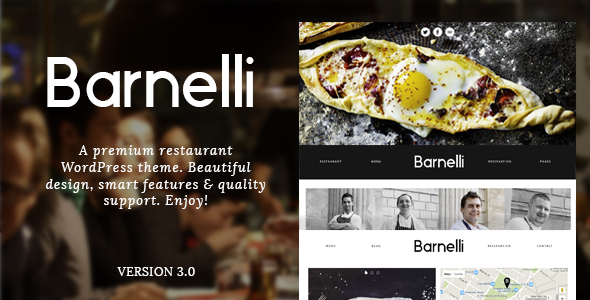
Stuck on your Barnelli WordPress theme? Let's fix it.
No endless back-and-forth. Just send us the details and we'll get it done.
No obligation · Replies within 1 hour · Quote within 1 day
Setup · Customization · Bug fixes · WooCommerce integration
About Barnelli WP Theme
Barnelli is a WordPress theme by yosoftware built for restaurant and food-related businesses. It ships with a clean layout focused on menus, reservations, and visual food presentation. The theme includes a built-in menu section, event listings, and a gallery suited to hospitality sites.
Barnelli uses a straightforward page builder approach, making it accessible for non-technical users while giving developers enough structure to extend it. It supports WooCommerce for online ordering setups and integrates with common reservation plugins. Typography and color controls are handled through the WordPress Customizer, keeping the setup process relatively simple.
For restaurant owners who want a polished online presence without building from scratch, Barnelli provides a solid starting point. That said, getting the most out of it often requires someone who knows the theme well.
Get matched with a Barnelli developer in under one day
Tell us about your Barnelli project. Small fixes, Barnelli theme customization, or a full website build, whatever you need, we've got it covered.
We'll connect you to the right Barnelli developers, define the scope, and get everything 100% clear.
You'll get one estimate, hire your preferred developer, and start collaborating.
Barnelli has quirks that take time to learn. Hiring through Codeable connects you with vetted WordPress developers who have worked on hospitality and restaurant themes before. You post your project, get a free estimate within 24 hours, and only move forward if the fit is right. No risk, no obligation.
Whether you need a full site build, a specific customization, or help fixing something that broke, a Barnelli developer on Codeable can scope the work accurately and deliver without the guesswork.
Pros
- Purpose-built for restaurants with dedicated menu and food sections included
- WooCommerce compatible for adding online ordering or merchandise sales
- Customizer-based settings make basic changes accessible without code
- Clean visual layout with good support for food photography galleries
- Compatible with popular reservation and events plugins
Cons
- Limited flexibility outside of restaurant use cases makes it a poor fit for other industries
- Advanced layout changes require custom CSS or child theme work
- Plugin compatibility issues can appear with newer WordPress versions if updates lag
- Built-in menu section lacks advanced filtering or multi-language support by default
- Documentation from yosoftware is sparse, making self-troubleshooting difficult
Who is Barnelli for?
Independent Restaurants
Barnelli fits independent restaurants well. The theme handles menus, opening hours, location maps, and gallery sections without requiring extensive plugin stacks. A Barnelli developer can tailor the layout to match the restaurant’s brand, add online reservation functionality, and set up a contact page that actually converts walk-ins into bookings.
Cafes and Coffee Shops
Cafes need a simple, visual site that loads fast and looks good on mobile. Barnelli’s image-forward layout suits this well. A Barnelli specialist can configure a clean homepage with a featured drinks menu, a gallery of the space, and an embedded map. Keeping the setup lean means faster load times and a better customer experience.
Food Bloggers and Recipe Sites
Food bloggers can use Barnelli as a base for recipe content, though it works better with some structural adjustments. A Barnelli expert can set up category pages for recipe types, integrate a newsletter signup, and configure schema markup so recipes appear correctly in Google search results. The visual layout supports food photography well.
Event Dining and Private Hire Venues
Venues offering private dining or event hire need clear booking flows and detailed event pages. Barnelli supports this with event section templates that a developer can extend. Integrating a booking form, adding a private hire inquiry page, and connecting with a calendar plugin are all achievable with a Barnelli developer handling the setup.
Catering Companies
Catering companies need to communicate services, showcase past work, and generate inquiries. Barnelli’s gallery and menu sections can be repurposed for portfolio and service displays. A Barnelli specialist can restructure the default layout to lead visitors toward a quote request form and make the site work harder as a sales tool.

Customizing Barnelli
Out of the box, Barnelli covers the basics. But most restaurant sites need more than defaults. A Barnelli expert can rework the layout to match your brand, adjust color schemes, modify typography, and restructure page templates to better suit your service offerings.
Common customization work includes custom menu section styling, integrating OpenTable or Resy reservation widgets, building custom homepage layouts, and adjusting mobile responsiveness for better display on phones. Child theme development is often recommended to keep changes safe across updates.
A Barnelli specialist can also connect the theme with third-party tools like Mailchimp for newsletter signups or Google Maps for location display. These integrations are straightforward for an experienced developer but time-consuming to get right without one.
Recommended plugins for Barnelli
Barnelli works well with a range of plugins that extend its core functionality. WooCommerce adds online ordering or gift card sales. The Events Calendar handles event nights, tastings, or private dining bookings. Contact Form 7 or WPForms cover reservation inquiries.
For sites that need to rank in local search, pairing Barnelli with a proper WordPress SEO setup makes a real difference for restaurant searches. Page speed also matters for mobile visitors. Optimizing images, caching, and scripts through a dedicated WordPress performance service keeps load times in check and reduces bounce rates from slow pages.
Not sure which plugins to use? This WordPress plugins directory covers the most popular options with reviews and setup guides.
Barnelli common issues
Barnelli menu section not displaying correctly after update
Menu display issues in Barnelli after an update usually point to a CSS conflict with a plugin or a theme file that got overwritten. First, check whether the issue appeared right after updating the theme or a plugin. Disable plugins one by one to isolate the conflict. If the menu section uses a shortcode, verify the shortcode syntax hasn’t changed in the new version. For persistent layout breaks, a WordPress bug fixing service can identify the root cause without guesswork.
Barnelli theme images not loading or broken on mobile
Broken images in Barnelli are often caused by incorrect file permissions, a CDN misconfiguration, or image sizes not being regenerated after a theme switch. Run the Regenerate Thumbnails plugin to rebuild image sizes for your theme. Check that your uploads folder has correct read permissions. If images break specifically on mobile, the issue may be with srcset attributes or a caching plugin serving stale files. A WordPress bug fixing specialist can trace the exact source quickly.
Barnelli reservation form not working or not sending emails
If Barnelli’s reservation or contact form stops sending emails, the problem is almost always with WordPress’s default mail function rather than the theme itself. Install an SMTP plugin like WP Mail SMTP and configure it with your email provider’s credentials. Check spam folders before assuming emails are lost. Also verify the form action URL hasn’t changed and that no security plugin is blocking form submissions. Test with a simple contact form to rule out theme-specific issues before going deeper.
Barnelli homepage layout broken after WordPress update
Homepage layout breaks after a WordPress core update usually mean a template compatibility issue between Barnelli and the new version. Check the browser console for JavaScript errors and the PHP error log for deprecation warnings. If you made changes directly in theme files rather than a child theme, those edits may have been wiped by the update. Restore from a backup if available and rebuild customizations in a child theme to prevent this happening again on future updates.
Barnelli FAQ
For restaurant and food businesses, Barnelli is a practical choice. It includes menu sections, gallery layouts, and event pages that fit hospitality sites. It works best when set up by someone familiar with the theme, as the default install needs configuration to perform well. It’s not ideal for businesses outside the food and restaurant space.
Yes, Barnelli is compatible with WooCommerce. You can use it to add online ordering, sell gift cards, or handle merchandise. Getting WooCommerce working cleanly within Barnelli’s layout often requires some styling adjustments to match the overall design. A Barnelli developer can handle this integration and make sure the checkout experience feels consistent with the rest of the site.
Barnelli doesn’t include a built-in reservation system, but it works with plugins like Bookly, OpenTable widgets, or simple contact forms. The right choice depends on your needs. A basic inquiry form through Contact Form 7 works for smaller venues. For high-volume bookings, a dedicated reservation plugin connected to your calendar is more reliable. A Barnelli specialist can set up whichever option fits your operation.
Yes. Vetted Barnelli developers are available through Codeable. You post your project, describe what you need, and receive a free estimate within 24 hours. There’s no obligation to hire. This is a practical option for restaurant owners who want the site built correctly without spending weeks learning the theme themselves.
Barnelli has varying compatibility with page builders depending on the version. Gutenberg block support is generally present in newer theme versions, though some custom sections may not map cleanly to blocks. Elementor compatibility depends on the specific template. Testing in a staging environment before committing to a builder is recommended. A Barnelli developer can confirm what works before you invest time in a setup that may need adjustment.
Hire a Barnelli Developer for Your Restaurant Site
Getting Barnelli set up properly takes more than installing the theme. From menu layouts to reservation integrations, the details matter. A vetted Barnelli expert can handle the build, the customizations, and the ongoing adjustments your site needs.
Post your project and get a scoped estimate at no cost. Get a Free Estimate and see what a proper Barnelli build looks like before committing to anything.
You'll need a free Codeable account so developers can ask questions and send their quotes.