BAUEN WordPress Theme
by webRedox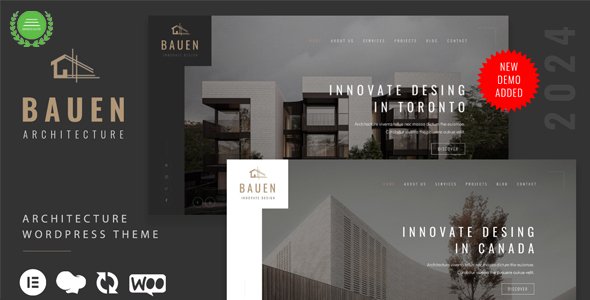
Stuck on your BAUEN WordPress theme? Let's fix it.
No endless back-and-forth. Just send us the details and we'll get it done.
No obligation · Replies within 1 hour · Quote within 1 day
Setup · Customization · Bug fixes · WooCommerce integration
About BAUEN WP Theme
BAUEN is a premium WordPress theme by webRedox, built for architecture firms, interior designers, and construction companies. It ships with a clean grid-based layout, full-screen project galleries, and a minimal aesthetic that keeps the focus on visual work. The theme is built on Elementor, so page layouts are drag-and-drop editable without touching code.
It includes a portfolio post type, contact forms, Google Maps integration, and smooth scroll animations. Performance is reasonably tight out of the box, and the demo content installs in one click. BAUEN suits studios that want a professional online presence without a bespoke build. That said, real client projects often need adjustments beyond what the theme panel allows, which is where a BAUEN specialist becomes useful.
Get matched with a BAUEN developer in under one day
Tell us about your BAUEN project. Small fixes, BAUEN theme customization, or a full website build, whatever you need, we've got it covered.
We'll connect you to the right BAUEN developers, define the scope, and get everything 100% clear.
You'll get one estimate, hire your preferred developer, and start collaborating.
Most BAUEN sites reach a point where the visual editor is not enough. Custom layouts, third-party integrations, and site-specific functionality need developer input. Finding someone who already knows the theme saves time and avoids trial-and-error fixes.
Through Codeable, you get matched with vetted WordPress developers who have hands-on experience with themes like BAUEN. Every project starts with a free estimate, and you only proceed if the scope and cost make sense. No bidding wars, no anonymous contractors.
Pros
- Built specifically for architecture and design portfolios, so the default layouts fit the niche without heavy modification
- Elementor-based page builder means non-technical users can edit content without touching code
- Full-screen project gallery with smooth transitions works well for showcasing visual work
- One-click demo import gets a site to a usable starting point quickly
- Clean, minimal design keeps attention on images rather than UI clutter
Cons
- Heavy reliance on Elementor means the database accumulates post meta quickly, which can slow queries on large sites
- Portfolio filtering options are limited out of the box and require custom code to extend meaningfully
- Mobile typography and spacing need manual CSS adjustments to look polished across all screen sizes
- Limited documentation for edge cases, so troubleshooting non-standard setups takes longer
- Theme updates occasionally break custom CSS added outside a child theme, requiring review after each update
Who is BAUEN for?
Architecture Firms
BAUEN’s grid portfolio and full-screen project pages suit architecture firms that need to present built work with high-quality photography. A BAUEN developer can add project filtering by type, location, or scale, and integrate an enquiry form tied to specific project pages, giving potential clients a direct route to contact.
Interior Design Studios
Interior design studios benefit from BAUEN’s minimal layout and large image areas. The theme handles before-and-after galleries well with the right plugin pairing. A BAUEN specialist can configure custom project categories, add mood board sections, and integrate an Instagram feed to keep the portfolio current without manual updates.
Construction Companies
Construction companies need more than a portfolio. BAUEN can be extended with service pages, team profiles, and a project timeline layout. A BAUEN developer can build out these sections cleanly, add a document download area for specs or tenders, and connect a contact form to the company’s CRM or email platform.
Landscape Design Practices
Landscape design practices work with seasonal projects and long-term maintenance clients. BAUEN’s visual focus suits the work, and a BAUEN expert can add a seasonal project archive, plant or material specification sections, and integrate a booking system for consultations alongside the standard portfolio display.
Real Estate Developers
Real estate developers can use BAUEN to present completed and upcoming projects. A BAUEN specialist can add a developments custom post type, integrate a map showing project locations, and connect a lead capture form to a mailing list. The theme’s clean layout works well for high-value property presentation without feeling like a standard real estate template.

Customizing BAUEN
BAUEN gives you a solid starting point, but most client sites need more than default settings. Customising BAUEN typically involves adjusting the portfolio grid columns, modifying the header layout, changing typography pairings, and fine-tuning spacing across breakpoints. Some of these changes require CSS overrides or child theme edits.
More involved customisations include adding custom post type filters, integrating booking or enquiry systems, and restructuring the homepage to match a specific brand. A BAUEN expert can handle these without breaking existing styles or update compatibility. If you need features that fall outside the theme’s built-in options, a BAUEN developer can extend it cleanly rather than forcing changes through the Elementor editor that create technical debt later.
Recommended plugins for BAUEN
BAUEN works well with a focused set of plugins. WooCommerce can be added if you sell design consultations or products. WPML handles multilingual sites for firms with international clients. For lead generation, Gravity Forms or WPForms integrate without conflicts.
On the technical side, pairing BAUEN with a caching layer and image optimisation plugin makes a real difference to load times. A WordPress performance audit can identify where the theme or its assets are slowing things down. If search visibility matters, structured data and on-page improvements covered in a WordPress SEO service will move the needle further than the theme alone can.
Not sure which plugins to use? This WordPress plugins directory covers the most popular options with reviews and setup guides.
BAUEN common issues
BAUEN portfolio grid not displaying correctly after update
Portfolio grid display issues after a BAUEN update are usually caused by a CSS conflict between the updated theme styles and custom overrides added directly to the parent theme. Check whether you’re running a child theme. If not, custom styles may have been overwritten. Clear all caching layers, then inspect the grid container in browser dev tools to identify which rule is conflicting. If the issue persists or involves regenerating post thumbnails, a WordPress bug fixing service can diagnose and resolve it without guesswork.
BAUEN header menu not showing on mobile
A BAUEN mobile menu that stops showing is typically a JavaScript conflict with another plugin or a missing menu assignment. First, check Appearance > Menus and confirm the correct menu is assigned to the mobile location. Then disable plugins one by one to isolate a JS conflict. If the hamburger icon appears but the menu does not open, the toggle script is likely being blocked. A WordPress bug fix can trace the exact script conflict and restore mobile navigation cleanly.
BAUEN Elementor sections broken or layout shifted
Broken Elementor sections in BAUEN usually follow a theme or Elementor update that changes wrapper classes or introduces new default padding. Open the affected page in Elementor, check for sections with missing widgets or shifted columns, and regenerate CSS under Elementor > Tools. If sections show as corrupted or widgets are missing, the Elementor data in the database may need repair. Avoid re-saving affected pages until the root cause is identified, as this can overwrite recoverable layout data.
BAUEN demo content not importing properly
BAUEN demo import failures are often caused by hitting PHP memory or execution time limits. Increase memory_limit and max_execution_time in your php.ini or wp-config.php before retrying. If the import stalls partway through, check whether placeholder images failed to download from the remote server, which is common on restricted hosting. Import the content XML manually via Tools > Import if the one-click option continues to fail, then reassign menus and widgets manually afterward.
BAUEN FAQ
BAUEN is a solid choice for architecture and design-focused sites. The portfolio layouts, full-screen imagery, and minimal UI suit firms that lead with visual work. It does not cover every edge case out of the box, and studios with specific functionality needs will likely require a BAUEN specialist to extend it, but the design foundation is well-suited to the industry.
BAUEN is built on Elementor and webRedox generally keeps the theme compatible with current Elementor releases. That said, major Elementor version jumps occasionally cause layout shifts or deprecated widget issues. Always test updates on a staging site before applying them to production. If a BAUEN and Elementor update combination breaks your layout, the issue is usually resolvable with targeted CSS or widget replacement.
BAUEN is compatible with WPML, which is the standard solution for multilingual WordPress sites. You will need a WPML licence and some configuration work to translate portfolio items, menus, and custom fields correctly. A BAUEN developer familiar with WPML can set this up properly so translated content displays consistently across all languages without layout issues.
BAUEN supports Google Fonts through the theme customiser, where you can select typefaces for headings and body text. For self-hosted or purchased fonts, you will need to enqueue them via a child theme’s functions.php and reference them in the customiser’s custom CSS field. A BAUEN expert can handle this if you are not comfortable editing theme files directly.
Basic content edits and layout changes are manageable through Elementor without developer help. Beyond that, things like custom post type filters, header modifications, performance tuning, and third-party integrations benefit from a BAUEN developer’s input. Attempting complex changes through the visual editor alone often creates inconsistent results or breaks on mobile. For anything beyond surface edits, hiring a BAUEN specialist saves time.
Hire a BAUEN Developer for Your WordPress Project
Whether you need a BAUEN expert to customise your layout, fix a specific issue, or build out new functionality, the process is straightforward. Post your project, get a free estimate, and work with a developer who knows the theme. No guesswork, no wasted budget on someone learning on the job.
Get a Free Estimate and describe what you need. You’ll hear back within 24 hours.
You'll need a free Codeable account so developers can ask questions and send their quotes.