Bauhaus WordPress Theme
by HighSea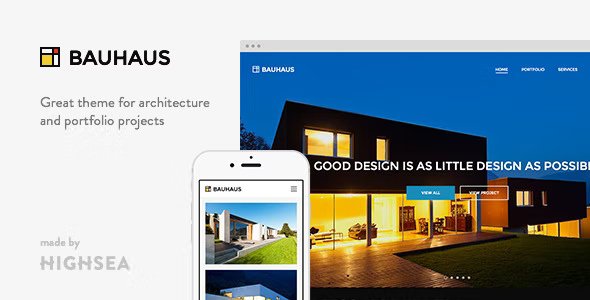
Stuck on your Bauhaus WordPress theme? Let's fix it.
No endless back-and-forth. Just send us the details and we'll get it done.
No obligation · Replies within 1 hour · Quote within 1 day
Setup · Customization · Bug fixes · WooCommerce integration
About Bauhaus WP Theme
Bauhaus is a WordPress theme by HighSea built around the principles of the historic Bauhaus design movement: clean geometry, strong typography, and a clear visual hierarchy. It targets creative professionals, agencies, and portfolio sites that want minimal decoration and maximum impact.
The theme ships with a block-based layout system, making it compatible with the WordPress Site Editor. Pages are built using a grid-first approach, and the typography options give you precise control over scale and spacing. Color palettes are intentionally restrained, pushing content to the foreground.
Bauhaus suits projects where design needs to do the heavy lifting without plugins doing the talking. If your site is visual and your content is the product, this theme gives you a structured, distraction-free foundation to build on.
Get matched with a Bauhaus developer in under one day
Tell us about your Bauhaus project. Small fixes, Bauhaus theme customization, or a full website build, whatever you need, we've got it covered.
We'll connect you to the right Bauhaus developers, define the scope, and get everything 100% clear.
You'll get one estimate, hire your preferred developer, and start collaborating.
Bauhaus is well-built but opinionated. The Full Site Editor gives you freedom, but theme.json configuration, block template structure, and custom patterns require real familiarity with how block themes work under the hood.
FoxyConcept works with vetted WordPress developers through Codeable. Every developer on the platform has passed a strict vetting process, so you get someone who knows block theme architecture and can make Bauhaus do exactly what your project needs, not just what the editor exposes by default. Post your project and get a free estimate with no obligation to hire.
Pros
- Full Site Editor compatible — templates and patterns built entirely in the block editor
- Lightweight codebase with no jQuery dependency and minimal render-blocking assets
- Strong typographic system with fluid type scale and per-block font controls
- Clean semantic HTML output that supports good heading structure out of the box
- Grid-first layout approach that makes building structured portfolio and agency pages straightforward
Cons
- Limited pre-built template variety compared to multipurpose themes with larger pattern libraries
- WooCommerce product and archive templates are bare and need significant styling to look polished
- Full Site Editor dependency means users unfamiliar with block themes face a steep learning curve
- theme.json is the primary way to control global styles, which requires developer knowledge to customize deeply
- HighSea has a smaller support community than mainstream theme shops, so forum help is limited
Who is Bauhaus for?
Creative Portfolio
Bauhaus strips away decorative noise, which makes individual pieces of work stand out. The grid layout controls and full-width image support let designers and illustrators build portfolio pages where the work itself carries the page. Typography customization means your personal brand stays consistent across every section without fighting the theme’s defaults.
Design Agency
Agency sites need structure and speed. Bauhaus delivers both with its block-based service pages, clean navigation patterns, and fast load times. You can build case study layouts, team sections, and contact pages using the built-in block patterns without installing a page builder. The restrained aesthetic aligns well with agencies that sell design thinking.
Architecture Studio
Architecture relies on full-width imagery, strong type, and spatial layouts. Bauhaus handles all three. Project pages can be built with large image grids and structured text blocks that mirror how architectural presentations are formatted. The geometric design language of the theme also fits the profession in a way that generic multipurpose themes do not.
Photography Site
Photography sites need themes that get out of the way. Bauhaus loads fast, uses clean full-width and grid gallery blocks, and does not impose heavy UI chrome around images. You can build gallery pages, individual project pages, and a contact section without any additional plugins. Minimal styling means nothing competes with your photos visually.
Art and Culture Publication
Publications covering art, architecture, or culture benefit from Bauhaus’s typographic precision and editorial layout options. The fluid type scale and column grid make long-form article pages readable and structured. The aesthetic nods to modernist print design, which fits content that takes visual culture seriously. It works well for magazines, journals, and institutional sites.

Customizing Bauhaus
Bauhaus works through the WordPress Full Site Editor, so most customization happens in the block editor rather than a separate theme options panel. You control headers, footers, and templates directly in the editor, which keeps things clean but has a learning curve if you are used to classic customizers.
Typography is one of the stronger customization areas. HighSea built in a fluid type scale and you can adjust font families, weights, and sizes per block. Grid layouts are configurable with column and gap controls baked into the theme patterns.
If you need changes beyond what the editor exposes, a Bauhaus expert can modify templates, add custom block patterns, or adjust the theme.json configuration to match your brand precisely without touching core files or breaking future updates.
Recommended plugins for Bauhaus
Bauhaus is a block theme, so it works best with plugins that follow block editor standards. WooCommerce integration is functional but the default product templates are minimal and often need styling work to match the rest of the site. Contact Form 7 and WPForms both drop in cleanly.
For performance, Bauhaus is lightweight out of the box with no jQuery dependency and minimal CSS overhead. Pairing it with a good caching layer and image optimization keeps scores high. For SEO, the semantic HTML structure and clean heading hierarchy give you a solid starting point. See our WordPress performance service and SEO optimisation service for further improvements.
Not sure which plugins to use? This WordPress plugins directory covers the most popular options with reviews and setup guides.
Bauhaus common issues
Bauhaus theme header not showing in Full Site Editor
This usually happens when the header template part has been accidentally overwritten or detached during a site editor session. Go to Appearance > Editor > Template Parts and check if a custom header exists alongside the default. Delete duplicate or empty template parts and reset to the theme default. If the issue persists after a reset, a file-level check of the theme’s parts/header.html may be needed to confirm the template was not corrupted. See our WordPress bug fixing service if you need hands-on help.
Bauhaus WordPress theme fonts not loading correctly
Bauhaus uses theme.json to register custom fonts. If fonts are not loading, first check that the font files are present in the theme’s /assets/fonts/ directory and referenced correctly in theme.json under the typography.fontFamilies array. A plugin conflict with font optimization tools like Autoptimize can also interrupt font delivery. Disable optimization plugins temporarily and test. If the issue is a third-party font not registering, the font face declaration in theme.json may need a manual path correction.
Bauhaus theme layout broken after WordPress update
Block theme templates can break after major WordPress updates if the block markup syntax changes. Start by deactivating all plugins and checking if the layout recovers. If it does, reactivate plugins one by one to find the conflict. If layout issues persist without plugins, compare your saved template HTML against the theme’s original template files for deprecated block attributes. Check our WordPress maintenance service to keep core, theme, and plugins updated in a controlled way that catches these conflicts before they hit production.
Bauhaus WooCommerce product page not styled
Bauhaus does not ship with detailed WooCommerce templates. The theme uses WooCommerce’s default block templates for product pages, which means styling is minimal. To fix this, you need to either create a custom single-product block template in the Site Editor or add targeted CSS in a child theme to align product page elements with the rest of the Bauhaus design. Using the WooCommerce block templates directly in the Site Editor is the cleanest approach and avoids template override conflicts on future updates.
Bauhaus FAQ
Bauhaus is a Full Site Editor block theme. It uses block-based templates and template parts, and it relies on theme.json for global styles rather than a classic customizer panel. This means all design editing happens in the WordPress Site Editor. It requires WordPress 6.0 or higher and is not compatible with classic theme workflows like widget areas or the old customizer controls.
Yes, Bauhaus is compatible with WooCommerce. The core pages like cart, checkout, and account work without configuration. However, Bauhaus does not include styled WooCommerce templates, so product pages and archive pages will look basic. You will need to build custom block templates in the Site Editor or add CSS to bring product pages in line with the rest of your design. A developer can handle this efficiently.
You can create a child theme for Bauhaus to add custom CSS or PHP functionality. However, because Bauhaus is a block theme, template customization primarily happens through the Site Editor rather than template file overrides. A child theme is still useful for adding custom functions, filters, or styles that you want to persist through parent theme updates. If you need structural changes to templates, use the Site Editor’s template editing tools instead.
Font changes in Bauhaus are managed through the Site Editor. Go to Appearance > Editor, then open the Styles panel and select Typography. From there you can change font families for headings and body text. The available fonts are defined in theme.json. If you want to add fonts not included by default, a developer will need to register them in theme.json or through a font loading plugin that supports block themes.
Bauhaus outputs clean, semantic HTML with a logical heading structure, which is a good baseline for SEO. The theme is lightweight and loads fast with no unnecessary scripts, which helps with Core Web Vitals. It does not include built-in SEO meta controls, so you will need a plugin like Yoast or Rank Math for full SEO management. Pairing Bauhaus with our WordPress SEO service gives you a strong technical foundation.
Hire a Bauhaus WordPress Developer
Need custom layouts, WooCommerce styling, theme.json modifications, or a full Bauhaus build from scratch? FoxyConcept connects you with experienced Bauhaus developers through our WordPress development services. Post your project today and get a free estimate within 24 hours. No commitment required and the estimate costs nothing. You only hire if you are satisfied with the proposal.
You'll need a free Codeable account so developers can ask questions and send their quotes.