Bauhaus WordPress Theme
by paul_tf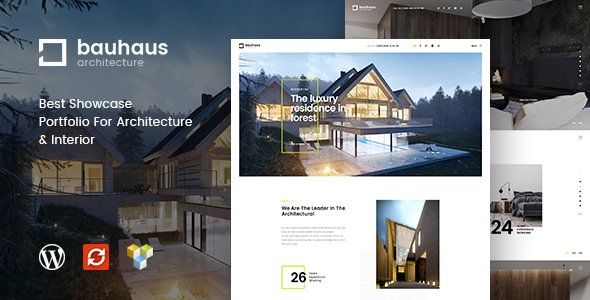
Stuck on your Bauhaus WordPress theme? Let's fix it.
No endless back-and-forth. Just send us the details and we'll get it done.
No obligation · Replies within 1 hour · Quote within 1 day
Setup · Customization · Bug fixes · WooCommerce integration
About Bauhaus WP Theme
Bauhaus is a minimalist WordPress theme built around clean typography, whitespace, and a grid-based layout system inspired by the Bauhaus design movement. It ships with the Elementor page builder, giving you full visual control without touching code.
The theme is developed by paul_tf and targets creative professionals, studios, and agencies who want a refined, image-forward site. It loads fast out of the box, supports full-width layouts, and includes several pre-built page templates covering portfolio, services, and contact pages.
WooCommerce compatibility is included, so you can run a shop alongside your portfolio or studio pages. The options panel is straightforward, covering fonts, colors, header styles, and footer layouts. If you need something beyond the defaults, the theme is well-structured for custom CSS and child theme development.
Get matched with a Bauhaus developer in under one day
Tell us about your Bauhaus project. Small fixes, Bauhaus theme customization, or a full website build, whatever you need, we've got it covered.
We'll connect you to the right Bauhaus developers, define the scope, and get everything 100% clear.
You'll get one estimate, hire your preferred developer, and start collaborating.
Getting Bauhaus to look exactly right takes more than dragging blocks around. paul_tf built the theme with a specific structure, and working with it efficiently means knowing where the CSS lives, how the Elementor templates are organized, and which customizations require a child theme.
Through Codeable, you get matched with a vetted WordPress developer who has hands-on experience with themes like Bauhaus. Post your project, get a free estimate within 24 hours, and only proceed if it makes sense for your budget. No risk, no obligation.
Pros
- Clean, grid-based layout that holds up well across screen sizes without heavy modification
- Ships with Elementor, so non-developers can build and edit pages visually
- Fast default load times due to minimal use of heavy scripts and bloated sliders
- WooCommerce compatible out of the box with styled product and cart pages
- Well-organized template files make child theme development and customization straightforward
Cons
- Limited built-in demo content means initial setup takes longer than themes with full one-click imports
- Heavy reliance on Elementor means switching page builders later is a significant rework
- Typography options in the default panel are limited and often require custom CSS for precise control
- No dedicated mega menu support, which becomes a problem for sites with complex navigation
- Update frequency from paul_tf has been inconsistent, which can create compatibility gaps with newer WordPress versions
Who is Bauhaus for?
Creative Portfolio
Bauhaus suits designers, illustrators, and art directors who want their work front and center. The grid layouts handle image-heavy portfolios well, and the whitespace-first approach keeps projects readable without visual clutter. Adding a custom Elementor template for each project category gives clients a polished browsing experience.
Architecture or Interior Design Studio
Architecture and interior design firms benefit from Bauhaus full-width imagery and structured project pages. The minimalist aesthetic matches the visual language of most studios. A developer can set up custom post types for projects and case studies, keeping the portfolio organized and easy to update without touching theme files.
Independent Photographer
Photographers need fast-loading galleries and clean presentation. Bauhaus delivers both. The theme handles full-screen hero images without performance issues, and WooCommerce integration means print sales can sit on the same site. Gallery plugin compatibility is solid with the most common options including Envira and FooGallery.
Design Agency
Agencies can use Bauhaus to build a professional services site with distinct sections for work, team, and contact. The page templates are flexible enough to support service landing pages, case study layouts, and a simple blog. Custom header styles let the agency brand sit cleanly above every page.
Art Print or Merchandise Shop
The WooCommerce compatibility makes Bauhaus a reasonable base for a design-led product shop. Print shops, poster sellers, and branded merchandise stores benefit from the minimal product page layout. With some developer input, the shop pages can be restyled to match the portfolio aesthetic exactly.

Customizing Bauhaus
Bauhaus gives you a solid baseline, but most serious projects need adjustments beyond what the theme options panel provides. A Bauhaus expert can rework the grid spacing, swap in custom typefaces, adjust breakpoints for mobile, or build new Elementor templates that match your brand exactly.
Common customization work includes modifying the header behavior on scroll, creating custom portfolio archive layouts, integrating WPML for multilingual sites, and connecting third-party forms or CRM tools. These tasks are doable by a developer familiar with how paul_tf structured the theme files.
If you need WooCommerce restyled to match the Bauhaus aesthetic, that is another area where a dedicated Bauhaus expert saves significant time compared to trial-and-error with CSS overrides.
Recommended plugins for Bauhaus
Bauhaus pairs well with several plugins that extend its core functionality. Elementor Pro unlocks additional widgets, popups, and theme builder sections that work within the existing grid. For performance, image optimization and caching plugins make a visible difference on portfolio-heavy builds. See our WordPress performance service for details on tuning a Bauhaus site.
For visibility, proper on-page SEO setup is essential. Our WordPress SEO service covers schema, meta optimization, and structured content that works with Bauhaus page templates. WooCommerce, WPML, and Gravity Forms all integrate cleanly with minimal conflicts.
Not sure which plugins to use? This WordPress plugins directory covers the most popular options with reviews and setup guides.
Bauhaus common issues
Bauhaus theme Elementor templates not loading correctly
This usually happens when the Elementor version and theme version are out of sync. Start by updating both the theme and Elementor to their latest versions. If the templates still fail to load, go to Elementor > Tools > Regenerate CSS and clear any server-side cache. If you are using a child theme, check that the parent theme templates are not being overridden incorrectly. A WordPress bug fixing specialist can diagnose the exact conflict quickly.
Bauhaus WordPress theme mobile menu not working
A broken mobile menu in Bauhaus is often caused by a JavaScript conflict with another active plugin, or a CSS z-index issue after a theme update. Open your browser console and check for JS errors on mobile viewport. Disable plugins one by one to isolate the conflict. If a recent theme update broke the menu, rolling back via a staging environment while the fix is applied is the safest path. Our bug fixing service handles these conflicts directly.
Bauhaus theme fonts not changing in Customizer
Bauhaus pulls some font settings from Elementor Global Fonts rather than the WordPress Customizer. If your Customizer changes are not appearing, check Elementor > Theme Style > Typography first. Also confirm there is no caching plugin serving a stale CSS file. If you have a child theme, make sure it is not enqueuing a stylesheet that overrides the parent theme font variables. A quick audit of the enqueue order usually resolves this within minutes.
Bauhaus WooCommerce pages showing unstyled layout
Unstyled WooCommerce pages typically mean the Bauhaus WooCommerce stylesheet is not loading. This can happen after a WooCommerce major version update removes hooks the theme relied on. Check whether the theme has a woocommerce.css file and confirm it is being enqueued. Adding add_theme_support('woocommerce'); to your child theme functions.php is a common fix. Our WordPress bug fixing service can patch this without disrupting your existing design.
Bauhaus FAQ
Yes, Bauhaus is a strong fit for creative portfolios. Its grid-based structure handles image-heavy content well, and the full-width layout options give individual projects room to breathe. The Elementor integration means you can build custom project pages visually. It works best for designers, photographers, architects, and studios who want a clean, minimal presentation rather than a feature-heavy theme.
Bauhaus is built with Elementor in mind and works with both the free and Pro versions. Elementor Pro unlocks the Theme Builder, which lets you create custom headers, footers, and archive templates that integrate with the Bauhaus layout. Some advanced widgets and popups from Elementor Pro also slot in cleanly. Keep both the theme and Elementor Pro updated to avoid compatibility gaps.
Bauhaus includes WooCommerce support, so running a shop is possible without major hacks. Product pages, cart, and checkout are styled to match the minimal aesthetic. For a simple print shop or merchandise store it works well. If you need a heavily customized shop with complex filtering or product variations, a developer will likely need to extend the WooCommerce templates beyond what Bauhaus provides by default.
Create a new folder in your wp-content/themes directory, add a style.css file with a Template header pointing to Bauhaus, and include a functions.php that enqueues the parent stylesheet. This gives you a safe place to add custom CSS and PHP without losing changes on theme updates. It is the recommended approach for any ongoing customization work on a Bauhaus site.
Migrating content to Bauhaus is straightforward using standard WordPress import tools, but rebuilding your page layouts inside Elementor takes time depending on how complex your current site is. If you are moving from another Elementor-based theme, some templates may transfer with adjustments. Our WordPress migration service covers the full move including content, redirects, and design rebuild.
Hire a Bauhaus WordPress Developer
Whether you need a full Bauhaus build from scratch, a design tweak, or a feature added to an existing site, we can match you with the right developer fast. Work is handled through Codeable, so every developer is vetted and reviewed by real clients.
Get a free estimate and describe your project. You will hear back within 24 hours with a clear scope and price. No commitment required until you are ready to move forward.
You'll need a free Codeable account so developers can ask questions and send their quotes.