BBQ WordPress Theme
by NiceThemes_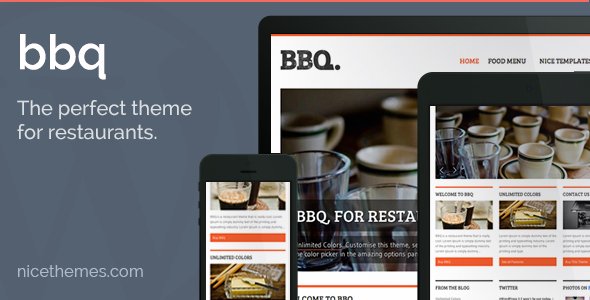
Stuck on your BBQ WordPress theme? Let's fix it.
No endless back-and-forth. Just send us the details and we'll get it done.
No obligation · Replies within 1 hour · Quote within 1 day
Setup · Customization · Bug fixes · WooCommerce integration
About BBQ WP Theme
BBQ is a free WordPress theme developed by NiceThemes. It was built for restaurant and food-related websites, with a clean layout focused on presenting menus, photos, and contact details without unnecessary clutter.
The theme ships with a full-width header image, custom menu sections, Google Fonts support, and widgetized areas. It works with the WordPress Customizer, so you can adjust colors, typography, and layout without touching code.
BBQ is lightweight and loads fast out of the box. It follows WordPress coding standards and is translation-ready. The theme is a solid starting point for small restaurant owners, food bloggers, or anyone running a catering or BBQ-focused website who wants something functional without paying for a premium theme.
Get matched with a BBQ developer in under one day
Tell us about your BBQ project. Small fixes, BBQ theme customization, or a full website build, whatever you need, we've got it covered.
We'll connect you to the right BBQ developers, define the scope, and get everything 100% clear.
You'll get one estimate, hire your preferred developer, and start collaborating.
BBQ is straightforward to set up, but getting a restaurant site to actually convert visitors into customers takes more than installing a theme. A vetted BBQ developer on Codeable can handle custom menu displays, booking integrations, speed improvements, and layout changes done properly the first time. No guesswork, no back-and-forth with a freelancer you found on a job board. You get a specialist who has worked with WordPress restaurant sites and knows what works.
Pros
- Free theme with no locked features behind a paywall
- Lightweight and fast-loading for a small restaurant site
- Built-in Customizer support for colors, fonts, and header images
- Translation-ready and follows WordPress coding standards
- Works cleanly with popular plugins including WooCommerce and contact form plugins
Cons
- Limited layout options compared to premium restaurant themes
- No built-in reservation or booking system
- Design can look generic without custom development work
- Menu sections are basic and lack interactive features like filtering
- Support is limited for the free version compared to premium NiceThemes products
Who is BBQ for?
BBQ Restaurant Website
The BBQ theme was built with this use case in mind. The full-width header lets you show off your pit or your food, and the menu sections give diners the information they need before they visit. Add a contact form and a Google Map embed and you have a functional restaurant site without custom development.
Food Blogger
Food bloggers need a clean layout that keeps the focus on photos and recipe posts. BBQ handles that well. The typography is readable, the layout does not compete with your content, and it loads fast enough that readers on mobile do not bounce. A few Customizer tweaks and you have a site that fits your brand.
Catering Business
Catering businesses need to show menus, pricing packages, and a clear way to get in touch. BBQ gives you the structural bones for that. With a developer adding a quote request form and a services page template, it becomes a practical lead generation site rather than just a brochure.
Food Truck
Food trucks need a simple site that loads fast on mobile and tells people where to find them. BBQ is light enough to work well here. Pair it with a schedule plugin or embed your social feed to show live location updates. It is a minimal setup that covers what food truck customers actually look for.
Local Diner or Grill
A local diner or grill does not need a complex website. BBQ gives you a header image, menu display, and contact details in a format that works on all screen sizes. It ranks cleanly with basic SEO setup and gives first-time visitors the information they need to decide to come in.

Customizing BBQ
BBQ gives you a reasonable amount of control through the WordPress Customizer. You can update the site identity, header image, background color, and widget areas without writing a line of code. For most small restaurant sites, that covers the basics.
If you need more, a BBQ expert can take the theme further. Custom page templates, unique menu layouts, online reservation forms, and WooCommerce integration for selling gift cards or merchandise are all possible with targeted development work.
NiceThemes also offers a premium version with additional sections and options. But if the free version is your starting point and you want specific changes made properly, working with a developer who knows the theme saves time and avoids breaking things during edits.
Recommended plugins for BBQ
BBQ pairs well with plugins that extend restaurant site functionality. WPForms or Gravity Forms handle reservations and contact requests. WooCommerce works if you want to sell merchandise or meal kits. Yoast SEO or Rank Math slot in cleanly for search visibility.
For site speed, caching plugins like WP Rocket work without conflicts. If you want to improve load times further, check the WordPress performance service. For search visibility improvements specific to restaurant and local SEO, the WordPress SEO optimisation service covers that in detail.
Not sure which plugins to use? This WordPress plugins directory covers the most popular options with reviews and setup guides.
BBQ common issues
BBQ theme header image not showing on mobile
This usually comes down to the header image dimensions not matching what the theme expects for smaller screens. BBQ uses a full-width header that crops differently on mobile. Set your header image to at least 1920px wide and check the focal point settings in the Customizer. If the image still disappears or stretches badly, a small CSS fix targeting the header on mobile breakpoints will sort it. A developer can resolve this in under an hour through the WordPress bug fixing service.
BBQ theme menu section not displaying correctly
Menu display problems in BBQ are often caused by a plugin conflict or a CSS override from a page builder. First, check whether the issue appeared after a recent plugin install or update. Deactivate plugins one by one to isolate the cause. If the layout is broken in a specific browser, clear cache and test again. For persistent layout issues that survive plugin deactivation, a developer can inspect the template files and fix the output directly. See the WordPress bug fixing service for fast turnaround.
BBQ theme slow loading after adding plugins
BBQ itself is lightweight, but plugin bloat can slow any theme down. Start with a free tool like GTmetrix or PageSpeed Insights to identify what is causing the delay. Common culprits are unoptimised images, render-blocking scripts, and plugins that load assets on every page regardless of whether they are needed. A caching plugin like WP Rocket helps, but for deeper performance work check the WordPress performance service.
BBQ theme footer widgets not working
If footer widgets in BBQ are not showing, first check that you have added widgets to the correct widget area in Appearance > Widgets. BBQ has specific footer widget regions and they only display if widgets are assigned. If widgets are assigned but still not visible, check for a CSS conflict hiding the footer area. Switching to a default theme temporarily will confirm whether the issue is theme-specific or caused by a plugin.
BBQ FAQ
Yes, BBQ is a free theme available from the WordPress theme repository. NiceThemes also offers a premium version with more layout options, additional sections, and dedicated support. The free version is fully functional for a basic restaurant or food site and has no core features locked behind a payment.
BBQ does not conflict with WooCommerce, but it was not designed specifically around it. The WooCommerce shop and product pages will use default WooCommerce templates with basic styling. If you want a polished shop experience that matches your BBQ theme design, a developer will need to add custom styling to the WooCommerce pages.
BBQ does not include a built-in reservation system. The most common approach is to add a form plugin like WPForms or Gravity Forms and embed a reservation form on a page. For more advanced booking needs, plugins like Bookly or Simply Schedule Appointments can be integrated. A developer can wire this up properly if the default setup does not fit your workflow.
You can use BBQ for any content site, but its design is clearly restaurant-oriented. The header imagery, section labels, and layout defaults all assume food content. Using it for an unrelated business would require significant restyling. For a non-restaurant project, a more neutral theme would likely save time and look more appropriate without heavy customisation.
BBQ Pro from NiceThemes adds more homepage sections, additional widget areas, premium support, and extended Customizer options. The free version covers basic restaurant site needs. If you find yourself wanting layout control that the Customizer cannot provide, upgrading to Pro or hiring a developer to extend the free version are both valid options depending on your budget.
Hire a BBQ WordPress Developer
Need custom work done on your BBQ theme site? Whether it is a layout change, a plugin conflict, a reservation form, or a full build from scratch, a vetted BBQ developer can get it done without the risk. Post your project and get a free estimate within 24 hours. No obligation to hire. Get your free estimate here and describe exactly what you need.
You'll need a free Codeable account so developers can ask questions and send their quotes.