Bcom WordPress Theme
by rs-theme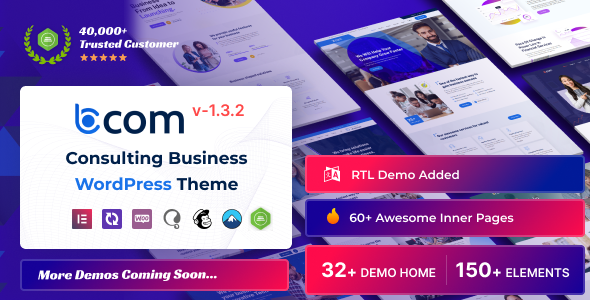
Stuck on your Bcom WordPress theme? Let's fix it.
No endless back-and-forth. Just send us the details and we'll get it done.
No obligation · Replies within 1 hour · Quote within 1 day
Setup · Customization · Bug fixes · WooCommerce integration
About Bcom WP Theme
Bcom is a WordPress theme by rs-theme built for business and corporate websites. It ships with a clean layout, WooCommerce support, and a drag-and-drop page builder, making it a practical choice for companies that need a professional web presence without starting from scratch.
The theme includes multiple homepage demos, header and footer variations, and pre-built inner pages for services, about, and contact sections. It works with Elementor, which means most layout changes can be handled visually without touching code.
Bcom is suited for small to mid-size businesses, agencies, and consultancies. It is regularly updated by rs-theme and is compatible with popular plugins including WPML, Contact Form 7, and major SEO tools. Performance out of the box is reasonable, though like most multi-purpose themes it benefits from proper configuration.
Get matched with a Bcom developer in under one day
Tell us about your Bcom project. Small fixes, Bcom theme customization, or a full website build, whatever you need, we've got it covered.
We'll connect you to the right Bcom developers, define the scope, and get everything 100% clear.
You'll get one estimate, hire your preferred developer, and start collaborating.
Most Bcom issues come from customization attempts that conflict with the theme’s core structure. An experienced developer knows the rs-theme codebase, understands where to extend it safely, and will not introduce technical debt in the process.
Through Codeable, you get access to vetted WordPress developers who have worked on Bcom projects across different industries. You post your project, get a clear estimate within 24 hours, and only move forward if the scope and price work for you. No risk, no guesswork.
Pros
- Elementor-native design makes visual editing fast without custom code
- Multiple pre-built demo layouts reduce initial setup time
- WooCommerce compatible with styled product and cart pages included
- WPML ready for multilingual business sites
- Regularly updated by rs-theme with WordPress core compatibility maintained
Cons
- Options panel can feel cluttered for users new to rs-theme products
- Deep customizations often require child theme work beyond the visual editor
- Page load speed needs optimization work before going live
- Some demo sections rely on plugin combinations that require separate purchases
- Limited community resources compared to larger themes like Astra or Divi
Who is Bcom for?
Business Consultancy
Bcom’s service page templates and clean typography work well for consultancies that need to present expertise clearly. The layout supports case studies, team pages, and contact forms without heavy customization. Elementor makes it straightforward to update content as service offerings change.
Digital Agency
Agencies need a theme that handles portfolio work, service listings, and client-facing pages without looking generic. Bcom’s header and footer variations give enough flexibility to build a distinctive look. Custom post types and dynamic Elementor widgets extend it further for agencies with specific display needs.
Corporate Services Firm
Corporate sites need structure and professionalism above everything else. Bcom ships with inner page layouts for about, team, and services that handle this well. Mega menu support helps when navigation involves multiple departments or service lines. The overall aesthetic is appropriate for enterprise-facing communication.
Small Business with WooCommerce
For businesses selling products alongside services, Bcom’s WooCommerce integration covers the basics cleanly. Product pages, cart, and checkout are styled consistently with the main design. Additional styling work is often needed for larger catalogues, but the foundation is solid for smaller shops.
Professional Services Provider
Lawyers, accountants, architects, and similar professionals benefit from Bcom’s structured layouts and clear call-to-action sections. The theme supports contact form integration, testimonials, and service breakdowns out of the box. It presents a credible, professional image without requiring a large development budget.

Customizing Bcom
Bcom gives you a solid starting point, but most businesses need more than a demo import. Customizing the theme to match your brand, content structure, and conversion goals takes time and specific knowledge of how rs-theme has built the options panel and Elementor integration.
Common customization work includes adjusting the header layout, building custom service or product pages, setting up mega menus, and configuring WooCommerce styling to match the overall design. Typography and color systems often need overrides beyond what the theme panel allows.
A Bcom expert knows where the theme’s limits are and how to extend it cleanly, whether through child theme code, custom CSS, or additional plugins. Trying to push Bcom beyond its defaults without that knowledge often leads to conflicts and layout issues that are harder to fix later.
Recommended plugins for Bcom
Bcom works well with a focused set of plugins. Elementor Pro extends the native page builder with more widgets and dynamic content options. WooCommerce adds full ecommerce functionality with reasonable compatibility. WPML handles multilingual setups cleanly.
For performance, pairing Bcom with a caching plugin and an image optimization tool helps significantly. See our WordPress performance service for specifics. If you need better search visibility, combining Bcom with Rank Math or Yoast alongside proper on-page work gives measurable results. Our WordPress SEO service covers that in full.
Not sure which plugins to use? This WordPress plugins directory covers the most popular options with reviews and setup guides.
Bcom common issues
Bcom theme header not displaying correctly after update
Header display problems after a Bcom update are usually caused by a conflict between the updated theme files and customizations stored in the options panel or a child theme. Start by clearing all caches, then check the theme’s header settings under the rs-theme panel. If you have a child theme with header overrides, compare your template files to the updated parent. Our WordPress bug fixing service can diagnose and resolve this quickly.
Bcom Elementor sections broken or showing white space
Broken Elementor sections in Bcom typically follow a plugin version mismatch or a failed regeneration of CSS files. Go to Elementor Tools and run the regenerate CSS and data option. If sections still show white space, check for JavaScript errors in the browser console, which usually point to a plugin conflict. Deactivate non-essential plugins temporarily to isolate the cause. Persistent issues may need a developer to review the page structure directly.
Bcom WooCommerce product page layout not matching demo
WooCommerce product pages not matching the Bcom demo usually means the required plugins or demo content were not fully imported. Check that WooCommerce is active and that the rs-theme recommended plugins are installed and configured. Some demo layouts also use specific Elementor templates that need to be set as the product template in WooCommerce settings. Rebuilding the product page template in Elementor Pro is often the cleanest fix.
Bcom theme slow loading speed on mobile
Bcom, like most business themes, loads several scripts and stylesheets that affect mobile performance. Start by enabling lazy loading for images, minifying CSS and JS through a caching plugin, and removing unused Google Fonts variants. The theme options panel often loads fonts and icon sets globally that are not needed on every page. A proper performance audit will identify the highest-impact changes. See our WordPress performance service for a structured approach.
Bcom FAQ
Yes, Bcom is built with Elementor compatibility as a core feature. Most of the demo layouts are constructed using Elementor, and the theme’s sections and widgets integrate cleanly with the free version. Some advanced features, such as dynamic content and custom templates, require Elementor Pro. The integration is stable across recent WordPress and Elementor versions.
Bcom includes WooCommerce support with styled templates for product pages, cart, checkout, and account pages. The theme applies its design system to WooCommerce elements consistently. For larger or more complex stores, additional styling and configuration work is often needed, but the out-of-the-box compatibility is functional for standard shop setups.
To install Bcom demo content, use the rs-theme demo importer included with the theme. Go to Appearance, then the theme panel, and find the demo import section. Select your preferred demo and run the import. Make sure required plugins are installed first. The process takes a few minutes and will populate pages, settings, and media from the chosen demo.
Bcom is WPML compatible, which makes it a viable option for multilingual business sites. You will need a WPML licence and some configuration time to set up language switchers and translate content. The theme’s header options include placement support for WPML language selectors. For complex multilingual builds, working with a developer will save significant setup time.
Bcom uses a clean HTML structure and supports major SEO plugins including Rank Math and Yoast SEO. Schema markup, open graph tags, and metadata are handled through those plugins rather than the theme itself. The theme does not add unnecessary markup that harms crawlability. Performance optimization is the main SEO-related area that needs attention before launch.
Hire a Bcom Developer
Whether you need a full Bcom setup, specific customizations, or fixes to an existing build, working with a specialist saves time and avoids problems that are expensive to undo. Our developers have hands-on experience with rs-theme products and deliver clean, maintainable work.
Get a free estimate with no obligation. Describe your project, get matched with a Bcom developer within 24 hours, and decide from there. The process is straightforward and completely risk-free.
You'll need a free Codeable account so developers can ask questions and send their quotes.