Bellaria WordPress Theme
by CreativeWS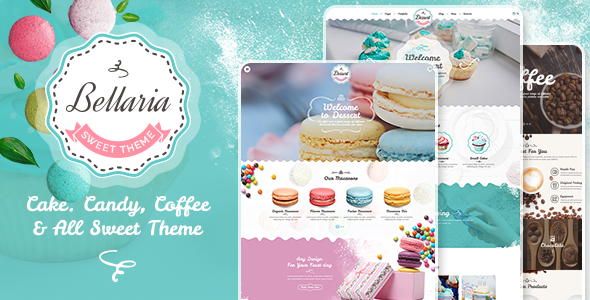
Stuck on your Bellaria WordPress theme? Let's fix it.
No endless back-and-forth. Just send us the details and we'll get it done.
No obligation · Replies within 1 hour · Quote within 1 day
Setup · Customization · Bug fixes · WooCommerce integration
About Bellaria WP Theme
Bellaria is a WordPress theme built by CreativeWS. It targets creative studios, photographers, and portfolio-focused businesses that need a clean, image-led layout without heavy configuration overhead.
The theme ships with a visual page builder, pre-built demo pages, and a grid-based portfolio system. It supports WooCommerce for basic shop functionality and includes built-in options for typography, colour palettes, and header layouts.
CreativeWS has positioned Bellaria as a multipurpose theme, but its strongest results come from visual-heavy sites where the work needs to speak for itself. The demo content is polished, and the import process is relatively straightforward compared to other themes in its category. Overall it is a solid starting point for creatives who want a professional look without hiring a developer from scratch.
Get matched with a Bellaria developer in under one day
Tell us about your Bellaria project. Small fixes, Bellaria theme customization, or a full website build, whatever you need, we've got it covered.
We'll connect you to the right Bellaria developers, define the scope, and get everything 100% clear.
You'll get one estimate, hire your preferred developer, and start collaborating.
Bellaria looks straightforward until you start pushing it beyond the demo. Custom portfolio filters, translated layouts, WooCommerce styling, and mobile breakpoint fixes all take time to do properly.
FoxyConcept works with vetted WordPress developers through Codeable, a platform that only accepts the top tier of WordPress talent. Every developer on the platform has been tested and reviewed. You get someone who knows exactly what they are doing with Bellaria, without the risk of hiring blind.
Pros
- Clean portfolio grid with smooth hover effects that work well for photographers and studios
- One-click demo import gets a working site up quickly without manual setup
- WooCommerce compatible so you can sell prints, services, or products without a separate theme
- Built-in typography controls let you change fonts across the site from one place
- Multiple header layout options including transparent and sticky variants without plugins
Cons
- WPBakery is bundled by default, which adds page weight and can cause builder lock-in
- Mobile portfolio layouts need manual CSS tweaks to look right on smaller screens
- Update frequency from CreativeWS has been inconsistent, creating compatibility lag with newer WordPress versions
- The theme options panel is not well documented, making some settings difficult to understand without trial and error
- Custom post type structure makes it harder to switch themes later without losing portfolio content
Who is Bellaria for?
Photography Portfolio
Bellaria suits photographers well. The full-width image layouts and grid portfolio options let work dominate the screen. You can organise shoots by category, enable lightbox previews, and keep the navigation minimal so visitors focus on the images rather than the interface.
Creative Agency
Agencies with a case study or project portfolio benefit from Bellaria’s section-based page builder. Service pages, team profiles, and client work can all be structured without heavy development. The visual style is professional enough for B2B clients without looking like a generic template.
Freelance Designer
Freelancers building a personal brand can use Bellaria to showcase selected work, set up a contact page, and present a clear services list. The theme does not over-complicate things, which suits solo operators who want something that looks polished with minimal ongoing maintenance.
Art Gallery or Exhibition Site
For galleries or exhibition sites, Bellaria handles image-heavy pages well. You can create dedicated sections per artist or collection, use the portfolio grid to categorise works, and keep a consistent visual tone across the site. It is a practical choice when the visual experience is the main priority.
Print or Digital Product Shop
The WooCommerce integration in Bellaria allows creatives to sell directly from their portfolio site. Whether you are selling prints, presets, or digital files, the shop pages inherit the theme’s visual style reasonably well. Some CSS adjustments help product pages match the rest of the site more tightly.

Customizing Bellaria
Bellaria gives you a reasonable amount of control through the WordPress Customizer and its own theme options panel. You can adjust header styles, font pairings, button colours, and section spacing without touching code.
That said, deeper customisation quickly hits limits. Modifying the portfolio grid layout, adjusting column behaviour on mobile, or integrating third-party plugins cleanly usually requires custom CSS or PHP work. A Bellaria expert who knows the theme structure can make these changes without breaking updates or introducing conflicts.
If you need a layout that goes beyond what the options panel offers, working with someone who has hands-on Bellaria experience is faster and less risky than experimenting yourself. The theme uses a mix of custom post types and shortcodes that behave unexpectedly if you edit them without context.
Recommended plugins for Bellaria
Bellaria works with the major WordPress plugin ecosystem. WooCommerce integration covers basic product pages and cart flows. Elementor and WPBakery are compatible, though WPBakery ships as the default builder.
For performance, the theme benefits from a proper caching layer and image optimisation setup. Out of the box, page load times on image-heavy portfolios can be slow. A WordPress performance audit is worth running before launch.
If you plan to drive organic traffic, pairing Bellaria with Yoast or Rank Math and doing structured WordPress SEO work will give you a real advantage over sites that rely on the theme defaults alone.
Not sure which plugins to use? This WordPress plugins directory covers the most popular options with reviews and setup guides.
Bellaria common issues
Bellaria portfolio grid not displaying correctly after update
This usually happens when a WPBakery or theme update changes grid class names without backward compatibility. Check whether the portfolio shortcode parameters are still valid in the current version. Clearing your cache is the first step. If the grid still breaks, inspect the element in your browser to identify missing or mismatched CSS classes. A developer can patch the output without reverting the update. See our WordPress bug fixing service if you need help quickly.
Bellaria WooCommerce pages not matching theme style
Bellaria’s WooCommerce styles do not always inherit global theme colours and fonts automatically. The most common fix is adding targeted CSS for product page elements like buttons, breadcrumbs, and tab navigation. In some cases the WooCommerce template files need to be overridden at the theme level. Avoid editing plugin files directly. Use a child theme or a custom CSS block to keep changes safe across updates.
Bellaria mobile menu not working or overlapping content
Mobile menu issues in Bellaria are often caused by a JavaScript conflict with another plugin. Start by disabling recently added plugins one at a time to isolate the conflict. If the menu is overlapping content rather than failing to open, the issue is usually a z-index or positioning rule in the theme CSS being overridden. Check the Customizer header settings first, then inspect the menu container in your browser’s developer tools.
Bellaria page builder content broken after WordPress update
WPBakery content can break when WordPress updates change how shortcodes are processed, or when the bundled WPBakery version is out of sync with the installed WordPress version. First, check whether CreativeWS has released a theme update that includes a newer WPBakery build. If not, updating WPBakery manually through Envato can help. Back up your site before making any changes. Ongoing WordPress maintenance helps catch these conflicts before they affect live pages.
Bellaria FAQ
CreativeWS does release updates for Bellaria, but the schedule is not regular. If you purchased through ThemeForest, check the changelog on the item page to see the last update date. For sites running older versions, compatibility with the current WordPress core should be tested before assuming everything still works as expected.
Bellaria can work alongside Elementor, but it is built around WPBakery. Switching builders mid-project means your existing page content will revert to raw shortcode text. Starting fresh with Elementor on a new Bellaria install is cleaner than converting existing pages. Some styling gaps may still require custom CSS to align with the theme properly.
Bellaria includes a one-click demo importer accessible from the theme options panel. Before running it, make sure your hosting environment allows large file uploads and has a high PHP memory limit. The import installs dummy content, images, and widget settings. Running it on an existing site with real content can overwrite settings, so always use a staging environment first.
Bellaria is listed as WPML compatible by CreativeWS. In practice, the portfolio custom post types and WPBakery elements need to be registered correctly for WPML to translate them. Basic page and post translation works without issues. For full multilingual portfolio functionality, some additional configuration is usually needed. A developer familiar with both WPML and Bellaria can set this up cleanly.
Yes. Moving a Bellaria site to a new host is a standard WordPress migration. Your design, content, and theme settings are stored in the database and file system, not tied to the server. Use a migration plugin or do a manual database and file transfer. Update your URLs in the database after the move. See our WordPress migration service if you want this handled properly.
Hire a Bellaria WordPress Developer
Whether you need help setting up Bellaria from scratch, fixing a layout issue, or building out a custom portfolio section, we can match you with the right developer. Work is scoped clearly, priced fairly, and delivered by someone with real WordPress experience.
Get a free estimate with no obligation. You will have a developer matched to your project within 24 hours.
You'll need a free Codeable account so developers can ask questions and send their quotes.