Benoit WordPress Theme
by WebGeniusLab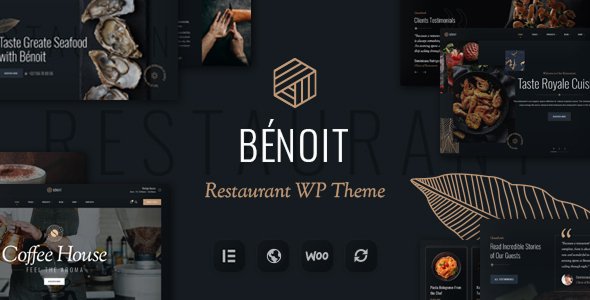
Stuck on your Benoit WordPress theme? Let's fix it.
No endless back-and-forth. Just send us the details and we'll get it done.
No obligation · Replies within 1 hour · Quote within 1 day
Setup · Customization · Bug fixes · WooCommerce integration
About Benoit WP Theme
Benoit is a WordPress theme by WebGeniusLab built for creative agencies, portfolios, and businesses that want a polished, visual-first website without hiring a custom developer from scratch. It ships with a drag-and-drop page builder, a solid set of pre-built demo templates, and clean typography that holds up well across screen sizes.
The theme integrates with Elementor, giving you direct control over layouts without touching code. Header and footer builders are included, along with WooCommerce support for light shop functionality. WebGeniusLab maintains the theme actively, so compatibility with recent WordPress versions stays current. If you want a theme that looks professional out of the box and gives you room to grow, Benoit is a reasonable starting point for most small to mid-sized projects.
Get matched with a Benoit developer in under one day
Tell us about your Benoit project. Small fixes, Benoit theme customization, or a full website build, whatever you need, we've got it covered.
We'll connect you to the right Benoit developers, define the scope, and get everything 100% clear.
You'll get one estimate, hire your preferred developer, and start collaborating.
Most Benoit issues come down to one thing: the person building the site hit the edge of what the theme panel can do. A developer who knows Benoit and the WordPress ecosystem underneath it can customize layouts, fix conflicts, extend functionality, and build features the default settings don’t support. Work on FoxyConcept is delivered through Codeable, a vetted network of WordPress specialists. You get a screened developer, not a race to the bottom on price.
Pros
- Ships with a large library of pre-built demo pages that cover agencies, portfolios, and business sites
- Native Elementor integration means layout control without touching code
- Includes a header and footer builder so you're not locked into a fixed navigation structure
- WooCommerce compatible with basic shop styling included out of the box
- WebGeniusLab updates the theme regularly, keeping it in line with current WordPress versions
Cons
- The demo import process can be slow and occasionally requires manual cleanup of placeholder content
- Heavy use of Elementor widgets across many pages can slow load times without additional optimization
- Some advanced layout options require Elementor Pro, which is a separate purchase on top of the theme
- Documentation covers basics well but gets thin when you hit edge cases or custom post type work
- Switching away from Benoit later means rebuilding Elementor-heavy pages, since content is tied to the builder
Who is Benoit for?
Creative Agency Website
Benoit’s agency-style demo templates give studios and creative teams a strong starting point. Multi-column service layouts, team sections, and case study pages are all available. A developer can wire these up to custom post types so the client team can update content without breaking the design.
Freelance Portfolio
Freelancers get a lot out of Benoit’s portfolio grid options and full-width project pages. The Elementor integration makes it easy to build a personal brand without hiring someone for every update. For more complex filtering or custom project taxonomies, a Benoit developer can extend the default setup quickly.
Small Business Website
Service businesses benefit from Benoit’s contact-ready layouts, Google Maps integration support, and clean call-to-action sections. The theme handles the basics well. For booking forms, custom quote calculators, or multi-location setups, additional plugin integration work is usually needed.
Photography or Visual Arts Studio
Benoit’s full-width image support and minimal typography make it a good fit for photographers and visual artists. Gallery layouts look clean without heavy customization. If you need client proofing, print ordering, or password-protected galleries, that functionality requires plugin configuration beyond the theme itself.
WooCommerce Boutique Shop
For small WooCommerce shops, Benoit provides styled product pages, cart layouts, and a checkout that fits the overall design. It works well for boutiques selling a focused product range. Larger catalogs with complex filtering, custom product fields, or subscription billing will need extra development work on top of the theme.

Customizing Benoit
Benoit gives you a wide surface area for customization through the WordPress Customizer and Elementor. You can adjust global colors, fonts, spacing, and header layouts without writing a line of CSS. Pre-built section blocks speed up page construction significantly.
That said, getting the most out of Benoit often means working around its default constraints. A Benoit expert knows where the theme’s options end and where custom CSS or child theme overrides need to begin. Things like custom post type layouts, advanced header behaviors, or WooCommerce template modifications typically require hands-on development work. If your vision goes beyond what the panel settings offer, working with someone who knows the Benoit codebase saves a lot of trial and error.
Recommended plugins for Benoit
Benoit works well with the standard WordPress plugin ecosystem. Elementor Pro unlocks additional widgets and dynamic content features that pair naturally with the theme’s structure. For contact forms, WPForms and Contact Form 7 both integrate without issues.
If you’re running a shop, WooCommerce slots in cleanly. For speed, pairing Benoit with a caching plugin and an optimized hosting stack makes a measurable difference. See our WordPress performance service for details. If organic traffic matters to you, Yoast or Rank Math work fine alongside the theme. Our WordPress SEO service covers the full setup.
Not sure which plugins to use? This WordPress plugins directory covers the most popular options with reviews and setup guides.
Benoit common issues
Benoit theme demo import not working
Demo import failures in Benoit are usually caused by a PHP memory limit or execution time that’s too low on the hosting account. The import process pulls in images, content, and widgets in one go, which is resource-intensive. Set memory_limit to at least 256MB and max_execution_time to 300 in your php.ini or wp-config.php. If the problem continues, importing via the WordPress XML file manually and installing required plugins separately usually resolves it. Our bug fixing service can handle this if you’re stuck.
Benoit header not showing on mobile
When Benoit’s header disappears or breaks on mobile, the first place to check is the header builder’s responsive settings. Each header element has visibility toggles per breakpoint. If those are set correctly and the issue persists, a CSS conflict with a plugin or a caching plugin serving a stale stylesheet is often the cause. Clear all caches first. If a plugin is injecting styles that override the header layout, you’ll need to trace it with browser DevTools and add a targeted CSS fix in your child theme.
Benoit theme slow loading after demo install
Benoit demo installs load a large number of image assets and Elementor-heavy pages that aren’t optimized by default. Start by installing a caching plugin and running images through a compression tool or lazy loading plugin. Check whether all installed demo plugins are actually needed for your project and deactivate any that aren’t. A performance audit will usually find two or three specific bottlenecks rather than a single fix. See our WordPress performance service for a full audit.
Benoit Elementor layout broken after update
After a theme or Elementor update, broken layouts in Benoit are most often caused by a widget or element that changed its structure between versions. Open the affected page in the Elementor editor and look for elements flagged with a warning icon. Regenerating the CSS cache under Elementor’s tools panel fixes a large share of post-update visual issues. If custom CSS was written against old selectors, those need updating manually. Check your child theme stylesheet for any selectors targeting Elementor classes that may have changed.
Benoit FAQ
WebGeniusLab updates Benoit regularly and the theme stays compatible with current WordPress releases. Before any major WordPress core update, it’s worth checking the theme’s changelog on ThemeForest to confirm compatibility. If you’re running an older version of Benoit, updating the theme itself is usually the safest step before updating WordPress core.
Benoit works with the free version of Elementor for most page-building tasks. However, some of the more advanced features shown in demos, such as dynamic content, custom forms, and certain widgets, require Elementor Pro. The theme itself doesn’t force the purchase, but building a site that matches the demo closely often makes Pro worth the cost.
Yes, you can start with a blank canvas in Benoit and build pages from scratch using Elementor. The demo is a shortcut, not a requirement. Starting fresh can actually be cleaner for projects with a specific design direction, since you’re not removing placeholder content and unused sections from an imported layout.
Always use a child theme for any customizations in Benoit. If your changes live in the parent theme files, they’ll be overwritten when the theme updates. Child theme CSS, custom templates, and functions added to the child theme’s functions.php survive updates safely. Elementor-built pages and Customizer settings are stored in the database, so those are not affected by theme file updates.
Benoit’s code is reasonably clean and doesn’t create obvious structural SEO problems. That said, the theme itself doesn’t replace an SEO plugin. Install Yoast SEO or Rank Math to handle meta titles, descriptions, schema, and sitemaps. Page speed also affects SEO, and Elementor-heavy pages in Benoit can need optimization work to score well on Core Web Vitals.
Hire a Benoit WordPress Developer
Whether you need a full Benoit site built from a demo, a custom layout that the theme settings can’t produce, or a specific bug fixed, we can match you with a developer who knows the theme. Work is scoped clearly before anything starts. Get a free estimate and hear back within 24 hours, no commitment required.
You'll need a free Codeable account so developers can ask questions and send their quotes.