Bijoux WordPress Theme
by vamtam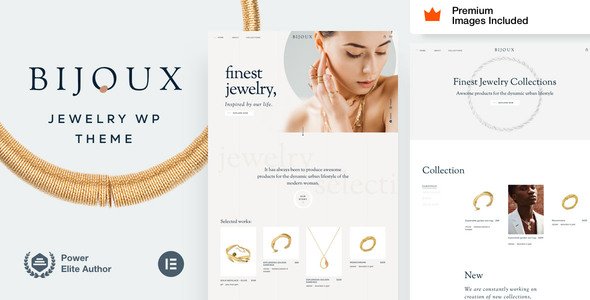
Stuck on your Bijoux WordPress theme? Let's fix it.
No endless back-and-forth. Just send us the details and we'll get it done.
No obligation · Replies within 1 hour · Quote within 1 day
Setup · Customization · Bug fixes · WooCommerce integration
About Bijoux WP Theme
Bijoux is a WordPress theme built by VamTam, a developer known for clean code and well-structured themes. It targets jewelry stores, boutiques, and luxury retail brands that need a polished online presence without building from scratch.
The theme ships with WooCommerce support, a drag-and-drop page builder, and a set of pre-built demo layouts you can import and modify. Product pages are designed to highlight detail, which matters when selling jewelry or high-end accessories where photography and presentation drive conversions.
VamTam themes are generally well-documented and receive regular updates. Bijoux fits into that pattern. It works with most popular plugins and gives shop owners enough control to set up a professional store without needing a developer for every change. That said, deeper customization does require technical knowledge.
Get matched with a Bijoux developer in under one day
Tell us about your Bijoux project. Small fixes, Bijoux theme customization, or a full website build, whatever you need, we've got it covered.
We'll connect you to the right Bijoux developers, define the scope, and get everything 100% clear.
You'll get one estimate, hire your preferred developer, and start collaborating.
VamTam themes have a specific way of handling layouts, hooks, and custom post types. A developer who hasn’t worked with Bijoux before will spend time reverse-engineering structure that an experienced Bijoux developer already knows. Through Codeable, you get matched with vetted WordPress specialists who have real project history. No time wasted on generalists figuring things out at your expense. The work gets done correctly the first time, with clean code that survives theme updates.
Pros
- Clean, minimal design that suits jewelry and luxury retail without looking generic
- Full WooCommerce compatibility including product variations, galleries, and cart features
- Pre-built demo content makes initial setup faster than starting from a blank theme
- VamTam provides regular theme updates and responds to support tickets
- Works with the WordPress Customizer so non-technical users can adjust branding settings
Cons
- The bundled page builder can conflict with third-party builders like Elementor if you try to mix them
- Deep layout changes require child theme work and familiarity with VamTam's template structure
- Demo import can overwrite existing settings if not handled carefully during setup
- Some advanced WooCommerce features like subscriptions or multi-vendor need additional configuration to display correctly
- Limited flexibility for non-jewelry use cases without significant customization effort
Who is Bijoux for?
Jewelry Boutiques
Bijoux is purpose-built for jewelry retailers. Product image galleries display cleanly, variation selectors work well for ring sizes and metal types, and the overall aesthetic matches what jewelry buyers expect from a premium brand. It removes the need to fight a generic theme into shape for this specific niche.
Luxury Accessories Brands
Brands selling watches, handbags, scarves, or other high-end accessories benefit from Bijoux’s emphasis on visual presentation. Large image blocks, clean typography, and focused product pages help communicate quality before a customer even reads the description. It suits brands where aesthetics are part of the product itself.
Handmade and Artisan Goods Shops
Artisan sellers on WooCommerce need a theme that makes handmade work look intentional and premium. Bijoux’s layout gives small-batch makers a professional storefront without requiring a full custom build. Sellers can showcase process photography, material details, and product stories within the existing template structure.
Bridal and Wedding Retailers
Bridal retailers selling rings, veils, jewelry sets, or accessories need a shopping experience that feels elevated. Bijoux’s aesthetic aligns with that expectation. Category pages, wishlist support via plugins, and clean checkout flows make it a practical fit for stores where customers are making considered, emotional purchases.
Gift and Lifestyle Stores
Gift shops and lifestyle brands that sell curated, visually appealing products can use Bijoux beyond its jewelry roots. The theme handles product collections and seasonal promotions well. With some customization, it adapts to candles, stationery, skincare, or any category where the shopping experience matters as much as the product itself.

Customizing Bijoux
Out of the box, Bijoux gives you control over fonts, colors, header layouts, and WooCommerce templates through the WordPress Customizer and its built-in page builder. You can swap demo content, adjust product grids, and set up a basic store without touching code.
Where things get more complex is when you want to move beyond the defaults. Custom product page layouts, bespoke animations, tailored checkout flows, or integration with third-party tools like subscription plugins or CRMs typically require a Bijoux expert who understands both the theme’s structure and WooCommerce internals.
A developer familiar with VamTam’s codebase can modify child theme templates cleanly, avoiding issues when updates roll out. If your store needs to look and behave differently from the demo, working with a Bijoux expert from the start saves significant time and avoids costly rework later.
Recommended plugins for Bijoux
Bijoux is built with WooCommerce at its core, and it works well with most extensions in the WooCommerce ecosystem. You can add plugins for product filters, wishlists, currency switchers, and gift options without breaking the layout.
For stores focused on search visibility, pairing Bijoux with a solid SEO setup matters. See our WordPress SEO services for help there. If your product catalog grows and page load times start to suffer, our WordPress performance optimization service can help keep things fast. Most optimization work is plugin and theme agnostic, so Bijoux is no exception.
Not sure which plugins to use? This WordPress plugins directory covers the most popular options with reviews and setup guides.
Bijoux common issues
Bijoux theme not displaying WooCommerce product images correctly
This usually comes down to image size settings in WooCommerce or a conflict with an image optimization plugin. Go to WooCommerce > Settings > Products > Display and check your image dimensions. Run a thumbnail regeneration using a plugin like Regenerate Thumbnails. If the issue persists, check whether any lazy load or WebP conversion plugins are interfering with how Bijoux loads gallery images. Our WordPress bug fixing service can diagnose this quickly.
Bijoux page builder layout broken after WordPress update
VamTam’s page builder can break when core WordPress updates change how block data or shortcodes are parsed. First, check if a theme update is available that addresses compatibility. If not, clear your cache, deactivate other plugins temporarily, and test whether the layout restores. If sections are missing or collapsed, you may need to rebuild affected pages in the updated environment. A developer familiar with Bijoux can restore layouts without rebuilding from scratch.
Bijoux theme slow loading on mobile devices
Bijoux loads high-resolution imagery by default, which can hurt mobile performance without optimization. Start by enabling a caching plugin, compress images before upload, and check whether VamTam’s built-in scripts are loading unnecessarily on mobile viewports. Google PageSpeed Insights will show you the specific bottlenecks. If load time is still an issue after basic fixes, our WordPress performance service covers deeper technical optimization.
Bijoux demo import not working or importing incomplete content
Demo imports fail for a few common reasons: PHP memory limits too low, execution time limits set too short, or a plugin conflict during import. Increase max_execution_time and memory_limit in your PHP settings or ask your host to do it. Deactivate non-essential plugins before importing. If the import completes but content is missing, it may be due to missing dummy media files. Import can usually be rerun safely if you reset the site first.
Bijoux FAQ
VamTam updates Bijoux regularly to maintain WooCommerce compatibility. Check the theme’s changelog on ThemeForest or VamTam’s site to confirm the latest tested WooCommerce version. If you’re running a newer WooCommerce release and haven’t updated the theme, you may hit styling or functional issues. Always update Bijoux before updating WooCommerce on a live store, and test on a staging site first.
Bijoux ships with its own VamTam page builder. You can install Elementor alongside it, but using both on the same page creates conflicts and inflates page weight. The safer approach is to choose one builder and stick with it. If you want to use Elementor site-wide, a developer can set up Bijoux so WooCommerce template pages are handled by the theme while Elementor builds content pages.
Create a new folder in wp-content/themes/ named something like bijoux-child. Add a style.css with the correct Template: bijoux header and a functions.php that enqueues the parent theme’s stylesheet. Activate the child theme from the WordPress dashboard. All your custom CSS and template overrides go in the child theme so they survive Bijoux updates without being overwritten.
Bijoux doesn’t handle currency or language switching natively. For multi-currency, you’ll need a plugin like CURCY or WooCommerce Multi-Currency. For multi-language, WPML or Polylang are the standard options and both work with WooCommerce. Bijoux’s templates are translatable. Setup requires configuration time, especially for language-specific product pages and checkout strings, but it’s achievable without modifying the theme core.
Yes, but migrating an existing store to a new theme always carries risk. Products, orders, and customer data live in the database and aren’t affected by a theme change. What changes is how everything looks and any shortcodes or page builder blocks tied to your old theme. Those will need to be rebuilt in Bijoux. Test the migration on a staging site first. Our WordPress migration service covers this kind of transition safely.
Hire a Bijoux Expert Developer
If your Bijoux store needs custom layouts, WooCommerce modifications, performance fixes, or something the theme doesn’t support out of the box, a specialist developer is the right call. Post your project and get a free estimate within 24 hours. No obligation to hire, no risk. Get your free estimate here and describe exactly what you need. A vetted developer who knows Bijoux and WooCommerce will reach out with a clear quote and plan.
You'll need a free Codeable account so developers can ask questions and send their quotes.