Bili WordPress Theme
by WebGeniusLab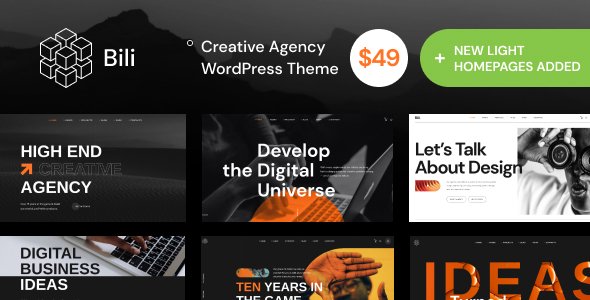
Stuck on your Bili WordPress theme? Let's fix it.
No endless back-and-forth. Just send us the details and we'll get it done.
No obligation · Replies within 1 hour · Quote within 1 day
Setup · Customization · Bug fixes · WooCommerce integration
About Bili WP Theme
Bili is a WordPress theme built by WebGeniusLab, designed for creative agencies, portfolios, and digital studios. It ships with a clean, minimal layout that puts visual work front and center. The theme is built on Elementor, so every section is editable without touching code.
Out of the box, Bili includes multiple pre-built demo pages, a header and footer builder, and smooth scroll animations. It supports WooCommerce, making it usable for studios that also sell products or services online.
WebGeniusLab keeps the codebase relatively lean, which helps with load times compared to heavier multipurpose themes. If you need a polished presentation site for a creative business or freelance portfolio, Bili gives you a solid starting point without requiring a full custom build from scratch.
Get matched with a Bili developer in under one day
Tell us about your Bili project. Small fixes, Bili theme customization, or a full website build, whatever you need, we've got it covered.
We'll connect you to the right Bili developers, define the scope, and get everything 100% clear.
You'll get one estimate, hire your preferred developer, and start collaborating.
Bili looks straightforward until you need it to do something specific. Custom layouts, plugin conflicts, broken mobile views, or a design that just doesn’t match the original vision are all common problems once you get past the demo.
Working with a vetted Bili developer through Codeable means you get someone who has solved these problems before. No guesswork, no learning curve billed to you. Codeable only works with screened WordPress professionals, so the developer matched to your project knows what they’re doing before they start.
Pros
- Built on Elementor, so layout editing is fully visual with no coding required
- Ships with multiple pre-built demo pages covering different creative niches
- Includes a header and footer builder for full structural control
- WooCommerce compatible out of the box for studios adding a shop
- Cleaner codebase than most multipurpose themes, which helps with base performance
Cons
- Elementor dependency means the theme is tightly coupled to one page builder
- Demo content import can be inconsistent, sometimes requiring manual cleanup
- Animation effects add JavaScript overhead that can affect Core Web Vitals scores
- Limited built-in documentation for non-standard customizations
- Some layout options only work correctly with Elementor Pro, not the free version
Who is Bili for?
Creative Agency Website
Bili’s multi-section layouts and smooth scroll animations work well for agencies presenting case studies and service offerings. You can build out separate pages for each service, a team section, and a project showcase without needing custom development. A Bili expert can configure the portfolio grid and inquiry forms to match your sales process.
Freelance Portfolio
Freelancers get a fast, professional-looking site without building from scratch. Bili’s minimal aesthetic keeps focus on the work itself. You can set up an about page, work samples, and a contact section quickly. If you need specific filtering or a client login area, a developer can extend the theme to cover those requirements.
Photography Studio
Full-width image layouts and clean gallery sections make Bili a practical choice for photography businesses. The theme handles high-resolution images well when properly configured. Adding a booking plugin or client proofing gallery is straightforward. A developer familiar with Bili can set up image optimization and lazy loading so the site stays fast.
Digital Marketing Studio
Digital marketing studios can use Bili to present services, pricing, and results in a structured way. The Elementor-based layout makes it easy to add testimonial sections, stat counters, and service breakdowns. Connecting lead capture forms to a CRM or email platform is a common add-on a Bili developer can handle.
Product Design Studio
Product designers and UX studios benefit from Bili’s portfolio-first structure. Case study pages can be built out with full project narratives, image sequences, and outcome metrics. The theme’s clean typography keeps written content readable. Custom project filters and password-protected case studies are both achievable with targeted development work.

Customizing Bili
Bili gives you a lot of visual control through Elementor and the WordPress Customizer, but getting everything to look exactly right takes time. Font pairing, spacing, color systems, and responsive behavior all need attention once you move past the demo content.
A Bili expert can speed this up significantly. Instead of spending hours reverse-engineering template structure or fixing mobile breakpoints, an experienced developer can customize headers, footers, portfolio layouts, and page sections to match your brand precisely.
WebGeniusLab’s themes follow consistent coding patterns, which means a developer familiar with their work can move faster. Custom post types, advanced Elementor widget configurations, and CSS overrides are all common tasks a Bili specialist handles regularly. The result is a site that looks intentional rather than assembled from defaults.
Recommended plugins for Bili
Bili works well with several common WordPress plugins. Elementor Pro unlocks additional widgets and dynamic content features that pair directly with the theme’s layout system. For contact forms, WPForms or Contact Form 7 both integrate without issues.
If you’re running a portfolio with client work, adding a filterable gallery plugin like FooGallery gives you more display options than the default grid. For online stores, WooCommerce slots in cleanly.
Performance is worth addressing early. Bili’s animation effects and Elementor overhead can slow load times on shared hosting. Pairing the theme with a caching plugin and optimized images makes a real difference. For deeper speed work, see our WordPress performance service. For search visibility, our WordPress SEO service covers what the theme alone cannot.
Not sure which plugins to use? This WordPress plugins directory covers the most popular options with reviews and setup guides.
Bili common issues
Bili theme demo import not working
Demo import failures in Bili are usually caused by server memory limits, PHP timeout settings, or a conflict with an active security plugin. First, check your PHP memory limit is set to at least 256MB and max execution time is above 300 seconds. Deactivate security plugins temporarily during import. If the import still stalls, import XML content manually and configure widgets separately. A developer can do this cleanly without losing your existing setup. See our WordPress bug fixing service if you need hands-on help.
Bili header not showing correctly on mobile
Mobile header issues in Bili typically come from custom CSS overriding the theme’s responsive rules, or Elementor breakpoint settings that weren’t configured for tablet and phone views. Open the header template in Elementor, switch to mobile preview mode, and check each element’s visibility and sizing settings. If you’ve added custom CSS in the Customizer, inspect for conflicting rules. A Bili developer can audit the header structure and fix breakpoints across all device sizes quickly.
Bili theme slow loading after adding content
Slow load times on Bili sites usually come from unoptimized images, Elementor’s CSS and JS loading on every page, and animation scripts running on pages that don’t need them. Start by enabling Elementor’s asset loading improvements in Settings > Elementor > Advanced. Add a caching plugin and compress images on upload. For more systematic performance work, our WordPress performance service covers full audits and fixes specific to Elementor-based themes like Bili.
Bili portfolio grid layout broken after plugin update
Portfolio grid breaks after a plugin update usually point to a JavaScript conflict or a CSS change introduced by the updated plugin. Open your browser console and look for JS errors on the portfolio page. Deactivate recently updated plugins one by one to isolate the conflict. If the grid relies on an Elementor widget, check whether the widget itself needs updating too. In cases where the layout structure has shifted, a developer may need to rebuild the grid section with current widget versions. Our bug fixing service handles these conflicts directly.
Bili FAQ
Yes, Bili is designed to work with both the free Elementor plugin and Elementor Pro. Some layout features and dynamic content options, such as custom post type displays and advanced forms, require Elementor Pro. The free version handles most standard page building. If you’re unsure which version you need for a specific feature, a Bili developer can advise based on your project requirements.
Technically yes, but it isn’t practical. Bili’s page templates are built inside Elementor, so removing the plugin leaves your pages without their intended layouts. You’d need to rebuild all content in another editor or with custom templates. If you want to move away from Elementor on a Bili site, that’s a significant rebuild rather than a simple switch. A developer can assess what’s involved for your specific site.
Yes, Bili includes WooCommerce support. Basic shop pages, product listings, and cart and checkout pages are styled to match the theme. Some WooCommerce pages may need CSS adjustments to fully align with your customized Bili design. A developer can handle those styling overrides and configure the shop layout to fit how you want to present your products.
Bili updates through the standard WordPress theme updater. Your Elementor-built page content is stored in the database, not in theme files, so it survives updates. However, any CSS added to the theme’s files directly will be overwritten. Always add custom CSS through the WordPress Customizer or Elementor’s global CSS fields, not by editing theme files. Using a child theme is the safest approach for code-level changes.
Bili doesn’t block good SEO, but the theme alone doesn’t handle it either. Heading structure, meta tags, schema markup, and site speed all require additional configuration. Use an SEO plugin like Rank Math or Yoast to manage on-page SEO. Address Core Web Vitals separately since Elementor adds overhead. For structured SEO work on a Bili site, our WordPress SEO service covers both technical and on-page factors.
Hire a Bili WordPress Expert
Need help setting up, customizing, or fixing your Bili WordPress site? Whether you’re starting from a blank install or picking up a half-built project, a specialist can get it done correctly. Post your project and get matched with a vetted Bili developer within 24 hours. No commitment required until you approve an estimate. Get a free estimate and see what’s possible.
You'll need a free Codeable account so developers can ask questions and send their quotes.