Bixol WordPress Theme
by Case-Themes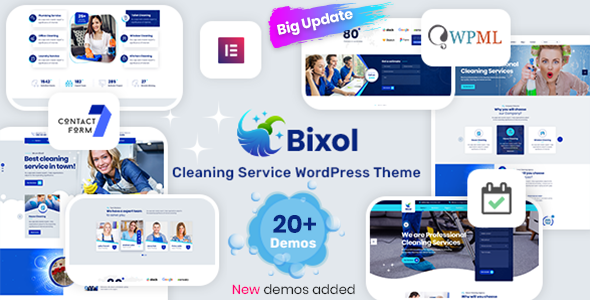
Stuck on your Bixol WordPress theme? Let's fix it.
No endless back-and-forth. Just send us the details and we'll get it done.
No obligation · Replies within 1 hour · Quote within 1 day
Setup · Customization · Bug fixes · WooCommerce integration
About Bixol WP Theme
Bixol is a multipurpose WordPress theme by Case-Themes, built for agencies, freelancers, and businesses that need a clean, professional web presence without spending weeks on setup. It ships with multiple pre-built demo layouts, Elementor compatibility, and a straightforward options panel that keeps configuration manageable.
The theme targets small-to-medium businesses looking for a polished starting point. Header and footer builder support, WooCommerce integration, and basic portfolio functionality make it flexible enough to cover a range of project types. Page load performance is reasonable out of the box, though like most multipurpose themes, it benefits from proper configuration. If you need a site that looks professional quickly, Bixol is a practical option worth considering.
Get matched with a Bixol developer in under one day
Tell us about your Bixol project. Small fixes, Bixol theme customization, or a full website build, whatever you need, we've got it covered.
We'll connect you to the right Bixol developers, define the scope, and get everything 100% clear.
You'll get one estimate, hire your preferred developer, and start collaborating.
Most Bixol issues come down to customisation depth, performance tuning, or plugin conflicts that aren’t obvious until something breaks. A vetted Bixol developer on Codeable can handle those problems directly, whether that’s a one-off fix or a full custom build on top of the theme. Codeable screens every developer before they’re allowed on the platform, so you’re not rolling the dice on quality. Post a project, get matched within 24 hours, and receive a clear estimate before committing to anything.
Pros
- Elementor compatibility makes visual layout editing straightforward without coding
- Multiple pre-built demo layouts reduce initial setup time significantly
- WooCommerce support is included, making it usable for simple shop builds
- Header and footer builder gives meaningful structural flexibility
- Lightweight options panel keeps admin configuration simple and accessible
Cons
- Demo import can be unreliable, sometimes requiring manual content reconstruction
- Typography options are limited compared to more design-focused themes
- Mobile responsiveness occasionally needs manual adjustment on complex layouts
- Documentation is sparse, which makes troubleshooting harder without developer experience
- Update frequency from Case-Themes is inconsistent, raising long-term compatibility concerns
Who is Bixol for?
Digital Agency Website
Bixol’s agency-oriented demo layouts include team sections, service grids, and case study templates. A Bixol developer can extend these with custom Elementor widgets and dynamic content to build a fully functional agency site. The clean design language suits professional services well without requiring heavy visual customisation from the start.
Freelance Portfolio
The theme includes portfolio post types and filterable gallery layouts that work well for creatives and freelancers. A Bixol specialist can configure project categories, custom archive templates, and single project pages to display work the way you actually want it shown, rather than the default demo structure.
Small Business Services Site
Local businesses and service providers benefit from Bixol’s pre-built pages for testimonials, pricing tables, and contact forms. The theme handles the standard pages a small business needs without unnecessary complexity. A Bixol expert can add booking integration, Google Maps embeds, and schema markup to make the site more functional.
WooCommerce Product Store
WooCommerce integrates cleanly with Bixol, covering product listings, cart, and checkout pages without major styling conflicts. For stores with specific layout needs, a Bixol developer can customise product page templates, category archives, and cross-sell sections to match the brand rather than using WooCommerce defaults throughout.
Startup Landing Page
Bixol’s single-page demo options are practical for startups that need a clear, focused landing page quickly. Hero sections, feature highlights, pricing, and a contact section can be assembled from existing demo content. A Bixol specialist can add conversion-focused elements like sticky CTAs, scroll animations, and A/B-ready section structures.

Customizing Bixol
Bixol ships with the WordPress Customizer and Elementor page builder support, which covers most surface-level changes. Colours, fonts, header layouts, and section spacing are all adjustable without touching code. That works well for standard builds.
Where it gets more involved is custom post type layouts, conditional logic across templates, and integrating third-party plugins cleanly into the design system. A Bixol expert can extend what the theme offers without hacking core files, keeping the build maintainable and update-safe. If you need custom Elementor widgets, child theme development, or a design that diverges significantly from the demo, working with a Bixol specialist saves time and avoids the technical debt that comes from trial-and-error customisation.
Recommended plugins for Bixol
Bixol works alongside most major WordPress plugins without conflict. WooCommerce, Contact Form 7, Yoast SEO, and WPForms all integrate cleanly. For caching and asset optimisation, plugins like WP Rocket or LiteSpeed Cache pair well with the theme’s structure.
If site speed is a priority, a proper WordPress performance audit will identify the specific bottlenecks in your Bixol build. For search visibility, structured WordPress SEO optimisation ensures your content is indexed correctly and your schema markup is in order. Neither is automatic, but both are achievable with the right setup.
Not sure which plugins to use? This WordPress plugins directory covers the most popular options with reviews and setup guides.
Bixol common issues
Bixol theme demo import not working
Demo import failures in Bixol usually come down to server memory limits, PHP timeout settings, or missing required plugins not being activated before import. Set WP_MEMORY_LIMIT to at least 256MB and increase max_execution_time in your PHP configuration. Install and activate all required plugins listed in the theme documentation before attempting import again. If the problem persists, a WordPress bug fixing specialist can import the demo manually or reconstruct the content from the XML file directly.
Bixol header layout broken after update
Header layout issues after a Bixol update are typically caused by changes to the theme’s header builder options or a conflict with a cached stylesheet. Clear all caching layers first, including server-side cache and any CDN cache. Check whether a child theme is in use, as direct customisations to the parent theme’s header files will be overwritten on update. If the layout is still broken, a WordPress bug fixing service can identify whether the issue is a CSS conflict, a plugin clash, or a breaking change in the update itself.
Bixol slow loading on mobile
Slow mobile performance in Bixol is usually linked to unoptimised images, render-blocking scripts, and large Elementor-generated CSS. Start by running the site through PageSpeed Insights to identify specific bottlenecks. Enable lazy loading for images, defer non-critical JavaScript, and consider a caching plugin configured for mobile separately. Bixol does not aggressively optimise asset delivery out of the box, so manual configuration or a performance-focused plugin setup is required to reach acceptable mobile scores.
Bixol Elementor widgets not displaying correctly
When Bixol’s Elementor widgets fail to render correctly, the most common causes are a version mismatch between Elementor and the theme, a conflict with another active plugin, or a corrupted widget configuration saved in the database. Deactivate plugins one by one to isolate conflicts. Regenerate CSS from Elementor’s Tools panel. If specific widgets are producing PHP errors, check the error log for the exact function failing. Upgrading both Elementor and the Bixol theme to their latest versions resolves the majority of these issues.
Bixol FAQ
Yes, Bixol is built with Elementor compatibility in mind. Most layout sections are constructed using Elementor widgets, and the theme registers custom widget areas and templates that work within the Elementor editor. For advanced widget development or fixing conflicts between Bixol and specific Elementor Pro features, a Bixol developer can resolve these directly without disrupting the existing build.
Bixol includes WooCommerce support covering shop pages, product archives, single product pages, cart, and checkout. Default WooCommerce templates are styled to match the theme’s design. For custom product layouts, filtered shop pages, or specific checkout modifications, a Bixol specialist can extend the WooCommerce integration beyond what the theme handles automatically.
Bixol demo content is imported through the one-click demo importer included with the theme. Before importing, activate all required plugins listed in the theme setup instructions. If the import fails due to server limits or timeout issues, increase PHP memory and execution time in your hosting configuration. Manual XML import via the WordPress importer tool is an alternative if the one-click method continues to fail.
Case-Themes releases updates for Bixol periodically, but the update frequency is irregular compared to larger theme developers. Before committing to a long-term project on Bixol, check the changelog on ThemeForest or the Case-Themes site for recent activity. For sites already running Bixol, a WordPress maintenance plan ensures compatibility is monitored and updates are applied safely.
Yes, and using a child theme with Bixol is strongly recommended if you plan to make any template-level customisations. Without a child theme, any changes to PHP template files will be overwritten when the theme updates. Creating a Bixol child theme is straightforward and ensures your customisations are preserved. A Bixol developer can set this up correctly as part of any build or customisation project.
Hire a Bixol Expert Developer
Whether you need a Bixol developer to set up a demo, customise templates, fix a layout issue, or build something the theme doesn’t support out of the box, the right developer makes the difference between a site that works and one that just exists. Get a Free Estimate and get matched with a vetted Bixol specialist through Codeable. No obligation, no risk, just a clear scope and a real price before any work starts.
You'll need a free Codeable account so developers can ask questions and send their quotes.