Blonwe WordPress Theme
by KlbTheme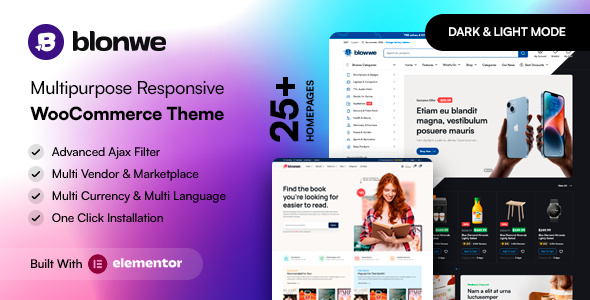
Stuck on your Blonwe WordPress theme? Let's fix it.
No endless back-and-forth. Just send us the details and we'll get it done.
No obligation · Replies within 1 hour · Quote within 1 day
Setup · Customization · Bug fixes · WooCommerce integration
About Blonwe WP Theme
Blonwe is a multipurpose WooCommerce theme built by KlbTheme. It targets fashion, lifestyle, and apparel stores, shipping with multiple pre-built demo layouts, a drag-and-drop page builder, and a header builder that covers most storefront configurations out of the box.
The theme uses Elementor as its primary builder and bundles several KlbTheme plugins that power features like wishlists, product filters, and quick-view modals. This tight plugin dependency is common in premium WooCommerce themes and works well when maintained properly.
Performance is reasonable on clean installs, though the bundled plugin stack adds HTTP requests. Pairing Blonwe with a solid caching layer and image optimization keeps load times competitive. It suits store owners who want a polished fashion-focused design without building from scratch.
Get matched with a Blonwe developer in under one day
Tell us about your Blonwe project. Small fixes, Blonwe theme customization, or a full website build, whatever you need, we've got it covered.
We'll connect you to the right Blonwe developers, define the scope, and get everything 100% clear.
You'll get one estimate, hire your preferred developer, and start collaborating.
Most Blonwe issues come down to plugin conflicts, layout breaks after updates, or WooCommerce templates that need customization beyond what the options panel allows. A Blonwe developer on Codeable has already worked through those problems on other stores. Codeable vets every developer before they take on work, so you’re not gambling on a freelancer profile. You post the project, get matched within 24 hours, and receive an estimate before spending anything.
Pros
- Multiple fashion and lifestyle demo layouts included, covering single-brand and multi-category store structures
- Header builder with sticky, transparent, and split header options that don't require custom code
- Bundled KlbTheme plugins handle wishlist, product compare, and ajax filtering without extra paid extensions
- Elementor compatibility means layout editing is visual and doesn't require PHP template knowledge
- Active updates from KlbTheme with reasonable WooCommerce version compatibility
Cons
- Heavy plugin bundle increases page weight and can slow down stores that don't apply proper caching
- KlbTheme's bundled plugins are not always compatible with popular third-party WooCommerce plugins out of the box
- Documentation is thin in places, particularly around advanced header configurations and custom post types
- Child theme is not included, and first-time users often customize the parent theme directly, causing issues on update
- Some demo content relies on placeholder images and dummy data that requires significant replacement work before going live
Who is Blonwe for?
Fashion and Apparel Stores
Blonwe was built with fashion retail in mind. Its product card designs, lookbook sections, and collection-style category pages suit clothing and accessories stores. A Blonwe developer can extend these layouts with size guides, outfit builders, or custom product tabs without reworking the core template structure.
Beauty and Cosmetics Shops
The clean, minimal demo layouts translate well to beauty and skincare brands. Product detail pages support multiple image angles and ingredient tabs. A Blonwe specialist can connect subscription plugins or bundling extensions to match how beauty products are typically sold online.
Lifestyle and Home Decor Brands
Lifestyle stores benefit from Blonwe’s editorial-style homepage sections that mix products with content blocks. A Blonwe expert can configure these sections to pull in blog posts alongside featured products, creating a content-commerce hybrid layout that suits brand-led stores.
Multi-Brand Boutiques
Multi-brand boutiques need flexible category structures and filtering that works across different product attributes. Blonwe’s bundled ajax filter handles basic attribute filtering, and a Blonwe developer can extend this with brand taxonomy pages and custom sorting logic for larger catalogs.
Dropshipping Fashion Stores
Dropshipping stores using AliExpress or Spocket integrations can sit on Blonwe without heavy custom development. The theme’s product layouts and quick-view modal reduce friction in the browsing experience. A Blonwe specialist can configure import workflows and currency switching for cross-border stores.

Customizing Blonwe
Blonwe gives you access to a Theme Options panel that covers typography, color schemes, header layouts, and footer configurations. Most visual changes can be made without touching code, but anything outside the panel typically requires custom CSS or child theme overrides.
A Blonwe expert can wire up custom product layouts, modify the mega menu structure, adjust WooCommerce loop templates, or integrate third-party plugins that conflict with KlbTheme’s bundled extensions. These tasks go beyond the standard options panel and need developer-level knowledge of how Blonwe’s template hierarchy is structured.
Child theme setup is strongly recommended before any customization. Changes made directly to parent theme files get wiped on updates, which is a common issue on Blonwe stores that skipped that step early on.
Recommended plugins for Blonwe
Blonwe bundles KlbTheme’s own plugins for wishlist, compare, and ajax product filters. These cover the basics, but most serious stores will add YITH or Barn2 plugins on top for more control.
Caching and script optimization become important quickly when you’re running multiple bundled plugins. A proper setup outlined in the WordPress performance guide keeps Blonwe stores fast under real traffic conditions.
For stores targeting organic search, structured data, breadcrumb configuration, and meta control benefit from the approach covered in WordPress SEO optimization.
Not sure which plugins to use? This WordPress plugins directory covers the most popular options with reviews and setup guides.
Blonwe common issues
Blonwe header not showing on mobile after update
Mobile header issues after an update usually point to a cached CSS conflict or a JavaScript error thrown by one of the bundled KlbTheme plugins. Start by clearing all caches, including server-level and CDN. Check the browser console for JS errors, then disable plugins one at a time to isolate the conflict. If the issue started after a theme update and you modified the parent theme directly, the update likely overwrote your changes.
Blonwe wishlist button not working
The Blonwe wishlist feature depends on the KlbTheme Wishlist plugin being active and on the correct version pairing with your current theme version. If the button does nothing on click, check whether the plugin is active in your dashboard. Also confirm there are no JavaScript console errors related to nonce verification or missing AJAX handlers. A version mismatch between the theme and its bundled plugins is the most common cause. Visit our WordPress bug fixing service if the issue persists.
Blonwe product filter not loading results via ajax
Ajax filter failures in Blonwe are often caused by caching plugins intercepting the AJAX request and returning a cached static response. Exclude the filter endpoint from caching rules. Also check whether a firewall or security plugin is blocking POST requests to admin-ajax.php. If you recently added a custom taxonomy, the filter widget may also need reconfiguring to include the new attribute.
Blonwe homepage slider broken after WooCommerce update
Homepage slider breaks after WooCommerce updates are typically caused by deprecated template hooks that the slider relies on. Check the theme changelog to see if KlbTheme released a patch for the WooCommerce version you updated to. If not, the fix usually involves updating the slider section’s template file in your child theme to use the current hook structure. Keep both Blonwe and WooCommerce on compatible version pairs.
Blonwe quick view modal showing blank or empty
A blank quick view modal usually means the modal template is loading but the AJAX call returning product data is failing. Open the browser network tab, trigger quick view, and look for a 500 error or an empty response on the AJAX request. Common causes include a PHP error in the product template partial, a missing featured image, or a conflict with a page caching plugin serving a static response to a dynamic request. Our WordPress bug fixing service covers this type of AJAX conflict.
Blonwe theme customizer changes not saving
Customizer changes that don’t save are usually a server-level issue. Check whether your PHP memory limit is below 256MB, as Blonwe’s options panel can hit that ceiling during save operations. Also verify file write permissions on wp-content. If you’re on a managed host with strict caching, the customizer preview may appear to save but the live site still serves a cached version of the old settings.
Blonwe add to cart button not responding
Add to cart failures in Blonwe can come from a JavaScript conflict, a nonce mismatch, or a WooCommerce session issue. First check the browser console for errors on the button click event. Then confirm WooCommerce AJAX is not blocked by a security plugin. If the button works on simple products but not on variable products, the issue is more likely tied to the variation form script that Blonwe overrides in its templates.
Blonwe demo import failing or timing out
Demo import timeouts are common on shared hosting where PHP execution time and memory limits are low. Blonwe’s demo package includes images, dummy products, and page builder data, which can take several minutes. Increase max_execution_time to at least 300 seconds and memory_limit to 512MB before attempting the import. If it still fails, try importing content in stages using the manual XML import rather than the one-click demo importer.
Blonwe checkout page layout broken
Checkout layout issues in Blonwe usually appear after a WooCommerce update changes its template structure. Blonwe ships with custom checkout templates that override WooCommerce defaults. When WooCommerce updates its template files, those overrides become outdated. Compare your theme’s checkout template against the current WooCommerce version using a diff tool and apply the necessary updates. See our WordPress bug fixing service for template update help.
Blonwe product images not displaying correctly
Product image display problems in Blonwe are often tied to image size regeneration after setup. If thumbnails look stretched or cropped incorrectly, run the Regenerate Thumbnails plugin after confirming your WooCommerce image dimensions are set correctly under Appearance > Customize > WooCommerce > Product Images. Also check whether a lazy load plugin is conflicting with Blonwe’s own image loading scripts, which can prevent images from rendering in sliders and galleries.
Blonwe FAQ
Yes, Blonwe is built specifically for WooCommerce. It includes custom product layouts, category pages, and cart and checkout templates. It works well for fashion and lifestyle stores out of the box. For stores with heavy catalog requirements or complex filtering needs, some additional configuration by a Blonwe specialist is worthwhile.
Blonwe is compatible with Elementor and uses it as the primary page builder for homepage and landing page layouts. The bundled demo content is built with Elementor widgets. KlbTheme also includes custom Elementor widgets for features like product sliders and promotional banners specific to the theme.
After activating Blonwe and its required plugins, go to Appearance > Import Demo Data. Select the demo closest to your desired layout and run the importer. Make sure your hosting environment meets the minimum PHP memory and execution time requirements before starting, as large demos can time out on restricted hosting plans.
Blonwe performs reasonably well on clean installs but the bundled plugin stack adds load. Combine it with a caching plugin, a CDN, and image compression to get competitive load times. Core Web Vitals scores are achievable with proper configuration. A Blonwe developer can audit and optimize your specific setup.
Blonwe requires WooCommerce and several KlbTheme-specific plugins including KlbTheme Core, KlbTheme Wishlist, and the filter plugin. These are bundled with the theme purchase. Elementor free is also needed for page editing. The theme will prompt you to install required plugins on activation.
Create a new folder in wp-content/themes with your child theme name. Add a style.css file with a Template header pointing to blonwe, and a functions.php that enqueues the parent stylesheet. Activate the child theme from Appearance > Themes. All customizations should go into the child theme to survive Blonwe updates.
Technically yes, but Blonwe’s design language is strongly fashion and lifestyle oriented. Using it for unrelated niches like software, services, or food delivery would require significant layout rework. A Blonwe developer could reconfigure the templates, but a more purpose-built theme may be a better starting point for unrelated industries.
Blonwe has been tested with WPML for multilingual stores and works with WooCommerce multi-currency plugins. Full compatibility depends on which currency or translation plugin you use. Testing on a staging site before applying to production is recommended. A Blonwe specialist can handle the integration if conflicts arise during setup.
Before updating Blonwe, back up your site and test on a staging environment. If you’ve modified parent theme files, those changes will be lost. Working from a child theme avoids this. Check the changelog for template file changes and update any overridden templates in your child theme to match the new version after updating.
Codeable is the most reliable option. It’s a vetted network of WordPress specialists where you post your project, get matched with a Blonwe developer within 24 hours, and receive a free estimate before committing. Visit our free estimate page to get started with no obligation.
Hire a Blonwe Expert Developer
If your Blonwe store needs custom layout work, plugin conflict resolution, performance tuning, or WooCommerce template modifications, working with a specialist saves time. A Blonwe developer who knows KlbTheme’s architecture will get it done cleanly without breaking your existing setup. Get a Free Estimate and describe what you need. No obligation, no upfront cost.
You'll need a free Codeable account so developers can ask questions and send their quotes.