Blue Diamond WordPress Theme
by GoodLayers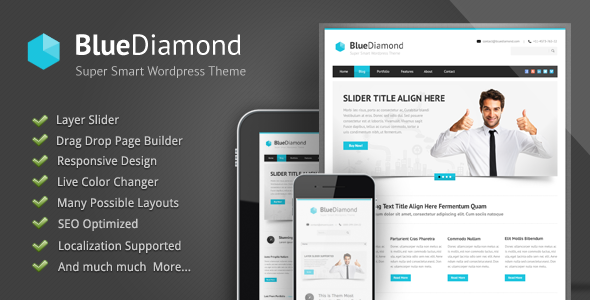
Stuck on your Blue Diamond WordPress theme? Let's fix it.
No endless back-and-forth. Just send us the details and we'll get it done.
No obligation · Replies within 1 hour · Quote within 1 day
Setup · Customization · Bug fixes · WooCommerce integration
About Blue Diamond WP Theme
Blue Diamond is a premium WordPress theme built by GoodLayers, a developer known for clean code and well-documented products. The theme ships with the GoodLayers page builder baked in, giving you drag-and-drop control over layouts without needing a third-party plugin.
It targets hotels, resorts, and hospitality businesses. You get a booking system integration, room listing templates, and a reservation form out of the box. The design leans formal and polished, which works well for upscale properties that need to look credible at first glance.
Blue Diamond supports WooCommerce, multiple header styles, and comes with a solid set of shortcodes. Translation-ready and WPML-compatible, it handles multilingual setups without major friction. Overall, it is a focused theme built for a specific industry, and it does that job well.
Get matched with a Blue Diamond developer in under one day
Tell us about your Blue Diamond project. Small fixes, Blue Diamond theme customization, or a full website build, whatever you need, we've got it covered.
We'll connect you to the right Blue Diamond developers, define the scope, and get everything 100% clear.
You'll get one estimate, hire your preferred developer, and start collaborating.
GoodLayers themes are well-built, but hospitality sites have specific needs that generic documentation does not cover. Booking system conflicts, custom room filtering, multilingual pricing, and third-party channel manager integrations all require someone who knows the theme’s structure.
Through Codeable, you get matched with a vetted Blue Diamond developer within 24 hours. Every developer on the platform has passed a rigorous vetting process. You get a free estimate before committing to anything, and the work is backed by Codeable’s satisfaction guarantee.
Pros
- Built-in room listing templates save significant setup time for hotel sites
- GoodLayers page builder is included at no extra cost and does not require a separate license
- WPML-compatible out of the box, making multilingual hotel sites manageable
- Redux-based theme options panel is well-organized and covers most common customizations
- GoodLayers provides regular updates and maintains compatibility with current WordPress versions
Cons
- The bundled page builder adds noticeable page weight and requires performance tuning on slower hosts
- Native booking functionality is basic and most serious hotel operations will need a third-party booking plugin
- Support response times from GoodLayers can be slow during busy periods
- Heavy reliance on shortcodes makes content harder to migrate if you switch themes later
- Schema markup for hotel and room listings is not included and needs to be added manually
Who is Blue Diamond for?
Boutique Hotels
Blue Diamond’s polished room listing templates and gallery layouts work well for boutique hotels that need to present a small number of rooms in detail. The formal design aesthetic suits four and five-star properties. A Blue Diamond specialist can extend the room pages with custom amenity icons, pricing tables, and direct booking call-to-action sections that match your brand.
Bed and Breakfasts
Bed and breakfast owners need a site that feels personal without looking amateur. Blue Diamond’s homepage layouts accommodate full-width imagery, owner introductions, and testimonial sections. Pairing it with a lightweight booking plugin keeps the setup simple. Customization work is minimal for this use case, making it a cost-effective starting point.
Holiday Villas and Vacation Rentals
Vacation rental sites need strong photo presentation and clear availability information. Blue Diamond handles both. The theme’s gallery shortcodes and room templates translate well to villa listings. A Blue Diamond developer can integrate tools like Lodgify or Smoobu for channel management, keeping your availability calendar synced across booking platforms.
Resort and Spa Properties
Resorts and spas need more page templates than a standard hotel site. Blue Diamond covers room listings, but spa service pages and dining sections need custom work. A Blue Diamond expert can build these out using the GoodLayers page builder without breaking the overall design consistency. WooCommerce integration also enables gift voucher and package sales.
Serviced Apartments
Serviced apartment operators typically need per-unit pricing, longer stay options, and corporate inquiry forms. Blue Diamond’s room templates can be adapted for apartment listings with some developer input. The theme’s WooCommerce compatibility also opens up direct booking deposit collection, which is useful for longer stays where upfront payment is standard practice.

Customizing Blue Diamond
Blue Diamond gives you a theme options panel built on Redux Framework. You can control colors, typography, header layout, footer columns, and sidebar positioning from one place. Room templates and booking forms have their own settings, so you can adjust field labels, pricing display, and availability calendars without touching code.
For anything beyond the panel, you will want a Blue Diamond expert. Custom room category pages, modified booking flows, or integrations with external reservation systems like HBook or MotoPress Hotel Booking require direct PHP and CSS work. A Blue Diamond specialist can also strip out unused shortcodes and page builder elements that slow down the front end.
Child theme setup is straightforward. All customizations done through a child theme survive updates cleanly, which matters given that GoodLayers pushes updates fairly regularly.
Recommended plugins for Blue Diamond
Blue Diamond pairs well with caching plugins like WP Rocket or LiteSpeed Cache. The GoodLayers page builder adds page weight, so pairing it with a WordPress performance optimization setup makes a real difference on mobile load times.
For SEO, Blue Diamond works with Yoast and Rank Math without conflicts. Schema markup for hotel listings is not built in, so adding structured data through a plugin or custom code is worth doing early. A proper WordPress SEO setup covering page speed, schema, and meta tags gives hotel sites a meaningful edge in local search results.
Not sure which plugins to use? This WordPress plugins directory covers the most popular options with reviews and setup guides.
Blue Diamond common issues
Blue Diamond booking form not sending emails
Email delivery failures from the Blue Diamond booking form are almost always a server SMTP issue, not a theme bug. WordPress uses the PHP mail() function by default, which many hosts block. Install an SMTP plugin like WP Mail SMTP and connect it to a transactional email service such as SendGrid or Mailgun. Test with the plugin’s built-in diagnostic tool. If emails still fail, check spam folders and confirm the From address is a domain-based email, not Gmail.
Blue Diamond page builder layout broken after update
GoodLayers page builder layout breaks after updates are usually caused by a version mismatch between the theme and the bundled page builder plugin. Go to Appearance > Install Plugins and check if the GoodLayers page builder has a pending update. Install it and clear your caching plugin afterward. If layouts are still broken, deactivate all plugins except the page builder and test. A WordPress bug fixing specialist can isolate the conflict quickly if plugin deactivation does not resolve it.
Blue Diamond slider not showing on mobile
The Blue Diamond slider often disappears on mobile because the slider plugin settings have mobile visibility turned off or a CSS rule is hiding it. Open the slider settings and check the responsive options tab. If visibility is enabled, inspect the element in browser dev tools on a mobile viewport to find the hiding rule. Also check if a caching plugin is serving a cached version without the slider. Purge the full cache and retest on a real device rather than a browser emulator.
Blue Diamond room availability calendar not loading
Availability calendar loading failures in Blue Diamond usually point to a JavaScript conflict or a broken API connection to your booking plugin. Open the browser console on the affected page and look for JS errors. If a conflict is listed, try deactivating plugins one by one to isolate it. If you are using an external booking service, verify that the API key is still valid in your plugin settings. Expired or rotated API keys are a common cause of calendar failures after a period of normal operation.
Blue Diamond theme options not saving
Blue Diamond theme options failing to save is often a PHP max input vars issue. The Redux Framework options panel sends a large number of fields on save, and many shared hosts set max_input_vars too low. Add max_input_vars = 3000 to your php.ini or .htaccess file. If you do not have server access, contact your host and ask them to raise the limit. Browser console errors on save can also point to a jQuery conflict worth investigating.
Blue Diamond white screen after update
A white screen in Blue Diamond after an update almost always means a PHP fatal error. Enable WP_DEBUG by adding define('WP_DEBUG', true); to wp-config.php and reload the page to see the error message. Common causes include a plugin incompatible with the new theme version or a PHP version mismatch. If you cannot access the admin area, connect via FTP and rename the theme folder temporarily to revert. A WordPress bug fixing service can diagnose and resolve this without data loss.
Blue Diamond contact form returns error 500
A 500 error on the Blue Diamond contact form submission usually means a server-side script failure. Check your server error logs in cPanel or via your host’s dashboard. Common triggers include a misconfigured SMTP plugin, a security plugin blocking form POST requests, or a PHP memory limit being hit. Temporarily disable your security plugin and retest. If the form works without it, whitelist the form’s POST action in the security plugin settings rather than leaving it disabled.
Blue Diamond slow loading on mobile
Blue Diamond loads slowly on mobile primarily because the GoodLayers page builder outputs significant CSS and JavaScript on every page. Start by running the site through PageSpeed Insights to identify the largest assets. Install a caching plugin and enable CSS and JS minification. Lazy-load images using a plugin or the native WordPress lazy-load attribute. Defer non-critical JS. If the theme is loading all page builder scripts globally, a WordPress performance fix can conditionally load scripts only on pages that need them.
Blue Diamond WPML language switcher not working
Blue Diamond WPML switcher problems are usually caused by missing string translations or the theme’s language files not being registered correctly with WPML. Go to WPML > Theme and Plugins Localization and run the string scan for Blue Diamond. Also check that each room post type is set to translatable in WPML > Translation Management. If the switcher appears but redirects to a 404, check that translated versions of the room pages exist and are published, not just saved as drafts.
Blue Diamond child theme styles not applying
If your Blue Diamond child theme styles are not applying, confirm that the child theme’s functions.php enqueues the parent stylesheet correctly using wp_enqueue_style with get_template_directory_uri() for the parent and get_stylesheet_directory_uri() for the child. Do not use the old @import method. Also check that the child theme’s style.css includes the correct Template: blue-diamond header. Clear caching after any change to confirm you are seeing the current output.
Blue Diamond FAQ
GoodLayers keeps Blue Diamond updated and the theme is compatible with current WordPress 6.x releases. Check the theme’s changelog on ThemeForest for the latest tested WordPress version. Always test updates on a staging site first, since GoodLayers page builder updates can occasionally affect existing layouts on major version bumps.
Yes, Blue Diamond has built-in WooCommerce compatibility. Product pages and cart templates are styled to match the theme. This makes it practical to sell booking deposits, gift vouchers, or packaged experiences directly through the site. A Blue Diamond developer can extend the WooCommerce templates to fit more complex sales flows if needed.
MotoPress Hotel Booking and HBook are the most commonly paired booking plugins with Blue Diamond. Both integrate cleanly and handle availability calendars, pricing rules, and online payment collection. MotoPress is the more feature-complete option. The right choice depends on your property size and whether you need channel manager connectivity.
Technically yes, but it is not a smooth pairing. Blue Diamond is designed around the GoodLayers page builder, and its templates rely on GoodLayers shortcodes. Running Elementor alongside it adds page weight and can create CSS conflicts. If Elementor is a priority, you would be better served by a theme built for it from the start.
Blue Diamond is WPML-compatible and handles multilingual setups well. Room post types, custom strings, and theme options can all be translated through the WPML interface. Initial setup requires some configuration in the WPML translation management panel. A Blue Diamond specialist can handle the full multilingual setup if the default workflow is unclear.
Always use a child theme for any code-level changes. Theme options saved through the Redux panel are stored in the database and survive updates automatically. Before updating, back up the site and test the update on a staging environment. The GoodLayers bundled plugins often need to be updated separately after the main theme update.
Blue Diamond does not include built-in schema markup for hotels or rooms, which is a gap for SEO. It works fine with Yoast and Rank Math for standard on-page SEO. For competitive hotel search results, you should add structured data for LodgingBusiness and room types. A proper WordPress SEO setup covers this alongside page speed and meta configuration.
Yes, Blue Diamond sites migrate like any standard WordPress install. You move the database and files, update the site URL in the database, and point the domain. The GoodLayers page builder content is stored in standard WordPress post meta, so it travels with the database. For a smooth transfer, a WordPress migration service handles the technical steps without downtime.
GoodLayers provides support through the ThemeForest comments section and a dedicated support forum. Response times vary. For critical issues like broken bookings or a white screen on a live hotel site, waiting days for a forum reply is not acceptable. A Blue Diamond developer through Codeable can respond and start work the same day.
Blue Diamond does not ship with a pre-built child theme file, but creating one takes about five minutes. You need a folder with a style.css containing the correct theme header and a functions.php that enqueues the parent stylesheet. GoodLayers documentation covers this. Always work in a child theme to keep customizations intact after updates.
Hire a Blue Diamond Expert Developer
If you need a Blue Diamond developer for a custom booking flow, layout work, plugin integration, or a bug you cannot track down, we can help. Work is delivered through Codeable, so you get a vetted specialist, not a generalist freelancer. Post your project, get a free estimate, and decide from there with no obligation.
Get a Free Estimate and have a Blue Diamond expert review your project within 24 hours.
You'll need a free Codeable account so developers can ask questions and send their quotes.