Blueprint WordPress Theme
by codesupplyco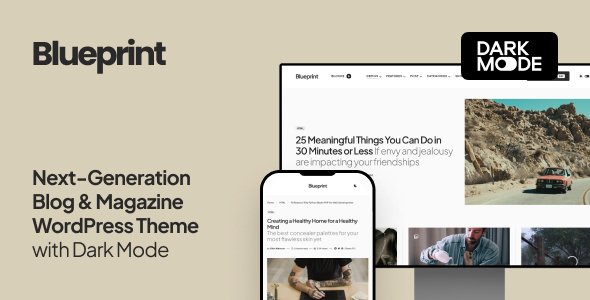
Stuck on your Blueprint WordPress theme? Let's fix it.
No endless back-and-forth. Just send us the details and we'll get it done.
No obligation · Replies within 1 hour · Quote within 1 day
Setup · Customization · Bug fixes · WooCommerce integration
About Blueprint WP Theme
Blueprint is a WordPress theme by CodeSupply Co., built for editorial and magazine-style websites. It focuses on clean typography, structured grid layouts, and a reading-first experience. The theme ships with multiple homepage layouts, flexible post formats, and a header builder that gives editors real control over presentation without touching code.
Blueprint is well-suited to news publishers, blogs, and content-heavy brands that need a polished front end without sacrificing speed. CodeSupply Co. has a strong reputation for well-coded themes, and Blueprint follows that pattern with clean markup, Gutenberg compatibility, and solid WooCommerce support. If your priority is content presentation and fast load times, Blueprint is a strong starting point.
Get matched with a Blueprint developer in under one day
Tell us about your Blueprint project. Small fixes, Blueprint theme customization, or a full website build, whatever you need, we've got it covered.
We'll connect you to the right Blueprint developers, define the scope, and get everything 100% clear.
You'll get one estimate, hire your preferred developer, and start collaborating.
Blueprint gives you a solid foundation, but every site has specific requirements the theme cannot handle out of the box. Custom layouts, plugin conflicts, performance tuning, and design deviations all need a developer who knows the theme’s structure. FoxyConcept works through Codeable, a vetted network of WordPress specialists. You get an expert familiar with CodeSupply Co. themes, not a generalist guessing their way through. Work is scoped properly, priced fairly, and backed by Codeable’s satisfaction guarantee.
Pros
- Clean, semantic markup that loads fast without unnecessary bloat
- Multiple pre-built homepage layouts covering grid, list, and magazine formats
- Strong typography controls with Google Fonts integration built in
- Native Gutenberg support with block-aligned styling out of the box
- Active updates from CodeSupply Co. with consistent WordPress core compatibility
Cons
- Limited layout flexibility beyond the built-in templates without custom CSS or PHP
- Header builder options are functional but less powerful than dedicated header plugins
- WooCommerce styling covers basics but needs custom work for larger or branded shops
- No dark mode option in the Customizer without additional CSS
- Demo import can require manual adjustment to match exactly what is shown in previews
Who is Blueprint for?
Editorial News Site
Blueprint’s multi-column grid and flexible category display make it a natural fit for news publishers. You can surface breaking stories, featured content, and section fronts from the homepage without plugins. The post format support handles video, gallery, and standard articles cleanly across devices.
Personal or Professional Blog
For individual writers and professionals, Blueprint keeps the focus on the article. Sidebar controls, author bio sections, and clean single post templates create a reading experience that works. Typography customisation means you can match the theme to your voice without a full redesign.
Digital Magazine
Blueprint handles the visual weight of a digital magazine well. Featured image sizing, category color coding, and homepage layout options give editors the tools to build a front page that looks intentional. Works well for lifestyle, culture, tech, and food verticals.
Niche Content Publisher
Sites built around a single topic such as finance, health, or travel benefit from Blueprint’s structured layout. Category archives are readable, internal linking is supported cleanly, and the theme doesn’t fight SEO plugins. A focused content strategy fits naturally inside Blueprint’s structure.
Content Marketing Hub
Marketing teams publishing long-form content, guides, and resource libraries can use Blueprint as a content hub. The clean layout supports conversion elements added via Gutenberg blocks or shortcodes. Paired with a lead capture plugin, it works as a standalone inbound traffic asset.

Customizing Blueprint
Blueprint’s Customizer gives you control over typography, color palettes, header layout, sidebar positions, and widget areas. You can switch between pre-built homepage templates and adjust column structures without writing CSS. Post meta, author boxes, and related posts sections are all toggle-based, so editors can manage display without developer help.
Beyond the built-in options, deeper customization requires PHP and CSS knowledge, particularly for custom post types, unique landing page layouts, or third-party plugin styling. A Blueprint expert can extend the theme properly without breaking future update compatibility. Child theme setup, custom Gutenberg blocks, and hook-based modifications are all common requests handled through professional Blueprint development.
Recommended plugins for Blueprint
Blueprint works well with popular plugins. Elementor and the native Gutenberg editor both integrate without layout conflicts. For membership or paywalled content, MemberPress and Restrict Content Pro slot in cleanly. WooCommerce support is built in, covering shop and product pages.
For performance, pairing Blueprint with a caching layer and image optimization plugin is straightforward. See our WordPress performance service for a full setup. If organic traffic matters, Blueprint’s clean markup supports structured SEO work covered in our WordPress SEO optimisation service.
Not sure which plugins to use? This WordPress plugins directory covers the most popular options with reviews and setup guides.
Blueprint common issues
Blueprint theme mobile menu not working
Mobile menu issues in Blueprint are usually caused by a JavaScript conflict with another plugin or a caching plugin serving a stale script file. Start by deactivating plugins one at a time and clearing your cache after each. If the menu works after deactivation, the conflict is confirmed. You can also check the browser console for JS errors pointing to the source. If the issue persists, a WordPress bug fixing service can isolate and resolve it quickly.
Blueprint homepage layout not matching demo after import
Demo imports rarely match exactly because demo content relies on specific media files, widgets, and plugin states that do not transfer automatically. After importing, check that required plugins listed in the theme documentation are active. Rebuild widget areas manually using the Customizer. Homepage template selection sometimes resets during import, so confirm the correct template is assigned under Page Attributes. A developer can replicate the demo layout accurately if manual steps are not resolving it.
Blueprint theme slow loading with images
Blueprint is not inherently slow, but unoptimised images are the most common cause of poor load times on editorial sites with heavy visual content. Install an image compression plugin and enable lazy loading if it is not already active. Pair this with a caching plugin and a CDN for best results. Blueprint’s clean markup means performance gains from these steps are significant. See our WordPress performance service for a full audit and fix.
Blueprint theme plugin conflict breaking layout
Layout breaks caused by plugin conflicts in Blueprint typically come from page builders, SEO plugins injecting scripts, or WooCommerce styling overrides. Open the browser inspector and look for CSS or JS errors on the affected page. Switch to a child theme if you have made direct edits, as this protects your changes during theme updates. Deactivating plugins individually in a staging environment is the safest diagnostic step. Our bug fixing service handles conflict resolution without disrupting live content.
Blueprint FAQ
Blueprint uses clean, semantic HTML which is a solid foundation for SEO. It is compatible with Yoast SEO and Rank Math without conflicts. Schema markup, page speed, and content structure still require configuration. The theme does not handle SEO automatically, but it does not create technical problems that hurt rankings. A proper SEO setup on top of Blueprint will perform well.
Blueprint is compatible with Elementor, and most sections can be built using the page builder without layout conflicts. However, Blueprint’s native Gutenberg support means many users do not need Elementor at all. If you are building custom landing pages or product pages alongside editorial content, Elementor works fine. Keep both updated to avoid styling conflicts between the builder and the theme.
Create a child theme folder in wp-content/themes/ with a style.css referencing Blueprint as the parent template and a functions.php that enqueues the parent stylesheet. Activate the child theme from the WordPress dashboard. All Blueprint updates will then apply to the parent without overwriting your custom CSS or PHP changes. CodeSupply Co.’s documentation covers this process if you need specifics.
Blueprint includes WooCommerce support covering shop pages, product archives, and cart and checkout styling. It handles standard store setups well. For heavily customised shops with branded product pages, custom filters, or complex layouts, additional CSS or template overrides will be needed. Blueprint is better suited as a content-first site with shop functionality added, rather than a dedicated ecommerce theme.
Always use a child theme before customising Blueprint. Updates to the parent theme will not overwrite changes stored in the child theme. If you have edited parent theme files directly, back them up before updating and reapply changes manually. Plugin-based customisations stored in the database, such as Customizer settings, are preserved across theme updates. Using a staging site to test updates before pushing to production is strongly recommended.
Hire a Blueprint WordPress Developer
Need a Blueprint developer to customise your layout, fix a display issue, or build something the theme doesn’t support natively? FoxyConcept delivers through Codeable, so every project is handled by a vetted WordPress professional. No bidding, no guesswork. Get a free estimate and describe what you need. You’ll have a scoped proposal within 24 hours with no obligation to proceed.
You'll need a free Codeable account so developers can ask questions and send their quotes.