Book Your Travel WordPress Theme
by themeenergy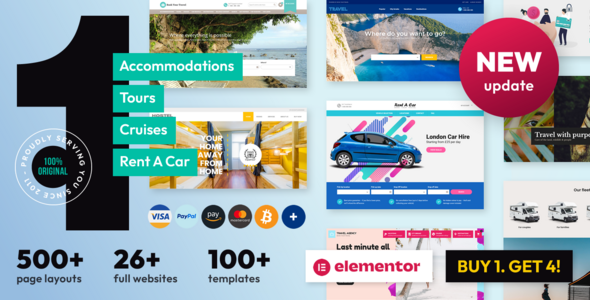
Stuck on your Book Your Travel WordPress theme? Let's fix it.
No endless back-and-forth. Just send us the details and we'll get it done.
No obligation · Replies within 1 hour · Quote within 1 day
Setup · Customization · Bug fixes · WooCommerce integration
About Book Your Travel WP Theme
Book Your Travel is a WordPress theme by ThemeEnergy built specifically for online travel booking businesses. It ships with a built-in hotel search, tour listings, car rentals, and activity bookings — all handled through WooCommerce and custom post types. The theme supports availability calendars, pricing tables, and room or package galleries out of the box.
It targets travel agencies, tour operators, bed and breakfasts, and car rental companies that need a booking workflow without paying for a separate plugin stack. The front end is built with Visual Composer, so layouts are drag-and-drop. Payment gateways, deposit options, and booking confirmation emails are all included. It is a practical starting point for travel sites that need real booking functionality, not just a pretty homepage.
Get matched with a Book Your Travel developer in under one day
Tell us about your Book Your Travel project. Small fixes, Book Your Travel theme customization, or a full website build, whatever you need, we've got it covered.
We'll connect you to the right Book Your Travel developers, define the scope, and get everything 100% clear.
You'll get one estimate, hire your preferred developer, and start collaborating.
Book Your Travel has enough moving parts — booking engine, WooCommerce, Visual Composer, availability calendars — that generic WordPress help rarely cuts it. You need someone who has worked inside this theme before. Through Codeable, you get matched with vetted WordPress developers who know travel booking themes and can hit the ground running. No agencies, no juniors, no guesswork. Post your project and get a real estimate within 24 hours.
Pros
- Built-in booking engine covers hotels, tours, car rentals, and activities without extra plugins
- WooCommerce integration handles payments, deposits, and booking confirmation emails natively
- Visual Composer included for drag-and-drop page building without touching code
- Availability calendars and seasonal pricing are configurable from the admin panel
- Multiple demo imports available covering different travel business types
Cons
- Relies on older Visual Composer (WPBakery) which creates page builder lock-in
- Booking engine customization requires PHP knowledge specific to ThemeEnergy's code structure
- Theme updates can break customizations made to booking templates or child theme overrides
- Limited compatibility testing with newer WooCommerce versions — conflicts appear after updates
- Support from ThemeEnergy is forum-based and can be slow for complex booking issues
Who is Book Your Travel for?
Tour Operators
Tour operators can list multi-day packages with itineraries, pricing tiers, group size limits, and departure calendars. The booking engine handles deposits and full payments. A Book Your Travel developer can add custom tour categories, filter sidebars by destination or duration, and connect the listings to a Google Maps route display.
Bed and Breakfasts
Bed and breakfasts get room listings with photo galleries, amenity icons, nightly rates, and an availability calendar guests can book directly. A Book Your Travel specialist can configure seasonal pricing, set minimum stay rules, and integrate Stripe or PayPal for secure checkout without a third-party booking platform taking a commission cut.
Car Rental Companies
Car rental businesses can set up vehicle listings with daily rates, pickup and drop-off locations, and insurance options at checkout. The theme’s WooCommerce base handles the transaction. A Book Your Travel developer can add custom fields for driver age requirements, GPS add-ons, and multi-location fleet filtering.
Travel Agencies
Travel agencies managing packages across multiple suppliers benefit from the theme’s flexible listing structure. Each package can have its own gallery, pricing table, and booking form. A Book Your Travel expert can build a custom search widget that filters by destination, travel style, or budget range to improve conversion from landing pages.
Activity and Experience Providers
Activity providers like cooking classes, diving schools, or city tour companies can list experiences with session times, participant limits, and instant booking. A Book Your Travel developer can wire up automated confirmation and reminder emails, add waiver form fields to the checkout, and display real-time availability without manual calendar management.

Customizing Book Your Travel
Customizing Book Your Travel goes well beyond swapping colors and fonts. The theme uses a custom booking engine with its own settings panel, so changes to pricing logic, availability rules, or seasonal rates require understanding how ThemeEnergy structured the back end. Visual Composer handles page layouts, but the booking widgets and search forms have their own configuration.
A Book Your Travel expert can integrate third-party payment gateways, build custom tour or property listing templates, adjust the checkout flow, and add multi-currency support. If you need custom search filters, conditional pricing, or a modified booking calendar, those tasks require PHP and WooCommerce knowledge specific to how this theme operates. Off-the-shelf customization only takes you so far.
Recommended plugins for Book Your Travel
Book Your Travel works well with a focused set of extensions. WooCommerce add-ons like WooCommerce Bookings or Stripe Payment Gateway extend the built-in checkout. WPML handles multilingual listings for international travel businesses. For speed, image-heavy tour galleries and map embeds need proper caching and optimization — a WordPress performance audit can cut load times significantly on travel sites with large inventories.
If organic traffic matters, pairing the theme with Rank Math or Yoast and running structured WordPress SEO optimization for tour and hotel pages helps listings appear in Google’s rich results. Schema markup for events and local businesses is especially useful here.
Not sure which plugins to use? This WordPress plugins directory covers the most popular options with reviews and setup guides.
Book Your Travel common issues
Book Your Travel booking form not sending confirmation emails
Confirmation emails failing usually points to a misconfigured WooCommerce email setting or a hosting server blocking outgoing mail. Check WooCommerce > Settings > Emails and confirm the booking confirmation template is enabled. Test with a plugin like WP Mail SMTP to route mail through an authenticated sender like SendGrid or Mailgun. If the issue persists after SMTP setup, a WordPress bug fix can trace the exact failure point in the theme’s email hooks.
Book Your Travel availability calendar not showing correct dates
Availability calendar issues in Book Your Travel often stem from a conflict between the theme’s custom post meta and a caching plugin writing stale data. Clear all caches first — object cache, page cache, and browser cache. If bookings made through the backend are not reflecting on the front end calendar, check whether the booking status in WooCommerce is set to a state the theme recognizes as confirmed. Incorrect status mapping is a common cause.
Book Your Travel WooCommerce checkout page broken after update
WooCommerce checkout breaks after updates usually mean a template file mismatch. Book Your Travel overrides several WooCommerce templates in its own directory. After a WooCommerce update, those overridden files become outdated. Go to WooCommerce > Status > System Status and look for outdated template warnings. Update the theme’s template overrides to match the new WooCommerce versions. If you are unsure which files to edit, the WordPress bug fixing service handles exactly this type of conflict.
Book Your Travel search widget not filtering results correctly
The search widget in Book Your Travel uses custom query parameters tied to specific taxonomy slugs. If results are wrong, check whether your tour or hotel categories match the slugs the widget expects. A permalink flush (Settings > Permalinks > Save) fixes many filtering issues. If custom post types were renamed or categories restructured, the widget query may need updating to match the new taxonomy structure.
Book Your Travel Visual Composer elements not loading on booking pages
WPBakery (Visual Composer) elements failing to load usually indicates a JavaScript conflict with another plugin or a PHP memory limit being hit. Open the browser console and look for JS errors pointing to a specific script. Increase PHP memory in wp-config.php if you see memory exhaustion errors. Deactivating plugins one by one while testing a booking page isolates the conflict quickly. A child theme and proper enqueueing of custom scripts also prevents this from recurring after updates.
Book Your Travel payment gateway not working with Stripe
Stripe not processing payments in Book Your Travel typically means the WooCommerce Stripe gateway plugin is running a version incompatible with the theme’s checkout template overrides. Check that the gateway is enabled, API keys are entered correctly, and that you are using HTTPS. If the payment button renders but transactions fail silently, the theme may be stripping required Stripe JS from the checkout page. Review the theme’s script loading logic on the checkout template.
Book Your Travel booking prices not calculating correctly
Incorrect price calculations in Book Your Travel often come from overlapping pricing rules — base price, seasonal rates, and extra services all interact. Review each listing’s pricing tab and confirm there are no conflicting rules set at the global and per-listing level. Tax settings in WooCommerce also affect totals displayed. If the math is wrong at checkout specifically, the issue may be in how the theme passes price data to the WooCommerce cart, which requires code-level investigation.
Book Your Travel demo import failing or importing blank pages
Demo import failures are common when server limits are too low. Increase max_execution_time to 300 seconds, upload_max_filesize to 64MB, and memory_limit to 256MB in php.ini or via wp-config.php. Try the import again after clearing any partial import data. If the pages import but appear blank, Visual Composer content may not have transferred correctly — re-import the demo content only, not the full package, to isolate which section is failing.
Book Your Travel Google Maps not displaying on tour or hotel listings
Google Maps failing to display on Book Your Travel listings is almost always caused by a missing or incorrectly restricted Google Maps API key. The theme requires a Maps JavaScript API key with the correct domain restrictions set in the Google Cloud Console. Enter the key in the theme options panel. If the map loads in admin but not on the front end, check for a Content Security Policy header from your hosting or security plugin that is blocking the Maps script domain.
Book Your Travel site slow to load on mobile with tour listings
Tour listing pages load slowly because of large unoptimized images, multiple map embeds, and unminified scripts loading on every page. Start by compressing tour images and serving them in WebP format. Lazy load images and defer non-critical JavaScript. Consider moving Google Maps to load on click rather than on page load. A full WordPress bug fix and performance review on mobile-specific bottlenecks can identify which assets are causing the most delay.
Book Your Travel FAQ
Yes, Book Your Travel is designed specifically for hotel and accommodation booking. It includes room listings, availability calendars, nightly pricing, and a checkout flow built on WooCommerce. It handles deposits, full payments, and booking confirmation emails without needing a separate hotel booking plugin, though complex property management setups may need developer customization.
Book Your Travel is built on WooCommerce for all payment processing and order management. Tours, rooms, and rental listings are WooCommerce products with custom booking fields layered on top. This means standard WooCommerce payment gateways — Stripe, PayPal, and others — work with the theme, though some checkout template overrides may need updating after major WooCommerce releases.
The front-end layouts rely on WPBakery (Visual Composer), so removing it breaks most demo page layouts. The booking functionality itself does not depend on WPBakery, but rebuilding page layouts without it requires significant custom development work. If you want to switch to Gutenberg or Elementor, a Book Your Travel specialist can migrate the layouts while preserving the booking engine.
Tour listings in Book Your Travel are a custom post type. Go to Tours in the WordPress admin, click Add New, and fill in the title, description, gallery, pricing, and availability settings. Each tour has its own meta box for dates, group size, and pricing tiers. Publishing the post adds it to the front-end tour archive and makes it bookable through the built-in checkout flow.
Book Your Travel does not include native multi-currency switching. You can add it through a WooCommerce multi-currency plugin such as Currency Switcher for WooCommerce. The theme’s pricing display needs to be tested with whichever plugin you choose, as some currency switchers conflict with the theme’s price calculation hooks and may show incorrect totals at checkout.
ThemeEnergy continues to sell and update Book Your Travel through ThemeForest. Support is provided through their forum system. Response times vary and complex booking engine questions may not get detailed answers. For active development needs or bug fixes beyond what the forum covers, working with an independent Book Your Travel developer is typically faster and more reliable.
Yes, Book Your Travel sites migrate like any WordPress site — export the database, move files, update wp-config.php with new database credentials, and update the site URL. Booking data is stored in WooCommerce order tables, so it travels with the database. Serialized data with absolute URLs should be updated using a tool like Better Search Replace after the move to avoid broken links.
Booking form fields in Book Your Travel are partly controlled through WooCommerce checkout settings and partly through the theme’s custom booking meta. Simple additions like a text field or checkbox at checkout can be done with a WooCommerce checkout fields filter in a child theme. More structural changes — adding fields to the booking widget or per-listing forms — require editing theme template files directly, which should be done in a child theme.
Book Your Travel is listed as WPML-compatible by ThemeEnergy. Tour listings, room types, and booking pages can be translated using WPML’s string translation and post translation features. Some booking engine strings may need manual registration in WPML’s string translation module. Testing all booking flows in each language after setup is important, as translated pages sometimes lose widget configurations.
ThemeEnergy builds several travel themes including Hotel Booking and Car Rental. Book Your Travel is the broadest, covering tours, hotels, and car rentals in one theme. The other themes are purpose-built for single verticals and tend to have simpler, more focused admin interfaces. If you only run a hotel, a single-purpose theme may be easier to manage. If you offer multiple travel products, Book Your Travel covers more ground.
Hire a Book Your Travel Developer
Whether you need a booking flow fixed, a custom tour listing built, or a full site setup, a dedicated Book Your Travel developer handles it faster and cleaner than trial and error. FoxyConcept delivers work through Codeable, so every developer is vetted and every project starts with a free estimate. Get a Free Estimate and describe exactly what you need — no obligation to hire.
You'll need a free Codeable account so developers can ask questions and send their quotes.