BookCard WP WordPress Theme
by pixelwars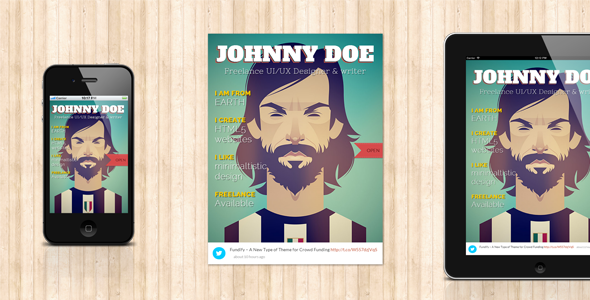
Stuck on your BookCard WP WordPress theme? Let's fix it.
No endless back-and-forth. Just send us the details and we'll get it done.
No obligation · Replies within 1 hour · Quote within 1 day
Setup · Customization · Bug fixes · WooCommerce integration
About BookCard WP WP Theme
BookCard WP is a WordPress theme by pixelwars built for authors, publishers, and book-related businesses. It gives you a clean, structured layout designed to showcase books, author bios, and reading lists without a lot of setup friction.
The theme includes dedicated book archive pages, single book templates with cover display, author profile sections, and pre-built page layouts. It works well with WooCommerce if you want to sell books directly, and integrates with common review or rating plugins.
BookCard WP is a niche theme, which is a strength. Instead of a generic multi-purpose layout you have to wrestle into shape, you get templates built specifically for the book world. That said, niche themes have limits, and customization sometimes requires a developer once you move past what the settings panel offers.
Get matched with a BookCard WP developer in under one day
Tell us about your BookCard WP project. Small fixes, BookCard WP theme customization, or a full website build, whatever you need, we've got it covered.
We'll connect you to the right BookCard WP developers, define the scope, and get everything 100% clear.
You'll get one estimate, hire your preferred developer, and start collaborating.
BookCard WP does a lot out of the box, but custom work requires someone who understands how the theme is structured. That is where working through Codeable makes sense. Every developer on the platform is vetted, so you are not guessing at skill level. Post your project, get matched with a BookCard WP developer within 24 hours, and review a free estimate before committing to anything. No retainers, no risk.
Pros
- Purpose-built templates for book archives and single book pages save significant setup time
- Clean author bio sections with social links and book lists work out of the box
- WooCommerce compatibility means you can sell books without a separate storefront theme
- Dedicated book cover display with structured metadata fields for genre, ISBN, and publisher
- Lightweight footprint compared to multipurpose themes overloaded with unused features
Cons
- Limited layout flexibility outside the default book and author templates
- Fewer third-party tutorial resources available compared to mainstream themes like Astra or Divi
- Update frequency from pixelwars is slower than larger theme shops, which can create compatibility lag
- Page builder support is not deep, so visual drag-and-drop editing has restrictions
- The niche focus makes it a poor fit if your site grows beyond books into unrelated content areas
Who is BookCard WP for?
Independent Authors
BookCard WP gives independent authors a professional home for their catalog. You can list each title with cover art, synopsis, buy links, and genre tags. The author bio section handles social proof cleanly. It is a better starting point than adapting a generic portfolio theme and spending hours on layout work that BookCard WP handles by default.
Small Book Publishers
Small publishers with multiple authors and titles benefit from the archive structure. Each author gets a profile page, each book gets its own template, and the relationship between them is built into the theme. Managing a catalog of ten to fifty titles is straightforward without custom development unless you need advanced filtering or bulk import.
Book Review Blogs
Book review bloggers get structured single-book pages with rating support and clean typography for long-form reviews. The reading archive keeps content organized by genre or author. Pairing the theme with an SEO plugin helps review posts rank for specific book titles, which is where most organic search traffic comes from in this niche.
Online Bookshops
With WooCommerce active, BookCard WP becomes a functional bookshop. Product pages use the book template layout, so cover art and metadata display correctly without custom styling. It works best for curated shops with a focused inventory. Very large catalogs may need additional performance work to keep page loads acceptable.
Literary Agencies
Literary agencies can use BookCard WP to present their roster of authors and titles in a structured, browsable format. Client author pages, recent publications, and submission guidelines each fit the existing template structure. It presents a more polished and relevant appearance than a standard business theme adapted for agency use.

Customizing BookCard WP
BookCard WP comes with a theme options panel that covers fonts, colors, header layout, and homepage sections. Most standard adjustments are doable without code. But if you want to change the book grid structure, add custom fields to book post types, or build a landing page that falls outside the default templates, you will hit the edges of what the panel allows.
A BookCard WP expert can handle those gaps cleanly. Child theme setup, custom CSS overrides, CPT modifications, and WooCommerce template adjustments are common requests. Trying to force those changes without proper theme knowledge often breaks the layout or creates update conflicts.
Working with a developer who knows the pixelwars codebase saves time. They know where the template files live, how the theme handles post types, and which hooks to use for clean customization.
Recommended plugins for BookCard WP
BookCard WP works well with several plugin categories worth considering. WooCommerce turns your book archive into a functional store. A review plugin like WP Product Review adds structured rating output. An email marketing plugin such as Mailchimp for WordPress pairs well with author newsletter sign-ups.
For site speed, image optimization and caching plugins help with cover-heavy pages. You can read more about WordPress performance improvements to keep load times in check. If you plan to drive organic traffic, pairing the theme with a solid WordPress SEO strategy will improve how book pages rank in search results.
Not sure which plugins to use? This WordPress plugins directory covers the most popular options with reviews and setup guides.
BookCard WP common issues
BookCard WP book post type not showing on homepage
This usually happens when the homepage template is set to a static page that does not include the book post type query. Check your Reading Settings and confirm the homepage template is the correct one from BookCard WP. If it is, open the theme options and verify the homepage sections are enabled and assigned. If the post type was registered by a plugin that deactivated, that will also cause books to disappear from queries.
BookCard WP WooCommerce product pages losing theme styling
WooCommerce uses its own template files, and BookCard WP may not override all of them. When WooCommerce updates, it sometimes breaks the connection between theme templates and plugin output. Check the WooCommerce system status for outdated template files. In most cases, a developer needs to create properly structured overrides in a child theme to keep the book layout intact after updates. Our WordPress bug fixing service covers this type of conflict.
BookCard WP custom fonts not loading correctly
Custom font failures in BookCard WP are usually caused by a caching plugin serving an old stylesheet, an enqueue conflict with another plugin, or a Content Security Policy header blocking external font sources like Google Fonts. Clear all caches first. Then check the browser console for blocked resource errors. If you moved to a new host recently, check that your SSL certificate is not causing mixed content issues with external font URLs.
BookCard WP author archive page returning 404 error
A 404 on author archive pages typically means permalinks need flushing. Go to Settings, then Permalinks, and click Save without changing anything. If that does not fix it, the custom rewrite rules for BookCard WP author post types may not be registering correctly. This can happen after a theme update or when a caching plugin stores old rewrite rules. Deactivate caching temporarily to test. Persistent issues usually require a developer to inspect the rewrite registration code.
BookCard WP FAQ
Yes, BookCard WP supports WooCommerce and the book template layout carries over to product pages reasonably well. You can sell physical or digital books directly from your site. For larger stores or more control over the checkout and product page layout, some custom template work may be needed. A developer can align WooCommerce output precisely with the theme design.
BookCard WP does not have deep native integration with Elementor. You can use Elementor on standard pages, but the custom book and author templates are outside the page builder’s control. Trying to rebuild those templates in Elementor often creates conflicts or duplicate layouts. For modifications to the book-specific templates, direct PHP and CSS work inside a child theme is the cleaner approach.
BookCard WP includes several built-in fields for books such as genre, ISBN, and publisher. If you need additional fields, a plugin like Advanced Custom Fields handles that without touching theme code. Displaying those custom fields in the correct location on the book template usually requires a small code addition in a child theme or a developer to hook into the right template action.
Always use a child theme for any customizations. If you have edited the parent theme files directly, those changes will be overwritten on update. Before updating, back up your site and review the changelog for template changes that could affect your layout. If you are unsure about safe update procedures, our WordPress maintenance service handles this as part of routine upkeep.
pixelwars updates BookCard WP, but the release cadence is slower than larger commercial theme shops. It is worth checking the theme’s changelog and support forum on ThemeForest for recent activity before purchasing or committing to a project. If update support is a concern, a developer can maintain compatibility with current WordPress and WooCommerce versions independently of official theme releases.
Hire a BookCard WP Developer
If your BookCard WP site needs custom layouts, book post type modifications, WooCommerce integration, or anything the settings panel cannot handle, a specialist is the faster path. Get a free estimate through FoxyConcept and connect with a vetted BookCard WP developer via Codeable. You describe the work, receive an estimate, and decide with no obligation to proceed.
You'll need a free Codeable account so developers can ask questions and send their quotes.