Bopea WordPress Theme
by jellywp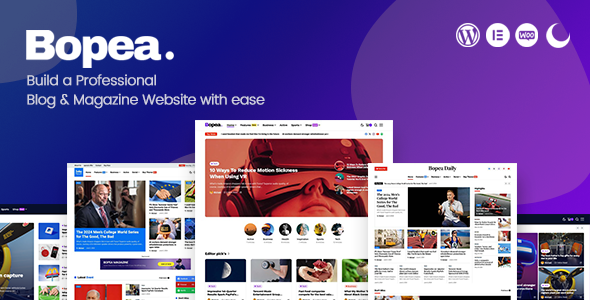
Stuck on your Bopea WordPress theme? Let's fix it.
No endless back-and-forth. Just send us the details and we'll get it done.
No obligation · Replies within 1 hour · Quote within 1 day
Setup · Customization · Bug fixes · WooCommerce integration
About Bopea WP Theme
Bopea is a WordPress theme built by JellyWP, designed primarily for creative agencies, portfolios, and small businesses that want a clean, modern look without heavy page builder overhead. It ships with pre-built demo templates, a block-based layout system, and tight integration with the WordPress Site Editor.
The theme is lightweight by default, which helps with load times out of the box. Typography controls, color palettes, and layout spacing are all handled through the Global Styles panel, so you get a consistent design without writing custom CSS for every element.
JellyWP has a reputation for well-coded themes that follow WordPress standards. Bopea is no exception. It suits developers and non-developers alike, though getting the most out of the template parts and block patterns does require some familiarity with full-site editing.
Get matched with a Bopea developer in under one day
Tell us about your Bopea project. Small fixes, Bopea theme customization, or a full website build, whatever you need, we've got it covered.
We'll connect you to the right Bopea developers, define the scope, and get everything 100% clear.
You'll get one estimate, hire your preferred developer, and start collaborating.
Bopea is well-built, but full-site editing themes have a learning curve. Template hierarchy, block patterns, and theme.json configuration can trip up even experienced WordPress users. FoxyConcept works through Codeable, a vetted network of WordPress specialists. Every developer on the platform has passed a rigorous vetting process, so you get someone who actually knows what they’re doing with Bopea, not a generalist guessing their way through it.
Pros
- Lightweight core with no bundled page builder slowing down load times
- Full-site editing support with theme.json for consistent global design control
- Includes well-structured block patterns for common page sections
- Clean, standards-compliant code from JellyWP with good developer documentation
- Responsive layouts that work across devices without extra configuration
Cons
- Full-site editing has a steep learning curve for non-technical users
- Fewer third-party tutorials compared to major themes like Astra or GeneratePress
- Advanced customization requires direct theme.json editing or child theme work
- Limited built-in WooCommerce templates for complex shop layouts
- Smaller community means fewer ready-made solutions if you hit an edge-case problem
Who is Bopea for?
Creative Agency Portfolio
Bopea’s clean grid layouts and typography controls suit agencies that want a distinctive portfolio without heavy design overhead. Block patterns for project showcases and team sections mean you can build a polished multi-page portfolio site quickly. The minimal codebase keeps performance strong even with large image assets.
Freelancer or Consultant Website
Freelancers need a site that loads fast, looks credible, and converts visitors. Bopea’s lightweight structure and Site Editor controls make it straightforward to set up a one or two-page site with a clear services section and contact form integration. No unnecessary features eating into performance or attention.
Small Business Service Site
Local businesses and service providers benefit from Bopea’s pre-built section patterns for testimonials, service lists, and call-to-action blocks. The theme handles standard business site requirements without forcing you into a bloated plugin ecosystem. A developer can extend it quickly for booking forms or custom post types.
Digital Product or SaaS Landing Page
Bopea works as a foundation for SaaS landing pages and digital product sites where performance and conversion layout matter. Its block-based structure makes it practical to build feature sections, pricing tables, and hero layouts that load quickly. Combine with a lightweight plugin for split-testing or lead capture.
Photography or Design Studio
Photographers and designers need a theme that keeps the visual work front and center. Bopea’s full-width layout options, minimal chrome, and clean typography make it suitable for image-heavy portfolios. Gallery blocks and full-site editing give you tight control over how work is presented without custom coding.

Customizing Bopea
Bopea customization works entirely inside the WordPress Site Editor. You can swap template parts, edit header and footer layouts, and adjust global fonts and colors without touching a stylesheet. Block patterns included with the theme give you a starting point for common page sections like hero areas, service grids, and testimonial rows.
Beyond the basics, customization gets more technical quickly. Custom post type layouts, advanced query loops, and conditional template logic all require hands-on development work. A Bopea expert can handle these without breaking your existing design or introducing bloat.
If you need Bopea customized beyond what the Site Editor offers, a developer who knows JellyWP’s codebase will save you significant time and avoid the trial-and-error that comes with unfamiliar theme architecture.
Recommended plugins for Bopea
Bopea works well with WooCommerce for simple shop setups, and the block-based structure means most Gutenberg-compatible plugins slot in without conflict. For contact forms, WPForms and Gravity Forms both integrate cleanly.
If you plan to extend Bopea with performance tooling, caching plugins, or image optimization, check the WordPress performance services available through FoxyConcept. For sites that need search visibility improvements on top of the theme, WordPress SEO optimization covers technical and on-page work beyond what a theme alone can provide.
Not sure which plugins to use? This WordPress plugins directory covers the most popular options with reviews and setup guides.
Bopea common issues
Bopea theme header not showing correctly after update
Header display issues in Bopea usually trace back to a conflict between a customized template part and a theme update that changed the default header structure. Open the Site Editor, navigate to the Header template part, and check whether your saved version overrides the updated default. Resetting to the theme default and reapplying changes usually resolves it. If a plugin is injecting scripts into the header, disable plugins one by one to isolate the conflict. Need help fast? The WordPress bug fixing service can diagnose and fix this same day.
Bopea block patterns missing or not loading in editor
Missing block patterns in Bopea typically happen when the theme files haven’t fully updated, or when a caching plugin is serving stale data to the editor. Clear all caches first, then deactivate and reactivate the theme. If patterns still don’t appear, check whether a child theme is overriding the patterns directory. A file comparison between your active theme and the latest Bopea release from JellyWP will confirm whether any pattern registration files are missing or corrupted.
Bopea theme styles not applying after WordPress update
When Bopea styles stop applying after a WordPress core update, the most common cause is a change in how Global Styles or theme.json are processed. Check the browser console for CSS loading errors and confirm your theme version is compatible with the current WordPress release. If you’re using a child theme, ensure the parent theme’s style.css is still being enqueued correctly. Clearing object cache and browser cache rules out stale stylesheet delivery before digging deeper into template or enqueue conflicts.
Bopea WooCommerce pages not displaying template layout
Bopea’s WooCommerce template coverage is limited. If shop, product, or cart pages are not using the expected layout, the theme may be falling back to WooCommerce’s default templates rather than custom block templates. Check the Site Editor for WooCommerce-specific templates and confirm they’re assigned correctly. If none exist, you need to create them using block template files. A developer familiar with both Bopea and WooCommerce can build these out properly without breaking the rest of the site.
Bopea FAQ
Yes. Bopea is a block theme built for the WordPress Site Editor. It uses template parts, block patterns, and theme.json for design control, which means it requires WordPress 6.0 or higher. The classic Customizer is not used. All layout and style changes are made through the Site Editor’s Global Styles panel and template editing interface.
Bopea is compatible with WooCommerce for basic shop setups. Standard product pages, cart, and checkout will function correctly. However, Bopea does not ship with a full set of custom WooCommerce block templates, so complex shop layouts may need custom template development. A developer can build those out as extensions to the existing theme structure.
Creating a child theme for Bopea follows the standard WordPress block theme child theme process. You need a new theme directory with a style.css referencing Bopea as the parent template, and a theme.json to extend or override parent styles. Unlike classic themes, block theme child themes don’t need a functions.php to enqueue parent styles. JellyWP’s documentation covers the specifics for Bopea.
Bopea is available from JellyWP. Check the JellyWP website for current pricing and licensing details, as availability and tier options can change. Some JellyWP themes offer free versions with premium upgrades, so confirm which version you’re using and what features are included before building a production site on it.
Yes, you can use Bopea for client websites. Review JellyWP’s license terms to confirm whether a single license covers one site or multiple. For agencies building multiple client sites on Bopea, a developer license or multi-site license is usually the appropriate option. Always keep the license documentation on file for client handoffs.
Hire a Bopea WordPress Developer
Need a Bopea developer to build a custom layout, fix a broken template, or extend the theme with new functionality? FoxyConcept delivers WordPress development through Codeable. Post your project, get a free estimate within 24 hours, and only move forward if the scope and price work for you. No obligation, no risk.
Get your free estimate today and describe what you need done with Bopea.
You'll need a free Codeable account so developers can ask questions and send their quotes.