Breek WordPress Theme
by EstudioPatagon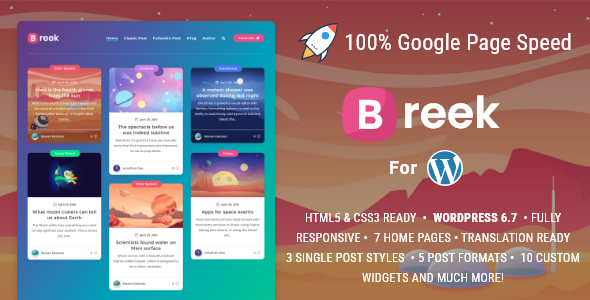
Stuck on your Breek WordPress theme? Let's fix it.
No endless back-and-forth. Just send us the details and we'll get it done.
No obligation · Replies within 1 hour · Quote within 1 day
Setup · Customization · Bug fixes · WooCommerce integration
About Breek WP Theme
Breek is a WordPress theme built by EstudioPatagon, a studio known for clean design and solid code. It uses a block-based layout with a strong focus on typography, whitespace, and visual hierarchy. The theme targets creative agencies, portfolios, and content-heavy sites that need a polished look without loading a page builder.
Breek ships with full-site editing (FSE) support, making it compatible with the WordPress block editor out of the box. Pattern libraries, global styles, and template parts give site owners a structured way to build pages. It is lightweight by default, which helps with Core Web Vitals scores. EstudioPatagon maintains active updates, so compatibility with the latest WordPress releases is generally reliable.
Get matched with a Breek developer in under one day
Tell us about your Breek project. Small fixes, Breek theme customization, or a full website build, whatever you need, we've got it covered.
We'll connect you to the right Breek developers, define the scope, and get everything 100% clear.
You'll get one estimate, hire your preferred developer, and start collaborating.
EstudioPatagon builds themes with developers in mind, but that does not mean every customisation is obvious. Breek’s FSE architecture has real depth, and getting it to behave exactly as a project requires takes experience with block hooks, theme.json, and WordPress template hierarchy.
Through Codeable, you get matched with a vetted Breek specialist who has worked on similar projects. No agencies, no bidding, no guesswork about who actually does the work. Post a project, get an estimate, and decide from there.
Pros
- Full site editing support with theme.json makes global style changes predictable and consistent
- Lightweight default output with minimal render-blocking resources helps Core Web Vitals scores
- EstudioPatagon provides regular updates keeping the theme compatible with current WordPress versions
- Block pattern library speeds up page building without requiring a third-party page builder
- Clean, typographically strong design works well for portfolio and editorial use cases out of the box
Cons
- FSE-based customisation has a steeper learning curve than classic theme options panels
- Limited WooCommerce-specific templates mean e-commerce builds need additional custom work
- theme.json overrides can be hard to manage when child themes or plugins also modify global styles
- Fewer third-party tutorials and community resources compared to mainstream themes like Astra or GeneratePress
- Some design patterns look noticeably similar across sites unless layout and typography are actively customised
Who is Breek for?
Creative Agency
Breek’s grid-based layouts and strong typographic defaults suit agency sites that need to present case studies and service pages cleanly. A Breek developer can build custom project archive templates and configure global styles to match brand guidelines precisely, without the overhead of a page builder slowing down the site.
Freelance Portfolio
For freelancers who want a fast, well-structured portfolio without managing a complex theme, Breek is a practical choice. The block patterns cover most standard portfolio layouts. A Breek specialist can add custom post types for project work and set up query templates that filter by category or service type.
Editorial or Magazine Site
Breek handles content-heavy pages well. Its whitespace-led design keeps long-form text readable, and the pattern library includes editorial layouts suited to articles and features. A Breek expert can configure category templates, archive pages, and reading-time indicators to support a consistent editorial experience.
Architecture or Interior Design Studio
Architecture and interior design studios need image-forward layouts that do not sacrifice load speed. Breek’s minimal structure lets large images carry the visual weight without heavy CSS interference. A Breek developer can set up full-bleed project pages and custom gallery templates that reflect the studio’s aesthetic.
Photography Website
Photography sites built on Breek benefit from its clean image presentation and fast default loading. The FSE templates make it straightforward to build consistent gallery and series pages. A Breek specialist can handle lazy loading configuration, image format optimisation, and lightbox integration to keep performance high.

Customizing Breek
Customising Breek goes beyond swapping colours and fonts. The theme relies heavily on block patterns and template parts, so getting the layout exactly right requires a working knowledge of the site editor. A Breek expert can configure global styles, build custom templates for specific post types, and wire up patterns in a way that stays easy for clients to edit later.
If you want custom query loops, conditional templates, or non-standard header and footer layouts, that work moves outside what the site editor handles cleanly. A Breek developer can write custom PHP for template logic, register block variations, and apply CSS that targets Breek’s specific class structure without breaking on theme updates. The result is a site that looks intentional rather than default.
Recommended plugins for Breek
Breek pairs well with performance-focused tooling. Because it is FSE-based, font loading, image sizing, and script handling all need deliberate configuration. Pairing Breek with a proper caching layer and image optimisation setup is straightforward once the theme is correctly structured. See our WordPress performance service for detail on what that involves.
For search visibility, Breek’s clean HTML output is a good starting point, but structured data, sitemap configuration, and meta handling still need attention. A targeted SEO setup built around the site’s content strategy will go further than the theme alone. Our WordPress SEO service covers that end to end.
Not sure which plugins to use? This WordPress plugins directory covers the most popular options with reviews and setup guides.
Breek common issues
Breek theme custom fonts not loading correctly in site editor
Font loading issues in Breek usually come down to how fonts are registered in theme.json or how a plugin is enqueuing its own font stack and overriding Breek’s settings. Check the typography.fontFamilies section in theme.json first and confirm font files are correctly referenced. If a caching plugin is serving stale CSS, flush all caches after any font change. Persistent issues often involve conflicting plugin CSS. Our WordPress bug fixing service can trace the exact source and resolve it cleanly.
Breek template changes not saving or reverting after update
Breek uses WordPress FSE templates stored in the database once customised via the site editor. A theme update can reintroduce default file-based templates if the database entries are wiped or if the update process resets template revisions. Before updating, export your template customisations. If templates have already reverted, check the template revision history in the site editor. A Breek developer can recover lost templates and set up a workflow that prevents this happening again. Our WordPress bug fixing service handles this kind of issue directly.
Breek header layout broken on mobile
Mobile header problems in Breek are usually caused by custom CSS that targets desktop breakpoints without corresponding mobile rules, or by a plugin injecting a sticky header script that conflicts with Breek’s navigation block. Open browser dev tools and inspect which styles are active at mobile widths. Check for plugin-added scripts that modify header position or z-index. If the issue appeared after a recent update, compare the current template against a known good state in the template editor’s revision history.
Breek theme.json changes not applying to frontend
theme.json changes not appearing on the frontend is a common FSE issue. The site editor caches global styles in the database, so file-level theme.json edits are only picked up when the database-stored styles are cleared. Go to Appearance > Editor > Styles and reset to defaults, or use WP-CLI to clear the global styles post. Also check whether a child theme has its own theme.json that is taking priority. If you are using a caching plugin, purge all CSS cache after making theme.json edits.
Breek FAQ
Yes. Breek is built as a block theme with full site editing support. It uses theme.json for global styles and relies on WordPress template parts and block patterns rather than a classic customiser. This means you manage headers, footers, and page templates through the WordPress site editor rather than a separate theme options panel.
Breek will run alongside WooCommerce, but it does not include dedicated WooCommerce templates. Default WooCommerce styles will apply to shop and product pages, which usually means some visual inconsistency with the rest of the site. A Breek developer can build custom WooCommerce templates that match the theme’s design properly.
Basic content editing and pattern-based page building is accessible to non-developers. Deeper customisation, including custom templates, modified global styles, and any work outside what the site editor handles cleanly, will require developer involvement. The FSE interface is more technical than classic WordPress theme customisers.
Create a folder in wp-content/themes/ with a style.css file that includes Template: breek in the header comment. For FSE child themes you can also include a theme.json to override parent styles. A Breek specialist can set this up correctly so updates to the parent theme do not overwrite your customisations.
Breek outputs clean, semantic HTML which is a reasonable starting point for SEO. The lightweight default structure helps with page speed, which is a ranking factor. That said, the theme alone does not handle structured data, XML sitemaps, or meta configuration. Those need a dedicated SEO plugin and proper setup to be effective.
Hire a Breek Developer
Whether you need a full Breek build, a specific customisation, or a fix for something that has broken, a dedicated Breek developer will get it done without workarounds that cause problems later. Work is scoped clearly upfront so there are no surprises on delivery or cost.
Start with a free estimate, no obligation to hire. Get a Free Estimate and describe what you need. You will be matched with a Breek specialist through Codeable within 24 hours.
You'll need a free Codeable account so developers can ask questions and send their quotes.