Brivona WordPress Theme
by ThemetechMount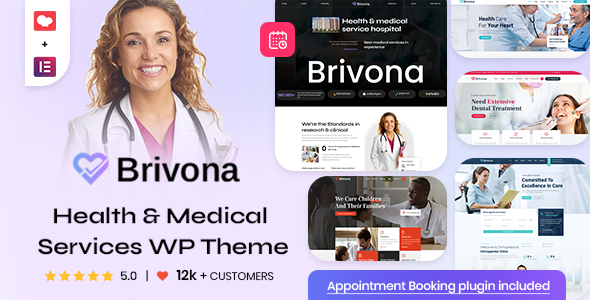
Stuck on your Brivona WordPress theme? Let's fix it.
No endless back-and-forth. Just send us the details and we'll get it done.
No obligation · Replies within 1 hour · Quote within 1 day
Setup · Customization · Bug fixes · WooCommerce integration
About Brivona WP Theme
Brivona is a multipurpose WordPress theme built by ThemetechMount. It targets businesses, agencies, and service-based websites that need a clean, professional layout without heavy customization work upfront.
The theme ships with multiple homepage demos, pre-built inner page templates, and WooCommerce compatibility. It is built on a page builder-friendly structure, making it accessible to users who want to set up a site without writing code.
Brivona supports Elementor, includes custom widgets, and follows standard WordPress coding practices. Typography, color schemes, and layout widths are all adjustable from the Customizer. It is translation-ready and includes RTL support, which widens its usability across different markets. For a business site that needs to go live quickly with a polished result, Brivona provides a solid starting point.
Get matched with a Brivona developer in under one day
Tell us about your Brivona project. Small fixes, Brivona theme customization, or a full website build, whatever you need, we've got it covered.
We'll connect you to the right Brivona developers, define the scope, and get everything 100% clear.
You'll get one estimate, hire your preferred developer, and start collaborating.
Most Brivona issues come down to one thing: the theme does what it does, but getting it to do something slightly different takes real skill. Tweaking a demo to fit your actual content, adding custom functionality, or diagnosing a conflict with another plugin are not beginner tasks.
FoxyConcept connects you with vetted WordPress developers through Codeable. Every developer on the platform has passed a strict vetting process. You get a free estimate before committing to anything. If your Brivona site needs work done properly, this is the straightforward way to get it done.
Pros
- Ships with multiple ready-to-import homepage demos that cover agency, business, and service layouts
- Full Elementor compatibility with custom widgets included in the theme package
- WooCommerce ready out of the box with styled product pages that match the theme design
- RTL and translation-ready, making it usable for multilingual or right-to-left language sites
- Lightweight front end with relatively clean markup that does not load unnecessary resources
Cons
- Demo import can be inconsistent, sometimes requiring manual setup of widgets and menus after import
- ThemetechMount's documentation is thin in places, making advanced customization harder to self-serve
- Header and footer builder options are limited compared to themes like Astra or GeneratePress
- Support response times from ThemetechMount can be slow, especially for free tier users
- Some design sections feel dated and need CSS overrides to modernize without rebuilding from scratch
Who is Brivona for?
Digital Agency Website
Brivona’s agency-style demo includes service blocks, team sections, and a portfolio grid. It suits web design studios, marketing agencies, or consulting firms that need a professional front page quickly. The Elementor integration makes it easy to swap in real content without rebuilding the layout structure from scratch.
Small Business Services
Plumbers, accountants, cleaning companies, and similar local businesses benefit from Brivona’s straightforward layout and contact-focused design. The theme includes call-to-action sections, service listing blocks, and a clean contact page template. It gets a professional service site live without overcomplicating the build.
Portfolio and Freelance
Brivona’s portfolio grid and project detail layout work well for freelancers showing off client work. Designers, photographers, and developers can use the pre-built portfolio sections with Elementor to present work clearly. The minimal design keeps the focus on the work itself rather than heavy theme decoration.
WooCommerce Store
WooCommerce integration is built into Brivona, with styled product pages, cart, and checkout that match the overall theme. It suits small online stores selling physical or digital products. You get a functional shop setup without needing a separate WooCommerce theme or significant template overrides to make it look consistent.
Startup Landing Page
Brivona’s single-page layout demo works for startups that need a fast, focused landing page. Hero section, feature blocks, pricing table, and a contact form can all sit on one page. It loads quickly and converts well when the content is clear. Elementor makes it easy to iterate on copy and layout without a developer.

Customizing Brivona
Brivona gives you a reasonable amount of control through the WordPress Customizer and Elementor. You can change fonts, colors, header layouts, and footer structure without touching code. The pre-built demo sections can be rearranged or replaced to match your brand.
However, deeper customization, like modifying the theme’s template hierarchy, adjusting WooCommerce templates, or building custom post type layouts, requires PHP and CSS knowledge. If you need Brivona to do something it does not do out of the box, that work gets technical fast.
A Brivona expert can handle those tasks cleanly. Whether it is a custom header, a modified archive layout, or integrating a third-party plugin with the theme’s design, working with someone who knows the theme saves time and avoids broken layouts or conflicts.
Recommended plugins for Brivona
Brivona works with the plugins most WordPress sites rely on. Elementor handles page building. WooCommerce covers shop functionality. WPML and Polylang handle translation. Contact Form 7 and WPForms both integrate without issues.
For SEO, Brivona’s clean markup works well alongside a proper SEO setup. The theme does not bloat the front end with unnecessary scripts, which helps with load times. If speed is a priority, pairing Brivona with a performance optimization service will get you measurably faster results. Caching, image compression, and script deferral all work on top of the theme without conflicts.
Not sure which plugins to use? This WordPress plugins directory covers the most popular options with reviews and setup guides.
Brivona common issues
Brivona demo import not working
Demo import failures in Brivona usually come from server limits. PHP memory, max execution time, and upload size all need to be high enough to handle the demo files. Set memory_limit to at least 256MB and max_execution_time to 300. If the import still stalls, try importing XML content and widgets separately rather than using the one-click importer. If you cannot access server settings, a developer can resolve this quickly. Our bug fixing service covers import issues like this.
Brivona header menu not displaying correctly
A misaligned or invisible menu in Brivona is almost always a menu location assignment problem. Go to Appearance, then Menus, and confirm the correct menu is assigned to the Primary location. If the menu shows but the styling is off, a CSS conflict with a plugin or Elementor header template is likely the cause. Disabling plugins one at a time helps isolate the conflict. If the header is a custom Elementor template, check that the display conditions are set correctly and not overriding the theme header.
Brivona Elementor widgets missing after update
Brivona’s custom Elementor widgets can disappear after a theme or Elementor update if the widget registration code breaks compatibility. First, clear all caches and regenerate Elementor’s CSS. If widgets are still missing, deactivate and reactivate the theme. Check the browser console for JavaScript errors that might prevent widgets from loading. If you are running Elementor Pro, version mismatches between it and the theme occasionally cause widget conflicts. Updating all components together usually resolves this.
Brivona WooCommerce product page layout broken
A broken WooCommerce layout in Brivona is usually caused by a missing or outdated WooCommerce template file within the theme. When WooCommerce updates its templates, themes that have not updated their overrides show layout problems. Check WooCommerce under WooCommerce, then Status, then System Status to see if any theme templates are outdated. Updating those specific files, either manually or through a child theme override, fixes the issue without affecting the rest of the site. Our WordPress bug fixing service handles WooCommerce template conflicts regularly.
Brivona FAQ
Brivona is available in both free and premium versions. The free version is listed on the WordPress theme repository and includes basic features and limited demo options. The premium version, sold through ThemetechMount, unlocks additional demos, more Elementor widgets, extended customization options, and priority support. For most business sites, the premium version is worth the cost.
Yes, Brivona is built with Elementor compatibility in mind. It includes custom Elementor widgets that extend the default widget library. Most of the pre-built demos are constructed with Elementor, so importing them gives you editable Elementor sections. The theme works with both the free and Pro versions of Elementor, though some advanced widget features may depend on the premium theme version.
After installing Brivona, go to Appearance, then Import Demo Data, if the theme includes a demo importer. You may need to install the required plugins first, including Elementor and any theme-specific plugins listed during activation. Make sure your server’s PHP memory limit and execution time are set high enough before importing, as large demo files will fail on restrictive hosting environments.
Brivona produces reasonably clean HTML output, which gives SEO plugins like Yoast or Rank Math a solid foundation to work with. The theme does not add excessive markup or render-blocking scripts by default. That said, the theme alone does not determine your rankings. Pairing it with a proper SEO setup and fast hosting will have far more impact than the theme choice itself.
Yes, Brivona includes WooCommerce support. Product pages, the cart, and checkout all inherit the theme’s styling. It suits small to mid-sized stores selling physical or digital products. For heavily customized shop layouts or large product catalogs, you may need additional template work. A developer can extend Brivona’s WooCommerce templates to match specific store requirements without rebuilding the whole site.
Hire a Brivona Developer
Whether you need a Brivona site built from scratch, customized beyond the defaults, or fixed after something broke, a specialist is faster and safer than working through it alone. FoxyConcept matches you with experienced WordPress developers through Codeable’s vetted network. You get a clear estimate with no obligation to proceed. Get a free estimate today and describe exactly what your Brivona project needs.
You'll need a free Codeable account so developers can ask questions and send their quotes.