Brixton WordPress Theme
by gljivec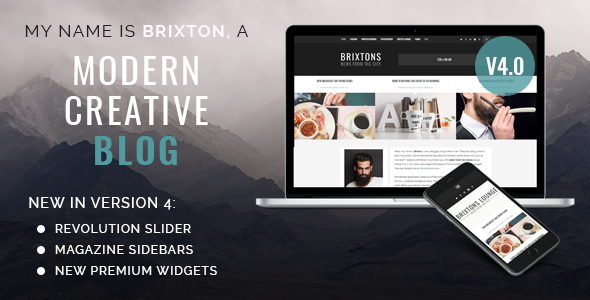
Stuck on your Brixton WordPress theme? Let's fix it.
No endless back-and-forth. Just send us the details and we'll get it done.
No obligation · Replies within 1 hour · Quote within 1 day
Setup · Customization · Bug fixes · WooCommerce integration
About Brixton WP Theme
Brixton is a bold, magazine-style WordPress theme built for publishers, bloggers, and content-heavy sites. It ships with a clean grid layout, multiple homepage templates, and strong typographic hierarchy. The theme is Gutenberg-compatible and works well with popular page builders, making it a practical choice for editors who want control without writing code.
Brixton supports custom widgets, flexible post formats, and a built-in featured post slider. It is translation-ready and WooCommerce-compatible, so you can add a shop without switching themes. Performance is reasonable out of the box, though image-heavy configurations will need additional optimisation. Overall, Brixton gives content sites a professional structure that is straightforward to manage once it is set up correctly.
Get matched with a Brixton developer in under one day
Tell us about your Brixton project. Small fixes, Brixton theme customization, or a full website build, whatever you need, we've got it covered.
We'll connect you to the right Brixton developers, define the scope, and get everything 100% clear.
You'll get one estimate, hire your preferred developer, and start collaborating.
Brixton is approachable for editors but can get complicated fast when you need custom layouts, plugin conflicts resolved, or performance brought up to a professional standard. The developers at FoxyConcept work through Codeable, a vetted network where you post your project and receive a free estimate within 24 hours. No retainer, no guesswork. You describe what you need, a Brixton developer reviews it, and you decide whether to proceed. Every engagement is risk-free.
Pros
- Clean magazine grid that works well for high-volume content sites without custom coding
- Multiple homepage templates included, reducing setup time for new publications
- Gutenberg-compatible with a sensible block styling baseline already in place
- WooCommerce-ready so you can add shop functionality without a theme change
- Translation-ready with .po/.mo file support, suitable for multilingual sites
Cons
- Customizer options do not cover advanced layout changes, requiring code for deeper edits
- The built-in slider adds render-blocking scripts that affect page speed scores
- Mobile menu behaviour on deeply nested navigation structures can feel clunky
- Limited documentation makes troubleshooting non-standard configurations time-consuming
- No built-in mega menu support, which limits large-category editorial sites
Who is Brixton for?
Online Magazine
Brixton’s multi-column grid and category-based layouts make it a strong foundation for online magazines. A Brixton developer can extend the default templates to create section-specific front pages, custom author profiles, and issue-based archive pages that match a print-inspired editorial structure.
Personal Blog
For personal bloggers, Brixton offers a polished presentation without requiring a designer. The typography settings and post format support handle text, video, and gallery content cleanly. A Brixton specialist can add custom reading time, related posts, and newsletter opt-in blocks to improve reader retention.
News Portal
News portals need fast load times and clear content hierarchy. Brixton’s featured post area and breaking news ticker support fast editorial publishing. A Brixton expert can configure category-specific colour coding, urgent post flags, and a streamlined mobile reading experience for time-sensitive content.
Lifestyle Brand
Lifestyle brands need visual impact and consistent branding across every page. Brixton’s flexible header and full-width layout options provide that foundation. A Brixton developer can build custom campaign landing pages, shoppable image grids, and branded category hubs that align with the brand’s visual identity.
Content Marketing Hub
Content marketing hubs rely on pillar pages and structured internal linking. Brixton handles long-form content cleanly with its typographic baseline. A Brixton specialist can add custom table of contents blocks, gated content sections, and lead magnet integration to turn editorial content into a lead generation asset.

Customizing Brixton
Brixton exposes most of its settings through the WordPress Customizer, covering colours, fonts, header layout, and sidebar behaviour. You can switch between full-width and boxed layouts, adjust the post grid columns, and configure the sticky navigation without touching a stylesheet.
For anything beyond those controls, a Brixton expert can step in quickly. Custom child themes, modified loop templates, unique category page layouts, and conditional sidebar logic are common requests. A Brixton specialist can also integrate third-party plugins cleanly, adjust the featured slider behaviour, and restructure the homepage sections to match a specific editorial format. If the default Customizer options feel limiting, a developer can extend them with custom fields or ACF-based templates.
Recommended plugins for Brixton
Brixton pairs well with caching plugins and image optimisation tools. Because the theme is image-heavy by design, running it through a WordPress performance audit will typically yield meaningful load time improvements through lazy loading, CDN integration, and minified assets.
For publishers, structured data and meta tag control are important. Pairing Brixton with Yoast SEO or Rank Math and following a proper WordPress SEO setup ensures category pages, author archives, and individual posts are indexed correctly. WooCommerce, membership plugins like MemberPress, and newsletter tools like Mailchimp for WordPress all integrate without major conflicts.
Not sure which plugins to use? This WordPress plugins directory covers the most popular options with reviews and setup guides.
Brixton common issues
Brixton theme homepage layout broken after WordPress update
Homepage layout breaks usually follow a WordPress core update that changes how widget blocks or template parts are registered. Start by clearing your cache and deactivating all plugins temporarily. If the layout restores, reactivate plugins one by one. If the issue persists, the theme’s homepage template may need a targeted fix. A WordPress bug fixing specialist can identify whether the conflict is in the theme templates or a plugin hook.
Brixton featured slider not showing images
When Brixton’s featured slider does not display images, the usual causes are a missing featured image on the assigned posts, a JavaScript conflict with another plugin, or incorrect slider settings in the Customizer. Check that the posts selected for the slider each have a featured image set. Then open your browser console and look for JS errors. Disable caching plugins during testing to rule out stale asset delivery causing the blank output.
Brixton theme slow loading on mobile
Brixton loads several scripts and a slider by default, which drags mobile scores down. Start by installing a caching plugin like WP Rocket or LiteSpeed Cache, then enable lazy loading for images. Disable the slider on mobile if it is not needed. Use a CDN to serve static assets. For a full audit of what is slowing your Brixton site down, a WordPress performance review will identify the highest-impact changes to make.
Brixton sidebar not displaying on single posts
If the sidebar is not showing on single post pages, check the Customizer under Layout settings. Brixton allows you to set the sidebar position per post type, and it may be set to full-width. Also check individual post settings if the theme supports per-post layout overrides. If a page builder is active, it may be stripping the sidebar via its own template. Switch to the default block editor temporarily to isolate whether the builder is the cause.
Brixton theme WooCommerce product page styling broken
WooCommerce product page styling breaks in Brixton usually happen after a WooCommerce major version update that changes its default template files. Compare your theme’s WooCommerce template folder against the current WooCommerce templates using a diff tool. Outdated override files need to be updated to match the new WooCommerce structure. A WordPress bug fixing service can handle this quickly and test across product page types.
Brixton custom logo not showing in header
If your custom logo is not appearing in the Brixton header, first confirm it has been uploaded under Customizer > Site Identity. Check the logo dimensions against what Brixton recommends in its documentation. Some Brixton configurations also have a header builder setting that can override the standard logo placement. Clear your caching plugin after saving. If the logo saves but still does not display, a CSS rule from a child theme or plugin stylesheet may be hiding it.
Brixton theme fonts not loading correctly
Brixton loads Google Fonts by default. If fonts are not rendering, the most common cause is a privacy plugin blocking Google Fonts requests, or a caching tool serving a stale stylesheet. Check the browser network tab to see if the font files return a 200 or an error. If you need to self-host the fonts for GDPR compliance, use a tool like OMGF to localise them. After switching, regenerate your cache and test across browsers.
Brixton category page showing wrong posts
Incorrect posts appearing on category pages usually points to a custom query or a plugin modifying the main WordPress loop. Check whether any SEO plugin has set a canonical redirect or noindex on the category. Also check if a third-party related posts or featured content plugin is injecting posts into the loop. Temporarily disable plugins and test the category page output. If the query is correct without plugins, add them back one at a time to find the conflict.
Brixton theme contact form not working
Contact form issues in Brixton are almost always plugin-level problems rather than theme-level. Check that your form plugin (Contact Form 7, WPForms, Gravity Forms) is up to date. Test with a simple form and no custom confirmation redirects. Check your server’s mail sending configuration, as many hosts block PHP mail by default. Install WP Mail SMTP and route mail through a transactional email service like Mailgun or SendGrid. Test submission after each change.
Brixton menu not collapsing correctly on mobile
If Brixton’s mobile menu does not collapse after a tap or shows items in the wrong order, inspect the menu’s JavaScript initialisation in your browser console. A common cause is a jQuery conflict introduced by another plugin loading its own jQuery version. Set jQuery to load in the footer via your caching plugin settings. Also check if a CSS transition rule has the menu container height set to a fixed value that prevents the toggle from working correctly on smaller viewports.
Brixton FAQ
Yes. Brixton is Gutenberg-compatible and renders block-based content without major styling issues. The default block styles are reasonably matched to the theme’s typography. Some blocks, particularly cover and media-text blocks, may need minor CSS adjustments to align with Brixton’s grid spacing on wider viewports.
Brixton includes basic WooCommerce compatibility. Standard shop, product, cart, and checkout pages display correctly. Product page styling may need adjustment after major WooCommerce version updates, particularly if the theme’s bundled WooCommerce template files fall out of sync with the plugin’s current template structure.
Brixton works with both Elementor and WPBakery. However, using a page builder on Brixton will bypass the theme’s native template system. This means layout settings configured in the Customizer may not apply to builder-edited pages. A Brixton developer can reconcile builder output with the theme’s global styles where needed.
Create a new folder in wp-content/themes, add a style.css file with the Template header pointing to brixton, then add a functions.php that enqueues the parent theme’s stylesheet. Activate the child theme from the WordPress dashboard. All customisations go into the child theme to survive parent theme updates.
Brixton produces clean HTML output and supports standard meta tag plugins. It is not an SEO liability, but it does not include built-in schema markup beyond what WordPress core provides. Pairing it with Yoast SEO or Rank Math covers structured data, sitemaps, and canonical tag management without conflicts.
Always run Brixton updates through a child theme setup. Custom code in the parent theme’s files will be overwritten on update. Before updating, back up your site, then run the update on a staging environment first. Customizer settings and widget configurations are stored in the database and survive updates without any extra steps.
Yes. Brixton is translation-ready and ships with .po and .mo file support. You can use WPML, Polylang, or TranslatePress to build a multilingual site on Brixton. Theme strings are translatable through the standard WordPress translation system, and no additional language files from the developer are required.
FoxyConcept connects you with a vetted Brixton developer through Codeable. Post your project, describe what you need, and receive a free estimate within 24 hours. There is no obligation to proceed. Visit Get a Free Estimate to start the process today.
Yes. Brixton’s multi-column layout, post format support, and category-based front page sections are well-suited to news sites. For a high-traffic news portal, you will want to pair it with a caching plugin and a CDN, and potentially have a Brixton specialist configure breaking news functionality and optimised archive pagination.
Out of the box, Brixton typically scores in the 60 to 75 range on Google PageSpeed for mobile, depending on configuration. The slider and unoptimised images are the main drag. With caching, a CDN, lazy loading, and image compression in place, scores above 85 on mobile are achievable without modifying the theme files.
Hire a Brixton Expert Developer
Whether you need a Brixton developer for a one-off fix or a full custom build, FoxyConcept delivers through Codeable’s vetted platform. Describe your project, get a free estimate, and only pay if you decide to move forward. Get a Free Estimate and have a developer review your Brixton site today.
You'll need a free Codeable account so developers can ask questions and send their quotes.