BuildPress WordPress Theme
by ProteusThemes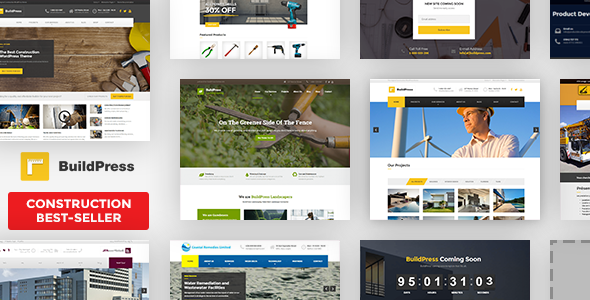
Stuck on your BuildPress WordPress theme? Let's fix it.
No endless back-and-forth. Just send us the details and we'll get it done.
No obligation · Replies within 1 hour · Quote within 1 day
Setup · Customization · Bug fixes · WooCommerce integration
About BuildPress WP Theme
BuildPress is a WordPress theme by ProteusThemes built specifically for construction companies, contractors, and trade businesses. It ships with a page builder, pre-built demo content, and a project portfolio system designed around how construction firms actually present their work.
The theme includes a cost calculator widget, team section, testimonials, and a services layout that maps well to multi-trade businesses. It uses the WPBakery page builder and integrates cleanly with Contact Form 7 and WPML for multilingual sites.
BuildPress targets a narrow audience and does that job well. If you run a construction, roofing, landscaping, or general contracting business and want a WordPress site without building layouts from scratch, this theme gives you a working starting point with minimal setup friction.
Get matched with a BuildPress developer in under one day
Tell us about your BuildPress project. Small fixes, BuildPress theme customization, or a full website build, whatever you need, we've got it covered.
We'll connect you to the right BuildPress developers, define the scope, and get everything 100% clear.
You'll get one estimate, hire your preferred developer, and start collaborating.
BuildPress customisation is straightforward in concept but time-consuming in practice. Adjusting WPBakery layouts, extending the portfolio system, or integrating third-party tools all take longer without theme-specific experience.
Through Codeable, you get matched with a vetted BuildPress developer who has worked on similar projects. No bidding wars, no generalist freelancers. You post your project, get a clear estimate within 24 hours, and decide from there with no obligation to proceed.
Pros
- Purpose-built for construction and trade businesses with relevant demo content included
- Built-in cost calculator widget that most generic themes don't include
- Project portfolio with category filtering works well for multi-service contractors
- WPML compatible for construction firms serving multiple language markets
- One-click demo import gets a working site structure up quickly
Cons
- WPBakery page builder adds page weight and can slow load times without optimisation
- Design feels dated compared to newer block-based themes without heavy customisation
- Cost calculator is basic and requires custom development for complex pricing logic
- Limited layout variety in demos means many BuildPress sites look similar
- No Gutenberg-native support, which creates long-term compatibility risk as WordPress evolves
Who is BuildPress for?
General Contractors
BuildPress suits general contractors who need a project portfolio, services list, and contact system without a complex build. The demo content maps closely to how GC firms present their capabilities. A BuildPress developer can extend it with location-based service pages and lead capture forms tied to specific project types.
Roofing Companies
Roofing businesses benefit from the services layout and testimonials section. Adding local SEO structure, a quote request form with job-type fields, and a before-and-after gallery makes the theme work harder. A BuildPress specialist can configure these additions without breaking the existing layout structure.
Landscaping and Garden Design
Landscaping companies use the portfolio heavily to show completed gardens and outdoor projects. BuildPress handles image-heavy layouts adequately, though performance tuning is recommended. Custom taxonomy filters for project type or garden size give clients a better browse experience without needing a separate plugin.
Electrical and Plumbing Trades
Electrical and plumbing trades need a clean services list, emergency contact options, and a simple call-to-action above the fold. BuildPress provides that structure. A developer can add click-to-call buttons, service area maps, and trust signals like certification badges to improve conversion on mobile traffic.
Architecture and Design Studios
Architecture studios and design consultancies use BuildPress for its project showcase capabilities. The portfolio grid works well for design work, though the aesthetic often needs refinement. A BuildPress expert can apply custom typography, a refined colour palette, and a full-screen project detail layout that matches a studio’s visual standards.

Customizing BuildPress
Out of the box, BuildPress covers the basics. Getting it to match a specific brand or workflow usually requires more than the theme options panel can handle on its own.
A BuildPress expert can rework the homepage layout, customise the project portfolio to filter by trade or location, adjust the cost calculator logic, and wire up the contact forms to CRM tools or email sequences. Custom post types for services, staff bios, and case studies can be extended beyond the default structure.
Child theme development keeps your changes safe through theme updates. If you need custom WPBakery elements, modified header layouts, or a colour system that goes beyond the built-in palette controls, working with a BuildPress developer saves significant time and avoids the trial-and-error of doing it manually.
Recommended plugins for BuildPress
BuildPress works well with a focused plugin stack. WooCommerce can be added for selling products or taking deposits on jobs. WPML handles multilingual setups for firms operating across regions.
For search visibility, pairing BuildPress with Yoast or Rank Math and a proper schema setup makes a measurable difference. A WordPress SEO specialist can configure structured data for local businesses, which matters for contractors targeting specific cities.
On the speed side, BuildPress with WPBakery can get heavy. Image optimisation, caching, and a CDN are worth implementing early. See the WordPress performance service for a full optimisation approach suited to construction sites.
Not sure which plugins to use? This WordPress plugins directory covers the most popular options with reviews and setup guides.
BuildPress common issues
BuildPress demo content not importing correctly
Demo import failures in BuildPress usually come from server memory limits or a timeout during XML processing. Increase max_execution_time and memory_limit in your php.ini or wp-config.php. If the importer stalls, try importing content and widgets separately using the Tools > Import method alongside the theme’s widget importer. Disable conflicting plugins before running the import.
BuildPress cost calculator not working or showing wrong output
The BuildPress cost calculator relies on correctly configured service items and pricing fields in the theme settings. If it outputs zero or nothing, check that each service row has a unit price set and that the shortcode is placed inside a WPBakery text block, not a raw HTML element. JavaScript conflicts with other plugins can also suppress output. Check the browser console for errors first.
WPBakery elements broken after BuildPress update
WPBakery element breakage after a BuildPress update usually means the theme’s registered custom elements are no longer mapping to updated class names. Clear all caches, deactivate and reactivate WPBakery, then check if the theme requires a paired plugin update. If elements are missing from the editor, the custom element registration file may need a manual restore. A WordPress bug fixing specialist can diagnose this quickly.
BuildPress portfolio not displaying all projects
If BuildPress portfolio items aren’t showing, first check the page template assigned to the portfolio archive. It should use the theme’s designated portfolio template, not a default page. Also check that the correct post type is selected in the WPBakery portfolio element settings. Pagination settings and posts-per-page values in Settings > Reading can also cut off visible projects unexpectedly.
BuildPress site loading slowly on mobile
BuildPress with WPBakery loads multiple scripts and stylesheets that hurt mobile performance. Start by enabling CSS and JS minification through a caching plugin like WP Rocket. Defer non-critical scripts, optimise images with WebP conversion, and remove unused WPBakery elements from the front-end asset queue. A lazy load plugin for the portfolio images makes a visible difference on slower connections.
BuildPress header layout broken on smaller screens
Header layout breaks in BuildPress on mobile are often caused by a custom logo that’s too wide or conflicting CSS from a child theme or plugin. Check the header settings in Appearance > Customize for mobile-specific options. If the issue appeared after an update, compare your child theme’s header overrides against the parent theme’s current header template for structural changes.
BuildPress contact form not sending emails
BuildPress uses Contact Form 7 for its default forms. If emails aren’t sending, the issue is almost always with WordPress’s default mail function, not the theme itself. Install WP Mail SMTP and connect it to a transactional mail service like Mailgun or SMTP2GO. Test with the plugin’s built-in mail tester. If you need help diagnosing the full setup, the WordPress bug fixing service covers mail configuration.
BuildPress child theme not applying custom styles
If child theme styles aren’t applying in BuildPress, check that your child theme’s style.css correctly references the parent theme in the file header and that you’re enqueuing styles via functions.php using wp_enqueue_style with the parent stylesheet as a dependency. Avoid using @import in the stylesheet. Also confirm the child theme is active in Appearance > Themes.
BuildPress WPML translation not working for portfolio items
WPML integration with BuildPress portfolio items requires each project post type to be registered as translatable in WPML’s settings under Custom Post Types. If translated versions aren’t showing, go to WPML > Translation Management and check that the project post type and its custom fields are included. The portfolio widget or shortcode also needs a language attribute to display correctly on translated pages. A bug fixing specialist can resolve persistent WPML conflicts.
BuildPress homepage sections disappearing after plugin update
Homepage sections disappearing after a plugin update in BuildPress usually means a WPBakery element that relied on a plugin’s shortcode is now broken or deregistered. Check the page in WPBakery’s backend editor to see which elements show errors. Reactivate the plugin that provided those elements or replace the broken block. Always test plugin updates on a staging site before applying them to a live BuildPress installation.
BuildPress FAQ
BuildPress is still listed on ThemeForest and ProteusThemes’ site. Updates have slowed compared to earlier years. It still functions on current WordPress versions, but the update cadence is infrequent. If long-term support matters for your project, factor that in before committing to it as your base theme.
BuildPress was built around WPBakery and does not natively support Gutenberg blocks. You can still use the block editor for basic content, but the theme’s layout elements and demo content are tied to WPBakery. Migrating to a fully block-based setup would require rebuilding most of the page templates from scratch.
Technically yes, but the demo content and most pre-built layouts won’t render correctly without it. The theme’s cost calculator widget and several custom elements are also registered through WPBakery. Using a different page builder means rebuilding the layouts entirely, which removes most of the convenience BuildPress is designed to offer.
Cost depends on the scope. Simple customisation like colours, fonts, and layout adjustments might run a few hundred dollars. More involved work such as custom portfolio filters, calculator logic, or third-party integrations will cost more. Post your project on Codeable for a free, no-obligation estimate based on your specific requirements.
BuildPress is SEO-neutral out of the box. It doesn’t add or block anything significant. Adding a proper SEO plugin, setting up schema markup for local businesses, and optimising page speed will have far more impact than the theme itself. WPBakery can hurt performance if not configured carefully, which does affect search rankings.
Yes. BuildPress fits any trade or contractor business well. The portfolio, services layout, and cost calculator are relevant across roofing, landscaping, electrical, and plumbing niches. You’ll likely need to adjust demo content and add niche-specific features, but the structural fit is solid compared to a generic business theme.
Always use a child theme so parent theme updates don’t overwrite your customisations. Before updating, take a full backup and test on a staging environment first. Check the changelog on ThemeForest for breaking changes, especially anything related to WPBakery elements. If you’re not using a staging setup, a WordPress maintenance service can manage updates safely.
Yes, BuildPress is WPML compatible. You can translate pages, portfolio items, services, and theme strings. Setting it up correctly requires configuring WPML’s translation management for all custom post types and registering theme strings. The process is straightforward but time-consuming to do properly on a site with significant content.
Yes. A standard WordPress migration process works for BuildPress sites. Export your database, move your files, update the site URL in the database, and reconfigure any server-specific settings. WPBakery licences are tied to domains, so you may need to reactivate after migration. A WordPress migration service handles this without downtime.
BuildPress recommends WPBakery Page Builder, Contact Form 7, and Revolution Slider. These are bundled or referenced in the theme documentation. WPML is suggested for multilingual sites. Beyond those, a caching plugin, an SEO plugin, and an image optimisation tool are worth adding to any BuildPress installation running in production.
Hire a BuildPress Expert Developer
Whether you need a full BuildPress setup, specific layout changes, or help fixing something broken, a specialist gets it done faster and cleaner than trial and error. Post your project and get a free estimate from a vetted BuildPress developer. No commitment required.
Get a Free Estimate and describe what you need. You’ll hear back within 24 hours.
You'll need a free Codeable account so developers can ask questions and send their quotes.