Business Lounge WordPress Theme
by stmcan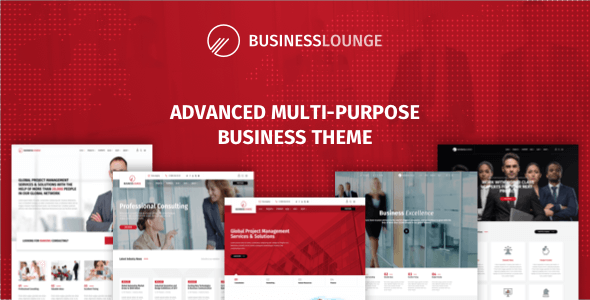
Stuck on your Business Lounge WordPress theme? Let's fix it.
No endless back-and-forth. Just send us the details and we'll get it done.
No obligation · Replies within 1 hour · Quote within 1 day
Setup · Customization · Bug fixes · WooCommerce integration
About Business Lounge WP Theme
Business Lounge is a premium WordPress theme by stmcan, built for corporate websites, agencies, and professional service firms. It ships with a drag-and-drop page builder, a clean grid-based layout system, and a library of pre-built demo pages you can import in one click.
The theme supports WooCommerce, custom headers, sticky navigation, and multiple blog layouts. Typography controls are granular, and the color system covers global and per-section overrides. Performance is reasonable out of the box, though like most feature-heavy themes it benefits from proper caching and asset optimization.
stmcan has maintained the theme actively on ThemeForest, with updates covering Gutenberg compatibility and PHP 8 support. It suits businesses that want a polished, professional look without building from scratch.
Get matched with a Business Lounge developer in under one day
Tell us about your Business Lounge project. Small fixes, Business Lounge theme customization, or a full website build, whatever you need, we've got it covered.
We'll connect you to the right Business Lounge developers, define the scope, and get everything 100% clear.
You'll get one estimate, hire your preferred developer, and start collaborating.
Most Business Lounge issues come down to one thing: customizations made directly in the parent theme that break on the next update. A proper developer works in a child theme, writes clean PHP, and tests before pushing live.
Through Codeable, you get matched with vetted WordPress developers who know themes like Business Lounge inside out. No bidding, no guesswork. Post your project, get a transparent estimate, and only pay if you decide to move forward.
Pros
- One-click demo import gets a full site up quickly with realistic placeholder content
- Granular typography and color controls cover most branding needs without custom CSS
- Supports multiple header layouts including sticky, transparent, and split headers
- WooCommerce-ready with styled product and cart pages out of the box
- Regular updates from stmcan covering Gutenberg compatibility and PHP 8 support
Cons
- Options panel can feel cluttered — finding specific settings takes time on first use
- Page builder markup adds extra div nesting that complicates custom CSS targeting
- Mobile menu behavior sometimes needs CSS fixes on narrow viewports
- Demo content import occasionally misses images due to external asset limitations
- Heavy out-of-the-box CSS load requires manual optimization for good Core Web Vitals scores
Who is Business Lounge for?
Corporate Agency Websites
Business Lounge fits corporate agencies well. The multi-column service sections, team member grids, and client logo areas map directly to what agency sites need. A Business Lounge developer can extend these with custom post types for case studies or a filterable portfolio that pulls from real project data.
Consulting and Professional Services
Consulting firms need credibility on the homepage fast. Business Lounge’s testimonial blocks, stats counters, and call-to-action sections handle this without custom builds. A Business Lounge specialist can wire up a lead capture form, CRM integration, or booking plugin to turn the site into an actual sales tool.
Law Firms and Legal Practices
Law firm sites need clean typography, clear practice area pages, and fast load times. Business Lounge covers the design side. A Business Lounge expert can add schema markup for legal services, build an attorney profile system, and make sure the site meets basic accessibility requirements for professional credibility.
Financial Services and Accounting
Financial services sites built on Business Lounge benefit from the theme’s structured layouts for pricing tables and service breakdowns. A Business Lounge developer can add gated content for downloadable resources, integrate a financial calculator, or connect a CRM for client intake workflows.
Coworking Spaces and Business Centers
Coworking spaces need a membership page, a pricing grid, and a booking or inquiry form working together. Business Lounge handles the visual structure. A Business Lounge specialist can connect a booking plugin, build a virtual tour section, and set up automated email responses for space inquiries.

Customizing Business Lounge
Business Lounge gives you a lot of control through the WordPress Customizer and its built-in options panel. You can adjust layouts, colors, fonts, header styles, and footer columns without touching code. The demo content import saves significant setup time.
That said, deeper changes — custom post type integration, conditional layouts, third-party API connections, or anything outside the options panel — require actual development work. A Business Lounge expert can modify templates cleanly using child themes, keeping your customizations intact through updates.
If your project needs a custom mega menu, a filtered portfolio section, or a redesigned homepage that goes beyond the demo, hiring a Business Lounge specialist saves you from hours of trial and error and keeps the codebase maintainable long-term.
Recommended plugins for Business Lounge
Business Lounge works well with WooCommerce for service catalogs or digital product storefronts. It integrates with WPForms, Gravity Forms, and popular SMTP plugins for contact and lead capture.
For speed, pairing it with a caching plugin and a CDN makes a real difference — especially if you’re running full-width image sections. See our WordPress performance optimization service for specifics. For search visibility, the theme is compatible with Yoast and Rank Math, though schema and technical SEO still need attention — our WordPress SEO service covers that in depth.
Not sure which plugins to use? This WordPress plugins directory covers the most popular options with reviews and setup guides.
Business Lounge common issues
Business Lounge demo content not importing correctly
Demo content import failures in Business Lounge usually come down to server memory limits or timeouts. Set upload_max_filesize, post_max_size, and max_execution_time to higher values in your php.ini or .htaccess. If external demo images fail to pull, import the XML file manually via Tools > Import after uploading it. Regenerate thumbnails with a plugin like Regenerate Thumbnails once content is in place.
Business Lounge header logo not showing on mobile
When the Business Lounge logo disappears on mobile, it’s usually a CSS conflict with the mobile header breakpoint or a missing retina image size. Check the Customizer under Header > Mobile Logo and confirm a mobile-specific logo is uploaded. If the issue persists, inspect with DevTools to find which CSS rule is hiding the element and override it in your child theme stylesheet.
Business Lounge page builder layout broken after update
Layout breaks after a Business Lounge update often mean the page builder shortcodes have changed or a JavaScript asset failed to load. Clear all caches first. Then check the browser console for JS errors pointing to a specific script. If the builder’s assets aren’t loading, deactivate conflicting plugins one at a time. For persistent issues, our WordPress bug fixing service can diagnose and resolve this quickly.
Business Lounge contact form not sending emails
Contact form emails failing in Business Lounge are almost never a theme problem — they’re a mail server issue. WordPress’s default wp_mail() relies on the server’s sendmail, which most hosts block. Install an SMTP plugin like WP Mail SMTP and connect it to a transactional email service like SendGrid, Mailgun, or your Google Workspace account. Test delivery after configuring and check spam folders before assuming it’s broken.
Business Lounge footer widgets not displaying properly
Business Lounge footer widget areas not displaying usually means the widgetized footer isn’t enabled in the theme options, or the widget areas weren’t assigned correctly after a demo import. Go to Appearance > Widgets and confirm content is assigned to the correct footer columns. Also check the footer layout setting in the theme options panel — some layouts hide columns at specific counts. If widgets were cleared by an update, reassign them manually.
Business Lounge white screen after activating theme
A white screen on Business Lounge activation points to a PHP error, usually a memory limit or a conflict with an active plugin. Enable WP_DEBUG in wp-config.php to surface the actual error. Common causes include outdated PHP versions below 7.4 and conflicts with caching or security plugins. Switch to the default theme via FTP or database if locked out, resolve the PHP error, then reactivate. See our WordPress bug fixing service if you need fast recovery.
Business Lounge slider images not loading
Slider images not loading in Business Lounge are typically caused by a missing image size or a lazy-load plugin interfering with the slider’s JavaScript. First, run Regenerate Thumbnails to recreate missing sizes. Then check if a lazy-load plugin is deferring slider images — most sliders need the first image to load immediately. Add the slider’s image class to the lazy-load exclusion list. Also check for JavaScript console errors from the slider library itself.
Business Lounge custom fonts not applying
Custom fonts not applying in Business Lounge can happen when the font is selected in the Customizer but the cache hasn’t cleared, or when a CSS specificity conflict is overriding the font-family rule. Clear server-side and browser cache after making font changes. If still not applying, use DevTools to find which CSS rule is winning and override it in your child theme. For Google Fonts, confirm the font is actually loading in the Network tab before assuming it’s a CSS issue.
Business Lounge WooCommerce shop page layout broken
WooCommerce shop page layout issues in Business Lounge often come from version mismatches between the theme’s WooCommerce template overrides and the current WooCommerce version. Check for outdated template files under Appearance > Theme Check or in the WooCommerce system status page. Update or remove outdated template overrides in your child theme. If the shop page is using a custom template that’s conflicting, our WordPress bug fixing service can patch the templates correctly.
Business Lounge theme options not saving
Business Lounge theme options not saving is usually a nonce expiration issue or a permissions problem with the options table in the database. Try saving from a freshly loaded admin page. If that doesn’t work, check that your WordPress user has the manage_options capability. Some security plugins block options saves — temporarily disable them to test. If using a server-side page cache, purge it after saving. A corrupted options row in the database may need direct repair via phpMyAdmin.
Business Lounge FAQ
Yes. Business Lounge is designed specifically for corporate and professional service sites. It includes service sections, team grids, testimonials, stats counters, and flexible homepage layouts that fit agency, consulting, and B2B use cases well. A Business Lounge expert can extend it further for specific industries.
Business Lounge has been updated for Gutenberg compatibility. You can use the block editor for standard page content. However, the theme’s own drag-and-drop builder handles most layout work. Some advanced blocks may not inherit theme styles without additional CSS adjustments.
After installing and activating Business Lounge, go to Appearance > Import Demo Data (or the theme’s specific import screen). Select a demo and click import. Increase PHP memory and execution time limits on your server first if imports time out. External images may not import — replace them with your own assets after import completes.
Yes, Business Lounge includes WooCommerce support with styled shop, product, cart, and checkout pages. It’s suited for digital products, service catalogs, or small physical product stores. A Business Lounge developer can customize WooCommerce templates within a child theme for more specific store requirements.
Create a folder in /wp-content/themes/ named business-lounge-child. Add a style.css with the correct header referencing Business Lounge as the parent template, then a functions.php to enqueue the parent stylesheet. Activate the child theme. All customizations go into the child theme to survive updates.
Business Lounge is listed as WPML compatible on ThemeForest. String translation works through WPML’s theme string scanner. For full multilingual setups, a Business Lounge specialist can configure WPML correctly, handle RTL language styling, and ensure translated pages inherit the correct layouts.
Always use a child theme for customizations — never edit the parent theme files directly. Before updating, back up your site. After updating, check for outdated WooCommerce template warnings and re-test key pages. If you’ve been editing the parent theme, consider migrating changes to a child theme before the next update.
Business Lounge is developed by stmcan, a ThemeForest author. The theme has been available on ThemeForest for several years with regular updates. stmcan also maintains other themes on the marketplace. Support is provided through the ThemeForest comments system and dedicated support tickets.
Yes. A Business Lounge developer can handle setup, custom layouts, plugin integration, and fixes. Through Codeable, you can post your project and get matched with a vetted specialist. Visit our WordPress development services page or get a free estimate to get started.
Out of the box, Business Lounge is reasonably optimized but not exceptional on Core Web Vitals. The CSS payload is large and some scripts load globally. With a caching plugin, CDN, and proper image optimization, scores improve significantly. See our WordPress performance service for specifics on what to target.
Hire a Business Lounge Developer
Whether you need a Business Lounge expert to set up a new site, fix a layout issue, or build custom functionality on top of the theme, we can help. Work is scoped clearly, delivered through Codeable, and backed by a developer vetting process that filters out the guesswork.
Get a Free Estimate — no obligation, no payment until you’re ready to proceed.
You'll need a free Codeable account so developers can ask questions and send their quotes.