Businext WordPress Theme
by ThemeMove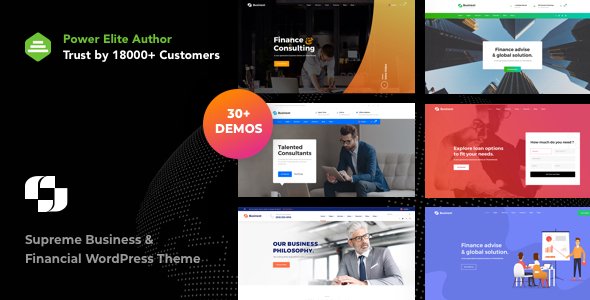
Stuck on your Businext WordPress theme? Let's fix it.
No endless back-and-forth. Just send us the details and we'll get it done.
No obligation · Replies within 1 hour · Quote within 1 day
Setup · Customization · Bug fixes · WooCommerce integration
About Businext WP Theme
Businext is a multipurpose business WordPress theme developed by ThemeMove. It’s built for agencies, consultants, IT companies, and service-based businesses that need a professional site without starting from scratch.
The theme ships with Elementor page builder support, a library of pre-built demos, and WooCommerce compatibility. Setup is straightforward: import a demo, swap out content, and you have a working site. ThemeMove keeps Businext updated regularly, which matters for compatibility with newer versions of WordPress and Elementor.
Out of the box you get header and footer builders, mega menu support, and a range of portfolio and blog layouts. It’s a solid starting point for businesses that want design flexibility without hiring a developer for every small change.
Get matched with a Businext developer in under one day
Tell us about your Businext project. Small fixes, Businext theme customization, or a full website build, whatever you need, we've got it covered.
We'll connect you to the right Businext developers, define the scope, and get everything 100% clear.
You'll get one estimate, hire your preferred developer, and start collaborating.
Businext is approachable for DIY setup, but there’s a gap between a working site and a well-built one. Things like custom layouts, page speed, plugin conflicts, or matching your brand precisely take developer knowledge. Codeable connects you with vetted WordPress developers who have hands-on experience with themes like Businext. You post your project, get a clear estimate, and only move forward if you’re happy with the scope. No risk, no guesswork.
Pros
- Large demo library covers most business and agency niches out of the box
- Full Elementor compatibility with dedicated widgets for business layouts
- Header and footer builder included without needing a separate plugin
- WooCommerce support for adding a shop to a service-based site
- Active updates from ThemeMove with ongoing WordPress core compatibility
Cons
- Demo import can bring in a large amount of media and dummy data that needs manual cleanup
- Heavy reliance on Elementor means switching page builders later is not practical
- Some advanced layout options are only accessible through custom CSS or child theme edits
- Page speed requires tuning out of the box, particularly on demo-heavy setups
- Support quality from ThemeMove can be inconsistent for complex or non-standard issues
Who is Businext for?
Marketing and Digital Agencies
Businext has agency-specific demos with service grids, team sections, and case study layouts. If you run a marketing or creative agency, you can get a professional presentation site live quickly. A developer can strip out unused demo sections and wire up your actual service pages and contact forms properly.
IT and Software Companies
The theme includes IT company demos with feature comparison tables, pricing sections, and app-style landing page layouts. These work well for SaaS products or software consultancies. Custom development helps when you need to connect a login portal, integrate a CRM, or add dynamic pricing logic.
Business Consultants
Consultants need a site that builds trust fast. Businext’s professional layouts with testimonial blocks, credentials sections, and clear service descriptions cover that. A developer can tighten the layout, set up a booking plugin, and make sure the site performs well on mobile where most visitors land first.
Financial Services
Financial services sites have specific requirements around trust signals, compliance notices, and clean information hierarchy. Businext provides a solid visual foundation. A developer familiar with the theme can build out custom page templates for services, calculators, or team bios without compromising the design.
Corporate Websites
Large organizations often need Businext to scale beyond a standard setup. That means custom post types for departments or news, role-based access to certain pages, multilingual support via WPML, and consistent branding across dozens of pages. Developer help is almost always necessary at that scale.

Customizing Businext
Businext gives you a lot of visual control through the Elementor editor and its theme options panel. You can adjust fonts, colors, layout widths, and spacing without touching code. The header builder lets you rearrange elements and create sticky or transparent header styles.
That said, deeper customization often requires more than drag-and-drop. Custom post type layouts, third-party plugin integration, WooCommerce checkout styling, or performance tuning typically need developer input. A Businext expert can make these changes cleanly without breaking the theme’s update path.
If you need something beyond what the theme options allow, working with someone who knows Businext well will save you time and avoid workarounds that create problems later.
Recommended plugins for Businext
Businext works well with a standard WordPress plugin stack. WooCommerce is supported for product listings and simple shops. Contact Form 7 and WPForms both integrate without issues. WPML is listed as compatible for multilingual setups.
For SEO, Yoast and Rank Math both work cleanly alongside Businext. On the performance side, the theme can be paired with caching plugins and image optimization tools, though you may need to tune some settings to get good Core Web Vitals scores. See our WordPress performance service and SEO optimisation service if you need help with either.
Not sure which plugins to use? This WordPress plugins directory covers the most popular options with reviews and setup guides.
Businext common issues
Businext demo import not working
Demo import failures in Businext are usually caused by memory limits, execution timeouts, or a missing required plugin like Elementor or the ThemeMove Core plugin. First, confirm all required plugins are active. Then increase your PHP memory limit to at least 256MB and set max_execution_time to 300. If imports still fail, try the manual XML import method. For persistent issues, our WordPress bug fixing service can sort it cleanly.
Businext Elementor widgets missing or not showing
Missing Elementor widgets in Businext almost always point to the ThemeMove Core companion plugin not being active or being outdated. Install and activate it from the theme’s required plugins list. If widgets are still absent after activation, check for a version mismatch between Busint and Elementor. Clearing the Elementor cache under Elementor > Tools usually resolves display issues once the plugin conflict is fixed.
Businext slow loading speed after demo import
Demo imports pull in large image files, excess CSS from Elementor, and sometimes multiple Google Font requests. Start by running your URL through PageSpeed Insights to identify the biggest issues. Install a caching plugin, enable image lazy loading, and remove demo content you’re not using. For deeper optimization including script deferral and server-side tuning, see our WordPress performance service.
Businext header not displaying correctly on mobile
Mobile header issues in Businext usually come from custom header builder settings not having responsive overrides set. Open the header template in Elementor, switch to mobile view, and check padding, font sizes, and menu toggle visibility. If a sticky header is behaving oddly on scroll, check the sticky settings in the ThemeMove header options panel. A developer can lock these settings correctly across all breakpoints.
Businext FAQ
ThemeMove updates Businext regularly to maintain compatibility with new WordPress releases. Before updating, always check the changelog on ThemeForest and test in a staging environment first. If you’re running an older version of Businext and want to update safely without breaking your layout, a developer can handle the update process with a proper backup and compatibility check in place.
Yes. Businext includes WooCommerce support with styled product pages, cart, and checkout. Basic shop functionality works out of the box. For more specific customizations like custom product tabs, filtered shop pages, or checkout flow changes, you’ll likely need developer help to get everything looking and working the way you want.
Technically yes, but the theme is built around Elementor. The pre-built demos are Elementor-based, and the custom widgets depend on it. You could use the block editor for basic pages, but you’d lose most of the theme’s layout flexibility. If you want to move to a block-based setup, a developer can assess how much work that realistically involves for your site.
Always use a child theme for any code changes so parent theme updates don’t overwrite your work. Settings saved through the theme options panel are stored in the database and survive updates. Elementor content is also stored in the database. Back up before updating, then update the theme and required plugins together to avoid version mismatches.
Businext produces clean HTML output and is compatible with Yoast SEO and Rank Math. The theme itself doesn’t hurt SEO, but page speed and content structure are where most sites fall short. Large demo imports and unoptimized images are the common issues. Check our WordPress SEO service if you want a proper technical review.
Hire a Businext Developer
Need help building or customizing your Businext site? Whether it’s a full setup from a demo import, a specific layout tweak, or fixing something that’s broken, we can match you with a developer who knows the theme well.
Post your project through our free estimate page. You’ll get a clear scope and price within 24 hours, and you’re under no obligation to hire. It’s a straightforward way to find out exactly what your project needs and what it will cost.
You'll need a free Codeable account so developers can ask questions and send their quotes.