Buzz Club WordPress Theme
by cmsmasters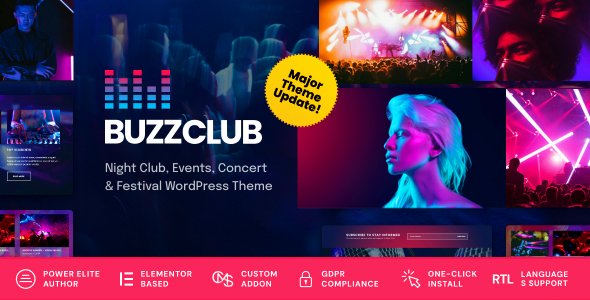
Stuck on your Buzz Club WordPress theme? Let's fix it.
No endless back-and-forth. Just send us the details and we'll get it done.
No obligation · Replies within 1 hour · Quote within 1 day
Setup · Customization · Bug fixes · WooCommerce integration
About Buzz Club WP Theme
Buzz Club is a WordPress theme by cmsmasters built for nightclubs, music venues, bars, and event-driven businesses. It ships with a bold visual design, dark color schemes, and layouts that suit high-energy brands. The theme includes event management features, ticket integration support, and multiple pre-built demo pages you can import with one click.
Built on the cmsmasters framework, Buzz Club supports custom post types for events, artists, and DJs. It works with WPBakery Page Builder for layout control and includes portfolio, gallery, and blog sections. The theme is translation-ready and includes basic WooCommerce support for selling merchandise or tickets directly from your site.
Buzz Club suits businesses that need a visually striking site fast, without building from scratch. It handles the design heavy lifting while giving you enough flexibility to match your brand.
Get matched with a Buzz Club developer in under one day
Tell us about your Buzz Club project. Small fixes, Buzz Club theme customization, or a full website build, whatever you need, we've got it covered.
We'll connect you to the right Buzz Club developers, define the scope, and get everything 100% clear.
You'll get one estimate, hire your preferred developer, and start collaborating.
Buzz Club is more opinionated than most themes. The cmsmasters framework has its own conventions, and WPBakery customization adds another layer. If you hit a wall or need something built properly, working with a vetted developer through Codeable means you get someone who has worked inside themes like this before. No guesswork, no trial and error on a live site. Just someone who knows what they’re doing and can get it done right.
Pros
- Strong out-of-the-box design for nightclubs and music venues — no generic look
- Includes custom post types for events, artists, and DJs built into the theme
- One-click demo import gets a full site live quickly for testing or client presentation
- WooCommerce compatibility allows merchandise and ticket sales without extra theme work
- Translation-ready with WPML support for multilingual venue or event sites
Cons
- WPBakery Page Builder lock-in makes it hard to switch builders or go block-editor later
- Page load speed needs optimization — theme ships with heavy scripts enabled by default
- Design is dark and niche-specific, making it unsuitable outside the nightlife vertical
- cmsmasters framework updates have been infrequent, raising long-term compatibility concerns
- Limited documentation for advanced customization compared to mainstream theme frameworks
Who is Buzz Club for?
Nightclubs and Bars
Buzz Club’s dark aesthetic and event listing features make it a direct fit for nightclubs and bars. You can list weekly nights, upcoming events, and resident DJs with dedicated sections. The gallery and video sections handle atmosphere content well. Adding WooCommerce lets you sell presale tickets or table reservations without a separate platform.
Music Event Promoters
Promoters running regular club nights or touring shows can use Buzz Club to build a branded event hub. The event custom post type keeps shows organized. Pair it with The Events Calendar plugin for filtered listings by date or venue. The theme handles flyer-style imagery well, which is central to how promoters market their events.
DJ and Artist Portfolios
DJs and artists need a site that reflects their brand without looking corporate. Buzz Club’s artist post type and portfolio sections are built for exactly this. You can showcase mixes, event history, press photos, and booking contact forms. The bold typography and full-width layouts give individual performers a strong visual presence without custom design work.
Live Music Venues
Live music venues need to communicate capacity, upcoming shows, and booking info clearly. Buzz Club handles all three. The event management structure supports multiple shows per week, and the layout adapts well to venue branding. You can add a ticketing plugin or link out to external ticket platforms from individual event pages without breaking the design.
Festival and Pop-Up Event Organizers
Festival organizers or pop-up event brands with a seasonal presence need a site that looks credible fast. Buzz Club’s one-click demos and pre-built layouts reduce setup time significantly. You can build a full event site with lineup, schedule, and ticket links in a day. Tear it down or archive it after the event without losing the structure for next time.

Customizing Buzz Club
Out of the box, Buzz Club covers the basics. But most nightclubs, event venues, and promoters have specific needs that require going beyond the theme defaults. A Buzz Club expert can help you get there without wasted time or broken layouts.
Common customization work includes tweaking the event listings to show real-time ticket availability, integrating third-party booking systems, adjusting the WPBakery layouts to match your brand’s color palette and typography, and adding custom post type fields for artist bios, set times, or venue details.
Performance is another area worth addressing. Buzz Club loads several scripts and styles by default. A developer can strip unused assets, optimize load order, and ensure the site performs well on mobile, where most nightlife audiences will find you first.
Recommended plugins for Buzz Club
Buzz Club pairs well with several plugins that extend its core features. WooCommerce adds ticketing and merch sales. The Events Calendar plugin integrates cleanly for recurring events and front-end filtering. Contact Form 7 or Gravity Forms handles booking enquiries and guest list sign-ups.
For performance, combining a caching plugin with image optimization can significantly reduce load times on image-heavy event pages. Check our WordPress performance service for details. If you want your venue appearing in local search results, structured data and proper on-page SEO setup matters. See our WordPress SEO service for that work.
Not sure which plugins to use? This WordPress plugins directory covers the most popular options with reviews and setup guides.
Buzz Club common issues
Buzz Club theme not displaying events correctly
Event display issues in Buzz Club are usually caused by a conflict between the theme’s custom post type setup and a third-party events plugin like The Events Calendar. Check whether the theme’s built-in event post type is clashing with the plugin’s own post type registration. In some cases, you’ll need to disable one or the other. If the layout is breaking, inspect the WPBakery shortcodes in the event template and verify the cmsmasters framework is fully active. Our WordPress bug fixing service can diagnose this quickly.
WPBakery editor broken or not loading in Buzz Club
WPBakery failing to load in Buzz Club usually points to a JavaScript conflict or an outdated version of either WPBakery or the theme itself. First, check the browser console for errors. A common culprit is a caching plugin serving stale JS files. Clear all caches and test in a private browser window. If the issue persists, deactivate plugins one by one to isolate the conflict. Also confirm you’re running the version of WPBakery that shipped with the theme, as newer versions sometimes break older theme integrations.
Buzz Club demo import not working or incomplete
Failed demo imports in Buzz Club are almost always caused by server-side limits. PHP memory limit, max execution time, and upload size restrictions all block the import process mid-way. Ask your host to temporarily increase these values: memory_limit to 256M, max_execution_time to 300, upload_max_filesize to 64M. Also make sure all required plugins listed in the theme documentation are installed before running the import. If the import completes but images are missing, the external image fetch likely timed out and you’ll need to re-import media separately.
Buzz Club theme slow loading on mobile
Buzz Club loads multiple CSS and JavaScript files by default, which hurts mobile performance significantly. Start by auditing which WPBakery elements are actually in use and disable the rest through the WPBakery element manager. Install a caching plugin and enable minification for CSS and JS. Compress and serve images in WebP format. Defer non-critical scripts. These steps alone can cut load time by 40 to 60 percent. For a full audit and implementation, see our WordPress performance service.
Buzz Club FAQ
cmsmasters has slowed down update frequency for Buzz Club compared to their newer themes. The theme still functions on current WordPress versions but compatibility with newer PHP versions and plugins is worth testing before committing to a production site. If long-term support matters, factor this into your decision or plan to have a developer on hand for maintenance. See our WordPress maintenance service for ongoing cover.
Buzz Club is built around WPBakery Page Builder and the cmsmasters framework. It does not natively support Elementor or the Gutenberg block editor. You can install Elementor alongside WPBakery, but you’ll likely run into conflicts and inconsistent styling. Gutenberg will work for basic content editing but the theme’s custom layouts and shortcodes are WPBakery-dependent. Switching builders requires rebuilding your page layouts.
Technically yes, but practically it’s a poor fit outside nightlife, music, and events. The design language, dark color schemes, and built-in content types are all oriented around that vertical. Using it for a restaurant, corporate site, or portfolio would require significant design overrides that largely defeat the purpose of using a pre-built theme. You’d be better served by a theme built for your actual use case.
Yes, Buzz Club includes WooCommerce compatibility. You can set up a shop for merchandise, tickets, or event packages. The styling integration is basic, so the shop pages may not perfectly match the rest of the theme without CSS adjustments. For anything beyond a simple product catalog, a developer will likely need to customize the WooCommerce templates to fit the Buzz Club design properly.
Migrating a Buzz Club site involves moving files, the database, and updating configuration settings. The theme itself travels with the site files, so no reinstallation is needed. The main risks are permalink structure changes and absolute URLs hardcoded in WPBakery content. Running a search-replace on the database after migration handles most URL issues. For a clean, issue-free move, see our WordPress migration service.
Hire a Buzz Club WordPress Developer
Need a Buzz Club developer who knows the cmsmasters framework and can build or fix things properly? FoxyConcept connects you with vetted WordPress specialists through Codeable. Whether you need a full setup, custom feature work, or something specific fixed, you can get a free estimate with no obligation to hire. Projects are matched within 24 hours and the entire process is risk-free.
You'll need a free Codeable account so developers can ask questions and send their quotes.