California WordPress Theme
by BoldThemes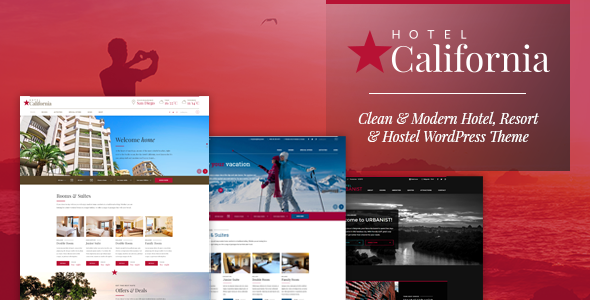
Stuck on your California WordPress theme? Let's fix it.
No endless back-and-forth. Just send us the details and we'll get it done.
No obligation · Replies within 1 hour · Quote within 1 day
Setup · Customization · Bug fixes · WooCommerce integration
About California WP Theme
California is a multipurpose WordPress theme built by BoldThemes. It ships with a visual page builder, a solid set of pre-built demo sites, and a clean aesthetic that works across a wide range of industries. The theme is built on BoldThemes’ own framework, which handles typography controls, header layouts, colour schemes, and widget areas without requiring third-party plugins for basic setup.
California supports WooCommerce, WPML, and Contact Form 7 out of the box. It comes with multiple header styles, sticky navigation, and a mobile-friendly layout that holds up without heavy customisation. The demo importer makes initial setup fast, letting you get a working site in place before tweaking details. It suits freelancers, small businesses, agencies, and portfolio sites that need a polished result without a fully custom build.
Get matched with a California developer in under one day
Tell us about your California project. Small fixes, California theme customization, or a full website build, whatever you need, we've got it covered.
We'll connect you to the right California developers, define the scope, and get everything 100% clear.
You'll get one estimate, hire your preferred developer, and start collaborating.
BoldThemes’ framework has its own conventions for child themes, hooks, and template overrides. Working around those without breaking core functionality takes familiarity with how California is structured. On Codeable, every developer is vetted and works exclusively with WordPress. You get someone who knows the theme, not a generalist figuring it out as they go. Post your project and receive an estimate within 24 hours, with no obligation to proceed.
Pros
- Multiple pre-built demos covering different industries, importable in one click
- Built-in typography and colour controls in the Customizer without extra plugins
- WooCommerce support included out of the box with styled product and cart pages
- Clean HTML output that works well with standard SEO plugins
- WPML compatible for multilingual sites without additional configuration work
Cons
- BoldThemes' custom page builder has a steeper learning curve than Elementor or Gutenberg
- Theme loads several CSS and JS files by default, which affects page speed scores on shared hosting
- Demo designs are a starting point but can look generic without significant style customisation
- Documentation is functional but thin on advanced developer topics like hooks and filters
- Child theme workflow is not as straightforward as with themes built on more common frameworks
Who is California for?
Creative Agency
California’s full-width sections, bold typography options, and portfolio post type make it a practical base for agency sites. You can showcase case studies, team members, and service offerings across clearly separated page sections. A developer can extend the layout with custom post types for client work and integrate a contact flow that feeds into a CRM or email platform.
Freelance Portfolio
Freelancers benefit from California’s clean grid layouts and project filtering. The theme handles portfolio galleries well, and the single-project template is easy to customise with skills, tools used, and client details. Pair it with a contact form and a simple blog section to build a complete personal site without overcomplicating the structure.
Small Business Service Site
Service businesses need clear page hierarchy, readable content sections, and a working contact setup. California covers all three. Its pre-built business demos include service listing pages, team sections, and testimonial blocks. Customising these to match a specific service type, like a law firm or consultancy, is straightforward with targeted stylesheet and template adjustments.
Online Store
California’s WooCommerce integration handles product archives, single product pages, and the checkout flow without needing a separate shop theme. The styling holds up for small to medium catalogues. Adding features like product filtering, subscriptions, or custom checkout fields is best handled by a developer familiar with both the theme and WooCommerce hooks.
Restaurant or Hospitality
Restaurant and hospitality sites need strong visual impact and a fast path to key information like menus, hours, and reservations. California supports full-screen hero images, custom menu sections, and Google Maps embeds. A developer can add reservation form integration, structured data for local SEO, and a mobile layout optimised for customers searching on the go.

Customizing California
California gives you control through the WordPress Customizer, covering fonts, colours, header layout, footer columns, and sidebar positions. Most visual changes are live-preview, which helps when adjusting spacing and type scales. The built-in page builder handles section-based layouts, and you can mix full-width blocks with contained content without touching CSS.
That said, getting California to match a specific brand identity often takes more than the default options offer. A California expert can extend the stylesheet cleanly, adjust hook-based template parts, and wire up custom post types without breaking the theme’s update path. If you need a layout that goes beyond the demo designs, working with a developer who knows the BoldThemes framework saves a lot of trial and error. Our WordPress development services cover exactly this kind of targeted theme work.
Recommended plugins for California
California works well with Elementor if you prefer a drag-and-drop workflow outside BoldThemes’ own builder. WooCommerce integration is solid for product pages and basic shop layouts. For performance, image optimisation and caching plugins are worth adding early since the theme loads several assets by default. Check our WordPress performance service if load times become an issue after setup.
For content-heavy sites, pairing California with an SEO plugin like Yoast or Rank Math is straightforward. The theme outputs clean markup, which helps. If you need structured SEO work beyond plugin defaults, our WordPress SEO service covers schema, site structure, and technical audits.
Not sure which plugins to use? This WordPress plugins directory covers the most popular options with reviews and setup guides.
California common issues
California theme page builder not loading in WordPress admin
This usually points to a JavaScript conflict with another plugin, or a PHP memory limit being hit. Start by deactivating plugins one at a time to isolate the conflict. Increase your PHP memory limit in wp-config.php if the builder loads a blank screen. If the issue appeared after a theme or plugin update, check the browser console for JS errors and compare with the changelog. Our WordPress bug fixing service can diagnose and resolve this quickly.
California theme WooCommerce styling broken after update
WooCommerce updates frequently introduce template changes that theme stylesheets do not account for automatically. If cart, checkout, or product pages look broken after an update, the first step is to check whether California has released a matching update. If not, the fix involves overriding WooCommerce templates inside your child theme and applying corrective CSS. Avoid editing the parent theme files directly, as this will be overwritten on the next update. A developer can handle this without disrupting the rest of the site.
California theme slow page speed on mobile
California loads multiple stylesheets and scripts by default, which adds weight on mobile connections. Start by running the site through PageSpeed Insights to identify the specific assets causing delays. Common fixes include combining and minifying CSS and JS with a caching plugin, deferring non-critical scripts, and serving images in WebP format. If the theme is loading builder assets on pages that do not use them, those scripts can be conditionally dequeued. Our WordPress performance service covers this in full.
California theme header layout not displaying correctly on mobile
Header display issues on mobile are often caused by custom header height or logo size settings that do not scale correctly at smaller breakpoints. Check the Customizer’s mobile header settings first. If the issue persists, inspect the header markup in your browser’s developer tools to find which CSS rule is causing the overflow or collapse. In most cases this requires a small addition to your child theme stylesheet targeting the correct media query. A California developer can fix this without touching the core theme files.
California FAQ
Yes, California suits small to medium business sites well. It includes service page layouts, team sections, testimonials, and contact integrations in its demos. The WooCommerce support also makes it viable for businesses selling online. You will likely need some customisation to move beyond the demo design, but the core structure is solid for professional use.
California can work alongside Elementor, but it is built around BoldThemes’ own page builder. Using both simultaneously can cause conflicts and bloat. Most developers recommend choosing one or the other. If you prefer Elementor’s interface, a developer can set California up as a shell and use Elementor for page content while keeping the theme’s header and footer intact.
Create a new folder in your themes directory with a style.css file that declares the parent theme as California using the Template header. Add a functions.php file that enqueues the parent stylesheet. Activate the child theme from the WordPress admin. All customisations go into the child theme to preserve changes across updates. BoldThemes’ documentation covers the basics, but a developer can set this up correctly in minutes.
Yes, migrating content to California is possible whether you are coming from another WordPress theme or a different platform. The process involves importing your content, rebuilding page layouts using California’s demos as a starting point, and reconfiguring widgets, menus, and settings. Our WordPress migration service handles this cleanly, including redirects and post-migration testing.
California is listed as WPML compatible, which means the theme’s text strings can be translated and page content can be duplicated across language versions using WPML’s interface. Setup still requires configuring WPML correctly and translating each page individually. For sites with large amounts of content or complex language structures, a developer can handle the full WPML setup and testing.
Hire a California WordPress Expert
Whether you need a custom layout, WooCommerce setup, a child theme, or fixes to an existing California build, a specialist gets it done without guesswork. All work is delivered through Codeable, where developers are pre-screened and rated. Get a free estimate and describe your project. You’ll hear back within 24 hours, and there’s no cost or commitment until you decide to move forward.
You'll need a free Codeable account so developers can ask questions and send their quotes.