Cannamed WordPress Theme
by GoodLayers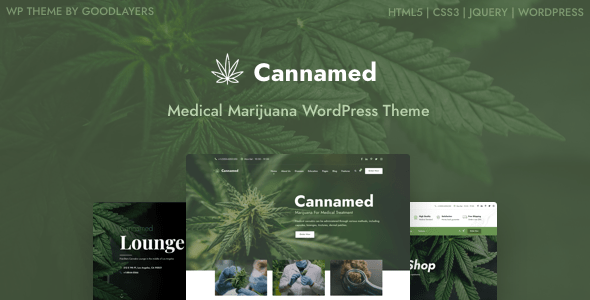
Stuck on your Cannamed WordPress theme? Let's fix it.
No endless back-and-forth. Just send us the details and we'll get it done.
No obligation · Replies within 1 hour · Quote within 1 day
Setup · Customization · Bug fixes · WooCommerce integration
About Cannamed WP Theme
Cannamed is a WordPress theme built by GoodLayers, designed specifically for cannabis dispensaries, CBD shops, and medical marijuana clinics. It comes with a purpose-built layout that covers product listings, lab results, strain guides, and appointment booking sections out of the box.
GoodLayers ships Cannamed with their GDPC page builder, giving you visual control over each section without touching code. The theme includes WooCommerce support for online product sales, age verification popups, and pre-built inner pages for services, menus, and blog content.
It is a niche theme, which is both its strength and its limitation. If you run a cannabis-related business and want a site that looks industry-appropriate from day one, Cannamed gets you there faster than building on a generic theme.
Get matched with a Cannamed developer in under one day
Tell us about your Cannamed project. Small fixes, Cannamed theme customization, or a full website build, whatever you need, we've got it covered.
We'll connect you to the right Cannamed developers, define the scope, and get everything 100% clear.
You'll get one estimate, hire your preferred developer, and start collaborating.
GoodLayers provides documentation and a support forum, but neither replaces a developer who knows the theme inside out. Codeable connects you with vetted WordPress specialists who have worked with Cannamed and understand its page builder quirks, WooCommerce integration points, and the compliance considerations specific to cannabis businesses.
Whether you need a full build, a specific feature added, or existing work debugged, you get a fixed estimate before any work starts.
Pros
- Built specifically for cannabis and CBD businesses, so the default layouts are already industry-appropriate
- WooCommerce integration is included, covering product pages, categories, and cart functionality
- Age verification popup is built in without needing a separate plugin
- GDPC page builder allows visual layout editing across all main page templates
- Pre-built inner pages for menus, services, lab results, and blog reduce initial setup time
Cons
- GDPC page builder adds front-end scripts that can slow page load if not optimised
- GoodLayers support is forum-based and response times can be slow for urgent issues
- The niche focus means fewer third-party tutorials or community resources compared to mainstream themes
- Migrating away from Cannamed later requires rebuilding content locked in the GDPC builder
- Theme updates can occasionally break customizations made to child theme or custom CSS
Who is Cannamed for?
Cannabis Dispensary
Dispensaries need product menus, strain detail pages, and clear compliance messaging. Cannamed’s pre-built menu and product layouts handle this well. A developer can extend these to pull live inventory data from a POS system like Jane or Dutchie, keeping your site menu accurate without manual updates.
CBD Online Shop
CBD shops selling through WooCommerce benefit from Cannamed’s built-in product page layouts that accommodate cannabinoid breakdowns and third-party lab certificates. With custom development, you can add subscription billing, bundle discounts, and product filtering by CBD concentration or product type.
Medical Marijuana Clinic
Medical cannabis clinics need appointment booking, patient intake forms, and clear service pages. Cannamed’s service section layouts cover the basics. A developer can integrate a booking system, add HIPAA-aware form handling, and build out a patient portal section that fits within the theme structure.
Cannabis Delivery Service
Delivery services need real-time product availability, delivery zone checks, and order tracking. Cannamed provides the visual foundation, but these features require custom development. A developer familiar with the theme can integrate delivery management tools and build a checkout flow that reflects your service area and hours.
Hemp Product Brand
Hemp brands selling wholesale or DTC need a site that communicates quality and compliance clearly. Cannamed’s layout supports this with sections for certifications, sourcing information, and product ranges. A developer can add a wholesale application form, tiered pricing logic, and a B2B account area within WooCommerce.

Customizing Cannamed
Out of the box, Cannamed covers the basics well. Customization is where things get more nuanced. The GDPC page builder handles layout changes, but anything beyond visual tweaks, such as custom post types for strains, integration with seed-to-sale software, or age-gate logic tied to geolocation, requires developer work.
Typography, color schemes, and header styles can be adjusted through the theme options panel. WooCommerce product pages can be restyled to show cannabinoid percentages, terpene profiles, or compliance labels if you know where to look.
A Cannamed expert can extend these defaults into something that actually fits your business, rather than the other way around. Custom booking flows, loyalty program integrations, and wholesale pricing structures are all achievable with the right hands on the code.
Recommended plugins for Cannamed
Cannamed pairs well with WooCommerce for retail sales, WPForms or Gravity Forms for consultation requests, and WPML if you serve multilingual markets. For dispensaries running local SEO campaigns, pairing the theme with a solid technical foundation matters as much as the design.
If your site is loading slowly due to the GDPC builder scripts or unoptimized images, WordPress performance work can cut load times significantly. For businesses targeting local search traffic, WordPress SEO optimisation ensures your strain pages and product categories are structured correctly for search engines.
Not sure which plugins to use? This WordPress plugins directory covers the most popular options with reviews and setup guides.
Cannamed common issues
Cannamed age verification popup not working
The age verification popup in Cannamed relies on a cookie being set correctly in the browser. If it is firing every visit or not appearing at all, the issue is usually a caching plugin clearing the cookie too aggressively, or a conflict with a security plugin blocking the script. Clear your cache, temporarily disable your security plugin, and test again. If the problem persists, a developer can trace the exact script conflict. Visit our WordPress bug fixing service for help.
Cannamed WooCommerce products not displaying correctly
Product display issues in Cannamed are usually caused by a WooCommerce version mismatch with the theme, a missing template override file, or a plugin conflict affecting the shop archive. Check that your WooCommerce version matches the theme’s tested range listed in the readme. Deactivate plugins one at a time to isolate the conflict. If you have edited template files, compare them against the current WooCommerce templates. Our bug fixing service can identify and resolve this quickly.
Cannamed GDPC page builder not loading in WordPress editor
If the GDPC page builder is not loading in the WordPress editor, the most common causes are a PHP memory limit being too low, a JavaScript error from a conflicting plugin, or the GDPC plugin needing an update separately from the theme. Increase your PHP memory limit to at least 256MB, check the browser console for JS errors, and confirm the GDPC plugin is active and updated. If the builder loads on some pages but not others, the issue is likely post-specific data corruption.
Cannamed theme update broke my site layout
When a Cannamed update breaks your layout, it is usually because the update changed GDPC shortcode structure or CSS class names that your customizations depended on. Before updating, always test on a staging site. After a breakage, compare your child theme CSS and any custom templates against what changed in the update. Reverting to the previous theme version via FTP buys you time to fix properly. For faster recovery, our WordPress bug fixing service handles post-update repairs.
Cannamed FAQ
GoodLayers updates Cannamed periodically to maintain WordPress compatibility, but it may lag behind the latest core release by a version or two. Always check the theme’s changelog and tested version before updating WordPress on a live site. Running a staging environment first is the safest approach. If you are unsure about compatibility after a WordPress update, a developer can review and resolve any resulting issues.
Cannamed’s layouts and inner page templates are built around GDPC shortcodes. You can use it without actively building pages in the visual editor, but removing the builder entirely would leave most pre-built pages without proper output. If you want to move to a block-based editing workflow instead, a developer would need to rebuild the affected page templates using the WordPress block editor.
Cannamed is listed as WPML compatible by GoodLayers. This means the theme strings can be translated and page builder content can be duplicated across languages. However, setting up WPML correctly with WooCommerce and the GDPC builder requires careful configuration. A developer familiar with multilingual WordPress setups can handle this without breaking your existing content.
Migrating an existing site to Cannamed means rebuilding your pages inside the GDPC builder, since content from other page builders or the block editor does not transfer directly. Your posts, products, and media can be moved via standard export and import. For a full WordPress migration, working with a developer ensures products, SEO settings, and custom data are carried over correctly.
Cannamed does not ship with a pre-built child theme, but creating one is straightforward. Any CSS customizations or template overrides should always go into a child theme so that theme updates do not overwrite your changes. If you are customizing Cannamed and have not set up a child theme yet, this should be the first step before making any code-level changes.
Hire a Cannamed Expert Developer
If your Cannamed site needs a custom build, a feature that does not exist in the theme defaults, or something that has broken and needs fixing, working with an experienced developer saves time and avoids costly mistakes. Post your project and get matched with a Cannamed specialist through Codeable. You will receive a clear estimate with no obligation to proceed. Get a free estimate today and describe exactly what you need.
You'll need a free Codeable account so developers can ask questions and send their quotes.