Captiva WordPress Theme
by commercegurus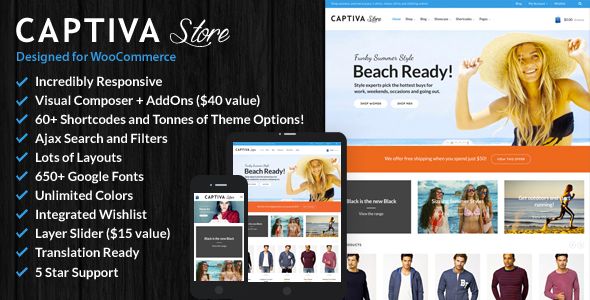
Stuck on your Captiva WordPress theme? Let's fix it.
No endless back-and-forth. Just send us the details and we'll get it done.
No obligation · Replies within 1 hour · Quote within 1 day
Setup · Customization · Bug fixes · WooCommerce integration
About Captiva WP Theme
Captiva is a WooCommerce theme built by CommerceGurus, a developer known for creating fast, conversion-focused store themes. It is designed specifically for product-heavy online shops that need clean layouts, quick load times, and a checkout flow that does not get in the way of sales.
Unlike general-purpose themes, Captiva is built around eCommerce from the ground up. It includes a range of pre-built shop templates, flexible product page layouts, and support for popular WooCommerce extensions. The theme is block-editor compatible and works well with Elementor for teams that prefer a visual workflow.
CommerceGurus themes have a reputation for clean code and genuine performance focus. Captiva fits stores selling physical products, digital downloads, subscriptions, and more. If your priority is a fast, good-looking WooCommerce store without heavy customization overhead, Captiva is worth a serious look.
Get matched with a Captiva developer in under one day
Tell us about your Captiva project. Small fixes, Captiva theme customization, or a full website build, whatever you need, we've got it covered.
We'll connect you to the right Captiva developers, define the scope, and get everything 100% clear.
You'll get one estimate, hire your preferred developer, and start collaborating.
Captiva is a capable theme, but like any WooCommerce build, the details matter. Custom checkout flows, product layout tweaks, extension conflicts, and performance issues all require hands-on knowledge to fix properly.
Working with a vetted developer through Codeable means you get someone who has actually worked with CommerceGurus themes before, not a generalist guessing their way through the code. Whether you need a full store setup or a targeted fix, the right person is available. Get a free estimate and see what is possible.
Pros
- Built specifically for WooCommerce, not adapted from a general-purpose theme
- Clean, lightweight code base that avoids the bloat common in multipurpose themes
- Sticky add-to-cart bar and quick view are built in, no plugin required
- Customizer-based settings cover most store configurations without touching code
- Good compatibility with major WooCommerce extensions including Subscriptions and Bundles
Cons
- Limited layout variety compared to multipurpose themes like Flatsome or Porto
- Documentation is thorough but dense, with a learning curve for non-technical users
- Some advanced layout customizations require template overrides or custom CSS
- Design flexibility is more restricted outside the Customizer without a page builder
- Updates occasionally break custom CSS or plugin integrations and need manual review
Who is Captiva for?
Fashion and Apparel Stores
Captiva handles product galleries, size guides, and variation swatches cleanly. The sticky add-to-cart feature works well for fashion products where customers scroll through images before deciding. Category pages support editorial-style layouts that suit clothing and accessories brands selling direct to consumer.
Health and Beauty Products
Health and beauty stores benefit from Captiva’s clean product page layout, which keeps focus on imagery and key details. Trust signals, ingredient lists, and customer reviews can all be structured without cluttering the page. The theme handles both single-product and multi-SKU catalogues without layout issues.
Electronics and Tech Accessories
Electronics stores need fast load times and clear product specifications. Captiva’s lightweight code base handles large catalogues without slowing down, and the product tab system makes it easy to separate specs, compatibility info, and reviews into organised sections without third-party plugins.
Home and Lifestyle Goods
Home goods stores often carry a wide product range across multiple categories. Captiva’s category page templates and filtering support help customers navigate large catalogues. The theme handles upsells and cross-sells well, which matters when average order value is a key metric for this type of store.
Digital Products and Downloads
Captiva supports WooCommerce’s digital download functionality without modification. Stores selling ebooks, templates, software, or courses can use the theme’s standard product pages effectively. Combined with WooCommerce Subscriptions, it also works for membership or recurring access models.

Customizing Captiva
Captiva gives you control over headers, footers, product pages, category pages, and the cart and checkout flow through the WordPress Customizer. Most visual changes are point-and-click, but getting the most out of the theme often means digging into layout options that are not immediately obvious.
Custom product page builders, sticky add-to-cart bars, quick view modals, and wishlist features all need to be configured correctly to work together. A Captiva expert can save you hours by setting up these features cleanly from the start, rather than troubleshooting conflicts later.
For stores with non-standard requirements, such as custom product tabs, conditional shipping notices, or category-specific layouts, template overrides and targeted CSS are usually the right approach. Getting that done properly requires solid WooCommerce and PHP knowledge.
Recommended plugins for Captiva
Captiva works well with standard WooCommerce extensions including WooCommerce Subscriptions, Bundles, and Product Add-Ons. It also integrates cleanly with most page builders and popular plugins like YITH Wishlist and WooCommerce Multilingual.
For stores focused on growth, pairing Captiva with proper WordPress performance optimisation and structured WooCommerce SEO work will make a real difference to traffic and conversion rates. The theme provides a solid base, but the surrounding setup determines how well the store actually performs.
Not sure which plugins to use? This WordPress plugins directory covers the most popular options with reviews and setup guides.
Captiva common issues
Captiva sticky add-to-cart not showing on product page
The sticky add-to-cart bar in Captiva is controlled through Customizer settings under the product page options. If it is not appearing, check that the option is enabled and that no CSS from a child theme or plugin is setting display: none on the component. JavaScript conflicts from caching plugins or minification tools can also prevent it from initialising. Disabling JS minification temporarily will confirm if that is the cause.
Captiva theme slow loading on mobile
Slow mobile performance with Captiva is usually caused by unoptimised images, render-blocking scripts, or a caching plugin not configured correctly. Run the site through PageSpeed Insights to identify the specific bottlenecks. Captiva itself is a lightweight theme, so if scores are poor, the issue is almost always in the hosting environment, image sizes, or third-party scripts loading on every page. A performance audit will give you a clear fix list.
Captiva quick view not working after plugin update
Quick view in Captiva relies on JavaScript that can conflict with certain WooCommerce extension updates or aggressive caching setups. After a plugin update, clear all caches first and test in a private browser window. If the modal still fails to open, check the browser console for JS errors. A script loading in the footer from a recently updated plugin is usually the culprit. If the conflict persists, a WordPress bug fix can isolate and resolve it properly.
Captiva WooCommerce checkout layout broken
Broken checkout layouts in Captiva are almost always caused by a plugin conflict or a CSS override targeting WooCommerce checkout fields. Deactivate non-essential plugins one at a time to find the source. Checkout field editor plugins and custom checkout plugins are frequent offenders. If the layout broke after a Captiva update, a CSS rule in your child theme may need to be updated to match the new markup structure.
Captiva FAQ
Yes. Captiva is built by CommerceGurus specifically for WooCommerce stores. It is not a general-purpose theme adapted for eCommerce. The code is written around WooCommerce conventions, which means fewer conflicts and better baseline performance than themes that add WooCommerce support as an afterthought.
Captiva is compatible with Elementor, though the theme’s own Customizer handles most store-specific settings. Elementor works well for custom landing pages, homepage layouts, and content sections. For product and category page templates, using Captiva’s built-in options alongside Elementor gives you the most control without creating conflicts.
Both themes are made by CommerceGurus and share a similar performance focus. Shoptimizer is the older, more established option with a larger user base and more documentation. Captiva is a newer release with a more modern design direction. For most stores, the right choice comes down to visual style preference rather than feature differences.
Most standard store configurations in Captiva can be handled through the WordPress Customizer without writing any code. However, customising product page templates, fixing plugin conflicts, or making layout changes beyond the built-in settings will require CSS knowledge at minimum, and PHP for anything structural.
Yes, Captiva is compatible with WooCommerce Subscriptions. Subscription product pages and account management areas display correctly with the theme. As with any WooCommerce extension, testing in a staging environment after updates is recommended to catch any layout changes before they affect live customers.
Hire a Captiva Expert Developer
If you need a Captiva developer to build out your store, fix a problem, or improve performance, we can match you with someone who knows the theme well. All work is delivered through Codeable, where every developer is vetted and rated. You get a free estimate before committing to anything.
From full store builds to single-issue fixes, our WordPress development services cover everything Captiva-related. Post your project and get a free estimate today.
You'll need a free Codeable account so developers can ask questions and send their quotes.