Car Service WordPress Theme
by QuanticaLabs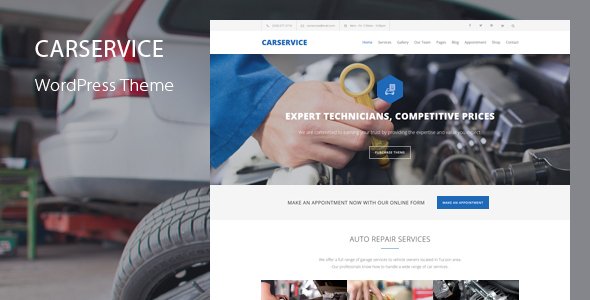
Stuck on your Car Service WordPress theme? Let's fix it.
No endless back-and-forth. Just send us the details and we'll get it done.
No obligation · Replies within 1 hour · Quote within 1 day
Setup · Customization · Bug fixes · WooCommerce integration
About Car Service WP Theme
Car Service is a WordPress theme built by QuanticaLabs for automotive service businesses. It targets mechanics, auto repair shops, tire centers, and detailing studios that need a professional online presence without hiring a custom developer.
The theme ships with a clean layout focused on service listings, appointment booking, and trust-building elements like team profiles and testimonials. It uses the WPBakery page builder for layout control and includes Revolution Slider for homepage banners. Demo content can be imported in one click, which cuts setup time significantly.
QuanticaLabs has a solid track record of building niche business themes with structured support documentation. Car Service follows that pattern with dedicated sections for pricing tables, working hours, and service categories. It runs on modern WordPress standards and is compatible with popular plugins like WooCommerce and WPML for shops and multilingual setups.
Get matched with a Car Service developer in under one day
Tell us about your Car Service project. Small fixes, Car Service theme customization, or a full website build, whatever you need, we've got it covered.
We'll connect you to the right Car Service developers, define the scope, and get everything 100% clear.
You'll get one estimate, hire your preferred developer, and start collaborating.
Most Car Service customization issues come down to the same patterns: WPBakery conflicts after updates, booking plugin mismatches, or layout breaks on mobile. A developer who knows the theme catches those fast.
Through Codeable, you get matched with vetted WordPress specialists within 24 hours. Every developer on the platform has passed a strict technical review, so you’re not gambling on quality. You post your project, get a free estimate, and only move forward if the scope and price work for you. No risk, no obligation.
Pros
- One-click demo import cuts initial setup time to under an hour
- Built-in pricing tables and working hours sections designed specifically for auto service businesses
- Revolution Slider included at no extra cost, saving around $30 on licensing
- WooCommerce compatibility allows selling parts, accessories, or service packages directly
- WPML-ready for multilingual automotive businesses serving mixed-language markets
Cons
- WPBakery page builder creates heavy shortcode dependency that makes switching themes painful
- Theme Options panel lacks granular control over individual service card styling
- Revolution Slider adds noticeable page weight if not configured carefully on mobile
- No native appointment booking system — requires a third-party plugin which may conflict with theme styles
- Support response times from QuanticaLabs can be slow during high-volume periods
Who is Car Service for?
Auto Repair Shop
Car Service fits a standard auto repair shop well. The service listing layout handles oil changes, brake jobs, and diagnostics cleanly. You can set up a booking form, display technician profiles, and list pricing tiers. A Car Service developer can extend this with real-time availability through Amelia or Bookly and add schema markup so Google shows your services in local search results.
Tire and Wheel Center
Tire centers need to display product inventory alongside installation services. With WooCommerce enabled, a Car Service specialist can build a product catalog for tire brands and link each listing to a booking flow for fitting appointments. Filtering by vehicle make and model requires custom taxonomy work, but it is achievable within the theme structure.
Car Detailing Studio
Detailing studios benefit from Car Service’s visual-heavy layout. Large image sections and before/after gallery support work well for showcasing results. A Car Service expert can configure a package-based pricing table, add a deposit-enabled booking plugin, and set up automated email confirmations to reduce no-shows and phone call volume.
Mobile Mechanic Service
Mobile mechanics need location-based service pages and a straightforward contact or booking flow. Car Service handles single-operator setups without unnecessary complexity. A developer can configure service area targeting with local SEO markup and build a simple intake form that captures vehicle details, postcode, and preferred time slot in one step.
Multi-Location Auto Service Chain
Running multiple branches from one WordPress install requires custom location post types, branch-specific service pages, and potentially a multisite configuration. A Car Service specialist can architect this properly so each location has its own SEO footprint, contact details, and booking calendar without duplicating content or creating management overhead across branches.

Customizing Car Service
Car Service gives you a Theme Options panel where you can change colors, fonts, header layouts, and footer structure without touching code. That covers most surface-level branding. But once you need to adjust service card layouts, rearrange booking form fields, or build custom post types for vehicle inspections or staff certifications, the default panel runs out of options quickly.
A Car Service expert can extend the theme properly. That means building child themes to protect your changes from updates, writing custom CSS for layout adjustments, and modifying WPBakery elements to match your brand exactly. If you need appointment scheduling integrated with a specific plugin like Amelia or Bookly, a Car Service specialist can wire that up cleanly without breaking the existing page structure.
Custom work like multi-location service pages, dynamic pricing tables, or integration with garage management software all require developer-level access.
Recommended plugins for Car Service
Car Service works well with plugins that extend booking, SEO, and performance. Adding a caching layer like WP Rocket or LiteSpeed Cache is straightforward, but image optimization for vehicle photos and service banners needs proper configuration to avoid slow load times on mobile.
For search visibility, pairing Car Service with Yoast or Rank Math and structuring your service pages with local schema markup helps Google surface your business in map results. See our WordPress SEO service for that kind of setup.
If your site carries high-resolution car imagery or embedded video, a proper WordPress performance audit can cut load time significantly and reduce bounce rates from mobile visitors.
Not sure which plugins to use? This WordPress plugins directory covers the most popular options with reviews and setup guides.
Car Service common issues
Car Service theme booking form not sending emails
Booking form email failures in Car Service usually trace back to the default WordPress mail function, which many hosts block. Install WP Mail SMTP and configure it with your host’s SMTP credentials or a service like SendGrid. Test the form after saving settings. If the form still fails, check whether a security plugin is blocking the form’s nonce or action hook. A plugin conflict is the second most common cause.
WPBakery elements broken after Car Service theme update
WPBakery shortcode rendering breaks when the bundled version bundled with Car Service falls behind the standalone plugin version, or vice versa. Do not run both simultaneously. If you purchased WPBakery separately, deactivate the theme-bundled version via the plugin manager. If you rely on the bundled copy, avoid updating WPBakery independently. For persistent layout damage, our WordPress bug fixing service can audit and restore affected pages.
Car Service homepage slider not loading on mobile
Revolution Slider mobile display issues in Car Service usually come from slider layers set to fixed pixel dimensions. Open the slider editor, switch to responsive settings, and set all layer sizes and positions to percentage-based values. Also check that the slider’s visibility settings are not accidentally hiding it on mobile breakpoints. Clear your cache after saving changes before retesting on a real device.
Car Service theme showing white screen after plugin install
A white screen after installing a plugin with Car Service almost always points to a PHP memory limit or a fatal error from a plugin conflict. Enable WP_DEBUG in wp-config.php to expose the actual error. If it is a memory issue, increase the limit to 256M. If a specific plugin is named in the error, deactivate it and contact its developer. Our WordPress bug fixing service handles these conflicts quickly.
Car Service demo content import fails or stalls
Car Service demo import failures typically happen due to server timeouts or memory limits on shared hosting. Increase PHP max_execution_time to 300 seconds and memory_limit to 256M in php.ini or via your host’s control panel. Try importing demo content in stages rather than all at once if the theme supports partial imports. If the importer stalls on media files, download the demo XML and import it manually through WordPress’s built-in importer tool.
Car Service theme fonts not loading correctly
Font loading issues in Car Service are often caused by a Google Fonts API change or a Content Security Policy header blocking external font requests. Check your browser console for blocked resource errors. If Google Fonts are restricted, download the font files locally and enqueue them through a child theme. If the theme uses custom icon fonts, verify the font files exist in the correct theme directory and have not been excluded by a minification plugin.
Car Service pricing table layout broken on smaller screens
Car Service pricing tables losing their column structure on tablets or phones is a WPBakery column configuration issue. Open the row containing the pricing table in WPBakery’s backend editor and adjust the column width settings for tablet and mobile breakpoints individually. Avoid using equal-width columns on small screens; stack them instead. Adding custom CSS for the pricing table wrapper with a max-width and overflow rule can also prevent horizontal scrolling on narrow viewports.
Car Service theme slow page speed on Google PageSpeed Insights
Car Service sites often score poorly on PageSpeed due to unoptimized vehicle images, render-blocking Revolution Slider scripts, and unused WPBakery CSS. Start by compressing images with ShortPixel or Imagify. Defer non-critical JavaScript in your caching plugin settings. Consider disabling Revolution Slider on mobile breakpoints entirely to reduce initial load weight. Our WordPress bug fixing service includes performance diagnostics for exactly this type of issue.
Car Service theme not compatible with WooCommerce checkout
WooCommerce checkout conflicts with Car Service usually show up as broken layout on the cart or checkout page. This happens when the theme’s custom CSS overrides WooCommerce’s default form styles. Create a child theme if you have not already, then add targeted CSS overrides scoped to WooCommerce page classes. Also check whether Car Service’s header or footer scripts are interfering with WooCommerce’s checkout JavaScript by temporarily switching to Storefront and testing.
Car Service custom CSS not applying after update
Custom CSS added via the Car Service Theme Options panel gets wiped on theme updates because it is stored in theme files rather than the database. The fix is to move all custom CSS into a child theme’s style.css file or use the WordPress Customizer’s Additional CSS field, which persists across updates. If you have been editing the parent theme directly, a child theme setup is the correct long-term solution and prevents this from happening again.
Car Service FAQ
Yes, Car Service from QuanticaLabs is well-suited to small auto repair shops. It includes service listings, pricing tables, team sections, and a contact or booking area out of the box. A small shop can import the demo, swap in their own content and branding, and have a working site quickly. For custom features like live booking or parts sales, you will need a developer to extend it properly.
Car Service theme does not ship with a native booking system, but it works alongside Amelia, Bookly, and similar plugins. The integration is functional but may require CSS adjustments to match the booking form to your site’s design. A Car Service developer can handle the styling and configure the plugin’s notification and calendar settings so it fits cleanly into your existing page layouts.
Technically yes, but it is not practical. The Car Service theme is built around WPBakery layouts and most demo pages rely on its shortcodes to render correctly. Removing WPBakery mid-project leaves raw shortcode strings visible on pages. If you want to switch to Gutenberg or Elementor, a Car Service specialist would need to rebuild your page layouts from scratch in the new editor.
The cleanest way to take payments on a Car Service site is through WooCommerce with Stripe or PayPal. You can sell service packages or parts as products, or pair it with a booking plugin that supports deposit collection. A developer can wire this up so customers pay at booking time with confirmation emails sent automatically. Basic WooCommerce setup is straightforward; custom checkout flows need developer input.
Car Service theme is responsive and adjusts for tablets and phones. However, Revolution Slider banners and some multi-column WPBakery layouts can display inconsistently on smaller screens without manual adjustment. Testing on real devices is important, particularly for the homepage and service pages. A developer can fine-tune breakpoint behavior and address any stacking or overflow issues that appear in production.
Car Service does not include multi-location functionality out of the box. You can create separate pages for each location manually, but a proper multi-location setup with individual service areas, booking calendars, and local SEO structured data requires custom development. A Car Service specialist can build a location post type or configure a multisite installation depending on the scale of your operation.
Customization cost depends on scope. Simple branding changes and content setup through the Theme Options panel can be done in a few hours. Adding booking integration, custom service pages, or WooCommerce functionality typically takes one to three days of developer time. For a precise number, post your project on Codeable and get a free estimate scoped to exactly what you need before committing.
Car Service is designed for service-based automotive businesses, not dealerships. It lacks vehicle inventory management, VIN detail pages, or finance calculator features that a dealership site needs. You could force-fit it, but a theme built specifically for car sales would be a better starting point. Car Service works best for workshops, garages, detailers, and tire shops rather than retail dealerships.
Start by optimizing images, which are the biggest load factor on most Car Service sites. Use a plugin like ShortPixel and enable WebP conversion. Add a caching plugin and configure it to defer render-blocking scripts from Revolution Slider and WPBakery. A CDN helps with static assets. For a full performance audit with measurable results, see our WordPress performance service.
Yes, migrating an existing site to Car Service theme is possible but requires careful planning. Your current content can be moved, but the visual layout will need to be rebuilt using WPBakery within the new theme. If your old site has custom post types or plugin data, a developer will need to map that across correctly. For a smooth transition, see our WordPress migration service which handles content, redirects, and design rebuild together.
Hire a Car Service WordPress Expert
Whether you need a full Car Service setup from scratch, a booking integration, a layout fix, or ongoing changes to your service pages, working with a specialist saves time and avoids compounding issues. Our developers know QuanticaLabs themes inside out and can scope your project accurately from the start. Get a free estimate and have a developer matched to your project within 24 hours, no commitment required.
You'll need a free Codeable account so developers can ask questions and send their quotes.