CargoPress WordPress Theme
by ProteusThemes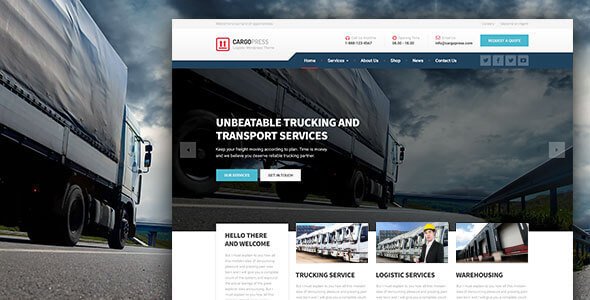
Stuck on your CargoPress WordPress theme? Let's fix it.
No endless back-and-forth. Just send us the details and we'll get it done.
No obligation · Replies within 1 hour · Quote within 1 day
Setup · Customization · Bug fixes · WooCommerce integration
About CargoPress WP Theme
CargoPress is a WordPress theme built by ProteusThemes specifically for freight, logistics, and transportation companies. It ships with a purpose-built page builder, pre-made demo content, and a layout designed around the needs of shipping and cargo businesses.
The theme includes a rate calculator widget, service area pages, a fleet showcase, and testimonial sections out of the box. It works with WPBakery Page Builder and includes ProteusThemes’ own widgets tailored to the industry.
CargoPress is a solid choice if you run a trucking company, freight forwarder, warehouse operation, or courier service and need a professional site without starting from scratch. It handles the visual structure well, though customisation beyond the demo often requires PHP and CSS knowledge.
Get matched with a CargoPress developer in under one day
Tell us about your CargoPress project. Small fixes, CargoPress theme customization, or a full website build, whatever you need, we've got it covered.
We'll connect you to the right CargoPress developers, define the scope, and get everything 100% clear.
You'll get one estimate, hire your preferred developer, and start collaborating.
CargoPress is not a difficult theme, but it has quirks. The ProteusThemes widget system, WPBakery’s shortcode output, and the demo content structure all interact in ways that catch non-developers off guard. Small changes can break the layout if you’re not familiar with how the theme handles its templates.
Working through Codeable connects you with developers who have handled CargoPress builds before. You get a fixed estimate, no bidding, and no risk. The work gets done correctly the first time.
Pros
- Built specifically for logistics and freight businesses with relevant pre-built sections
- Includes a rate calculator widget that most generic themes don't offer
- Demo content is detailed enough to use as a real starting point
- WPBakery integration gives non-developers reasonable layout control
- ProteusThemes has a track record of theme updates and documentation
Cons
- WPBakery shortcodes create content lock-in that's hard to unpick later
- The rate calculator is basic and not connected to real shipping APIs by default
- Page load times suffer without additional performance work due to bundled scripts
- Deep customisation requires familiarity with ProteusThemes' non-standard widget system
- Limited third-party plugin compatibility testing outside the ProteusThemes ecosystem
Who is CargoPress for?
Freight and Cargo Companies
CargoPress was designed with freight operations in mind. The theme includes service pages, a fleet section, and a rate calculator that fits naturally into a cargo company’s workflow. A developer can extend the calculator and connect quote requests to your internal team without rebuilding the site from scratch.
Trucking and Haulage Businesses
Trucking companies need to communicate routes, capacity, and reliability. CargoPress handles this with dedicated service and coverage area pages. Custom icons, fleet galleries, and driver or partner testimonials all have designated sections in the theme’s demo layout.
Courier and Last-Mile Delivery Services
For courier services, the priority is fast quote requests and clear service descriptions. CargoPress supports this with its enquiry widgets and service listing structure. Integrating a booking or dispatch tool requires developer work, but the front-end foundation is already in place.
Warehouse and Storage Operators
Storage and warehouse operators can use CargoPress to showcase facility details, storage options, and pricing tiers. The layout supports feature grids and service descriptions well. A developer can add a unit availability or booking system on top of the existing structure.
Freight Forwarders and Customs Brokers
Freight forwarders and customs brokers deal in trust and process. CargoPress supports detailed service pages, contact forms, and case study-style content. A developer can tailor the theme to include shipment tracking links, compliance information, and multi-step quote requests.

Customizing CargoPress
Getting CargoPress to match your brand takes more than swapping a logo. The theme uses WPBakery Page Builder for layout control, but many style decisions sit in the theme options panel or require direct CSS overrides.
Common customisation work includes adjusting the rate calculator to reflect real pricing logic, building out service pages for specific routes or regions, and integrating contact or quote forms with CRM tools. Font and colour changes are straightforward, but restructuring page templates or adding custom post types needs developer input.
If you want changes done properly without breaking the demo structure, working with a CargoPress expert is the fastest route. A developer familiar with ProteusThemes’ framework will know where the theme’s limits are and how to work around them cleanly.
Recommended plugins for CargoPress
CargoPress works well alongside several tools that extend its core functionality. Adding a quotes or booking plugin handles lead capture more reliably than a basic contact form. For sites targeting multiple locations, pairing the theme with a solid SEO setup improves local search visibility. Check out our WordPress SEO service if that’s a priority.
Performance is worth attention too. CargoPress loads several scripts and WPBakery assets that can slow things down. Image optimisation, caching, and a CDN make a real difference. Our WordPress performance service covers this in full.
Not sure which plugins to use? This WordPress plugins directory covers the most popular options with reviews and setup guides.
CargoPress common issues
CargoPress rate calculator not working
The CargoPress rate calculator widget is built on ProteusThemes’ custom widget system. If it stops working, the usual causes are a plugin conflict, a PHP version incompatibility, or a failed theme update that left widget configuration incomplete. Check the browser console for JavaScript errors first. If the issue is deeper, a developer can inspect the widget registration and reconfigure or replace the calculator with a more reliable plugin-based solution. Visit our WordPress bug fixing service for hands-on help.
CargoPress demo content not importing correctly
Demo import failures in CargoPress are common and usually tied to server timeout limits, missing required plugins, or conflicts with existing content. The one-click importer requires WPBakery and specific ProteusThemes plugins to be active before import. If images fail to load or widgets appear empty, the import likely stopped partway through. A developer can run a manual import using the XML file and configure widgets directly, which is more reliable than the automated tool on shared hosting.
CargoPress WPBakery layout broken after update
WPBakery updates frequently conflict with theme-specific shortcodes in CargoPress. After an update, rows or columns may collapse, elements may lose styling, or custom ProteusThemes widgets may stop rendering. The fix usually involves clearing caches, checking for deprecated shortcode parameters, and in some cases reverting to the WPBakery version the theme was tested with. If the layout is significantly broken, a developer should audit the page templates before making further changes.
CargoPress theme slow loading on mobile
CargoPress loads WPBakery scripts, custom fonts, multiple CSS files, and ProteusThemes widget assets on every page. On mobile, this adds up quickly. The fix involves deferring non-critical JavaScript, removing unused CSS, enabling lazy loading for images, and setting up a caching layer. A CDN also helps with asset delivery. Our WordPress performance service handles these optimisations with measurable before-and-after results.
CargoPress FAQ
CargoPress is built around WPBakery, not Elementor. While Elementor can technically be installed alongside CargoPress, the theme’s layout sections and ProteusThemes widgets are designed for WPBakery. Running both page builders creates conflicts and bloats the site. If you want an Elementor-based logistics site, you’re better off starting with a different theme rather than trying to bridge the two.
Technically yes, but it’s not practical. The demo content and most CargoPress page templates rely on WPBakery shortcodes to render correctly. Removing WPBakery leaves raw shortcode text visible on your pages. You’d need to rebuild all pages using a different editor, which removes the value of using CargoPress in the first place. Most CargoPress sites are built and maintained with WPBakery active.
Yes. CargoPress includes a rate calculator widget as part of the ProteusThemes widget set. It allows users to enter shipment details and receive a basic estimate. It is not connected to live carrier APIs by default, so real-time rates from FedEx, UPS, or freight exchanges require additional development work or a dedicated shipping plugin integrated on top.
Before updating CargoPress, back up your site files and database. Customisations made through the theme options panel are usually safe across updates. CSS added via the WordPress customiser is also preserved. However, changes made directly to theme template files will be overwritten. Use a child theme for any template-level edits. If you’re unsure what was modified, a developer can audit the site before the update runs.
CargoPress works for multi-location companies at the content level. You can create separate service area pages, location-specific contact details, and region-based service descriptions. For a true WordPress multisite setup, the theme needs to be tested carefully as ProteusThemes widgets may behave differently across subsites. A developer familiar with multisite can confirm compatibility and handle the configuration. Check our WordPress migration service if you’re moving an existing site.
Hire a CargoPress Developer
Need help setting up, customising, or fixing a CargoPress site? FoxyConcept delivers WordPress development through Codeable, where every developer is vetted and projects are matched within 24 hours.
Whether you need a full build from the demo or targeted fixes to an existing site, you can get a free estimate with no obligation to hire. It’s a straightforward way to find out what your project costs before committing to anything.
You'll need a free Codeable account so developers can ask questions and send their quotes.