CarPress WordPress Theme
by ProteusThemes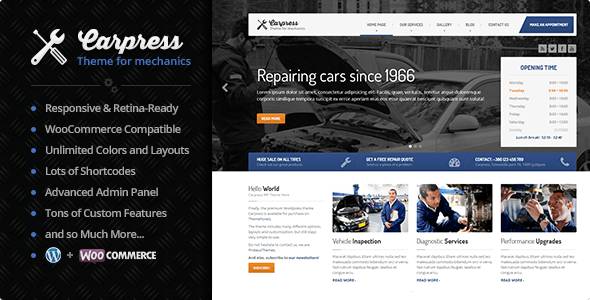
Stuck on your CarPress WordPress theme? Let's fix it.
No endless back-and-forth. Just send us the details and we'll get it done.
No obligation · Replies within 1 hour · Quote within 1 day
Setup · Customization · Bug fixes · WooCommerce integration
About CarPress WP Theme
CarPress is a WordPress theme built by ProteusThemes specifically for car dealerships, auto repair shops, and automotive businesses. It ships with WooCommerce integration for listing vehicles, a vehicle search widget, and pre-built page templates that cover most dealership needs out of the box.
The theme uses the WPBakery page builder and includes custom post types for cars, making it straightforward to add inventory with specs, pricing, and gallery images. It also supports advanced filtering by make, model, year, mileage, and price. For businesses that need a professional automotive site without building from scratch, CarPress covers a lot of ground. That said, getting it configured properly and extended beyond its defaults does require some technical knowledge.
Get matched with a CarPress developer in under one day
Tell us about your CarPress project. Small fixes, CarPress theme customization, or a full website build, whatever you need, we've got it covered.
We'll connect you to the right CarPress developers, define the scope, and get everything 100% clear.
You'll get one estimate, hire your preferred developer, and start collaborating.
CarPress is well-built for its niche, but dealership sites have specific needs that go beyond what any theme ships with. Inventory imports, custom finance calculators, lead routing, and performance tuning all require hands-on developer work.
FoxyConcept connects you with vetted CarPress developers through Codeable. Post a project, get a free estimate within 24 hours, and only move forward if the scope and price make sense. No commitment required.
Pros
- Purpose-built for automotive businesses with vehicle post types and search filters included
- WooCommerce integration allows vehicle sales, deposits, and pricing management
- Vehicle search widget supports filtering by make, model, year, price, and mileage
- Pre-built page templates for dealership homepage, inventory pages, and single vehicle listings
- WPML compatible for multilingual dealership and import/export business sites
Cons
- WPBakery page builder creates shortcode lock-in, making future migrations harder
- Redux Framework theme options panel can feel cluttered and hard to navigate for non-technical users
- Vehicle import from CSV or third-party DMS tools requires custom development or additional plugins
- Default performance is average, image-heavy vehicle listings need caching and optimization work
- Limited block editor support, Gutenberg workflow is not well integrated in current versions
Who is CarPress for?
Used Car Dealerships
CarPress is designed for exactly this use case. Dealers can list used vehicles with full specs, photo galleries, pricing, and contact forms. The search and filter system lets buyers narrow inventory by make, model, year, and price range, reducing phone inquiries and helping buyers find relevant stock faster.
Auto Repair and Service Shops
Auto repair shops can use CarPress to present services, display pricing, and capture booking requests through contact forms. The automotive design language builds trust with car owners. A CarPress specialist can strip back the inventory features and rebuild the homepage around services, testimonials, and a location map.
Vehicle Import and Export Businesses
Businesses importing or exporting vehicles can use CarPress to publish available stock with detailed specifications and inquiry forms. WPML compatibility means the site can serve multiple language markets. Custom fields and taxonomy terms can be added by a CarPress developer to match specific import categories or compliance requirements.
Car Rental Companies
Car rental companies can adapt CarPress vehicle listings to show rental fleet instead of for-sale inventory. With custom development, availability calendars and booking plugins can be integrated. A CarPress expert can modify the post type fields to include rental pricing tiers, mileage limits, and pickup location details.
Motorcycle and Powersports Dealers
Motorcycle and powersports dealers can repurpose CarPress by adjusting vehicle taxonomies to cover bikes, ATVs, and personal watercraft. The filtering and gallery systems transfer well to non-car inventory. A CarPress specialist can relabel fields and adjust search parameters to match how powersports buyers actually search.

Customizing CarPress
CarPress gives you a Theme Options panel built on Redux Framework, which controls colors, fonts, header layout, and widget areas. Most visual changes can be made without touching code, but deeper customization requires PHP and CSS work, especially around the vehicle listing templates and search filters.
A CarPress expert can restructure the vehicle archive pages, add custom fields to the car post type, create filtered search results that match your stock, and integrate third-party inventory tools. Custom homepage layouts using WPBakery, branded color schemes, and localized currency or unit settings are all common requests. If the out-of-the-box setup does not fit your workflow, a CarPress specialist can adapt it without breaking the update path or core theme files.
Recommended plugins for CarPress
CarPress works with WooCommerce for vehicle sales and deposits, Contact Form 7 for lead capture, and WPML for multilingual dealership sites. You can add live chat plugins, financing calculator widgets, and CRM integrations on top of the core theme.
For sites carrying large inventories, proper caching and image optimization matter. A WordPress performance review is worth doing before launch. If you want your vehicle listings to rank in local search, pairing CarPress with structured data and a solid WordPress SEO setup will make a real difference to organic traffic from buyers searching by location and model.
Not sure which plugins to use? This WordPress plugins directory covers the most popular options with reviews and setup guides.
CarPress common issues
CarPress vehicle search not filtering results correctly
Vehicle search filter issues in CarPress are usually caused by taxonomy mismatches or missing vehicle attribute values on individual listings. Check that each car post has the correct make, model, year, and price fields populated. If the AJAX filter is failing silently, check browser console for JavaScript errors. A plugin conflict with a caching plugin blocking AJAX requests is also common. Clearing cache after each test helps isolate the cause.
CarPress homepage layout broken after plugin update
A broken CarPress homepage after a plugin update usually means a WPBakery shortcode is no longer rendering correctly. Go to the page editor and look for raw shortcode strings appearing as text. Deactivate recently updated plugins one at a time to find the conflict. If WPBakery itself updated and changed a shortcode structure, you may need to rebuild that section. Our WordPress bug fixing service can trace and resolve layout breaks quickly.
CarPress vehicle images not displaying in listings
If vehicle images are missing in CarPress listings, first check that the featured image is set on each car post. If images are set but not displaying, the issue is often a regeneration problem with thumbnail sizes. Run a thumbnail regeneration using a plugin like Regenerate Thumbnails. If images still do not appear, check whether a security or CDN plugin is blocking image hotlinking or transforming image URLs unexpectedly.
CarPress WooCommerce vehicle price not showing
CarPress uses WooCommerce product data for vehicle pricing in some configurations. If the price is not showing, confirm the WooCommerce product connected to the vehicle post has a regular price set. Also check whether a currency switcher plugin is suppressing the price display. Template overrides in a child theme that reference the old price hook location can also cause this after WooCommerce updates. Our WordPress bug fixing service handles WooCommerce integration issues like this routinely.
CarPress contact form not sending emails
CarPress uses Contact Form 7 for lead capture forms. If emails are not arriving, the issue is almost always server-level mail delivery, not the form itself. Install an SMTP plugin like WP Mail SMTP and configure it with a transactional mail service such as Mailgun, SendGrid, or your hosting provider’s SMTP credentials. Test delivery after each change. Also check spam folders before assuming the form is broken.
CarPress theme options not saving changes
CarPress theme options run on Redux Framework. If settings are not saving, the most common cause is a PHP session or nonce conflict introduced by a caching plugin or security plugin blocking the save request. Temporarily disable caching and try again. Also check for JavaScript errors in the browser console when clicking Save, as a JS conflict from another plugin can silently prevent the save action from completing.
CarPress mobile menu not working on phones
CarPress mobile menu issues are usually CSS or JavaScript conflicts. Open browser developer tools on a mobile viewport and check for console errors. A plugin loading conflicting jQuery versions is a frequent cause. Also verify that the correct menu is assigned to the mobile menu location in Appearance > Menus. If the hamburger icon appears but clicking it does nothing, a JS error is blocking the toggle handler. Our WordPress bug fixing service can debug and fix this fast.
CarPress single vehicle page returning 404 error
A 404 on single vehicle pages in CarPress almost always means WordPress permalink settings need to be refreshed. Go to Settings > Permalinks and click Save Changes without making any edits. This flushes rewrite rules and usually resolves the issue instantly. If the 404 persists, check that the CarPress car post type is registered correctly and that the theme is active. A deactivated theme or a failed plugin dependency can prevent custom post types from registering.
CarPress site loading slowly on vehicle archive pages
Vehicle archive pages in CarPress load multiple images and can be slow without optimization. Start by enabling full-page caching with a plugin like WP Rocket or LiteSpeed Cache. Configure lazy loading for vehicle thumbnail images. Compress images with a tool like ShortPixel before uploading. If the database queries behind the vehicle filter are slow, adding indexes or limiting query depth can help. A full review is available through our WordPress performance service.
CarPress WPML language switcher not working
WPML integration with CarPress requires that the vehicle post type and taxonomies are registered as translatable in WPML settings. Go to WPML > Translation Management and check that the Cars post type and all related taxonomies are set to translatable. The language switcher widget also needs to be placed in an active widget area. If vehicle pages switch language but redirect to 404, check that translated versions of each vehicle post have been created in WPML.
CarPress FAQ
ProteusThemes updates CarPress periodically for WordPress compatibility. Check the theme changelog on ThemeForest before updating your live site. Running the latest WordPress version with an untested theme update can break templates. Test updates on a staging environment first. If you are unsure about compatibility after a WordPress core update, a CarPress specialist can verify and fix any issues.
Yes. CarPress integrates with WooCommerce to handle vehicle pricing, purchase buttons, and cart functionality. You can set each vehicle as a WooCommerce product and manage pricing through the product editor. Some CarPress features like price display and currency formatting pull directly from WooCommerce settings, so both need to be configured consistently.
CarPress does not include a built-in inventory import tool. Bulk importing vehicles from a CSV or connecting to a DMS platform requires a custom plugin or third-party integration. A CarPress developer can build an import routine that maps your data fields to the theme’s car post type and taxonomies, saving significant manual data entry time.
CarPress is WPML compatible, which means you can translate vehicle listings, page content, and theme strings into multiple languages. You need an active WPML licence to enable this. Each vehicle post is translated separately within WPML. A CarPress specialist can configure WPML correctly and ensure language switchers display properly across all page types.
CarPress uses Advanced Custom Fields or its own meta boxes for vehicle data. Adding custom fields requires either registering new ACF field groups assigned to the car post type or adding custom meta boxes through a child theme or small plugin. A CarPress expert can add fields and make them display correctly on single vehicle pages and in search filters without editing core theme files.
CarPress was built around WPBakery and does not have full Gutenberg support. You can use the block editor for basic content pages, but vehicle listing templates and the homepage builder rely on WPBakery shortcodes. Migrating CarPress to a fully Gutenberg-based workflow would require significant custom development work.
CarPress can be adapted for car rentals with custom development. The vehicle post type structure works well for fleet listings, but you would need a booking plugin and custom field adjustments to handle rental dates, pricing per day, and availability. A CarPress developer can integrate a booking system and rework the vehicle display to suit rental-specific information.
Large vehicle inventories in CarPress create performance pressure from images and database queries. Use a caching plugin, compress and lazy-load vehicle images, and limit the number of posts loaded per archive page. A CDN helps deliver images faster to visitors in different locations. For a full audit, see our WordPress performance service.
Migrating an existing dealership site to CarPress involves moving vehicle data into the theme’s custom post type structure, recreating pages using WPBakery, and reconfiguring search filters. If your current site stores inventory in a different format, data mapping is required. Our WordPress migration service handles this kind of structured content migration.
FoxyConcept matches you with vetted CarPress developers through Codeable. Post your project, receive a free estimate within 24 hours, and only proceed if the scope fits your needs. All developers on Codeable are screened and work is covered by a satisfaction guarantee. Visit our WordPress development services page to get started.
Hire a CarPress Expert Developer
Whether you need a CarPress developer to set up your dealership site from scratch, customize vehicle listings, fix a broken layout, or integrate third-party tools, FoxyConcept can match you with the right specialist. Projects are delivered through Codeable, so every developer is vetted and work is guaranteed.
Get a Free Estimate and describe what you need. You will hear back within 24 hours with a clear scope and price.
You'll need a free Codeable account so developers can ask questions and send their quotes.