Cartify WordPress Theme
by AgniHD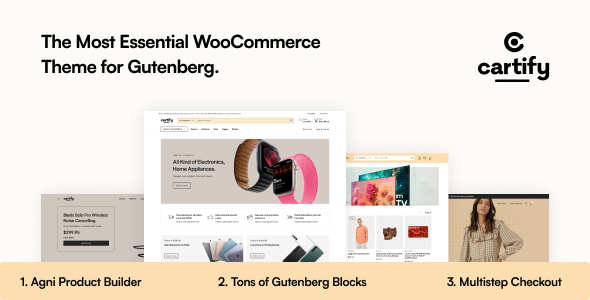
Stuck on your Cartify WordPress theme? Let's fix it.
No endless back-and-forth. Just send us the details and we'll get it done.
No obligation · Replies within 1 hour · Quote within 1 day
Setup · Customization · Bug fixes · WooCommerce integration
About Cartify WP Theme
Cartify is a WooCommerce theme built by AgniHD, designed specifically for online stores that need a clean, product-focused layout without the bloat that slows most shop themes down. It ships with a minimal codebase, pre-built demo content, and full WooCommerce compatibility out of the box.
The theme supports multiple homepage layouts, flexible product grid options, and a sticky cart feature that keeps checkout accessible without interrupting the browsing experience. Header and footer builders are included, so you can adjust the store structure without touching code.
Cartify works well for small to mid-size eCommerce stores selling physical products, digital downloads, or subscription items. It is compatible with popular plugins like WooCommerce Subscriptions, YITH Wishlist, and most major page builders including Elementor.
Get matched with a Cartify developer in under one day
Tell us about your Cartify project. Small fixes, Cartify theme customization, or a full website build, whatever you need, we've got it covered.
We'll connect you to the right Cartify developers, define the scope, and get everything 100% clear.
You'll get one estimate, hire your preferred developer, and start collaborating.
FoxyConcept connects you with vetted Cartify developers through Codeable, a platform built exclusively for WordPress professionals. Every developer on Codeable has passed a technical screening process, so you are not sorting through generic freelancers.
Whether you need a full store build, a specific customization, or help fixing something broken, you get a free estimate before committing to anything. The work is covered by Codeable’s satisfaction guarantee. No risk, no wasted budget on the wrong hire.
Pros
- Lightweight codebase keeps page load times low compared to multipurpose shop themes
- Full WooCommerce compatibility including variable products, subscriptions, and digital downloads
- Built-in header and footer builder removes the need for a separate plugin for layout control
- Sticky cart and quick view features work out of the box without extra plugins
- Clean product grid and category page templates that are straightforward to customize
Cons
- Limited demo variety means more custom work is needed to differentiate your store's look
- Advanced filtering requires a third-party plugin like AJAX Search Filters or FacetWP
- Documentation is sparse in areas, which slows down developers unfamiliar with the theme
- Some customizer options are shallow and require CSS or PHP edits to achieve deeper changes
- No built-in mega menu, so complex navigation structures need a plugin or custom development
Who is Cartify for?
Fashion and Apparel Stores
Cartify’s clean grid layout and quick view functionality work well for clothing stores where customers browse multiple products before buying. Variable product support handles size and color options correctly, and the minimal design keeps the focus on product imagery. A developer can add lookbook-style category pages or size guide popups without restructuring the theme.
Digital Products and Downloads
Cartify supports WooCommerce digital downloads natively. Stores selling ebooks, templates, software, or courses can use it without extra configuration for file delivery. The checkout flow is straightforward, and a developer can strip out shipping fields, add license key delivery, or connect to an email marketing tool to automate post-purchase sequences.
Home Goods and Furniture
Product pages in Cartify give enough room for large images and detailed descriptions, which matters for furniture and home goods where buyers need context before purchasing. A developer can add room visualizer integrations, custom product tabs for dimensions and materials, and inquiry forms for high-ticket items that customers want to ask about before ordering.
Health and Beauty
Health and beauty stores benefit from Cartify’s fast load times and clean product presentation. Ingredient lists, usage instructions, and before-and-after imagery can be built into custom product tabs. A developer can also set up subscription purchasing options for consumables like supplements or skincare, keeping repeat buyers on a regular order schedule.
Electronics and Gadgets
Electronics stores need detailed product specifications and clear comparison options. Cartify’s product page structure can be extended with a comparison plugin and custom spec tables added through template overrides. A developer can also wire up a compatibility checker or configurator for products that have multiple components, keeping the shopping experience clear for technical buyers.

Customizing Cartify
Out of the box, Cartify gives you a solid starting point, but most stores need adjustments that go beyond what the theme customizer allows. A dedicated Cartify expert can rework product page layouts, build custom category templates, and integrate third-party plugins without breaking the existing design.
Common customization work includes modifying the cart and checkout flow, adding custom fields to product pages, adjusting the mobile navigation, and setting up conditional content blocks for promotions or upsells.
If you need a unique design that still runs on Cartify, a developer can create a child theme to keep your changes safe through updates, and wire up any WooCommerce extension your store relies on. Custom work stays clean, maintainable, and documented.
Recommended plugins for Cartify
Cartify pairs well with WooCommerce extensions for product filtering, subscriptions, bookings, and multi-currency support. Adding these correctly takes more than installing a plugin. You may need template overrides, CSS adjustments, or custom hooks to make everything look right.
Speed is also worth addressing early. A well-configured caching layer, image optimization, and a proper CDN setup can cut load times significantly on product-heavy stores. See our WordPress performance service for that work.
For stores targeting organic traffic, structured data and on-page optimization matter. Our WordPress SEO service covers product schema, category optimization, and technical fixes specific to WooCommerce stores built on Cartify.
Not sure which plugins to use? This WordPress plugins directory covers the most popular options with reviews and setup guides.
Cartify common issues
Cartify theme checkout page not displaying correctly
Checkout display issues in Cartify are usually caused by a plugin conflict, a WooCommerce template override that has fallen out of sync after an update, or a CSS rule colliding with the checkout fields. Start by switching to a child theme if you haven’t already, then check which WooCommerce templates Cartify is overriding and compare them against the current WooCommerce version. Our WordPress bug fixing service can diagnose and resolve checkout issues quickly.
Cartify product images not loading or showing broken on mobile
Broken product images in Cartify on mobile are often tied to incorrect image size registration, a CDN misconfiguration, or lazy loading conflicting with the theme’s image scripts. Run the WooCommerce regenerate thumbnails tool first. If images are still broken, check whether a caching or optimization plugin is stripping srcset attributes. A developer can trace the exact cause and fix it without affecting desktop display or other image sizes.
Cartify WooCommerce cart total not updating without page refresh
Cart totals not updating in Cartify without a page refresh usually points to a JavaScript conflict blocking WooCommerce’s AJAX cart functions. This often happens after adding a caching plugin that minifies or combines scripts incorrectly. Check browser console errors first. If WooCommerce AJAX calls are being blocked or returning errors, the fix is usually excluding cart scripts from minification or resolving a script loading order issue.
Cartify theme slowing down after adding plugins
Cartify is a lightweight theme, but adding poorly coded plugins can undo that quickly. The most common culprits are page builders loading scripts on every page, unoptimized image plugins, or multiple slider plugins queuing large assets. Use Query Monitor to identify slow database queries and scripts. Our WordPress performance service can audit your full plugin stack and remove bottlenecks without breaking your store’s functionality.
Cartify FAQ
Yes. Cartify is built around WooCommerce and handles the core store features well, including variable products, cart, checkout, and account pages. It is a better fit for stores that want a fast, focused shopping experience rather than a feature-heavy theme that tries to do everything. For complex requirements, a developer can extend it with targeted plugins.
Cartify is compatible with Elementor for building and editing pages. The theme’s own header and footer builder handles global structure, while Elementor can be used for landing pages, custom product category pages, or promotional content. Avoid building core WooCommerce templates in Elementor unless you use Elementor Pro’s WooCommerce builder, as conflicts can occur.
Cartify does not include multi-vendor functionality by default. You can add it using a plugin like Dokan or WCFM Marketplace, but integration requires custom development work to align the vendor dashboard and product submission flow with Cartify’s layout. It is doable but expect customization time, especially for the frontend vendor profile and store pages.
Always use a child theme before making any code changes to Cartify. With a child theme in place, updates to the parent theme will not overwrite your customizations. For customizer settings and Cartify’s built-in options, those are stored in the database and are not affected by updates. If you have modified template files directly, compare them against the updated versions after each update.
Cartify is generally compatible with WPML, which is the most widely used multilingual plugin for WooCommerce stores. You will need WPML’s WooCommerce Multilingual add-on to handle product translations and currency by language. Some theme strings may need to be registered manually in WPML’s string translation panel. A developer familiar with both Cartify and WPML can set this up cleanly.
Hire a Cartify Developer
Need a Cartify expert who knows WooCommerce inside out? FoxyConcept works through Codeable to match you with a developer suited to your project within 24 hours. Whether it’s a full store build, a layout change, or a tricky plugin conflict, you get a clear scope and a free estimate before any work starts. Get your free estimate today and find out exactly what your Cartify project will take.
You'll need a free Codeable account so developers can ask questions and send their quotes.