Charity Foundation WordPress WordPress Theme
by nicdark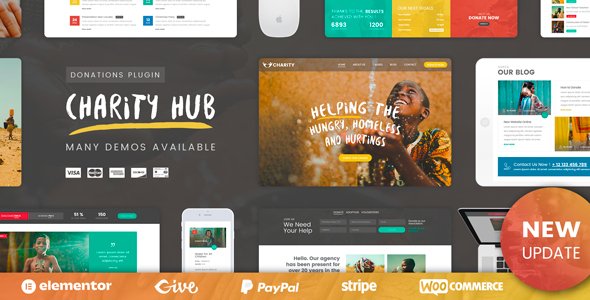
Stuck on your Charity Foundation WordPress WordPress theme? Let's fix it.
No endless back-and-forth. Just send us the details and we'll get it done.
No obligation · Replies within 1 hour · Quote within 1 day
Setup · Customization · Bug fixes · WooCommerce integration
About Charity Foundation WordPress WP Theme
Charity Foundation WordPress is a theme by nicdark built specifically for nonprofits, charities, and fundraising organisations. It ships with donation-ready layouts, campaign progress bars, event listings, and volunteer management sections. The design is clean and purpose-built rather than adapted from a generic multipurpose template.
The theme integrates with GiveWP and PayPal for donation processing, includes shortcode-based content blocks, and supports WPML for multilingual charity sites. Page builder compatibility (WPBakery) is built in, so building out cause pages or team sections does not require custom code. It is a practical starting point for any organisation that needs to collect donations and communicate its mission online without building from scratch.
Get matched with a Charity Foundation WordPress developer in under one day
Tell us about your Charity Foundation WordPress project. Small fixes, Charity Foundation WordPress theme customization, or a full website build, whatever you need, we've got it covered.
We'll connect you to the right Charity Foundation WordPress developers, define the scope, and get everything 100% clear.
You'll get one estimate, hire your preferred developer, and start collaborating.
nicdark themes follow consistent conventions, but configuring Charity Foundation WordPress for a live fundraising site involves more moving parts than a standard business site. Payment gateways, donation forms, campaign tracking, and multilingual support all need to be set up correctly before launch.
Codeable connects you with vetted WordPress developers who have worked with charity and nonprofit themes before. You post your project, get a fixed estimate, and only move forward if the scope and price work for you. No cold outreach, no guesswork about who you are hiring.
Pros
- Purpose-built for nonprofits with donation, campaign, and event sections included from the start
- Native GiveWP integration means donation forms work without heavy custom development
- WPBakery page builder support makes building cause and team pages accessible without code
- WPML compatibility allows multilingual charity sites for international organisations
- Clean, focused design avoids the bloat common in multipurpose themes adapted for charity use
Cons
- WPBakery is an older page builder and not as modern as Elementor or Gutenberg-first workflows
- Theme options panel is functional but dated compared to newer Customizer-heavy themes
- Documentation is limited and some shortcodes require hands-on testing to understand fully
- Heavy reliance on shortcodes creates lock-in that makes switching themes messy later
- Update frequency from nicdark has slowed, which raises questions about long-term compatibility with newer WordPress versions
Who is Charity Foundation WordPress for?
Nonprofit Fundraising Organisations
Nonprofits running active fundraising campaigns get immediate value from the built-in donation progress bars, cause pages, and GiveWP integration. A Charity Foundation WordPress developer can configure tiered giving, set up recurring donations, and connect Stripe or PayPal so the site is ready to accept contributions from day one.
Faith-Based Charities and Churches
Churches and faith organisations need event listings, volunteer sign-ups, and sermon or news sections alongside donation functionality. The theme’s flexible page layouts handle these without requiring a second theme or major workarounds. A Charity Foundation WordPress specialist can tailor the design to match the organisation’s visual identity.
Humanitarian Aid and Relief Campaigns
Emergency relief organisations benefit from the campaign urgency layouts and clear calls to action built into the theme. Fast deployment matters in these cases. A developer familiar with Charity Foundation WordPress can stand up a campaign page quickly, integrate a payment processor, and ensure the donation flow is tested and functional before the campaign goes live.
Environmental and Conservation Nonprofits
Environmental nonprofits often run multiple concurrent campaigns with individual funding targets. The theme’s cause post type supports this natively. A Charity Foundation WordPress expert can display live progress across campaigns, add impact counters, and integrate email capture for donor follow-up without custom plugin development.
Animal Welfare and Rescue Organisations
Animal rescue organisations need adoption listings, volunteer applications, and donation forms in one site. Charity Foundation WordPress covers the fundraising layer well. A developer can extend the theme with custom post types for animals and intake forms, keeping everything within one manageable WordPress installation.

Customizing Charity Foundation WordPress
Out of the box, Charity Foundation WordPress covers most nonprofit use cases, but real-world sites almost always need adjustments. Donation form styling, custom campaign layouts, header colour schemes, and homepage section reordering are common starting points. The theme options panel handles basics, but deeper changes need CSS or child theme work.
A Charity Foundation WordPress expert can configure GiveWP donation tiers, set up recurring giving, connect payment gateways, and customise campaign pages to match your branding. nicdark’s shortcode system is flexible but takes time to learn, so working with someone who knows the theme saves hours of trial and error. Custom post types for causes, events, and team members can also be extended without touching core files when handled correctly.
Recommended plugins for Charity Foundation WordPress
Charity Foundation WordPress works well with several plugins beyond its built-in stack. GiveWP add-ons cover recurring donations, fee recovery, and donor management. For performance, image optimisation, caching, and a CDN make a real difference, especially on campaign pages with multiple images and progress bars. See our WordPress performance service for specifics.
SEO plugins like Yoast or Rank Math pair cleanly with the theme. If your charity relies on organic search to attract donors, structured metadata and schema for events and causes matters. Our WordPress SEO service covers this in detail. Contact form and email marketing integrations (Mailchimp, Constant Contact) round out a typical nonprofit setup.
Not sure which plugins to use? This WordPress plugins directory covers the most popular options with reviews and setup guides.
Charity Foundation WordPress common issues
Charity Foundation WordPress donation form not submitting
Donation form submission failures on Charity Foundation WordPress usually come from a JavaScript conflict with another plugin or an SSL misconfiguration. Start by checking the browser console for JS errors, then deactivate plugins one at a time to isolate the conflict. Ensure your site runs on HTTPS and that the GiveWP form action URL matches the live domain. If the problem persists, our WordPress bug fixing service can trace and resolve the conflict.
GiveWP not working with Charity Foundation WordPress theme
GiveWP compatibility issues with Charity Foundation WordPress often come down to version mismatches. After a GiveWP major update, shortcodes or template overrides inside the theme may break. Clear any caching plugins first, then check if the theme has a child theme override file for GiveWP templates that needs updating. Regenerate permalinks from Settings > Permalinks as well, since custom post type conflicts can affect form routing.
Charity Foundation WordPress campaign progress bar not showing
Campaign progress bars in Charity Foundation WordPress pull donation totals from GiveWP. If the bar is not displaying, check that the campaign goal is set inside the GiveWP form settings and that the correct form ID is referenced in the shortcode. Also verify that GiveWP’s goal feature is enabled under Donations > Settings > Display. A mismatch between the shortcode form ID and the actual published form is the most common cause.
WPBakery page builder broken after Charity Foundation WordPress update
WPBakery breaking after a theme update usually means the bundled version of WPBakery inside Charity Foundation WordPress is out of sync with the standalone plugin if you have both active. Deactivate the standalone WPBakery plugin and use only the version bundled with the theme, or update both to matching versions. Check the nicdark changelog for the theme version you updated to, as it often specifies the supported WPBakery version.
Charity Foundation WordPress PayPal integration not connecting
PayPal connection issues in Charity Foundation WordPress are most often caused by incorrect API credentials or using sandbox credentials on a live site. In GiveWP, go to Donations > Settings > Payment Gateways > PayPal and verify that live mode is selected and the API keys are from your PayPal business account. Also ensure your server’s PHP cURL extension is enabled, as PayPal’s API calls depend on it. Our WordPress bug fixing service handles gateway configuration issues regularly.
Charity Foundation WordPress mobile layout broken on phones
Mobile layout problems in Charity Foundation WordPress are usually traced to a custom CSS override that uses fixed pixel widths, or a WPBakery row with a custom padding value that does not scale correctly. Use browser dev tools to inspect the breaking element on a small viewport. Check theme options for any full-width section overrides. If a child theme stylesheet is present, look there for conflicting media queries before touching the parent theme.
Charity Foundation WordPress shortcodes showing as plain text
Shortcodes rendering as plain text in Charity Foundation WordPress mean the plugin or feature that registers the shortcode is not active. This usually happens after a theme change or when the required plugin (GiveWP, a nicdark plugin, or WPBakery) has been deactivated. Go to Plugins > Installed Plugins and confirm all theme-required plugins are active. The theme’s installation screen lists required and recommended plugins that must be present for shortcodes to render.
Charity Foundation WordPress events page showing 404
A 404 on the events page after setting up Charity Foundation WordPress almost always means permalinks need to be refreshed. Go to Settings > Permalinks and click Save Changes without changing anything. This flushes the rewrite rules and registers the events custom post type URL. If that does not fix it, check that the page assigned as the events archive in the theme options actually exists and is published.
Charity Foundation WordPress WPML pages not translating correctly
WPML translation issues on Charity Foundation WordPress often occur when theme strings are not registered in WPML’s String Translation module. Go to WPML > Theme and Plugins Localization and scan the theme for strings. Cause pages and campaign titles sometimes need to be manually duplicated per language in WPML’s translation editor. Also ensure the theme’s language files are in the correct directory and that WPML’s language switcher is placed correctly in the theme’s widget areas.
Charity Foundation WordPress slow loading on campaign pages
Slow campaign pages on Charity Foundation WordPress are commonly caused by unoptimised images in cause galleries, multiple undeferred JavaScript files from WPBakery, and uncached GiveWP queries. Install a caching plugin, compress images, and enable lazy loading. Check that GiveWP’s API endpoint is not being called on every page load. Our WordPress bug fixing service includes performance diagnosis if the source is not immediately obvious.
Charity Foundation WordPress FAQ
Yes, for organisations that want a working starting point without building from scratch. It handles donations, campaigns, events, and volunteer sections in one theme. It is not the most modern codebase, but it is functional and purpose-built. For a polished result, working with a Charity Foundation WordPress specialist is worth considering, particularly for payment setup and custom layouts.
Yes. GiveWP is the primary donation plugin the theme is designed around. Cause pages, progress bars, and donation shortcodes all connect to GiveWP forms. Most GiveWP add-ons work without conflict, though template overrides in older theme versions may need updating after major GiveWP releases.
Yes. Charity Foundation WordPress supports PayPal, Stripe via GiveWP, and offline donations. You configure payment gateways inside GiveWP’s settings, not the theme itself. A developer can set up and test the full donation flow including confirmation emails, donor receipts, and currency settings before you go live.
Not natively. Charity Foundation WordPress is built for WPBakery, not Elementor. You can install Elementor separately, but the theme’s included demo content and shortcodes are WPBakery-dependent. Running both builders on the same site adds bloat and can cause conflicts. Sticking with WPBakery is the more stable approach for this theme.
Yes, through GiveWP’s Recurring Donations add-on. The theme itself does not manage recurring giving directly, but because it integrates with GiveWP, you can enable monthly or annual giving options on any donation form. This add-on is a paid GiveWP extension and needs to be configured separately.
nicdark updates have slowed in recent years. The theme still works with current WordPress versions, but the update cadence is less active than it was. It is worth checking the ThemeForest changelog before purchasing to see the last update date. Running a child theme is recommended to avoid losing customisations during any future updates.
Yes. Charity Foundation WordPress is WPML-compatible, which is the most widely used multilingual plugin for WordPress. You can translate cause pages, campaign titles, navigation, and theme strings. A Charity Foundation WordPress developer familiar with WPML can set up the translation workflow and ensure language switchers are correctly placed.
Campaign pages use the Causes custom post type built into the theme. Create a new Cause post, add your campaign description, set a featured image, and link it to a GiveWP form for the donation progress bar. WPBakery handles layout within the page. The theme documentation covers basic setup, but a developer can build out more detailed multi-campaign architectures.
Yes, a site migration is straightforward in technical terms. Your existing content, donor data, and media can be moved to a new WordPress install running Charity Foundation WordPress. However, if your current site uses a different donation plugin, you will need to migrate donation records carefully to avoid data loss. See our WordPress migration service for support with this process.
Cost depends on scope. A focused task like configuring GiveWP and payment gateways is typically a few hours of work. A full site build with custom campaign layouts, multilingual setup, and payment testing runs longer. Post your project on Codeable to get a fixed estimate from a vetted Charity Foundation WordPress developer before committing to anything.
Hire a Charity Foundation WordPress Developer
Whether you need a Charity Foundation WordPress expert to configure your donation setup, fix a broken campaign layout, or build out a full nonprofit site from scratch, we can match you with the right developer. Work is scoped upfront and delivered through Codeable’s vetted network. Get a Free Estimate with no obligation to hire.
You'll need a free Codeable account so developers can ask questions and send their quotes.