Charity Home WordPress Theme
by TonaTheme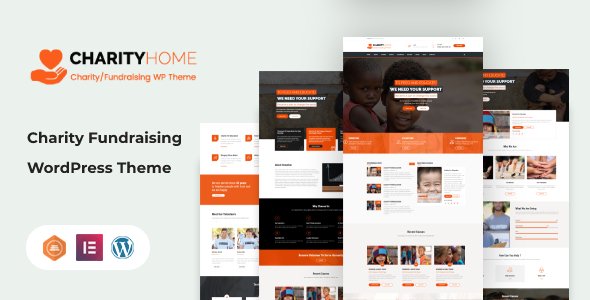
Stuck on your Charity Home WordPress theme? Let's fix it.
No endless back-and-forth. Just send us the details and we'll get it done.
No obligation · Replies within 1 hour · Quote within 1 day
Setup · Customization · Bug fixes · WooCommerce integration
About Charity Home WP Theme
Charity Home is a WordPress theme built by TonaTheme for nonprofit organizations, charities, and fundraising campaigns. It ships with donation-ready layouts, cause pages, and event sections designed to help organizations collect support online without heavy development work.
The theme integrates with popular donation plugins and includes pre-built page templates for campaigns, volunteer sign-ups, and impact reports. It uses a clean visual style that puts your cause front and center, with large hero sections, donor counters, and call-to-action blocks built into the default layout.
Charity Home is built on a standard WordPress foundation, which means it works with most major plugins and supports full customization through the WordPress Customizer and Elementor. It suits small charities launching their first site as well as established nonprofits replacing an outdated theme.
Get matched with a Charity Home developer in under one day
Tell us about your Charity Home project. Small fixes, Charity Home theme customization, or a full website build, whatever you need, we've got it covered.
We'll connect you to the right Charity Home developers, define the scope, and get everything 100% clear.
You'll get one estimate, hire your preferred developer, and start collaborating.
Charity Home has specific quirks around its donation layouts and demo import process that catch many site owners off guard. A developer who knows the theme can skip the trial and error entirely.
Through Codeable, you get matched with a vetted WordPress developer who has worked with themes like Charity Home before. No junior freelancers, no guesswork on pricing. Post your project, get a clear estimate, and decide whether to move forward. There is no obligation to hire.
Pros
- Pre-built donation and cause page templates save significant setup time
- Compatible with GiveWP and Charitable out of the box
- Includes donor progress bars and fundraising counters in the default layout
- Works with Elementor for drag-and-drop page editing
- Clean, distraction-free design keeps the focus on the cause and donation CTA
Cons
- Demo import can be unreliable and often requires manual cleanup afterward
- Limited layout variety compared to premium multipurpose themes
- Some sections are not easily moved or hidden without custom CSS
- Documentation from TonaTheme is sparse and not always up to date
- Plugin conflicts with certain payment gateways require manual troubleshooting
Who is Charity Home for?
Nonprofit Organizations
Registered nonprofits get a ready-made structure for cause pages, impact statistics, and donation calls to action. The theme’s layout supports annual reports and volunteer recruitment pages without needing a custom build from scratch. It covers the core pages most nonprofit sites need from day one.
Fundraising Campaigns
Time-limited fundraising campaigns benefit from the theme’s built-in progress bars and goal counters. You can set up a dedicated campaign page quickly, embed a donation form, and drive traffic directly to it. The layout is optimized to reduce friction between landing and donating.
Faith-Based Charities
Churches and faith-based organizations use Charity Home for donation pages, event listings, and outreach program pages. The clean visual style works well for communities that need a professional online presence without a design that feels overly corporate or transactional.
Animal Welfare Groups
Animal shelters and rescue groups can use the cause grid to showcase animals available for sponsorship or adoption. Donation forms connect directly to specific animals or programs. The emotional imagery sections in the theme work well for telling individual animal stories.
Community Foundations
Community foundations running multiple grant programs can organize their work using the theme’s cause and program page templates. Donor pages and impact sections help communicate results to existing supporters and attract new ones through transparent reporting.

Customizing Charity Home
Getting Charity Home to match your brand takes more than swapping colors in the Customizer. The theme ships with demo content that needs to be replaced cleanly, and sections like the donation counter or cause grid often require careful configuration to display correctly.
A Charity Home expert can set up your homepage layout, connect your donation plugin, configure cause pages, and make sure your event and volunteer sections work the way you need them to. Custom CSS adjustments, font changes, and header modifications are straightforward for an experienced developer but time-consuming if you are doing it yourself for the first time.
If you want the theme to reflect your organization’s identity accurately and function reliably from day one, working with a Charity Home expert is the fastest path to a finished site.
Recommended plugins for Charity Home
Charity Home pairs well with GiveWP or Charitable for donation processing. Add WooCommerce if you sell merchandise or branded goods to support your cause. For events, The Events Calendar integrates cleanly with the theme’s layout.
To get the most from your site beyond design, consider investing in WordPress performance optimization to keep load times fast for donors on mobile, and WordPress SEO to help your cause pages rank for relevant search terms and attract organic traffic from people looking to donate or volunteer.
Not sure which plugins to use? This WordPress plugins directory covers the most popular options with reviews and setup guides.
Charity Home common issues
Charity Home demo import not working
Demo import failures in Charity Home are usually caused by PHP memory limits or upload size restrictions on the server. Increase memory_limit to at least 256MB and max_execution_time to 300 in your php.ini or wp-config.php. If the import still stalls, try importing XML content manually through WordPress Tools and upload the widget data separately. If this keeps causing problems, a WordPress bug fixing service can resolve it without data loss.
Charity Home donation plugin not displaying correctly
When a donation form from GiveWP or Charitable does not display correctly inside Charity Home, the cause is usually a CSS conflict between the theme’s stylesheet and the plugin’s default styles. Open browser DevTools and inspect the broken element to find which rule is overriding the plugin layout. Add corrective CSS in Appearance > Customize > Additional CSS. If the form breaks on specific templates only, check that the page template assigned to that page is correct in the page editor.
Charity Home header logo not showing on mobile
A logo that disappears on mobile in Charity Home is typically a max-width or display issue in the theme’s responsive CSS. Check the Customizer under Header settings to confirm a mobile logo is not set to a broken file path. Then inspect the header in mobile view using DevTools and look for display: none or overflow rules hiding the image. A targeted CSS fix using a mobile media query usually resolves this in under 15 minutes.
Charity Home fundraising progress bar not updating
The fundraising progress bar in Charity Home pulls its values from either a shortcode attribute or a connected donation plugin total. If the bar is not updating, first confirm your donation plugin is correctly configured to pass totals to the theme’s widget or shortcode. Static bars set with manual numbers need to be updated manually in the page editor. If you are using GiveWP, check that the campaign goal is published and the form ID referenced in the shortcode matches the active form.
Charity Home FAQ
Yes, Charity Home is compatible with Elementor. You can use Elementor’s drag-and-drop editor to modify page layouts while keeping the theme’s built-in header, footer, and donation sections active. Some theme-specific templates are not editable directly in Elementor, but most content pages work without issues. For complex layout changes, a developer familiar with both tools will get results faster.
Charity Home is designed to work alongside GiveWP. You can embed GiveWP donation forms into cause pages using shortcodes, and the theme’s progress bar elements can be aligned with GiveWP campaign goals. Some styling adjustments may be needed to make the form match your site’s color scheme, but the core functionality connects without custom development.
Yes. Charity Home suits church websites well. The event sections, sermon or program pages, and donation layouts map directly to what most church sites need. The design is clean and avoids anything too corporate. You may want to relabel some default sections, like changing cause pages to ministry pages, which is straightforward in the page editor.
Before updating Charity Home, back up your site including the database and theme files. Customizations made through the WordPress Customizer are stored in the database and survive theme updates. Changes made by editing theme files directly will be overwritten. Use a child theme to protect any code-level customizations. If you skipped that step, consider WordPress maintenance support before running the update.
Charity Home by TonaTheme is available as a premium theme, typically sold through ThemeForest or the developer’s own site. A single license covers one website. You will need an active license to receive theme updates and support from TonaTheme. Free versions or trial demos may be available but usually lack full template access and plugin integration support.
Hire a Charity Home Developer
Whether you need a full site build, a layout fix, or help connecting your donation plugin, a Charity Home developer can handle it. Work is delivered through Codeable, so you get a vetted professional with transparent pricing and no risk.
Get a free estimate and describe your project. You will hear back within 24 hours with a clear scope and cost. No obligation to move forward until you are ready.
You'll need a free Codeable account so developers can ask questions and send their quotes.