Charm WordPress Theme
by ThemeRain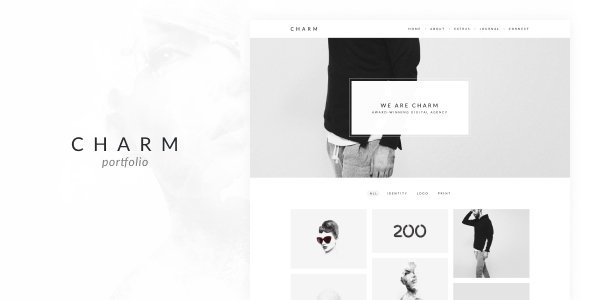
Stuck on your Charm WordPress theme? Let's fix it.
No endless back-and-forth. Just send us the details and we'll get it done.
No obligation · Replies within 1 hour · Quote within 1 day
Setup · Customization · Bug fixes · WooCommerce integration
About Charm WP Theme
Charm is a WordPress theme by ThemeRain built for creative professionals and small businesses that want a clean, visually led website. It ships with a drag-and-drop page builder, multiple homepage layouts, and a portfolio section that works well for photographers, designers, and agencies.
The theme is coded on a lightweight base with WooCommerce compatibility, meaning you can add a shop without switching themes. The demo content installer makes initial setup quick. Typography is controlled through Google Fonts, and the color scheme can be changed site-wide from the customizer without touching code.
Charm sits in the mid-range of ThemeRain products. It is not the most feature-heavy option available, but it does what it promises without unnecessary bloat. For a studio, freelancer, or boutique service business, it covers the basics well out of the box.
Get matched with a Charm developer in under one day
Tell us about your Charm project. Small fixes, Charm theme customization, or a full website build, whatever you need, we've got it covered.
We'll connect you to the right Charm developers, define the scope, and get everything 100% clear.
You'll get one estimate, hire your preferred developer, and start collaborating.
Charm is approachable for beginners, but custom work adds up quickly when you are doing it alone. A vetted developer knows the theme structure, avoids shortcuts that cause problems later, and delivers clean, maintainable code.
Through Codeable, every developer is pre-screened. You post your project, get matched with a specialist, and receive a fixed estimate before any work starts. No auctions, no junior freelancers guessing their way through your site. Just a straightforward process with experienced people.
Pros
- Lightweight theme base keeps page load times reasonable without heavy optimization work
- Built-in portfolio section with filter categories suits creative and agency use cases well
- WooCommerce compatible out of the box so you can add a shop without switching themes
- One-click demo import gets you a working starting point in minutes
- Google Fonts integration and global color controls in the Customizer make brand changes straightforward
Cons
- Limited layout variety compared to newer multipurpose themes with modular block systems
- Documentation from ThemeRain is thin, which makes troubleshooting without developer help harder
- The bundled page builder is not Gutenberg-native, which can cause friction on newer WordPress installs
- Mobile menu styling options are minimal and often need CSS overrides for custom brand needs
- Update frequency from ThemeRain has slowed, raising questions about long-term compatibility with future WordPress versions
Who is Charm for?
Photography Portfolio
Charm’s full-width image sections and portfolio grid make it a practical choice for photographers. You can organize work by category, display high-resolution images cleanly, and link directly to a contact or booking form. The theme does not get in the way of the photography, which is the main requirement for this use case.
Creative Agency
Agencies with a small team and a defined service offering can use Charm’s homepage sections to walk visitors through work samples, services, and a clear call to action. The layout is structured enough to present a professional front without requiring a full custom build. Adding a case study section takes some customization but is achievable.
Freelance Designer
A freelance designer needs a site that looks considered without costing weeks of setup time. Charm delivers that. The portfolio filter, about section, and contact form cover the core pages. Typography and color controls let you align the theme to your personal brand without writing much CSS from scratch.
Boutique WooCommerce Store
Charm’s WooCommerce compatibility means a boutique store selling physical or digital products can run on the same theme as the brand’s main site. Product pages inherit the theme’s clean styling. For stores with a small catalogue and a strong visual identity, this avoids the need to manage two separate themes.
Small Business Services
Local service businesses such as consultants, therapists, or interior designers can use Charm’s homepage layout to cover the essentials: a headline, services list, testimonials, and a contact section. The theme is simple enough that a business owner can manage content updates without developer help once the initial setup is done.

Customizing Charm
Charm gives you a reasonable amount of control through the WordPress Customizer, but deeper changes require CSS knowledge or direct template edits. Header layouts, logo placement, font pairing, and color palettes are all adjustable without code. Section ordering on the homepage can be managed through the included page builder.
Where things get more involved is custom post type layouts, portfolio filters, and integrating third-party plugins that were not part of the original theme design. A Charm expert can handle these modifications cleanly, keeping your child theme organized and update-safe.
If you need a layout that Charm does not support by default, such as a custom service page structure or a styled pricing table, working with a Charm expert saves time and avoids breaking changes. Custom CSS applied without a child theme gets wiped on every theme update, which is a common mistake on self-managed sites.
Recommended plugins for Charm
Charm works with WooCommerce for product listings and a checkout flow. WPForms or Contact Form 7 handle lead capture. WPML adds multilingual support if you need it. For galleries and portfolio display, Envira Gallery slots in cleanly.
If site speed is a concern, pairing Charm with a caching plugin and image optimization tool makes a measurable difference. You can read more about this on our WordPress performance page. For search visibility, Yoast SEO or Rank Math integrate without conflicts. See our WordPress SEO optimisation service for structured help with that side of things.
Not sure which plugins to use? This WordPress plugins directory covers the most popular options with reviews and setup guides.
Charm common issues
Charm theme homepage sections not showing after WordPress update
This usually happens when a plugin conflict or a PHP version change affects how the theme initializes its homepage template. Start by switching to a default WordPress theme temporarily to isolate whether the issue is theme-specific. Clear your cache, then check for JavaScript errors in the browser console. If sections are missing after an update, the theme’s page template may have been reset. A developer can restore the correct template assignment and check for compatibility issues with your current plugin stack.
Charm portfolio filter not working on mobile
Charm’s portfolio filter relies on JavaScript that can conflict with other scripts loaded on the page. On mobile, this is often compounded by a script loading order issue or a minification plugin stripping needed code. Check whether the filter works when caching and minification are disabled. If it does, the issue is in your optimization plugin settings. Adjusting script exclusions usually resolves it. If the filter never worked on mobile, a CSS z-index or touch event issue may need a targeted fix. Our WordPress bug fixing service covers this type of problem.
WooCommerce pages unstyled or broken with Charm theme
Charm includes basic WooCommerce stylesheet support, but it does not cover every WooCommerce template. After a WooCommerce major version update, template files can fall out of sync with the theme. Check the WooCommerce status page under Tools in your dashboard for any outdated template warnings. Updating those templates in a child theme resolves most styling breaks. Avoid editing core theme files directly, as those changes will be overwritten on the next theme update.
Charm theme custom CSS not saving in the Customizer
If custom CSS entered in the Customizer is not saving, the most common causes are a file permissions issue on your server or a caching layer serving an old version of the stylesheet. First, clear all caches including server-side and CDN. If the CSS still does not apply, check that your WordPress installation can write to the uploads directory. A broken or read-only uploads folder prevents the Customizer from saving stylesheet changes. If the issue persists, a developer can check server-level permissions and rule out database write errors.
Charm FAQ
ThemeRain still lists Charm on ThemeForest, but update frequency has slowed in recent years. The theme functions on current WordPress versions, but you should monitor compatibility with each WordPress release. If you are building a new site on Charm, factor in the cost of occasional developer fixes as the WordPress core continues to evolve.
Charm was built before the block editor became standard. It works alongside Gutenberg for basic content editing, but its homepage sections rely on its own page builder. Elementor can be installed alongside Charm and used to build pages, though styling conflicts may appear. A developer can resolve those conflicts and help you decide which builder approach works best for your setup.
Yes. Charm includes WooCommerce support covering product archives, single product pages, cart, and checkout. The styling is functional rather than highly customized. For stores with specific layout or branding requirements, some CSS work will be needed. The theme handles small catalogues well without modification.
After activating Charm, a notice appears in the WordPress dashboard prompting you to install required plugins and import demo content. Follow that prompt, install the listed plugins first, then run the one-click demo importer. The process takes a few minutes. If the importer fails partway through, it is usually a server timeout issue. Increasing PHP execution time or using a developer to run the import via WP-CLI solves it.
Your posts, pages, and media transfer to any theme automatically since WordPress stores content in the database separately from theme files. What will not carry over are theme-specific layouts and Customizer settings from your previous theme. You will need to rebuild page layouts using Charm’s tools. For complex migrations, see our WordPress migration service for a handled approach.
Hire a Charm WordPress Expert
Need custom layouts, plugin integration, or a fix that has been sitting on your list for too long? A Charm developer can handle it. Work is delivered through Codeable, so you get a clear scope and a fixed price before anything starts.
Get a free estimate and describe what you need. No obligation, no upfront payment, and you only hire if the quote works for you.
You'll need a free Codeable account so developers can ask questions and send their quotes.