Chérie WordPress Theme
by firstsight_design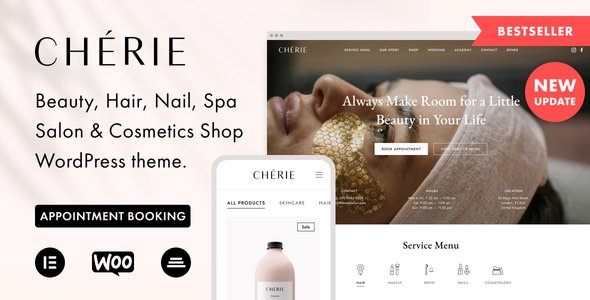
Stuck on your Chérie WordPress theme? Let's fix it.
No endless back-and-forth. Just send us the details and we'll get it done.
No obligation · Replies within 1 hour · Quote within 1 day
Setup · Customization · Bug fixes · WooCommerce integration
About Chérie WP Theme
Chérie is a WordPress theme by firstsight_design built for visually driven brands. It targets photographers, wedding planners, boutique studios, and lifestyle businesses that need a clean, editorial look without sacrificing usability.
The theme ships with a full-screen layout, elegant typography pairings, and a minimal admin footprint. It works with the WordPress block editor and supports WooCommerce for shops that want to keep the aesthetic tight.
Chérie leans heavily on white space and large imagery. If your business sells through visuals, that approach works. The theme is well-coded, loads fast out of the box, and avoids the bloat that drags down many multipurpose alternatives. It is a focused tool for a specific kind of site.
Get matched with a Chérie developer in under one day
Tell us about your Chérie project. Small fixes, Chérie theme customization, or a full website build, whatever you need, we've got it covered.
We'll connect you to the right Chérie developers, define the scope, and get everything 100% clear.
You'll get one estimate, hire your preferred developer, and start collaborating.
Most Chérie issues come down to one thing: changes made without understanding the theme’s structure. A developer who knows firstsight_design builds can work inside Chérie properly, using child themes, block patterns, and hooks correctly.
Through Codeable, you get matched with vetted WordPress developers who have real experience with themes like Chérie. No guessing, no junior freelancers learning on your project. You post your requirements, get an estimate, and decide whether to proceed. No obligation either way.
Pros
- Clean, editorial design that works immediately for image-led brands
- Lightweight codebase with no unnecessary bundled plugins or page builders
- Full-screen and split-layout options built into the theme without custom CSS
- WooCommerce compatible with minimal style conflicts out of the box
- Block editor support with curated patterns that match the overall aesthetic
Cons
- Limited layout variety outside the core editorial style, which restricts some niches
- Advanced customization requires CSS knowledge or developer help
- Fewer built-in demo templates compared to larger multipurpose themes
- Third-party plugin styling often needs manual adjustment to match Chérie's aesthetic
- Community support forums are smaller than themes with larger user bases
Who is Chérie for?
Wedding Photographers
Chérie’s full-screen image handling and minimal navigation make it a strong fit for wedding and portrait photographers. Galleries stay front and center. Contact forms and booking links can be added without disrupting the layout. The result is a portfolio site that feels intentional rather than template-heavy.
Boutique E-commerce Stores
For boutique shops selling clothing, homeware, or artisan goods, Chérie’s WooCommerce compatibility keeps product pages clean. The white space and typography give products room to breathe. Brands that sell through aesthetics benefit directly from a theme that doesn’t compete with the product visuals.
Wedding Planners and Event Studios
Wedding planners and event studios need to communicate style and professionalism quickly. Chérie does that. The layout prioritizes imagery and short copy, which suits how clients browse these services. Inquiry forms, testimonials, and gallery sections slot in without requiring heavy development work.
Lifestyle and Fashion Bloggers
Chérie’s editorial grid and typography pairings suit lifestyle and fashion content well. Posts with large hero images perform visually. Category pages stay clean. For bloggers who monetize through affiliate links or brand partnerships, the design keeps focus on content without looking cluttered.
Beauty and Wellness Brands
Spas, skincare brands, and wellness studios need a site that communicates calm and quality. Chérie’s restrained design language does that without requiring extensive customization. Service pages, booking integrations, and product sections can all be built within the theme’s style framework.

Customizing Chérie
Chérie gives you a solid starting point, but most serious builds need more than the default settings. Color palettes, font stacks, header layouts, and section spacing can all be adjusted through the Customizer, though some changes require CSS or template edits.
WooCommerce styling, custom gallery layouts, booking integrations, and third-party plugin compatibility often fall outside what a theme handles on its own. That is where a Chérie expert saves you significant time.
A developer who knows firstsight_design themes understands the template structure, hook system, and block patterns Chérie relies on. They can extend the theme cleanly without breaking future updates or creating technical debt that slows your site down later.
Recommended plugins for Chérie
Chérie pairs well with several plugin categories. Contact form plugins, gallery managers, and booking tools can all be added without disrupting the visual style, provided they are implemented correctly.
For shops built on Chérie, WooCommerce extensions for product filtering, wishlists, and checkout customization are common additions. Performance plugins like caching and image optimization keep the large-format visuals from hurting load times. Need help there? Our WordPress performance service covers that directly.
If SEO is a priority, structured data and proper meta handling need attention. Our WordPress SEO service works alongside Chérie without touching the theme files unnecessarily.
Not sure which plugins to use? This WordPress plugins directory covers the most popular options with reviews and setup guides.
Chérie common issues
Chérie theme header not displaying correctly on mobile
Mobile header problems in Chérie usually come from a CSS conflict with a plugin adding its own styles, or a custom CSS rule that wasn’t written with responsive breakpoints in mind. Open browser DevTools and inspect the header element on mobile view. Check for conflicting z-index values or display properties. If a menu plugin is involved, that is often the source. A WordPress bug fixing service can isolate the conflict quickly.
Chérie WooCommerce product page layout broken after update
WooCommerce updates occasionally override theme template files if those files haven’t been updated to match the new WooCommerce version. In Chérie, check the WooCommerce template version notice under Appearance. If templates are outdated, they need to be updated in your child theme. Avoid editing the parent theme directly. If you’re unsure which templates are affected, a developer can audit and update them cleanly.
How to add custom fonts to Chérie WordPress theme
Chérie supports custom fonts through the Customizer’s font settings and via Google Fonts integration. For fonts outside that library, you need to enqueue them manually using a child theme’s functions.php file or a plugin like Use Any Font. Avoid editing the parent theme’s files directly. Once the font is loaded, apply it through Customizer CSS or targeted stylesheet rules in your child theme.
Chérie theme full-screen image not loading on homepage
If the full-screen homepage image isn’t loading, the most common causes are an incorrectly set featured image, a theme option that wasn’t saved, or an image dimension below the recommended size for Chérie’s hero section. Check the homepage template settings in the Customizer. Also confirm the image was assigned correctly and isn’t being blocked by a caching plugin serving a stale version of the page.
Chérie FAQ
Yes. Chérie includes WooCommerce support and handles product pages, shop archives, and cart layouts without major style conflicts. Smaller boutique shops benefit most from the aesthetic match. Larger catalogs with complex filtering or custom checkout flows may need developer work to keep everything aligned with the theme’s visual style.
Chérie is built around the WordPress block editor and doesn’t officially bundle Elementor support. You can install Elementor alongside it, but expect styling conflicts that require custom CSS to resolve. Using Elementor with Chérie also defeats part of the theme’s appeal, which is its clean, lightweight approach. The block editor is the better path here.
Create a folder in wp-content/themes with a style.css file that includes the Template header pointing to cherie (match the exact theme folder name). Add a functions.php that enqueues the parent theme’s stylesheet. Activate the child theme from Appearance. All your customizations go in the child theme, keeping the parent intact for updates.
Yes, migrating content to Chérie is possible, but the layout will need rebuilding in the new theme’s structure. Posts and pages transfer via XML export, but custom page templates, widgets, and Customizer settings don’t carry over automatically. Our WordPress migration service handles this cleanly with minimal downtime.
firstsight_design provides support through ThemeForest’s item comments if purchased there, or through their own support channel depending on where you bought the theme. For issues beyond what the developer covers, including customization, plugin conflicts, or performance, a third-party WordPress developer is the practical option. Our team covers Chérie-specific issues directly.
Hire a Chérie WordPress Developer
If your Chérie site needs custom work, a specific feature added, or something is broken and you can’t pinpoint why, working with a specialist is the faster route. Our developers know firstsight_design themes and deliver clean, maintainable work.
Get a free estimate with no obligation to hire. Describe your project, receive a quote within 24 hours, and decide from there. The process is straightforward and the work is guaranteed.
You'll need a free Codeable account so developers can ask questions and send their quotes.