Claue WordPress Theme
by JanStudio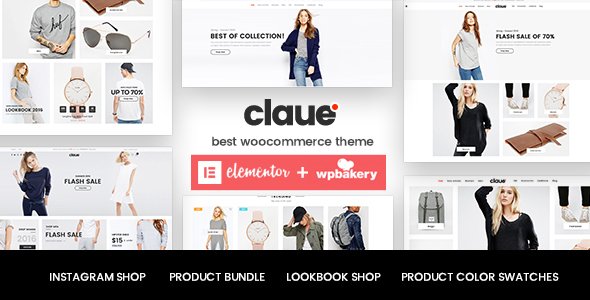
Stuck on your Claue WordPress theme? Let's fix it.
No endless back-and-forth. Just send us the details and we'll get it done.
No obligation · Replies within 1 hour · Quote within 1 day
Setup · Customization · Bug fixes · WooCommerce integration
About Claue WP Theme
Claue is a clean, minimal WooCommerce theme built by JanStudio and sold on ThemeForest. It targets fashion, apparel, and lifestyle stores that need a visually polished storefront without heavy page builders slowing things down.
The theme ships with multiple pre-built demos, Ajax cart and search, product quick view, wishlist support, and a flexible header builder. It runs on WPBakery and Elementor, giving store owners layout control without touching code.
Performance-wise, Claue is lighter than many WooCommerce themes in its category, but it still depends on how many bundled plugins you activate. Used selectively, it loads fast and ranks well. It is a solid starting point for any WooCommerce store in the fashion or lifestyle space.
Get matched with a Claue developer in under one day
Tell us about your Claue project. Small fixes, Claue theme customization, or a full website build, whatever you need, we've got it covered.
We'll connect you to the right Claue developers, define the scope, and get everything 100% clear.
You'll get one estimate, hire your preferred developer, and start collaborating.
Claue has enough moving parts that generic WordPress freelancers often miss things. A developer who knows the theme’s hook structure, demo import quirks, and WPBakery integration points will move faster and break less.
Through Codeable, you get matched with vetted WordPress developers who have hands-on WooCommerce and theme experience. Post a project, get a fixed estimate, and only proceed if the scope and price work for you. No bidding wars, no guesswork.
Pros
- Clean minimal design that suits fashion and lifestyle brands out of the box
- Multiple pre-built demos covering different store layouts and niches
- Ajax-powered cart, search, and filters reduce full page reloads
- Supports both WPBakery and Elementor for layout flexibility
- Active ThemeForest seller with regular updates and dedicated support
Cons
- Bundled plugins add significant weight if all are activated during demo import
- WPBakery shortcode lock-in makes switching page builders later painful
- Some demo designs require manual CSS tweaks to match exactly on a live site
- Deep customizations to checkout or product templates can break on theme updates
- Support is limited to the ThemeForest comments system, which is slow for complex issues
Who is Claue for?
Fashion and Apparel Stores
Claue was built with fashion retail in mind. Its product gallery layouts, size guide support, and lookbook-style pages make it a natural fit for clothing brands. A Claue developer can configure variable product displays, set up swatches for color and size, and optimize the category pages for browsing heavy catalogs.
Lifestyle and Home Decor
The theme’s whitespace-heavy design translates well to home decor and lifestyle stores where product photography does the selling. A Claue specialist can build custom collection pages, integrate room-scene galleries, and connect the store to Instagram feeds or Pinterest product pins without disrupting the clean layout.
Beauty and Cosmetics Brands
Beauty brands need product pages that handle ingredient lists, shade variations, and tutorial content. Claue supports tab-based product descriptions and flexible galleries that work well here. A Claue expert can extend this further with custom fields for skin type filters or bundle product displays common in cosmetics retail.
Streetwear and Sneaker Retailers
Streetwear stores move fast and often need limited-drop mechanics, countdown timers, and stock scarcity displays. Claue’s Ajax cart and quick view features handle the browsing side well. A Claue developer can layer in release date logic, notify-me waitlists, and social proof integrations that match the energy of the niche.
Multi-brand Boutiques
Multi-brand boutiques need strong filtering, brand archive pages, and clear catalog structure. Claue supports layered navigation out of the box, but a Claue specialist can extend this with custom taxonomies, brand logo displays, and per-brand landing pages that improve both user experience and organic search visibility.

Customizing Claue
Claue ships with a large customizer panel covering typography, colors, header layouts, footer columns, and product page structure. Most visual changes are point-and-click, but anything beyond surface-level adjustments requires developer input.
Custom product filters, category page restructuring, checkout modifications, and integrations with third-party plugins all need hands-on work. A Claue expert can also strip out unused demo assets that inflate load times, rebuild page templates cleanly, and set up multi-currency or size guide functionality without breaking the theme’s update path.
If you need Claue to behave like a bespoke store rather than a template, working with a Claue specialist saves significant time compared to trial-and-error customization through WPBakery or the native customizer.
Recommended plugins for Claue
Claue works well with YITH WooCommerce plugins for wishlist, compare, and quick view. It also supports WooCommerce Subscriptions and Bookings if your store model needs them.
For store performance, plugin bloat is the main risk. A developer can audit what is actually running and trim the stack. See our WordPress performance service for technical optimization work.
On the SEO side, Claue pairs well with Rank Math or Yoast, but product schema, breadcrumb markup, and category page optimization still need configuration. Our WordPress SEO service covers that end-to-end.
Not sure which plugins to use? This WordPress plugins directory covers the most popular options with reviews and setup guides.
Claue common issues
Claue demo import not working or stuck
Demo import failures in Claue are usually caused by PHP memory limits, execution time limits, or missing required plugins. Check your php.ini or wp-config.php for memory_limit and max_execution_time values. Set memory to at least 256MB and execution time to 300 seconds. Also confirm all required plugins listed in the theme documentation are installed before running the import. If the importer freezes mid-way, clear the database of partial import data before retrying.
Claue product quick view not opening
Quick view failures in Claue are often caused by JavaScript conflicts with other plugins or a missing AJAX handler. Open your browser console and look for JS errors on the product listing page. Common culprits include caching plugins serving stale scripts or optimization plugins combining JS files incorrectly. Disable JS optimization temporarily and retest. If the issue persists, check that the quick view option is enabled in the Claue theme settings panel and that WooCommerce template overrides are not blocking the modal output.
Claue header not showing on mobile
If the Claue header disappears or collapses incorrectly on mobile, the issue is usually a CSS conflict or a custom header layout that has not been configured for responsive breakpoints. Open the theme customizer and check the mobile header settings separately from the desktop layout. Some Claue demos use a separate mobile menu module that must be enabled independently. If you have added custom CSS or a child theme stylesheet, check for rules overriding the header display property at smaller screen widths.
Claue WooCommerce cart not updating with Ajax
Ajax cart issues in Claue typically trace back to caching plugins aggressively caching dynamic cart fragments, or JS files being deferred or combined by performance plugins. Exclude WooCommerce cart fragment scripts from optimization rules. In caching plugins like WP Rocket or LiteSpeed Cache, ensure cart fragments and the wc-ajax endpoint are excluded from page caching. If the issue appeared after a plugin update, check for WooCommerce compatibility notes in the Claue changelog. Our WordPress bug fixing service can diagnose persistent Ajax failures.
Claue wishlist button not working after update
Wishlist button failures after a Claue update usually mean the bundled YITH WooCommerce Wishlist plugin version is out of sync with the theme’s expectations. Check the theme documentation for the recommended plugin version and downgrade if needed. If you updated the plugin independently through the WordPress dashboard rather than through the theme’s bundled version, there may be template conflicts. Deactivate and reactivate the wishlist plugin, then clear all caches before retesting the button behavior on single product pages.
Claue theme slow loading on WooCommerce shop page
Slow shop pages in Claue are almost always caused by unoptimized product images, too many active plugins from the demo import, or missing server-side caching. Start by running a baseline test in GTmetrix or PageSpeed Insights with the browser console open to identify the largest requests. Deactivate demo plugins you are not using. Enable object caching if your host supports it. Image lazy loading and WebP conversion also have a significant impact on WooCommerce listing pages. See our WordPress performance service for a full technical audit.
Claue size guide popup not displaying correctly
Size guide popups in Claue rely on a custom shortcode or WPBakery element that outputs a modal. If the popup does not display, check whether the size guide content has been saved correctly in the theme settings under WooCommerce or Product Options. Verify that no JavaScript errors appear in the console when clicking the size guide trigger. CSS z-index conflicts from third-party plugins can also hide the modal behind other page elements. Inspect the modal element in your browser dev tools to see if it is rendering but invisible.
Claue mega menu not working on hover
Mega menu issues in Claue are often caused by the menu not being assigned to the correct theme location, or the mega menu settings not being saved per menu item. In the WordPress menu editor, expand each top-level item and confirm the mega menu option is enabled and a column layout is selected. Hover behavior failures can also be caused by CSS transition conflicts or touch event handling on trackpad devices. On mobile, Claue uses a separate menu system, so mega menu settings do not carry over to the hamburger menu.
Claue product images not displaying on checkout
Missing product images on the WooCommerce checkout page in Claue are typically a WooCommerce setting or a template override issue. Go to WooCommerce settings and confirm that order review images are enabled. If Claue has a custom checkout template in the woocommerce folder of the theme, check whether it overrides the default order review partial without including the thumbnail output. A Claue developer can patch the template correctly. For persistent template conflicts, our WordPress bug fixing service can resolve this quickly.
Claue child theme changes not applying after update
If child theme changes are not applying after a Claue parent theme update, the most common cause is incorrect function priority in the child theme’s functions.php, or CSS specificity being overridden by updated parent styles. Confirm your child theme is active in Appearance and that it lists the correct parent theme slug. For function overrides, use remove_action and add_action with appropriate priority values rather than duplicating functions. For CSS, add !important sparingly or increase selector specificity to override parent styles reliably.
Claue FAQ
Claue is built specifically for WooCommerce and handles product listings, variable products, quick view, wishlist, and Ajax cart well. It is a strong choice for fashion and lifestyle stores. That said, performance depends on how many bundled plugins you activate, and complex catalog setups may need a Claue developer to configure properly.
Yes, Claue includes Elementor support alongside its default WPBakery integration. You can build pages with Elementor, but some theme-specific elements and shortcodes are tied to WPBakery. For full Elementor-based builds, a Claue specialist can help restructure templates so Elementor controls the layout without conflicts from the bundled page builder.
Claue includes a one-click demo importer accessible from the theme panel after activation. Before importing, install all required plugins listed in the theme documentation and increase PHP memory to at least 256MB. Choose only the demo you plan to use rather than importing all demos, which reduces clutter. Child theme users should import from the parent theme temporarily to avoid conflicts.
Claue does not include native multi-currency switching, but it is compatible with plugins like CURCY or WOOCS. For more advanced setups involving geolocation-based currency switching and checkout price conversion, a Claue developer can configure the integration correctly and ensure the currency switcher displays properly within the theme’s header layout.
Claue is fully responsive and includes separate mobile header and menu settings in the theme customizer. Most layouts adapt well out of the box. Complex custom headers or heavily modified product pages may need CSS adjustments at mobile breakpoints, especially if WPBakery columns have been configured with fixed widths.
WPBakery is bundled and used in most Claue demos, but you are not forced to use it. You can build pages with Elementor or the block editor instead. However, demo content built with WPBakery shortcodes will not render correctly without it active. A clean Elementor-only setup requires rebuilding demo pages rather than importing them directly.
JanStudio updates Claue regularly, with releases typically addressing WooCommerce compatibility, bug fixes, and new features. You can track the changelog on the ThemeForest item page. Major WooCommerce version releases usually prompt a corresponding Claue update within a few weeks. Always test updates on a staging site before applying them to a live store.
Claue is listed as WPML compatible on ThemeForest. String translation, RTL layout support, and WooCommerce Multilingual integration all function with the theme. That said, a multilingual WooCommerce setup has many moving parts. A Claue specialist familiar with WPML can configure language switchers, currency per language, and translated product slugs without breaking the store.
The fastest route is posting a project on Codeable, where vetted WordPress developers with WooCommerce and theme experience review your brief and provide a fixed estimate. Alternatively, get a free estimate here and describe your Claue project. No obligation to proceed until the scope and cost are agreed.
Claue requires WooCommerce and WPBakery Page Builder as core dependencies. It bundles optional plugins including YITH WooCommerce Wishlist, YITH WooCommerce Compare, Contact Form 7, and MailChimp for WooCommerce. Not all are required for the theme to function. A Claue developer can identify which plugins your specific setup actually needs and deactivate the rest to reduce overhead.
Hire a Claue Developer for Your WooCommerce Store
Whether you need a Claue expert to set up your store from scratch, fix a specific issue, or extend the theme beyond its defaults, we can match you with the right developer fast. Projects are scoped with a free estimate before any work begins.
Get a Free Estimate and describe what you need. A developer with direct Claue and WooCommerce experience will review your project and come back with a clear plan.
You'll need a free Codeable account so developers can ask questions and send their quotes.