CleanSkin WordPress Theme
by AncoraThemes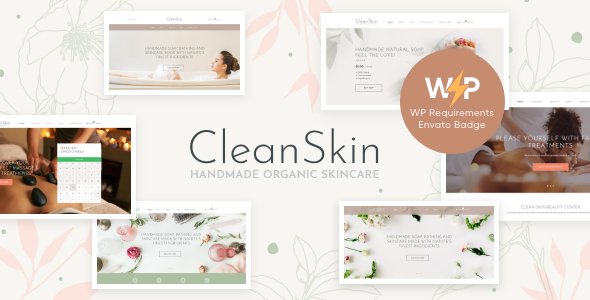
Stuck on your CleanSkin WordPress theme? Let's fix it.
No endless back-and-forth. Just send us the details and we'll get it done.
No obligation · Replies within 1 hour · Quote within 1 day
Setup · Customization · Bug fixes · WooCommerce integration
About CleanSkin WP Theme
CleanSkin is a multipurpose WordPress theme built by AncoraThemes. It targets businesses, portfolios, and service-based websites that need a clean layout without a lot of visual noise. The theme ships with the WPBakery Page Builder, giving you drag-and-drop control over your page structure without touching code.
CleanSkin supports WooCommerce, which makes it a reasonable choice for small shops attached to a service or portfolio site. It includes several pre-built demo templates, a sticky header, smooth scroll, and Google Fonts integration. The codebase is translation-ready and supports WPML for multilingual sites.
It performs well for straightforward sites, but like most bundled-builder themes, getting the most out of it usually takes some configuration work. If you want a polished result, working with someone who knows the theme saves a lot of time.
Get matched with a CleanSkin developer in under one day
Tell us about your CleanSkin project. Small fixes, CleanSkin theme customization, or a full website build, whatever you need, we've got it covered.
We'll connect you to the right CleanSkin developers, define the scope, and get everything 100% clear.
You'll get one estimate, hire your preferred developer, and start collaborating.
Most WordPress developers can install a theme. Fewer know how to extend one properly without creating a maintenance problem down the line. FoxyConcept works through Codeable, a vetted network of WordPress specialists. Every developer on the platform is screened and rated, so you are not rolling the dice on quality.
If you need CleanSkin customised, a feature added, or something fixed that is not working as expected, you can get a free estimate with no obligation to hire. The work is scoped clearly before anything starts. Explore our WordPress development services to see how we can help.
Pros
- Ships with WPBakery Page Builder included, no extra license needed
- WooCommerce compatible out of the box for small shop setups
- Multiple pre-built demo templates importable in one click
- Translation-ready with WPML support for multilingual sites
- Live Customizer controls cover most global styling without custom CSS
Cons
- WPBakery generates heavy shortcode output that complicates theme switching later
- Demo import can pull in a lot of dummy content that requires manual cleanup
- Header customisation options are limited beyond the built-in layout presets
- Page speed needs work out of the box, especially on image-heavy pages
- Limited documentation for edge cases and advanced custom configurations
Who is CleanSkin for?
Creative Agency
CleanSkin’s structured grid layouts and full-width sections work well for agencies presenting case studies and team pages. WPBakery lets you arrange project showcases without custom development. A developer can add custom post types for portfolio entries and wire them into filtered grids that go beyond the default theme output.
Freelance Portfolio
Freelancers get a clean, professional starting point with CleanSkin’s minimal aesthetic. The portfolio section and contact integration cover the basics. With a few targeted customisations, you can add a services page, a PDF download section, or a booking form that fits your workflow without needing a full custom build.
Small Business Service Site
Local businesses and consultants use CleanSkin for clear, no-clutter service pages with a sticky header and contact forms. The demo templates give you a working structure fast. A developer can adapt the layout to match your brand, add a Google Maps embed, and set up lead capture forms connected to your CRM.
WooCommerce Shop
CleanSkin’s WooCommerce support makes it a workable choice for brands that sell a small product range alongside a content or portfolio site. Product pages, cart, and checkout all function with the theme. A developer can style the shop pages to match the rest of the site and add custom product display logic where needed.
Health and Wellness Brand
Health, wellness, and lifestyle brands benefit from CleanSkin’s clean whitespace and readable typography. The theme handles blog layouts well, which suits content-led brands. With some configuration, you can add appointment booking integrations, client testimonial sections, and a product shop to support a full service offering.

Customizing CleanSkin
CleanSkin gives you a live Customizer panel for global settings like fonts, colors, header layout, and footer columns. WPBakery handles the page-level work. Most users get started quickly, but hitting the limits of the default options is common once you move past the demo templates.
Custom post types, advanced header configurations, and layout changes that go outside the included shortcodes usually require custom PHP or child theme work. A CleanSkin expert can build on top of what the theme provides without breaking update compatibility.
If you need a specific layout, a custom section added to an existing page, or help matching a brand style guide, a developer who has worked with CleanSkin and AncoraThemes’ structure will get you there faster and cleaner than trial and error.
Recommended plugins for CleanSkin
CleanSkin pairs naturally with a few key additions. WooCommerce is supported out of the box for product listings and checkout. WPML or Polylang works for multilingual builds. Contact Form 7 and WPForms both integrate without issues.
For performance, a caching plugin like WP Rocket or LiteSpeed Cache helps, especially if you are running WPBakery with several modules per page. Image optimization through ShortPixel or Imagify is worth adding early. If SEO is a priority, Yoast or Rank Math slot in cleanly. You can read more about WordPress performance tuning and WordPress SEO optimisation to get more from your CleanSkin setup.
Not sure which plugins to use? This WordPress plugins directory covers the most popular options with reviews and setup guides.
CleanSkin common issues
CleanSkin header not showing correctly after update
Header display issues after a CleanSkin update are usually caused by a conflict between the theme’s stylesheet and a cached version of the old CSS. Start by clearing your site cache and any CDN cache. If the problem continues, check whether a child theme or custom CSS is overriding header styles. Deactivate plugins one by one to rule out a conflict. If nothing resolves it, a WordPress bug fixing specialist can diagnose the root cause quickly.
WPBakery content not displaying properly in CleanSkin
WPBakery rendering issues in CleanSkin often happen after a WPBakery update that changes how shortcodes output HTML. Check that your WPBakery version is compatible with your current version of CleanSkin. Regenerate the CSS cache inside WPBakery settings. If rows or columns are collapsing or overlapping, the issue is usually a CSS conflict with a plugin or custom stylesheet. A developer can trace the conflict and apply a targeted fix without restructuring your pages.
CleanSkin demo import not working or incomplete
CleanSkin’s one-click demo import can fail if your hosting environment has low PHP memory limits or a short max execution time. Increase memory_limit to at least 256MB and set max_execution_time to 300 in your php.ini or wp-config.php. If the import completes but looks incomplete, some assets may have timed out. Try importing the content XML manually through the WordPress importer and then re-applying the Customizer settings from the theme panel.
CleanSkin theme slow loading on mobile
CleanSkin can load slowly on mobile primarily because WPBakery adds render-blocking scripts and large CSS files. Start with a caching plugin and enable CSS and JS minification. Defer non-critical scripts and lazy load images. Check Google PageSpeed Insights for specific recommendations. If your hosting is shared and under-resourced, that compounds the issue. For a deeper fix, see our notes on WordPress performance optimisation or hire a developer to audit and resolve the bottlenecks.
CleanSkin FAQ
Yes, CleanSkin is a practical choice for small to medium business websites. It has a clean layout, solid WooCommerce support, and pre-built templates that cover common service and portfolio structures. It works best when paired with some configuration time or a developer who can adapt the demo to fit your specific brand and content needs.
CleanSkin includes WooCommerce support out of the box. Product pages, category listings, cart, and checkout all work with the default theme styles. Some styling adjustments are usually needed to make the shop pages feel consistent with the rest of your site design, especially if you have made significant changes to the default template layout.
Technically yes, but the demo templates and most of the layout flexibility in CleanSkin assume WPBakery is active. Without it, you lose the drag-and-drop page structure and revert to the standard WordPress block editor. The block editor works fine for content pages, but recreating complex demo layouts without WPBakery takes custom development work.
Always use a child theme for any code customisations. Changes made directly to the parent theme files will be overwritten on update. For Customizer settings, those are stored in the database and survive updates. Before updating, back up your site and check the AncoraThemes changelog for breaking changes. Consider a WordPress maintenance plan to keep updates managed safely.
Yes, CleanSkin is translation-ready and compatible with WPML. You can run a multilingual site using WPML or Polylang alongside CleanSkin. String translations for theme-specific text are handled through the .pot file included with the theme. Complex multilingual setups with separate menus and layouts per language may need some developer configuration to work cleanly.
Hire a CleanSkin WordPress Developer
Need a CleanSkin developer to customise your layout, fix a bug, or build something the theme does not handle out of the box? FoxyConcept matches you with a specialist who knows AncoraThemes’ structure and how to extend it properly.
Work is delivered through Codeable, with a clear scope before anything starts. No surprises, no guesswork. Get a free estimate today and tell us what you need.
You'll need a free Codeable account so developers can ask questions and send their quotes.