Comet WordPress Theme
by ThemePitch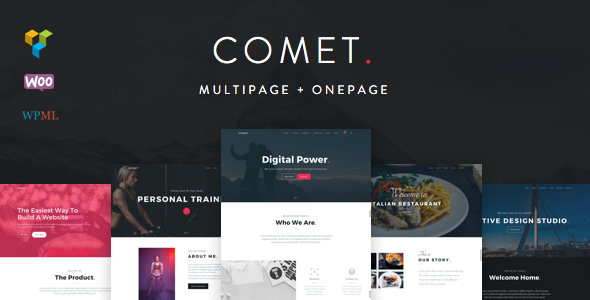
Stuck on your Comet WordPress theme? Let's fix it.
No endless back-and-forth. Just send us the details and we'll get it done.
No obligation · Replies within 1 hour · Quote within 1 day
Setup · Customization · Bug fixes · WooCommerce integration
About Comet WP Theme
Comet is a WordPress theme by ThemePitch built for agencies, freelancers, and creative studios that need a clean, minimal portfolio presence. It ships with a drag-and-drop page builder, multiple homepage layouts, and a grid-based portfolio system that keeps project showcases structured and fast-loading.
The theme targets professionals who want a polished site without bloat. Typography is handled well out of the box, spacing is consistent, and the color system is flexible enough for most brand palettes. WooCommerce support is included, so adding a services or products page is straightforward.
ThemePitch has kept Comet updated alongside major WordPress releases, which matters for long-term stability. If you need a minimal, creative theme that works well across devices and does not require heavy customization to look professional, Comet is a solid starting point.
Get matched with a Comet developer in under one day
Tell us about your Comet project. Small fixes, Comet theme customization, or a full website build, whatever you need, we've got it covered.
We'll connect you to the right Comet developers, define the scope, and get everything 100% clear.
You'll get one estimate, hire your preferred developer, and start collaborating.
Comet is straightforward to set up, but getting it past the default demo look takes real WordPress knowledge. A developer who knows the theme’s template structure can build custom portfolio filters, adjust the grid at breakpoints, and wire up third-party tools cleanly. Through Codeable, FoxyConcept connects you with vetted WordPress specialists who have hands-on experience with themes like Comet. No junior developers, no outsourcing. You get a free estimate before any commitment and work starts fast once you approve.
Pros
- Clean minimal design that works well for creative and agency portfolios without heavy customization
- Built-in portfolio grid with multiple layout options and smooth filtering
- Lightweight codebase that loads fast compared to multipurpose theme alternatives
- WooCommerce compatible out of the box for adding simple shop or services pages
- Active updates from ThemePitch keeping it stable across recent WordPress versions
Cons
- Customizer options are limited compared to block-based themes, so deeper changes need custom CSS or PHP
- Portfolio post types cannot be easily relabeled or restructured without developer intervention
- Limited inner page templates mean service or about pages often look similar without extra work
- Documentation is thin on advanced use cases like custom fields or loop modifications
- Not built for Gutenberg-first workflows, which may frustrate editors used to block editing
Who is Comet for?
Freelance Designer Portfolio
Comet’s grid-based portfolio and clean typography make it a natural fit for freelance designers. You can display case studies, categorize by discipline, and keep the focus on the work rather than the interface. The minimal layout does not compete with visual content, which matters when clients are evaluating your output before they ever read your bio.
Creative Agency Website
Small creative agencies use Comet to present team work without a heavy marketing-site feel. The homepage layouts support service blocks, client logos, and featured projects in a way that reads professional without looking like every other agency site built on Divi. A developer can extend the theme to handle multiple team members and service category pages cleanly.
Photography Studio
Photographers need fast image loading and clean gallery presentation. Comet’s portfolio grid handles both well, especially when paired with a performance-focused image plugin. Full-width featured images work without layout breaking, and the minimal chrome keeps visual attention on the photos rather than navigation elements or sidebar clutter.
Digital Marketing Consultant
Marketing consultants use Comet to build credibility through case studies and service pages. The theme’s layout supports a results-focused structure where project outcomes are presented alongside service descriptions. Adding a contact form and a simple blog for thought leadership content rounds out the setup without requiring a theme switch.
Web Development Studio
Web development studios often choose Comet precisely because they can control the output. The theme provides a clean baseline that developers can extend with custom post types, ACF field groups, and template overrides. It is easier to build on a minimal theme than strip down a bloated one, and Comet’s structure makes that work predictable.

Customizing Comet
Comet gives you a decent range of options through the WordPress Customizer, covering fonts, colors, header layouts, and footer columns. For most personal portfolios or small agency sites, those built-in controls are enough to get a branded result without touching code.
Where things get more involved is when you need custom post type layouts, unique section ordering, or pixel-specific adjustments to the portfolio grid. That is where a Comet expert becomes worth the time saved. A developer familiar with the theme can modify templates directly, add custom CSS that does not break on updates, and extend the builder to match a client’s exact spec rather than a close approximation.
Child themes are also worth setting up early. Working inside a child theme means your changes survive updates without needing to be reapplied manually each time ThemePitch pushes a new version.
Recommended plugins for Comet
Comet works well with several key plugins. Contact Form 7 or WPForms slot in cleanly for lead generation. WooCommerce handles product or service sales without layout conflicts. Yoast SEO and Rank Math both integrate without issues, though getting the most from on-page SEO in Comet usually benefits from a dedicated WordPress SEO review.
For speed, Comet is light enough that pairing it with WP Rocket or LiteSpeed Cache produces strong Core Web Vitals scores. If you want to push performance further, a structured WordPress performance audit can identify exactly where load time is being lost.
Not sure which plugins to use? This WordPress plugins directory covers the most popular options with reviews and setup guides.
Comet common issues
Comet theme portfolio not showing posts on archive page
This usually comes down to a portfolio post type flush or a template conflict. Go to Settings > Permalinks and save without changing anything to flush rewrite rules. If the archive still does not display, check whether a page has been manually assigned the same slug as the portfolio archive. Plugin conflicts, particularly with SEO plugins that manage archives, can also suppress portfolio output. Try disabling plugins one by one to isolate the cause. For persistent issues, a WordPress bug fixing service can trace the exact source quickly.
Comet WordPress theme header logo not displaying correctly on mobile
Mobile logo display problems in Comet are often tied to the retina image setting or the logo width value in the Customizer being set too large for small viewports. Go to Appearance > Customize > Header and reduce the max logo width value. If the logo is a high-resolution PNG uploaded at its full dimensions, scaling it down to the display size before uploading prevents the browser from doing that work. Also check whether a caching plugin is serving a stale header version after your changes.
Comet theme custom CSS not loading after update
If custom CSS added through the Customizer disappears after a Comet update, it usually means the CSS was stored in the theme’s own options rather than the WordPress Customizer’s dedicated Additional CSS field. Always add custom CSS in Appearance > Customize > Additional CSS, which is stored in the database independently of the theme files. Better still, set up a child theme and add styles there. That approach survives every update without needing you to check after each one. See our WordPress maintenance service for ongoing update management.
Comet theme WooCommerce shop page layout broken
WooCommerce layout breaks in Comet are most often caused by a missing template file after a WooCommerce update. The theme may include custom WooCommerce templates that become outdated when WooCommerce releases a new version. Go to WooCommerce > Status > System Status and look for outdated template warnings. Updating those templates, either manually or through a developer, resolves most shop layout issues. If the break appeared after a recent plugin update, consider a bug fix service to restore the layout properly.
Comet FAQ
ThemePitch has maintained Comet through recent WordPress releases and it works on WordPress 6.x without major issues. That said, compatibility with specific plugins and Gutenberg features depends on your setup. Before updating WordPress on a live site running Comet, test on a staging environment first. If you are on an older version of the theme, check the ThemePitch changelog before updating to confirm what changed.
Comet includes its own page builder, but it can be used alongside Elementor with some caveats. Full-width Elementor templates work on pages where Comet’s own builder is not active. WPBakery is less clean to integrate since both systems try to control the same content area. Most developers recommend picking one builder and sticking with it to avoid output conflicts and page slowdowns from loading multiple builder assets.
Portfolio categories in Comet are handled through a custom taxonomy registered with the portfolio post type. You can add new categories from Portfolio > Categories in the WordPress admin. Once created, they appear as filter options on the portfolio archive if filtering is enabled in the theme settings. For custom filter behavior or reordering categories, a small code addition in a child theme functions file handles it cleanly.
Comet is not a block theme and does not support full-site editing. It is built on the classic theme architecture with PHP templates and the WordPress Customizer for settings. If you need FSE features like a block-based header or template editor, you would need a different theme. Comet is well-suited for developers and site owners who prefer the classic theme workflow.
Yes, migrating an existing site to Comet is possible. The process involves recreating your page layouts using Comet’s templates, reassigning portfolio content to the theme’s post types, and reapplying any customizations. It is not a one-click switch. A WordPress migration service can handle the transition without losing content or breaking URLs, which matters for SEO continuity.
Hire a Comet WordPress Developer
Whether you need a full Comet build from scratch, custom template changes, or fixes to an existing site, FoxyConcept can match you with a developer who knows what they are doing. Work is scoped clearly, priced fairly, and delivered on time. Get a free estimate and describe your project. You will have a developer proposal within 24 hours and no obligation to proceed until you are satisfied with the plan.
You'll need a free Codeable account so developers can ask questions and send their quotes.