ComRepair WordPress Theme
by BrothersTheme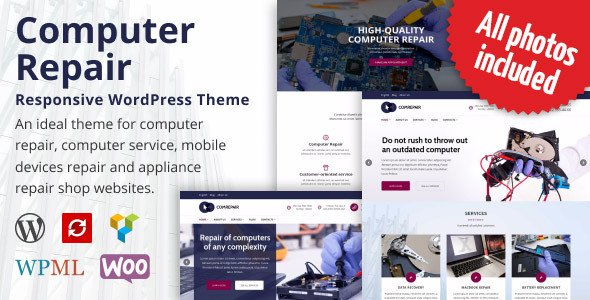
Stuck on your ComRepair WordPress theme? Let's fix it.
No endless back-and-forth. Just send us the details and we'll get it done.
No obligation · Replies within 1 hour · Quote within 1 day
Setup · Customization · Bug fixes · WooCommerce integration
About ComRepair WP Theme
ComRepair is a WordPress theme built by BrothersTheme specifically for computer repair shops, electronics service centers, and IT support businesses. It ships with a service-oriented layout that puts your repair services, pricing tables, and contact details front and center.
The theme includes a booking-ready design, pre-built inner pages for services and team members, and a homepage built to convert visitors into customers. It works with Elementor, making page edits straightforward without touching code.
ComRepair is a niche theme, which means it avoids bloat. You get what a repair shop actually needs: a clear service list, a call-to-action section, testimonials, and a contact form. Setup is relatively quick compared to general-purpose themes, especially if your business fits the target use case.
Get matched with a ComRepair developer in under one day
Tell us about your ComRepair project. Small fixes, ComRepair theme customization, or a full website build, whatever you need, we've got it covered.
We'll connect you to the right ComRepair developers, define the scope, and get everything 100% clear.
You'll get one estimate, hire your preferred developer, and start collaborating.
ComRepair is a niche theme, and that cuts both ways. It fits its use case well, but when something breaks or needs extending, general WordPress advice often does not apply. You need someone who knows BrothersTheme templates specifically.
FoxyConcept works through Codeable, a vetted network of WordPress specialists. Every developer on the platform has passed a strict review process. You post your project, get matched within 24 hours, and receive a free estimate before any commitment. No hourly billing surprises, no guesswork on who you are hiring.
Pros
- Purpose-built for repair shops, so the homepage layout requires minimal restructuring
- Elementor compatibility makes visual edits accessible without writing code
- Includes pre-built pages for services, pricing, team, and contact
- Lightweight compared to multipurpose themes, which helps initial load times
- Clean separation of sections makes it straightforward to swap demo content for real business content
Cons
- Niche focus limits flexibility if your business expands beyond repair services
- Demo content import can be inconsistent depending on server environment
- Support from BrothersTheme can be slow on complex technical queries
- Built-in booking functionality is basic and usually needs a third-party plugin for real use
- Fewer community tutorials available compared to mainstream themes like Astra or OceanWP
Who is ComRepair for?
Computer Repair Shop
ComRepair was designed around this exact use case. The homepage includes service cards, a pricing section, and a prominent contact or booking call to action. A computer repair shop can import the demo and have a working site structure in a short time. Custom service descriptions and local SEO adjustments are the main work after that.
Phone and Tablet Repair Service
Phone and tablet repair businesses need fast quote requests and clear turnaround times displayed upfront. ComRepair’s service section and call-to-action layout handles both. Adding a form plugin for instant quote submissions and integrating a repair status tracker are common customization requests for this use case.
IT Support and Managed Services
IT support companies can use ComRepair’s service listing and team sections to communicate what they offer and who delivers it. The theme’s layout supports adding client logos, SLA details, and a support ticket form. Some structural customization is usually needed to shift the tone from consumer repair to business IT services.
Electronics Parts Retailer
Shops selling computer parts, cables, or refurbished electronics can pair ComRepair with WooCommerce to build a hybrid service-and-shop site. The theme’s layout supports a shop section alongside the standard service pages. Product page styling may need additional CSS work to match the rest of the theme’s design.
Home Appliance Repair Business
Appliance repair businesses often serve a specific local area and need their service pages to reflect that. ComRepair’s location and contact sections are easy to adapt for this. Adding local schema markup and creating individual pages per service type helps with local search visibility alongside the base theme setup.

Customizing ComRepair
ComRepair gives you a solid starting point, but most businesses need adjustments before the site feels like theirs. Color schemes, typography, service icons, and section order are all things you will likely want to change from the defaults.
More involved work includes setting up custom booking forms, integrating payment or invoicing plugins, adding WooCommerce for parts sales, or building out a multi-location structure. A ComRepair expert can handle all of this without breaking the existing layout.
If you want to move beyond the demo content and build something that matches your actual brand and service list, working with someone who knows the theme saves a lot of trial and error. FoxyConcept connects you with developers who have hands-on experience customizing BrothersTheme templates like ComRepair.
Recommended plugins for ComRepair
ComRepair works well with several popular plugins. WooCommerce handles parts and accessory sales directly from the site. WPForms or Gravity Forms add booking and quote request functionality. WPML covers multilingual needs if you serve different language markets.
For site speed, combining ComRepair with a caching plugin and a CDN makes a real difference, especially on image-heavy service pages. Check our WordPress performance service for optimization options.
If organic search matters to your business, pairing ComRepair with Yoast or Rank Math is a start, but structured technical work helps more. See our WordPress SEO service for details.
Not sure which plugins to use? This WordPress plugins directory covers the most popular options with reviews and setup guides.
ComRepair common issues
ComRepair demo content not importing correctly
Demo import failures on ComRepair usually come down to server memory limits or a PHP timeout during the import process. Set max_execution_time to 300 and memory_limit to at least 256MB in your php.ini or wp-config.php. Also confirm the required plugins listed in the theme documentation are activated before attempting the import. If the import still fails partially, a developer can import content manually. See our bug fixing service for help.
ComRepair homepage layout broken after update
Layout breaks after a ComRepair update are most often caused by a conflict between the updated theme files and saved Elementor data. Open the affected page in Elementor, check for missing widgets or broken sections, and use Elementor’s regenerate CSS option under Tools. If the theme update changed template files that Elementor was referencing, you may need to rebuild specific sections. Always back up before updating. Our maintenance service handles this as part of a managed update workflow.
ComRepair contact form not sending emails
When the ComRepair contact form stops sending emails, the issue is nearly always server-side email delivery rather than the form itself. WordPress’s default mail function is unreliable on most hosts. Install an SMTP plugin such as WP Mail SMTP and configure it with your email provider’s credentials. Test delivery using the plugin’s built-in tool. If you are using a third-party form plugin like WPForms, check that the form notification settings have the correct reply-to and recipient addresses configured.
ComRepair theme slow to load on mobile
ComRepair can load slowly on mobile if large images from the demo content were not replaced or optimized. Run the page through Google PageSpeed Insights to identify the specific assets causing delay. Compress images with a plugin like ShortPixel, enable lazy loading, and remove any slider or animation scripts you are not using. If the theme loads third-party fonts or icon libraries on every page, consider subsetting or self-hosting them. Visit our performance service for a full optimization audit.
ComRepair FAQ
Yes. ComRepair is built to work with Elementor. The demo content is structured around Elementor page templates, so you can edit sections, swap images, and rearrange content visually. Some deeper template files like the header and footer may require working in the theme customizer or with custom code rather than Elementor alone.
Yes, ComRepair works well for phone and tablet repair businesses. The service layout, pricing table, and booking call-to-action sections apply directly to this use case. You will want to update the service descriptions, add your specific repair types, and consider a quote request form plugin to handle customer inquiries before they walk in.
ComRepair supports WooCommerce. You can add a shop section for parts or accessories alongside your service pages. The default WooCommerce styling may not perfectly match the theme’s design out of the box, so some CSS adjustments are usually needed to make product pages look consistent with the rest of the site.
Color changes in ComRepair are handled through the WordPress Customizer under Appearance. Most primary colors, button styles, and accent colors have dedicated options there. For colors that are not exposed in the Customizer, you can add custom CSS through the Additional CSS field or via a child theme to avoid losing changes on updates.
ComRepair gives you a clean structure that supports local SEO, but the theme alone does not do the work. You need an SEO plugin, properly written service pages, local schema markup, and a Google Business Profile. The theme’s layout makes it easy to create individual service pages, which helps with targeting local search terms for specific repair types.
Hire a ComRepair Developer for Your Repair Shop Site
Whether you need a full ComRepair setup, a specific customization, or help fixing something that stopped working, FoxyConcept can match you with the right developer fast. Work is delivered through Codeable, so every developer is pre-vetted and accountable.
Post your project and get a free estimate within 24 hours. No obligation to hire. Get your free estimate here and describe what you need in plain terms.
You'll need a free Codeable account so developers can ask questions and send their quotes.