Construction WordPress Theme WordPress Theme
by WPCharming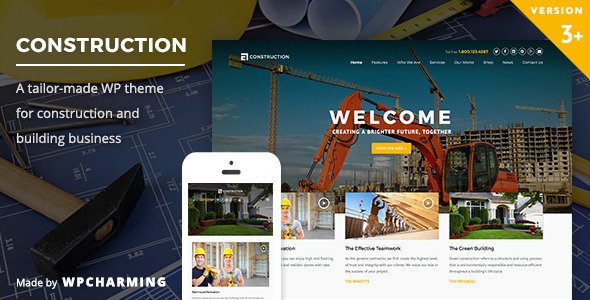
Stuck on your Construction WordPress Theme WordPress theme? Let's fix it.
No endless back-and-forth. Just send us the details and we'll get it done.
No obligation · Replies within 1 hour · Quote within 1 day
Setup · Customization · Bug fixes · WooCommerce integration
About Construction WordPress Theme WP Theme
Construction WordPress Theme by WPCharming is built for contractors, builders, architects, and construction companies that need a professional site without spending months on development. It ships with project portfolio layouts, service pages, team sections, and a contact form setup designed for quote requests.
The theme is compatible with Elementor, making page editing visual and accessible to non-developers. It includes pre-built demo content you can import and adapt, covering everything from a general contractor homepage to specialist trade pages. WooCommerce compatibility is included, useful for selling materials or branded merchandise. With a focus on clean code and structured layouts, it gives construction businesses a solid starting point that does not require heavy customisation to look polished and credible online.
Get matched with a Construction WordPress Theme developer in under one day
Tell us about your Construction WordPress Theme project. Small fixes, Construction WordPress Theme theme customization, or a full website build, whatever you need, we've got it covered.
We'll connect you to the right Construction WordPress Theme developers, define the scope, and get everything 100% clear.
You'll get one estimate, hire your preferred developer, and start collaborating.
WPCharming builds themes with flexibility in mind, but every business has requirements that go beyond the theme’s defaults. FoxyConcept connects you with vetted WordPress developers through Codeable, a platform built specifically for serious WordPress work. Every developer on Codeable has passed a technical vetting process, which means you are not sorting through generalist freelancers. You get a developer who knows WordPress deeply, understands theme architecture, and can work with Construction WordPress Theme specifically to build what you actually need.
Pros
- Pre-built demo content imports quickly and covers common construction business page types
- Elementor compatibility makes layout editing visual without requiring code knowledge
- Project portfolio post type is included and structured for showcasing completed work
- WooCommerce ready out of the box for businesses that want to sell products alongside services
- Responsive layouts handle large project photography reasonably well across screen sizes
Cons
- Demo import can bring in placeholder images that require manual replacement throughout the site
- Deep customisation beyond the theme panel requires child theme development to stay update-safe
- Limited built-in options for project filtering by category without additional plugin configuration
- Some page templates are tightly coupled to Elementor, making non-Elementor editing awkward
- Theme support response times from WPCharming can be slow depending on ticket volume
Who is Construction WordPress Theme for?
General Contractors
General contractors need a site that communicates reliability and shows completed projects clearly. Construction WordPress Theme’s portfolio layouts and service page templates are well-suited to this. A developer can configure project categories, add a quote request workflow, and connect the site to a CRM to capture leads automatically from the contact form.
Architecture Firms
Architecture firms need strong visual presentation. The theme’s full-width image support and clean grid layouts work well for showcasing design portfolios. A Construction WordPress Theme specialist can extend the portfolio system with custom fields for project details like location, year, and scope, giving visitors structured information alongside the visuals.
Specialist Trade Businesses
Electricians, plumbers, roofers, and other trade businesses benefit from a focused service page structure. Construction WordPress Theme supports this with clear service sections and call-to-action placements. Adding a booking plugin or quote calculator on top of the theme makes the site functional for capturing job requests directly rather than just displaying information.
Property Developers
Property developers need project pages that detail developments in progress and completed builds. The theme’s portfolio functionality can be repurposed for this with custom fields covering units, locations, and status. A WordPress developer can also integrate map embeds and gallery sliders that perform well without slowing down page load significantly.
Construction Equipment Suppliers
Equipment suppliers can use Construction WordPress Theme as a foundation and layer WooCommerce on top for a product catalogue. A developer can configure WooCommerce templates to match the theme’s visual style, set up product categories for equipment types, and add rental enquiry forms where outright purchase is not the transaction model.

Customizing Construction WordPress Theme
Out of the box, Construction WordPress Theme covers the basics well. Serious customisation is where most businesses run into friction. Matching the theme to a specific brand, restructuring the project portfolio, integrating a booking or quote calculator, adding custom post types for equipment or services, or connecting third-party CRM tools all require going beyond what the theme panel offers.
A Construction WordPress Theme expert can handle these jobs cleanly. That means writing child theme code that survives updates, customising Elementor templates without breaking mobile layouts, and building features the theme does not natively support. Whether you need a single tweak or a full site build on top of the theme framework, working with a specialist saves time and avoids the trial-and-error that comes with DIY customisation on a business-critical site.
Recommended plugins for Construction WordPress Theme
Construction WordPress Theme works well with several plugin categories that expand its usefulness. WooCommerce adds an online shop for materials or branded products. Gravity Forms or WPForms handle quote requests and project enquiry workflows. WPML makes the site multilingual, relevant for firms operating across regions.
For site speed, caching plugins like WP Rocket combined with a CDN make a real difference, especially when the site carries large project photography. See our WordPress performance optimisation service for a structured approach to load times. If organic search matters to your business, pairing the theme with a solid plugin setup and proper schema markup is covered through our WordPress SEO optimisation service.
Not sure which plugins to use? This WordPress plugins directory covers the most popular options with reviews and setup guides.
Construction WordPress Theme common issues
Construction WordPress Theme demo import not working
Demo import failures usually come from PHP memory limits, execution time limits, or file upload size restrictions on the server. Increase these values in php.ini or wp-config.php. Also check that required plugins like Elementor are installed before running the import. If the import stalls repeatedly, import XML content and widget data separately rather than using the one-click importer. If the issue persists, a developer can run the import via WP-CLI to bypass browser timeout constraints.
Construction WordPress Theme project portfolio not displaying correctly
Portfolio display issues are commonly caused by a missing flush of permalink settings. Go to Settings > Permalinks and save without changing anything. If the custom post type is not registering, check that the theme is active and no plugin conflict is interfering. If portfolio templates show blank pages, a child theme override may be conflicting with the parent theme’s template hierarchy. Check template file names match what WordPress expects for custom post type archives.
Construction WordPress Theme contact form not sending emails
If the contact form is not sending emails, the problem is almost always server-side email delivery, not the form plugin itself. Install an SMTP plugin like WP Mail SMTP and connect it to a transactional mail service such as Mailgun, Postmark, or SendGrid. Test delivery using the plugin’s built-in test tool. If you need help diagnosing delivery failures or reconfiguring form integrations, our WordPress bug fixing service covers this type of issue directly.
Construction WordPress Theme slow loading on mobile
Mobile slowness on Construction WordPress Theme is usually caused by unoptimised images, Elementor loading full asset libraries on every page, or third-party scripts running without deferral. Start by running the site through PageSpeed Insights to identify the specific bottlenecks. Compress images, enable lazy loading, and configure a caching plugin. Elementor’s asset loading can be controlled through its performance settings. A performance audit will identify which changes deliver the most measurable improvement.
Construction WordPress Theme header layout broken after update
Header layout breaks after a theme update usually indicate a conflict between updated template files and customisations made in the parent theme rather than a child theme. If you edited header files directly in the parent theme, those changes get overwritten on update. Move all customisations into a child theme going forward. To fix the current break, compare your header template against the updated version and reapply your changes correctly. If you need this resolved quickly, our WordPress bug fixing service can handle it.
Construction WordPress Theme Elementor widgets not loading
Elementor widgets failing to load inside Construction WordPress Theme are often caused by a version mismatch between Elementor and the theme, or a PHP error suppressing output. Open the browser console and check for JavaScript errors. Deactivate other plugins one at a time to isolate a conflict. Ensure Elementor and Elementor Pro are both updated to versions the theme supports. Regenerate Elementor’s CSS by going to Elementor > Tools > Regenerate Files. If errors persist, check the PHP error log for fatal errors triggered during page render.
Construction WordPress Theme images not showing in portfolio
Portfolio images not appearing is usually a thumbnail regeneration issue. When you switch themes or change image sizes, WordPress does not automatically regenerate existing thumbnails. Install the Regenerate Thumbnails plugin and run it across your media library. Also check that featured images are set on each portfolio post. If images were uploaded before the theme was activated, the required crop sizes may not exist yet. After regenerating, clear your caching plugin before testing again.
Construction WordPress Theme footer widgets not saving
Footer widgets not saving is typically caused by a caching layer serving a stale version of the page, or a conflict with a plugin that modifies the widget registration process. First, clear all caches including server-side cache, CDN cache, and your caching plugin. Then test widget saving with all plugins except the theme’s required plugins deactivated. If widgets save correctly with plugins off, reactivate them one at a time to find the conflict. Check the browser console for JavaScript errors during the save action as these can also block widget updates.
Construction WordPress Theme WooCommerce pages unstyled
Unstyled WooCommerce pages inside Construction WordPress Theme usually mean the theme’s WooCommerce support declaration is missing or the WooCommerce template overrides in the theme are outdated. Check if the theme folder contains a woocommerce directory with template files. If those templates are older than the installed WooCommerce version, they may conflict. Update them by copying the relevant WooCommerce template files into your child theme’s woocommerce folder. If you need a developer to handle WooCommerce styling properly, our WordPress bug fixing service covers this.
Construction WordPress Theme menu not showing on mobile
Mobile menu failures in Construction WordPress Theme are usually JavaScript conflicts or CSS issues where the hamburger toggle is not wired to the correct menu container. Open browser dev tools on mobile viewport and check if clicking the toggle fires any JavaScript errors. Verify the menu is assigned in Appearance > Menus to the correct theme location. If a caching plugin is minifying and combining JavaScript files, try disabling JS concatenation to see if the menu works with unminified scripts. That isolates whether minification is breaking the toggle function.
Construction WordPress Theme FAQ
Yes, it works well for small to medium contractor sites. The pre-built page templates cover services, project portfolios, team pages, and contact forms. You can have a functional site running from the demo import with relatively little setup time. For basic needs it is a practical choice. If your requirements go beyond the defaults, a Construction WordPress Theme developer can extend it without rebuilding from scratch.
Yes. Construction WordPress Theme is built with Elementor compatibility as a core feature. Most of the pre-built templates are Elementor-based, so you edit them visually through the Elementor interface. This makes layout changes accessible without writing code. For more complex layout work or custom widgets, a developer familiar with both Elementor and the theme can build on top of the existing templates cleanly.
For basic content editing and layout adjustments, yes. Swapping text, images, and colours through Elementor and the Customizer does not require code. Where it gets harder is anything structural: custom fields, new post types, third-party integrations, or layout changes that go beyond what Elementor’s panel exposes. Those tasks benefit from a developer who knows the theme’s structure.
Construction WordPress Theme includes a portfolio custom post type. Go to your WordPress dashboard and look for the Portfolio menu item. Add new entries with featured images, descriptions, and categories. The theme provides shortcodes or Elementor widgets to display the portfolio on any page. If you need filtered portfolios or custom project detail fields, that requires additional configuration or plugin support.
The theme has clean HTML output and is compatible with SEO plugins like Yoast and Rank Math, which handle the critical on-page SEO elements. Schema markup for local businesses is worth adding separately. Page speed has a meaningful impact on SEO rankings, so optimising images and enabling caching matters alongside the plugin setup. The theme alone does not guarantee good rankings without proper SEO configuration on top.
Yes, Construction WordPress Theme declares WooCommerce support. You can install WooCommerce and the shop, product, cart, and checkout pages will inherit the theme’s styling. Some template styling may need minor adjustments depending on your product layout needs. A developer can ensure WooCommerce templates are properly integrated and styled to match the rest of your site without visual inconsistencies.
After activating the theme, install the required plugins it prompts you to add. Then go to Appearance > Import Demo Data or the theme’s dedicated import page. Select the demo you want and run the import. Make sure your PHP memory limit is at least 256MB and your max execution time is set high enough to complete the import. Large demo packages can time out on low-resource hosting plans.
Yes. FoxyConcept provides Construction WordPress Theme specialists through Codeable. You post your project, describe what you need, and receive a free estimate within 24 hours. There is no obligation to proceed. Developers on Codeable are vetted specifically for WordPress work, so you are not dealing with generalists. It is a straightforward way to get expert help without a long hiring process.
Start with image optimisation using a plugin like ShortPixel or Imagify. Add a caching plugin such as WP Rocket or W3 Total Cache. Reduce Elementor’s CSS and JS loading using its built-in performance settings. Consider a CDN for static assets. Hosting quality has a large impact too. If your site is on shared hosting and carries significant image content, upgrading to managed WordPress hosting will produce noticeable speed improvements.
Yes, Construction WordPress Theme is compatible with standard page caching plugins including WP Rocket, W3 Total Cache, and LiteSpeed Cache. Be cautious with JavaScript and CSS minification settings, as these can break Elementor-based layouts or menu scripts if configured aggressively. Test the site thoroughly after enabling minification. Most caching plugins include an exclusion list where you can prevent specific scripts from being minified if they cause problems.
Hire a Construction WordPress Theme Developer
If you need a Construction WordPress Theme expert to customise your site, fix a technical issue, or build new functionality, FoxyConcept delivers that through Codeable’s vetted developer network. Post your project, get a free estimate within 24 hours, and only move forward if the scope and price work for you. No obligation, no risk. Get a Free Estimate and describe what you need.
You'll need a free Codeable account so developers can ask questions and send their quotes.